Introduction In projects, we often need to configure different settings based on various requirements. On large platforms like Windows/Linux, configuration files such as ini or xml may be used. However, on embedded platforms, there may not even be a file system. Often, we only need to hard-code these configurations into the code, without the need for runtime changes. For example, device information for each device does not change throughout its lifecycle. Therefore, there is no need for such flexible configuration files. Below, I will guide you through some techniques related to macro configuration in C language, which can achieve flexible code trimming and customization. Based on my current knowledge, there may be errors or omissions, so please feel free to point them out.
Story
Suppose we are developing a project for a device, and for simplicity, we will only write a small part of it. The main function looks like this:
main.c:
#include "device.h"

int main(){  Device_printfMsg();  return 0;}
For simplicity, the device has just one function that prints its information:
device.h:
#ifndef _DEVICE_H
#define _DEVICE_H
void Device_printfMsg(void);
#endif
device.c:
#include "device.h"
#include <stdint.h>
#include <stdio.h>
static const char *devType = "ABS";
static uint32_t devID = 34;

void Device_printfMsg(void){  printf("Device: %s\r\n" , devType);  printf("DevID: %u\r\n" , devID);  printf("DomainName: %s_%u.local\r\n" , devType, devID);}
This simple device is now complete:
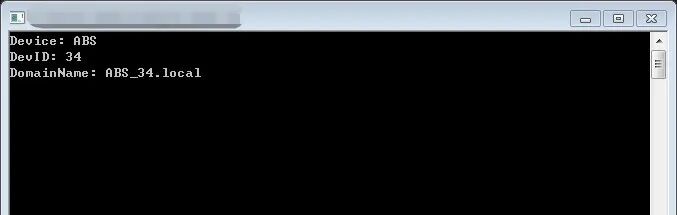
However, this is too tightly coupled. If I now have another device that needs to be maintained, the simplest approach would be to modify the values one by one. If I only need to change a few parameters occasionally, that’s fine, but in practice, there are often multiple parameters that need frequent changes, making manual modifications unreliable.
My first reaction might be to do something like this.
device.c:
#include "device.h"
#include <stdint.h>
#include <stdio.h>
#if 0  static const char *devType = "ABS";  static uint32_t devID = 34;#else  static const char *devType = "CBA";  static uint32_t devID = 33435;#endif

void Device_printfMsg(void){  printf("Device: %s\r\n" , devType);  printf("DevID: %u\r\n" , devID);  printf("DomainName: %s_%u.local\r\n" , devType, devID);}
This is a quick switching technique, allowing me to quickly switch different configurations by modifying the value after #if to 1 or 0:
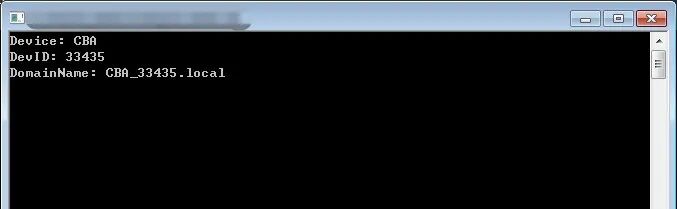
Observing the code, I find that there is quite a bit of redundant code, and for example, the DomainName. It is likely that this format will be used frequently in other parts of the code, so it is inappropriate to place it in the printf format string. We need to allocate a separate string for it.
After organizing, it becomes like this.
#include "device.h"
#include <stdint.h>
#include <stdio.h>
#if 0  #define DEV_NAME    ABS  #define DEV_ID      34#else  #define DEV_NAME    CBA  #define DEV_ID      33435#endif
#define _STR(s)  #s#define MollocDefineToStr(mal)  _STR(mal)
static const char devType[] = MollocDefineToStr(DEV_NAME);
static uint32_t devID = DEV_ID;
static const char devDName[] = MollocDefineToStr(DEV_NAME) "_" MollocDefineToStr(DEV_ID) ".local";

void Device_printfMsg(void){  printf("Device: %s\r\n" , devType);  printf("DevID: %u\r\n" , devID);  printf("DomainName: %s\r\n" , devDName);}
No need to look further, the running result is exactly the same as the previous one.
#define is a macro definition, and since we are discussing macro configuration techniques, there is no need to explain what macros do.
However, it is important to emphasize that the role of macros is text replacement; note that it is text. The preprocessor does not recognize whether a variable is a variable; it only knows to replace text when it sees a previously defined macro.
Therefore:
static uint32_t devID = DEV_ID;This line actually becomes:
static uint32_t devID = 33435;We see that the macro MollocDefineToStr is quite interesting; this macro is used to convert the expanded value of a macro into a string.
After preprocessing,
static const char devDName[] = MollocDefineToStr(DEV_NAME) "_" MollocDefineToStr(DEV_ID) ".local";This line will become:
static const char devDName[] = "CBA" "_" "33435" ".local";Then, since consecutive strings in C are automatically merged if not separated, the above is equivalent to
static const char devDName[] = "CBA_33435.local";Next, another device comes along. I endure and expand the quick switch to a multi-branch type.
#include "device.h"
#include <stdint.h>
#include <stdio.h>
#define DEV_ABS 1#define DEV_CBA 2#define DEV_LOL 3
// Select the current device#define DEV_SELECT  DEV_LOL
#if (DEV_SELECT == DEV_ABS)  #define DEV_NAME    ABS  #define DEV_ID      34#elif(DEV_SELECT == DEV_CBA)  #define DEV_NAME    CBA  #define DEV_ID      33435#elif(DEV_SELECT == DEV_LOL)  #define DEV_NAME    LOL  #define DEV_ID      1234#else  #error "please select current device by DEV_SELECT"#endif
#define _STR(s)  #s#define MollocDefineToStr(mal)  _STR(mal)
static const char devType[] = MollocDefineToStr(DEV_NAME);
static uint32_t devID = DEV_ID;
static const char devDName[] = MollocDefineToStr(DEV_NAME) "_" MollocDefineToStr(DEV_ID) ".local";

void Device_printfMsg(void){  printf("Device: %s\r\n" , devType);  printf("DevID: %u\r\n" , devID);  printf("DomainName: %s\r\n" , devDName);}
Now, every time I just need to modify the corresponding device at #define DEV_SELECT, and the readability is quite good.
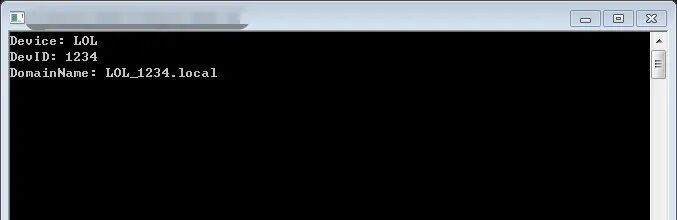
The #error line ensures that you do not forget to configure it, because if you configure an incorrect value, the preprocessor will directly report an error.

At this point, I would generally move the configuration-related parts to the header file, which would look like this:
device.h:
#ifndef _DEVICE_H
#define _DEVICE_H
#define DEV_ABS 1#define DEV_CBA 2#define DEV_LOL 3
#ifndef DEV_SELECT #define DEV_SELECT DEV_ABS#endif
#if (DEV_SELECT == DEV_ABS)  #define DEV_NAME    ABS  #define DEV_ID      34#elif(DEV_SELECT == DEV_CBA)  #define DEV_NAME    CBA  #define DEV_ID      33435#elif(DEV_SELECT == DEV_LOL)  #define DEV_NAME    LOL  #define DEV_ID      1234#else  #error "please select current device by DEV_SELECT"#endif
void Device_printfMsg(void);
#endif
device.c:
#include "device.h"
#include <stdint.h>
#include <stdio.h>
#define _STR(s)  #s#define MollocDefineToStr(mal)  _STR(mal)
static const char devType[] = MollocDefineToStr(DEV_NAME);
static uint32_t devID = DEV_ID;
static const char devDName[] = MollocDefineToStr(DEV_NAME) "_" MollocDefineToStr(DEV_ID) ".local";

void Device_printfMsg(void){  printf("Device: %s\r\n" , devType);  printf("DevID: %u\r\n" , devID);  printf("DomainName: %s\r\n" , devDName);}
This way, these configuration parameters become visible to other files that include this header file.
As for the line:
#ifndef DEV_SELECT #define DEV_SELECT DEV_ABS#endifThis line has a great advantage: it allows you to have default parameters that can be customized across different projects. Thus, by defining macros in the compiler options, you can generate project-specific code from the same source code.
For example, in VS, you can right-click on the project item in the solution explorer -> properties, open the project properties page, and define macros in C/C++ -> Preprocessor -> Preprocessor Definitions.
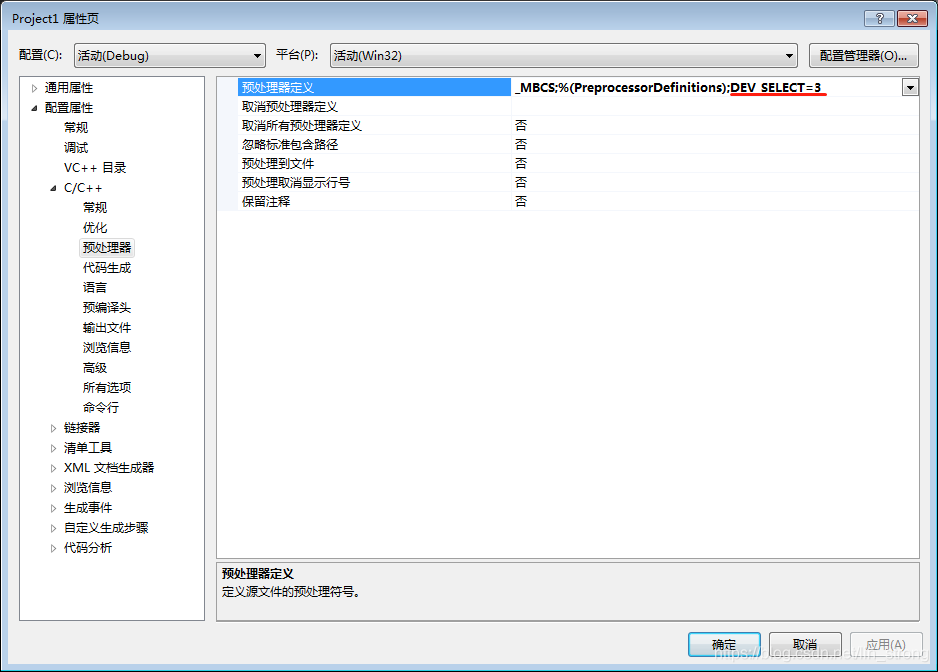
In CodeWarrior, it is in Edit -> Standard Settings:
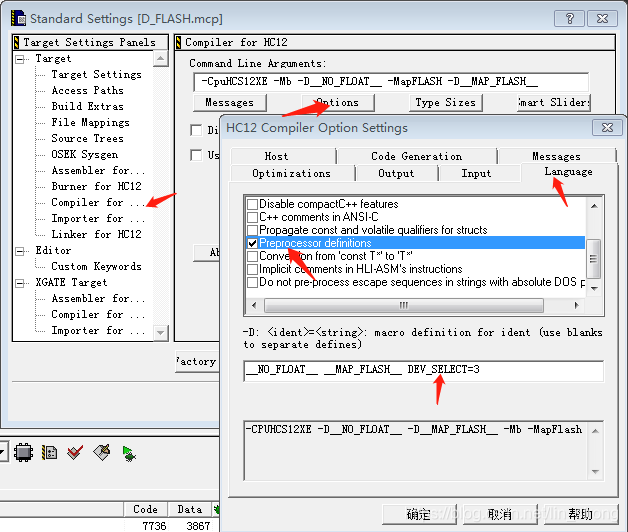
Of course, one small issue is that this method cannot use the previous enumeration-like method to assign values to macros; you have to assign numbers, strings, etc. directly.
Next. What!? I need to add devices, and this won’t do! A bunch of #if #else will be a nightmare. If I have hundreds of thousands of devices, does that mean one .h file will have hundreds of thousands of lines? I need to separate the configuration information!
Create a file with any name, even any extension, and just name it DEVINFO.txt.
DEVINFO.txt:
// Device configuration information template, configure based on specific devices
// Device name, string#define DEV_NAME    DEFAULT// Device ID, U32#define DEV_ID      0
Then modify the device module:
device.h:
#ifndef _DEVICE_H
#define _DEVICE_H
#ifndef DEVINFO_FILENAME  #define DEVINFO_FILENAME DEVINFO.txt#endif
void Device_printfMsg(void);
#endif
device.c:
#include "device.h"
#include <stdint.h>
#include <stdio.h>
#define _STR(s)  #s#define MollocDefineToStr(mal)  _STR(mal)
#include MollocDefineToStr(DEVINFO_FILENAME)
static const char devType[] = MollocDefineToStr(DEV_NAME);
static uint32_t devID = DEV_ID;
static const char devDName[] = MollocDefineToStr(DEV_NAME) "_" MollocDefineToStr(DEV_ID) ".local";

void Device_printfMsg(void){  printf("Device: %s\r\n" , devType);  printf("DevID: %u\r\n" , devID);  printf("DomainName: %s\r\n" , devDName);}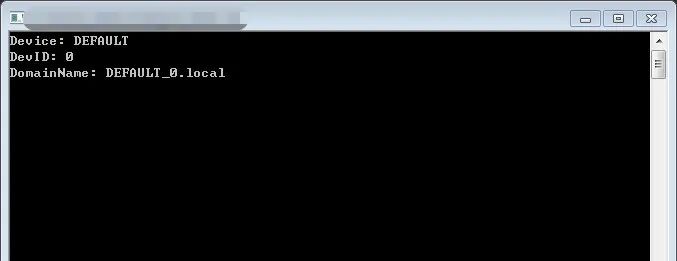
Perfect, all device-related information is read from the external txt file, and the filename is given by the previously mentioned customizable macro configuration method. We can add configuration files for other devices as well.
// Device name, string#define DEV_NAME ABS// Device ID, U32#define DEV_ID 34// Device name, string#define DEV_NAME CBA// Device ID, U32#define DEV_ID 33435// Device name, string#define DEV_NAME LOL// Device ID, U32#define DEV_ID 1234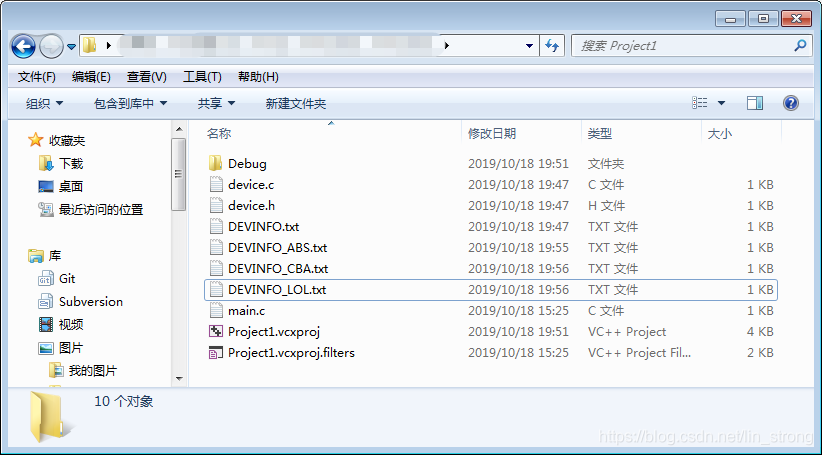
Now, we just need to create a TXT information table for each device, and when we need to switch to a different device, we can simply change the macro configuration to switch to a different filename.
To understand why this method works, the key is to grasp this line:
#include MollocDefineToStr(DEVINFO_FILENAME)We know that after preprocessing, this line will become:
#include "DEVINFO.txt"You might think: what is this? Can I include a txt file? I have only seen .h files included before. This is a big misconception. In fact, include has never been specified to only be .h files; it can be any name. The preprocessor directive simply expands the included file’s content recursively as text.
Therefore, this line will be directly replaced by the content of the corresponding file, word for word. There may be some comment information added before and after.
Thus, this method of grouping and binding fixed configuration information is very suitable for decoupling into different configuration files, importing as needed. Furthermore, it should be managed in a dedicated folder for these configuration files.
As for configurations that are frequently changed independently?
For one or two, the previous preprocessor macro definition method can handle it, but a slightly larger project will involve many configuration parameters, and it is not suitable to write them all in the compiler options.
At this point, I would create a project configuration file, perhaps named app_cfg.h, and summarize all the macro configurations that may be used throughout the project for easy modification. This is where the previously mentioned customizable macro writing method becomes particularly useful:
app_cfg.h:
#define DEVINFO_FILENAME DEVINFO_CBA.txt// Other macro configuration options ...Then, I need to use the forced inclusion file technique, which is equivalent to adding a line directly at the beginning of all .c files.
#include "app_cfg.h"This is in VS2012:
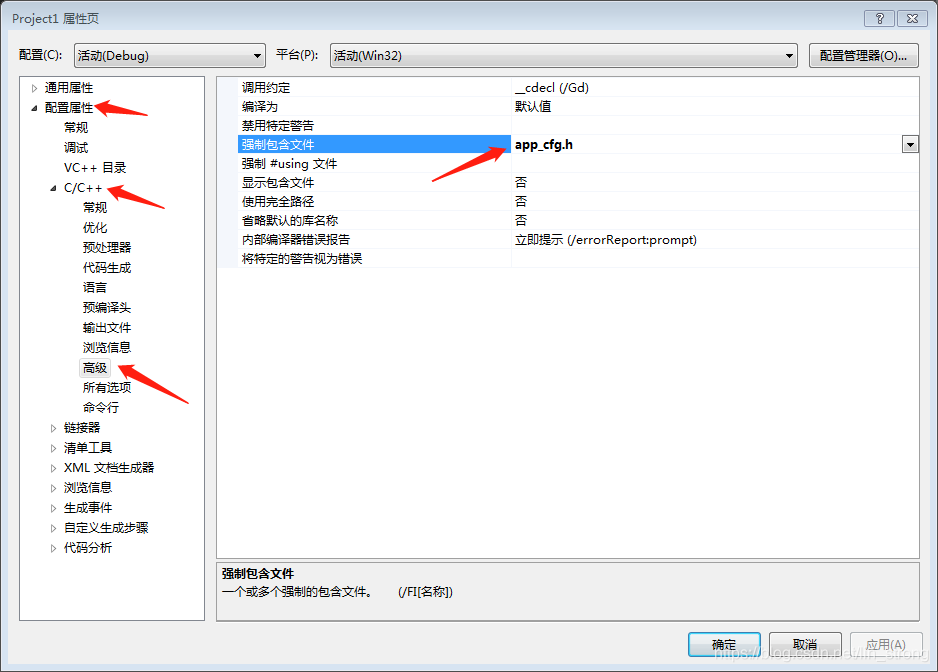
This is in CodeWarrior:
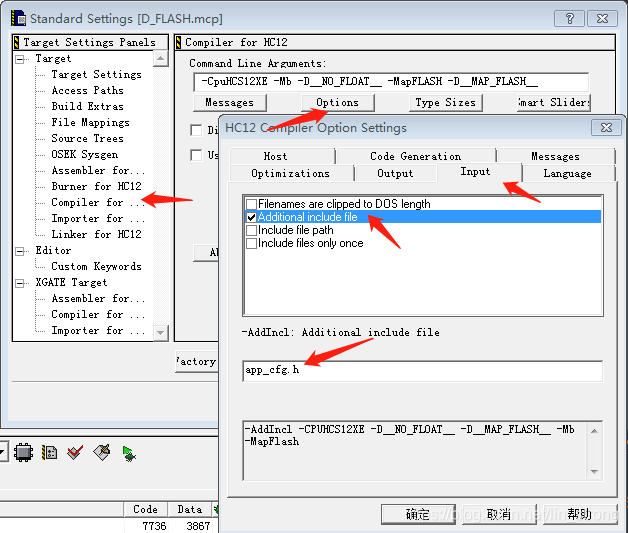
Then, I can happily control the entire project from one file!
Now I have another requirement: the ID has a limit and cannot exceed 5000. So I will modify it. In
#include MollocDefineToStr(DEVINFO_FILENAME)Add this line below:
#if(DEV_ID > 5000) #error "device ID shouldn't be bigger than 5000"#endifThis way, when we select CBA, it will not compile:

It can also be checked.
#ifndef DEV_ID #error "DEV_ID lost"#endifCheck whether DEV_ID has been correctly defined as a macro, or if you want to combine conditions:
#if !defined(DEV_NAME) || !defined(DEV_ID) #error "DEV_NAME or DEV_ID malloc define lost"#endifThen, for example, if a device needs to perform code customization, one method is to write statements in the code to check the current device’s name and execute corresponding specific statements.
However, to save on the amount of code written and also to demonstrate the power of macros, we can also use preprocessor directives. Unfortunately, we cannot judge strings in preprocessor directives, but we can judge numbers, and we have IDs to use. So, for example, if we want the ABS device to output an extra line “hahaha”, the code would be modified like this:
void Device_printfMsg(void){ printf("Device: %s\r\n" , devType); printf("DevID: %u\r\n" , devID); printf("DomainName: %s\r\n" , devDName);#if(DEV_ID == 34) printf("hahaha\r\n");#endif}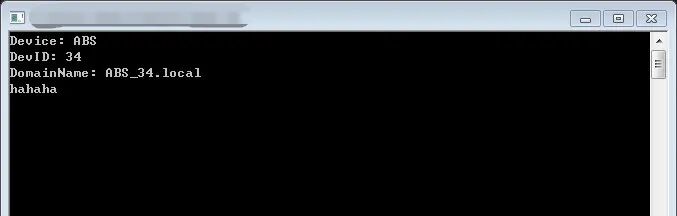
Remember, the essence of these preprocessor directives is text replacement, so this line of code only exists when the device is ABS; for other devices, this line of code is not seen at all.
Of course, you can try using the previous include method and other macro methods to further customize the code; this is a creative task.
Finally, I suddenly remembered a clever trick that I have been using in my code recently.
I specifically created a DebugMsg.h, which looks something like this:
#ifndef _DEBUG_MSG_H
#define _DEBUG_MSG_H
#include <stdio.h>
#ifdef _DEBUG  #define _dbg_printf0(format)                   ((void)printf(format))  #define _dbg_printf1(format,p1)                ((void)printf(format,p1))  ……#else  #define _dbg_printf0(format)  #define _dbg_printf1(format,p1)  ……#endif#endif
This way, all modules that include this file can use a unified interface to output debugging information. As long as I define _DEBUG in the main configuration file, all debug printf will become real printf; otherwise, they will be empty statements with no debug information:
#include "DebugMsg.h"
void Device_printfMsg(void){  _dbg_printf0("Device_printfMsg called.\r\n");  printf("Device: %s\r\n" , devType);  printf("DevID: %u\r\n" , devID);  printf("DomainName: %s\r\n" , devDName);}
Now, if I want to use this interface but also want to set a separate switch for my device module, what should I do?
The overall logic is simple: _DEBUG is the main switch. If it is off, all module debug information is off. Then each module has its own switch, which must be defined together with _DEBUG to enable debug information for that module.
So, I modified my module like this.
device.h:
#ifndef _DEVICE_H
#define _DEVICE_H
// malloc define _DEVICE_DEBUG to enable debug message// #define _DEVICE_DEBUG
#ifndef DEVINFO_FILENAME#define DEVINFO_FILENAME DEVINFO.txt#endif
void Device_printfMsg(void);
#endif
device.c:
……#ifndef _DEVICE_DEBUG#undef _DEBUG#endif
#include "DebugMsg.h"

void Device_printfMsg(void){  _dbg_printf0("Device_printfMsg called.\r\n");  printf("Device: %s\r\n" , devType);  printf("DevID: %u\r\n" , devID);  printf("DomainName: %s\r\n" , devDName);}
This way, the _dbg_printf0 will only be defined as printf if both _DEVICE_DEBUG and _DEBUG are defined; otherwise, it will be defined as an empty statement, resulting in no debug information.
What is happening here? When the preprocessor reads the line #ifndef _DEVICE_DEBUG and finds that _DEVICE_DEBUG is not defined, it will cancel the definition of _DEBUG in the next line. Thus, regardless of whether I actually defined _DEBUG, when it comes to #include “DebugMsg.h” and expands, the preprocessor will consider _DEBUG as undefined, so it will define _dbg_printf0 as an empty statement, achieving this chained logic.
Conclusion
Alright, I have talked enough. I believe you have enjoyed reading this. If you want to delve deeper, you can specifically look at some advanced uses of C language macros.
Next time you see a library filled with macros, you won’t be so confused, right? (# ^ . ^ #)
Source: https://blog.csdn.net/lin_strong/article/details/102626503