1. Summary of Methods and Properties of the HTTP Object in the JS Module
<span>r.args</span>
- Request parameters, case-sensitive, read-only.
- Values of repeated parameter names are converted to an array.
- For example,
<span>'a=1&b=2&A=3&b=4&B=two%20words'</span>is converted to<span>r.args</span>, resulting in<span>{a: "1", b: ["2", "4"], A: "3", B: "two words"}</span>.
<span>r.done()</span>- After calling this function, the next data block will be returned directly to the client without invoking the js_body_filter function.
<span>r.error(string)</span>- Writes an error-level log to the error log.
<span>r.finish()</span>- Ends the response to the client.
<span>r.headersIn</span>- Gets the header values of the HTTP request, such as
<span>r.headersIn.Authorization</span>.
<span>r.headersOut</span>- Header values of the HTTP response, which can be written to, such as
<span>r.headersOut["Content-Type"] = "text/plain"</span>.
<span>r.httpVersion</span>- HTTP version number, read-only.
<span>r.internal</span>- Value is true when the location is configured as internal.
<span>r.internalRedirect(uri)</span>- Performs an internal redirect, transparent to the client.
<span>r.log(string)</span>- Writes an info-level log to the error log.
<span>r.method</span>- Gets the HTTP request method, read-only.
<span>r.parent</span>- Parent request object.
<span>r.remoteAddress</span>- Client address, read-only.
<span>r.requestBuffer</span>- HTTP request body, can only be used in the js_content directive.
<span>r.requestText</span>- Same as r.requestBuffer, but returns a string.
<span>r.rawHeadersIn</span>- Array of key-value pairs of headers received from the client, with all field names in lowercase.
<span>r.rawHeadersOut</span>- Array of key-value pairs of HTTP response headers.
<span>r.responseBuffer</span>- Response body for the request.
<span>r.responseText</span>- Response body for the request, but returns a string.
<span>r.return(status[, string | Buffer])</span>- Returns a response to the client, with the first parameter as the status code and the second parameter as the response content string or buffer.
<span>r.send(string | Buffer)</span>- Sends response body content to the client, can send either a string or buffer.
<span>r.sendBuffer(data[, options])</span>- Can only be called by the js_body_filter method. Adds data to the data chain to be forwarded to the next filter. The first parameter data can be a string or buffer. The options object contains two fields: last and flush.
- last: boolean type, true indicates that the current data is the last data block.
- flush: boolean type, true indicates that the current data block should be a flush flag.
<span>r.sendHeader()</span>- Sends HTTP headers to the client.
<span>r.setReturnValue(value)</span>- Sets the return value obtained from the js_set directive, can only be used in asynchronous methods.
<span>r.status</span>- Status code value, can be assigned.
<span>r.subrequest(uri[, options[, callback]])</span>- Purpose: Creates a sub-request.
- options parameter: If a string is passed, it should be the request parameter string. If an object is passed, it can contain the following fields:
- args: request parameter string, default is empty.
- body: request body, defaults to the parent request’s body.
- method: request method, defaults to GET.
- detached: boolean type, if true, the response of the created sub-request will be ignored.
- callback parameter: response callback function. If no callback function is passed, the subrequest method will return a Promise object.
<span>r.uri</span>
- Gets the URI of the current request, read-only.
<span>r.rawVariables</span>- Gets the value of nginx variables, with the value data type as buffer.
<span>r.variables</span>- Gets the value of nginx variables, with the value data type as object. For example, to get the value of the foo variable, use
<span>r.variables.foo</span>.
<span>r.warn(string)</span>- Writes a warning-level log to the error log.
2. Testing
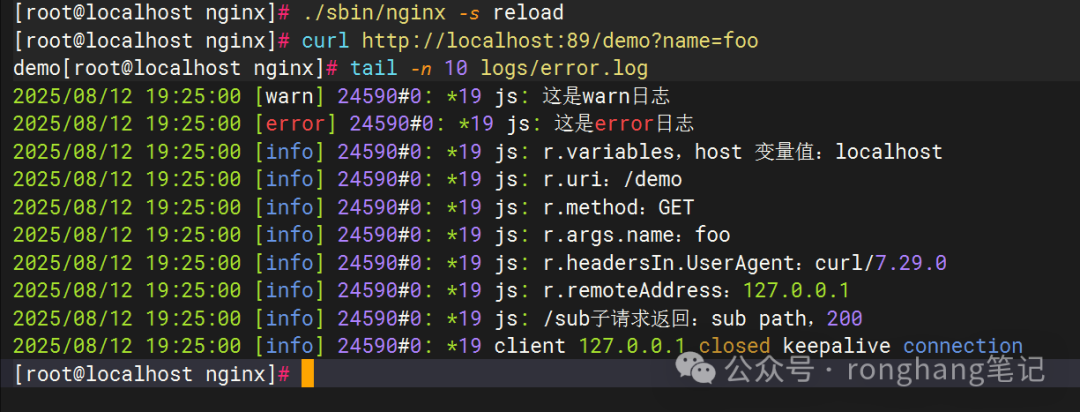
1. Print logs
JS code
async function demo(r) {
  // Log
  r.log("This is an info log");
  r.warn("This is a warn log");
  r.error("This is an error log");

  r.log(`r.variables, host variable value: ${r.variables.host}`);
  r.log(`r.uri: ${r.uri}`);
  r.log(`r.method: ${r.method}`);
  r.log(`r.args.name: ${r.args.name}`);
  r.log(`r.headersIn.UserAgent: ${r.headersIn["User-Agent"]}`);
  r.log(`r.remoteAddress: ${r.remoteAddress}`);

  // Create sub-request
  let res = await r.subrequest("/sub");
  r.log(`/sub sub-request returned: ${res.responseText}, ${res.status}`);

  r.return(200, "demo");
}


export default { demo };
Nginx configuration
worker_processes  1;

load_module modules/ngx_http_js_module.so;

events {
    worker_connections  1024;
}


http {
 # Set JS file directory
 js_path "/usr/local/nginx/njs";
 js_import request.js;

 error_log logs/error.log info;


    server {
        listen 89;
        server_name localhost;
        default_type text/plain;
        charset utf-8;

        location /demo {
            js_content request.demo;
        }

         location /sub {
            return 200 "sub path";
        }
    }
}
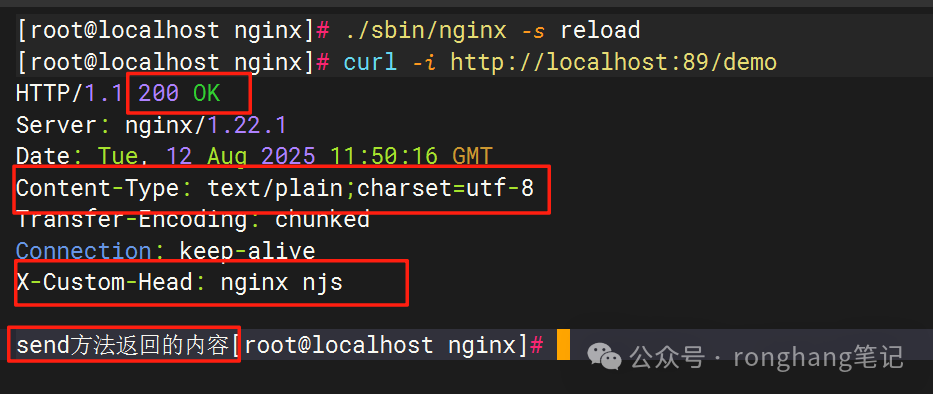
2. Output response content
JS code
async function demo(r) {
  // Set status code
  r.status = 200;
  // Set response header
  r.headersOut["Content-Type"] = "text/plain;charset=utf-8";
  r.headersOut["X-Custom-Head"] = "nginx njs";
  r.sendHeader();
  // Response body content
  r.send("Content returned by send method");
  r.finish();
}

export default { demo };
Nginx configuration
http {
    js_path "/usr/local/nginx/njs";
    js_import request.js;


    server {
        listen 89;
        server_name localhost;

        location /demo {
            js_content request.demo;
        }
    }
}