Linux Virtual Server (DR)
Logical Architecture
Component Introduction
The DR mode (Direct Routing) of LVS (Linux Virtual Server) is a high-performance load balancing method characterized by the following:
- • Director: Responsible for modifying the destination MAC address of the client request packets to the Real Server MAC address, and then directly forwarding them to the backend Real Server.
- • Real Server: After processing the request, it directly returns the response to the client without going through the Director, reducing the network load on the Director and improving performance.
- • VIP (Virtual IP): Needs to be configured on both the Director and all Real Servers (but ARP responses must be suppressed on Real Servers), so that client requests to the VIP can be received and scheduled by the Director, while Real Servers can respond directly.
Network Topology
The network topology is built using eve-ng software, but you can also use VMware virtual machines; there is no difference in usage. Compared to vmware, eve-ng is more intuitive and closer to actual network architecture.
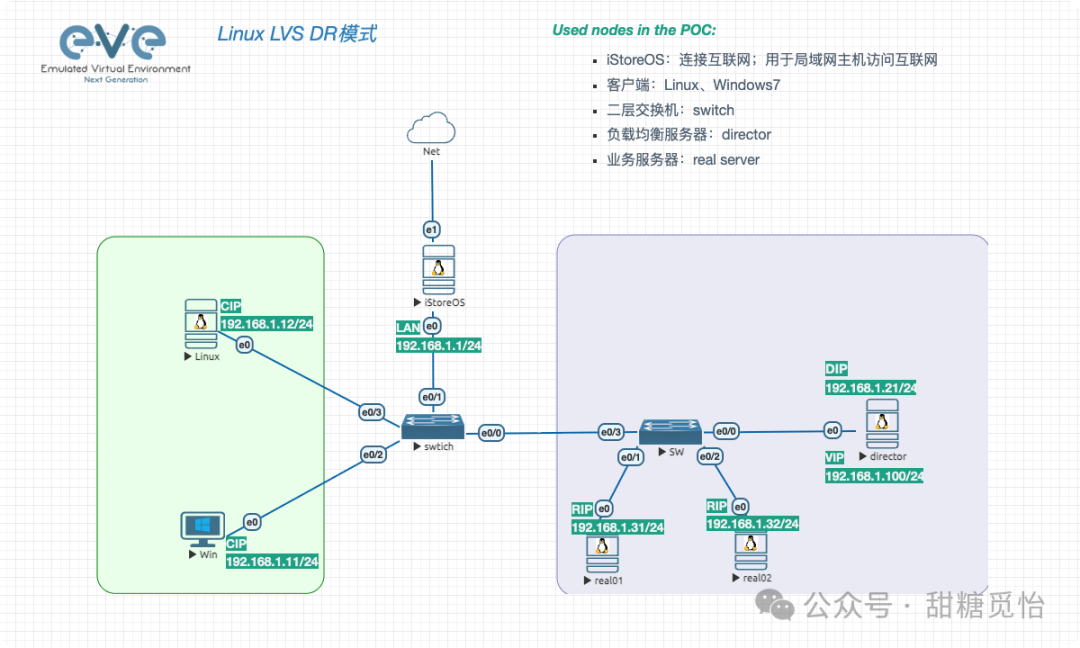
Component Information
All machines are on the same local area network, i.e., within a Layer 2 network.
| Component | Description | MAC |
|---|---|---|
| Operating System | Debian 13.1 | / |
| Client | 192.168.1.12 | 00:50:00:00:03:00 |
| Director | 192.168.1.21, 192.168.1.100 (vip) | 00:50:00:00:04:00 |
| Real Server 1 | 192.168.1.31, 192.168.1.100 (lo) | 00:50:00:00:01:00 |
| Real Server 2 | 192.168.1.32, 192.168.1.100 (lo) | 00:50:00:00:02:00 |
Practical Operation
1. Director
Package Installation
# Install package
apt install ipvsadm -y
Address Configuration
# 1. ens3
ip link set ens3 up
ip addr add 192.168.1.21/24 dev ens3
ip route add default via 192.168.1.1 dev ens3

# 2. vip
ip addr add 192.168.1.100/24 dev lo
Kernel Parameters
# Enable IP forwarding
echo 1 > /proc/sys/net/ipv4/ip_forward
LVS Configuration
# 1. LVS DR configuration
ipvsadm -A -t 192.168.1.100:80 -s rr
ipvsadm -a -t 192.168.1.100:80 -r 192.168.1.31:80 -g
ipvsadm -a -t 192.168.1.100:80 -r 192.168.1.32:80 -g
# 2. LVS view
ipvsadm -Ln
2. Real Server
Real Server 1
Package Installation
# Install package
apt install nginx -y
Address Configuration
# 1. ens3
ip link set ens3 up
ip addr add 192.168.1.31/24 dev ens3
ip route add default via 192.168.1.1 dev ens3
# 2. lo
ip addr add 192.168.1.100/24 dev lo
ARP Response Suppression
To ensure that ARP requests for the VIP are only responded to by the Director, Real Servers must suppress responses to ARP queries for the VIP.
- • arp_ignore = 1: Only respond to ARP requests for IPs that are local to the interface.
- • arp_announce = 2: Always use the most appropriate local address (i.e., the VIP on lo) as the source IP for ARP responses.
echo 1 > /proc/sys/net/ipv4/conf/all/arp_ignore
echo 2 > /proc/sys/net/ipv4/conf/all/arp_announce
echo 1 > /proc/sys/net/ipv4/conf/lo/arp_ignore
echo 2 > /proc/sys/net/ipv4/conf/lo/arp_announce
echo 1 > /proc/sys/net/ipv4/conf/ens3/arp_ignore
echo 2 > /proc/sys/net/ipv4/conf/ens3/arp_announce
Nginx Configuration
# 1. index.nginx-debian.html
echo "<h1>Real Server 01</h1>" > /var/www/html/index.nginx-debian.html
# 2. Start nginx
systemctl start nginx
Real Server 2
Package Installation
# Install package
apt install nginx -y
Address Configuration
# 1. ens3
ip link set ens3 up
ip addr add 192.168.1.32/24 dev ens3
ip route add default via 192.168.1.1 dev ens3
# 2. lo
ip addr add 192.168.1.100/24 dev lo
ARP Response Suppression
To ensure that ARP requests for the VIP are only responded to by the Director, Real Servers must suppress responses to ARP queries for the VIP.
- • arp_ignore = 1: Only respond to ARP requests for IPs that are local to the interface.
- • arp_announce = 2: Always use the most appropriate local address (i.e., the VIP on lo) as the source IP for ARP responses.
echo 1 > /proc/sys/net/ipv4/conf/all/arp_ignore
echo 2 > /proc/sys/net/ipv4/conf/all/arp_announce
echo 1 > /proc/sys/net/ipv4/conf/lo/arp_ignore
echo 2 > /proc/sys/net/ipv4/conf/lo/arp_announce
echo 1 > /proc/sys/net/ipv4/conf/ens3/arp_ignore
echo 2 > /proc/sys/net/ipv4/conf/ens3/arp_announce
Nginx Configuration
# 1. index.nginx-debian.html
echo "<h1>Real Server 02</h1>" > /var/www/html/index.nginx-debian.html
# 2. Start nginx
systemctl start nginx
Verification
Verification Results
- 1. Access 192.168.1.100:80
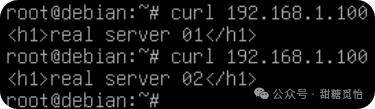
- 2. Director
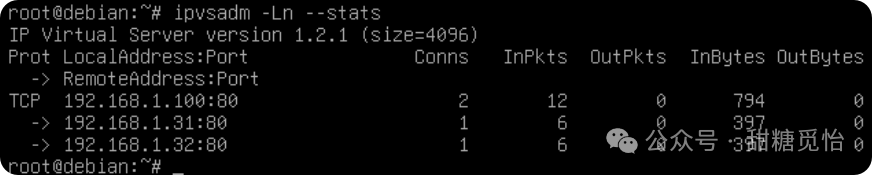
Use <span>ipvsadm -Ln --stats</span> to check; you can see that each of the 2 real servers has 1 connection, indicating that load balancing with rr is successful. It is recommended to use the curl command for testing; Windows browsers may not observe the actual effect due to caching, TCP connection timeouts, etc.
Packet Capture Information
1. Director
Director packet capture shows that it only receives data packets from client requests, without responding to the client.

2. Real Server
Real Server packet capture shows that it responds to the client with data packets.

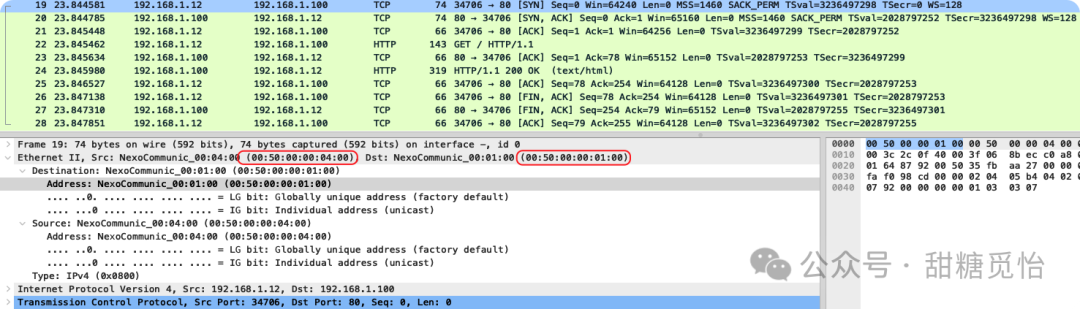
- 1. Click on the first few data packets to see the MAC address modification
The MAC address is modified from Director to Real Server; that is, <span>00:50:00:00:04:00</span> is modified to <span>00:50:00:00:01:00</span>
Conclusion
The LVS DR mode, with its excellent performance and scalability, has become an ideal choice for high-concurrency scenarios. The Director is only responsible for forwarding requests by modifying the MAC address to direct packets to the Real Server, while the response traffic is returned directly to the client by the Real Server. This “separation of incoming and outgoing traffic” design greatly reduces the load on the Director, avoids bandwidth bottlenecks, and achieves performance close to that of physical hardware, providing a solid foundation for building high-performance, highly available service architectures.