Introduction
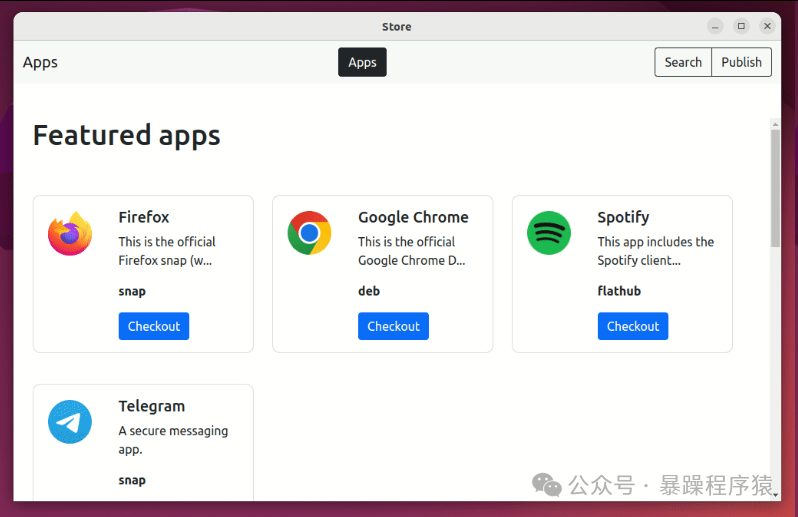
Modren is an open-source Linux application store that supports various package formats such as APT, Snap, Flatpaks, and DEB, providing great convenience for users of Ubuntu, Debian derivatives, and other systems.
Main Features
Multi-format Support: Modren application store supports various Linux software package formats, including APT (the main package manager for Ubuntu and its derivatives), Snap (a universal Linux package format developed by Canonical), Flatpaks (a system for packaging and distributing applications across Linux distributions), and DEB (Debian package format). This wide format support means users can manage and install software packages from different sources within a unified interface.
User-Friendly: Modren provides an intuitive user interface that makes it easy and quick to find, install, and manage packages. Whether you are a novice or an experienced Linux user, you can easily get started.
Cross-Distribution Support: Modren not only supports Ubuntu but is also compatible with Debian derivatives and other systems, providing convenience for more Linux users.
Unified Management Interface: Modren offers a unified management interface that allows users to easily manage software packages from different sources. This avoids the hassle of switching between multiple package managers.
Rich Software Package Resources: Due to its support for multiple package formats, Modren provides a wealth of software package resources. Users can find the software packages they need in one application store without having to visit multiple different application stores or websites.
Open Source and Free: Modren is open source, which means users can freely access its source code, modify it, and distribute it. Additionally, Modren is free to use, and users do not have to pay any fees to utilize its services.
Comparison with Similar Tools
Comparison with GNOME Software: Modren uses the Electron framework, while GNOME Software uses the GTK framework. This makes Modren lighter and provides a simpler application publishing method. Users can publish applications directly within the Modren store, whereas GNOME Software requires applications to be added to a repository.
Comparison with KDE Discover: KDE Discover is functionally similar to GNOME Software, while Modren is characterized by its lightweight nature and multi-format support.
How to Use
Installing Modren: Users can download and install the application store from Modren’s GitHub page. Since Modren is open source, users can freely access its source code and compile it for installation, or install it using the provided distribution packages.
Browsing and Searching for Packages: In the Modren application store, users can browse various packages and search for the desired packages using keywords. The application store provides detailed package information, including version number, size, description, etc., to help users make choices.
Installing and Managing Packages: Once the desired package is found, users can click the install button to install it. Modren will automatically handle dependencies and ensure the correct installation of packages. Additionally, users can manage installed packages within Modren, including updates, uninstalls, and other operations.
For more information, you can visit its official website or refer to related technical documentation.
GitHub Address
https://github.com/RudraSwat/modren?tab=readme-ov-file
Download Address
https://github.com/RudraSwat/modren/releases/tag/v1.0.0
 Follow our public account for more original content recommendations!
More content can also be found in the author’s published books!
———————————————Recommend a public account that likes to talk nonsense———————————————