The First Step in Penetration Testing! HTTP/HTTPS Message Analysis and Packet Sniffing Skills
Introduction
HTTP/HTTPS Message Analysis
HTTP (Hypertext Transfer Protocol) is the most widely used network protocol on the Internet, and all WWW protocols are built on top of HTTP. In penetration testing, HTTP message analysis is the first and crucial step. By analyzing HTTP messages, testers can understand the communication process between the client and the server, including key information such as request methods, request headers, response status codes, and response headers. This information is vital for identifying potential security vulnerabilities, such as Cross-Site Scripting (XSS), Cross-Site Request Forgery (CSRF), and insecure header information. Additionally, analyzing HTTP messages helps to understand the functionality and structure of websites, providing a foundation for subsequent testing.
Packet Sniffing Skills
Packet sniffing is a fundamental skill in penetration testing, referring to the process of capturing and analyzing network packets. In penetration testing, packet sniffing skills are primarily used to capture and analyze HTTP/HTTPS messages for further analysis. Commonly used packet sniffing tools include Wireshark, Fiddler, and Burp Suite. These tools help testers capture network traffic and view and analyze packet content in real-time. Through packet sniffing, testers can discover security issues in the network, such as man-in-the-middle attacks and data leaks. Furthermore, packet sniffing can also be used to test the performance and stability of web applications, helping testers identify potential performance bottlenecks and stability issues.
Process
Table of Contents
Introduction: Starting from “Not Understanding Packet Sniffing”
1. HTTP Message Analysis: Interpreting “Chat Records” from a Penetration Testing Perspective
1. Request Message: 3 Core Fields You Must Understand (Common in Penetration Testing)
(1) Request Line: The Core of the Core!
(2) Request Header: “Additional Information” for the Server
(3) Request Body: Submitted Data
2. Response Message: Focus on “Status Code + Response Body”
(1) Status Code: The Server’s “Emotional Feedback”
(2) Response Header: The Server’s “Additional Explanation”
(3) Response Body: Actual Returned Content
3. Beginner Practice: Using Burp Suite to Analyze Baidu
2. HTTP vs HTTPS: Major Differences in Penetration Testing
1. Concept: What Are They?
(1) HTTP (Hypertext Transfer Protocol)
(2) HTTPS (Secure Hypertext Transfer Protocol)
2. Principle: How Do They Work?
3. Core Differences and Summary
4. Practical Impact in Penetration Testing (Must Read!)
Conclusion: Building a Strong Foundation for Easier Monetization of Side Projects
Essential Tools for Beginners:
Introduction: Starting from “Not Understanding Packet Sniffing”
When conducting network packet analysis, do you feel overwhelmed by the dense header information on the screen? Why can packet sniffing tools directly display clear data when using the http:// protocol, but once switched to the https:// protocol, the messages become indecipherable encrypted garble? If you aspire to increase your income through SRC vulnerability exploitation but find that your lack of understanding of HTTP basics leads to your vulnerability reports being ignored or rejected,
For penetration testing beginners, HTTP/HTTPS is the “foundation”—whether it’s SQL injection, XSS, or man-in-the-middle attacks, all web vulnerability exploitation relies on it. Today, using simple language and practical exercises, I will help you understand message analysis and the differences between the two in 10 minutes, laying a solid foundation for more efficient vulnerability exploitation and monetization of side projects!
1. HTTP Message Analysis: Interpreting “Chat Records” from a Penetration Testing Perspective
Let’s set aside complex definitions: HTTP messages are the “chat records” between penetration testing tools (like Burp) and the server:
Request Message = You “ask” the server (for example, “give me the homepage data”)
Response Message = The server “answers” you (for example, “okay, here is the homepage content”)
Penetration testing packet sniffing is essentially “listening” to this conversation to find security vulnerabilities!
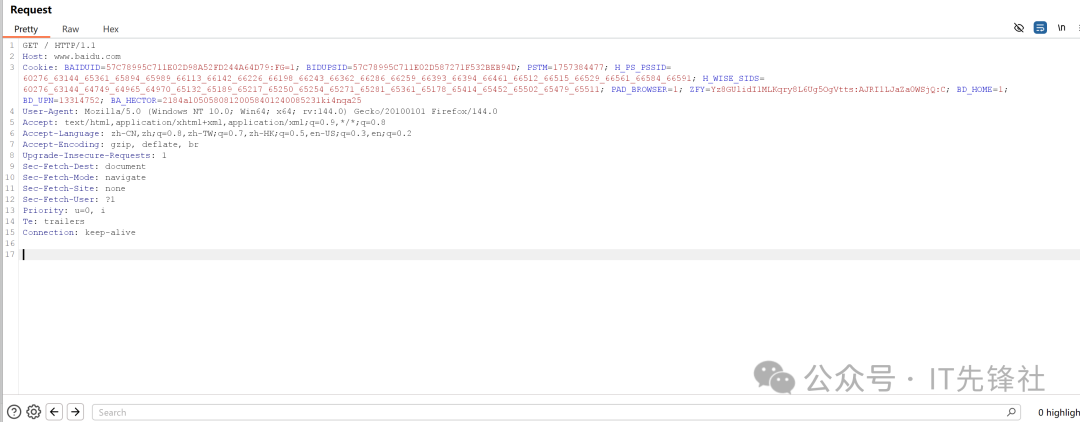
1. Request Message: 3 Core Fields You Must Understand (Common in Penetration Testing)
There is no need to try to remember all related fields; you only need to focus on mastering these 3, ensuring you understand their respective roles and specific application methods.
(1) Request Line: The Core of the Core!
GET / HTTP/1.1
Function: Tells the server “what you want to do and what protocol to use”
Penetration Testing Usage: Switch between HTTP request methods (e.g., GET and POST) and adjust the request URL path (e.g., try accessing the /admin directory), while also detecting and confirming the version of the network protocol being used.
(2) Request Header: “Additional Information” for the Server
User-Agent: Browser identity identifier, can be modified in penetration testing to masquerade as a mobile device/other browsers to bypass protective detection
Cookie: To successfully exploit backend vulnerabilities, it is crucial to maintain login status; only by carrying this status information can you access pages that require authentication.
Referer: The source page can assist users in bypassing certain permission verifications.
(3) Request Body: Submitted Data
Scenario: Only present in POST requests (e.g., login form submission)
Penetration Testing Usage: Adjust parameter values in this section (e.g., change loginname=test to username=admin’) to attempt to trigger SQL injection.
2. Response Message: Focus on “Status Code + Response Body”
(1) Status Code: The Server’s “Emotional Feedback”
Four status codes that must be remembered in penetration testing:
200: Success! Request processed normally
204: No content! Check sensitive information in response headers
301: Permanent redirect! Investigate privilege escalation vulnerabilities
302: Redirect! May be a redirect after permission verification, track the redirect address to find the backend
400: Bad request! Correct the payload format
401: Unauthorized access detected! User needs to log in; consider using weak password cracking or attempting to bypass authentication mechanisms.
403: Access denied! Insufficient permissions, attempt to bypass (e.g., modify Referer)
404: Page not found! Used for directory scanning, beware of false 404s
405: Method not allowed! Switch GET/POST request methods
500: Server error detected, this is likely a sign that a security vulnerability has been exploited.
502: Gateway error detected, it is recommended to reduce the frequency of testing operations or simplify the data packet load.
503: Service unavailable! May be rate-limited, pause and adjust
(2) Response Header: The Server’s “Additional Explanation”
Set-Cookie: The server distributes a new session authorization to the client.
Content-Type: Response content type, determines how to parse
(3) Response Body: Actual Returned Content
In penetration testing, finding vulnerabilities (such as sensitive information leakage, XSS points) mainly looks here
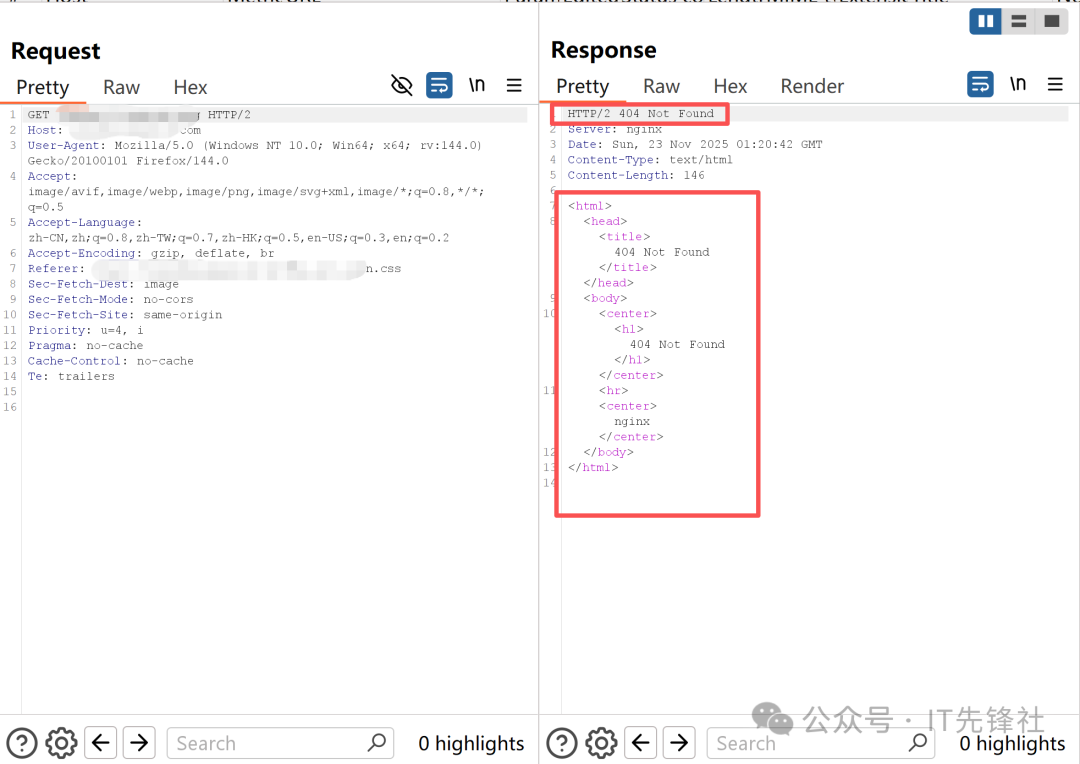
3. Beginner Practice: Using Burp Suite to Analyze Baidu
Steps:
Download Burp Suite Community Edition (free), install and open it

Configure browser proxy: 127.0.0.1:8080
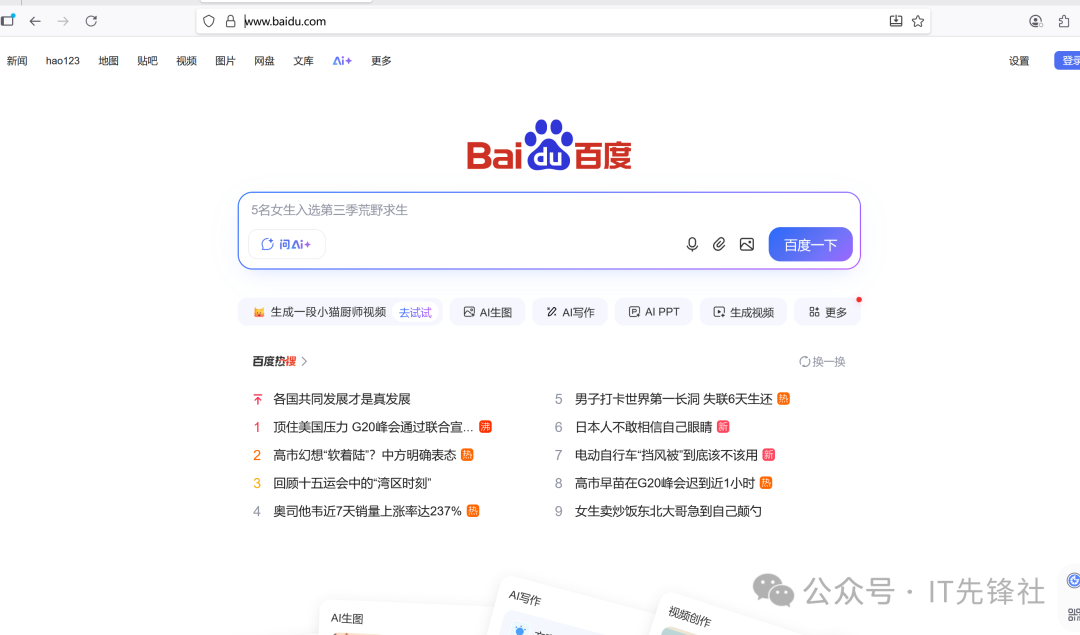
Visit http://www.baidu.com
Check the captured messages in the HTTP history under Burp’s proxy function
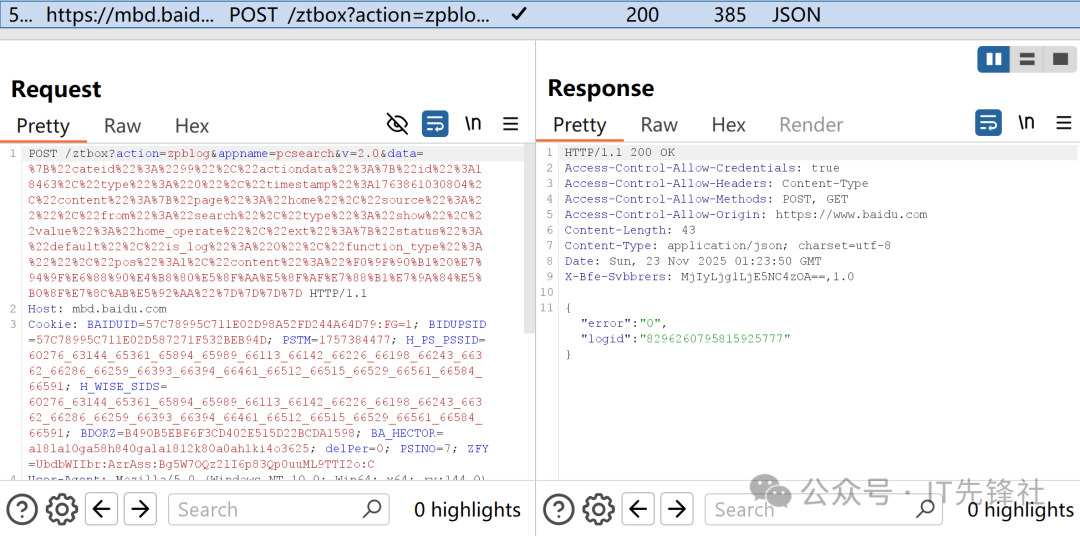
Follow along: Find the User-Agent in the request header, try modifying it to a mobile device identifier, and observe the page changes!
2. HTTP vs HTTPS: Major Differences in Penetration Testing
1. Concept: What Are They?
(1) HTTP (Hypertext Transfer Protocol)
- • One-Sentence Understanding: The “common language” for transmitting website content (text, images) over the network, or “plaintext telegram”.
- • Core Characteristics: Plaintext Transmission. During the data transmission process between the browser and the server, no encryption measures are typically taken, similar to sending an unsealed postcard, where anyone on the transmission path can potentially peek at the information contained.
- • Default Port: 80
(2) HTTPS (Secure Hypertext Transfer Protocol)
- • One-Sentence Understanding: The “secure upgraded version” of HTTP, equivalent to wrapping “common language” in a layer of “encrypted phone”.
- • Core Characteristics: Encrypted Transmission. Before data transmission begins, all information is encrypted into seemingly meaningless garbled sequences to ensure its security. This encryption mechanism means that only authorized recipients holding the corresponding key can successfully decrypt and read this information. This security measure can be likened to sending a password box that only the recipient has the key to open, effectively protecting the confidentiality of the information.
- • Default Port: 443
- • Foundation: An SSL/TLS encryption layer is added beneath HTTP.
2. Principle: How Do They Work?
HTTP Principle (Simple but Dangerous)
- 1. Establish Connection: The browser initiates a TCP connection to the server.
- 2. Send Request: The browser sends a plaintext request, such as: “I want to see the homepage”.
- 3. Return Response: The server returns an unencrypted response, such as: “This is the HTML code for the homepage”.
- 4. Disconnect: Transmission complete, connection closed.
⚠️ Risk: In this process, any attacker in the middle (such as a hacker sharing the same Wi-Fi network) has the ability to eavesdrop, tamper with, or even impersonate the server, which is what we commonly refer to as a “man-in-the-middle attack”.
HTTPS Principle (Complex but Secure): The core of HTTPS lies in the SSL/TLS handshake protocol, which is like the browser and server agreeing on a “secret language” and “code” that only they understand before having a secret conversation.
Simplified TLS Handshake Process:
“Greeting” and Presenting Credentials (ClientHello & ServerHello)
The browser connects to the server’s port 443, saying: “Hi, I support these encryption suites, and this is my random number A.”
The server responds: “Okay, we will use this encryption method; this is my random number B, and my digital certificate (containing the public key).”
Identity Verification (Certificate Verification)
This is the most critical step! The browser will check the server’s certificate:
Is it issued by a trusted Certificate Authority (CA)? (Like verifying if an ID card is issued by the police department)
Is the certificate still valid?
Does the domain on the certificate exactly match the domain currently being accessed?
Only after passing verification will the browser trust that the other party is the “real” server and not an impersonator.
Generate Session Key (Premaster Secret)
After the browser trusts the server, it generates a third random number (“premaster secret”).
Next, we use the public key contained in the certificate to encrypt this random number and send it to the server.
Note: Only the server holding the corresponding private key can decrypt this information.
Final Agreement (Generate Session Key)
Now, both the browser and the server have the same three random numbers (A, B, premaster secret).
Both parties independently generate the same “session key” using the same algorithm based on these three random numbers. This key will be the symmetric encryption key for this conversation.
Secure Conversation Begins (Encrypted Communication)
After both parties complete the handshake, all subsequent HTTP communications, whether sending requests or receiving responses, will use the “session key” just created to perform symmetric encryption and decryption operations.
3. Core Differences and Summary
| Feature | HTTP | HTTPS |
| Security | Plaintext transmission, insecure | Encrypted transmission, very secure |
| Working Principle | Directly sends plaintext data | First securely exchanges keys through TLS handshake, then encrypts data with the key |
| Identity Authentication | Cannot verify server identity, prone to impersonation | Verifies server identity through digital certificates, preventing impersonation |
| Data Integrity | Data can easily be tampered with by a man-in-the-middle | Has mechanisms to ensure data is not tampered with during transmission |
| Default Port | 80 | 443 |
| Visual Indicator | Browser address bar shows ⚠️ Not Secure | DisplaysLock Icon 🔒 |
A Vivid Analogy:
- • HTTP is like chatting with a friend in a noisy café at normal volume, where everyone around can hear what you are saying.
- • HTTPS is like you both first secretly agree on a code that only you two can understand (the handshake process) before starting to communicate in that code. Even if someone nearby hears, they won’t know what you are saying.
Conclusion: Nowadays, HTTPS is the standard for websites. It not only protects users’ private data (such as passwords and credit card numbers) but is also an important indicator for search engine rankings and browser trust. Any website that requires security must use HTTPS.
4. Practical Impact in Penetration Testing (Must Read!)
Testing HTTP Websites:
Use network packet interception and analysis methods to dynamically adjust request parameter values, making the vulnerability detection process clear, transparent, and efficient.
Focus on issues of sensitive information being transmitted in plaintext
Testing HTTPS Websites:
Must do: Configure certificates in Burp
Visit http://burp to download the CA certificate
Import it into the browser/system trust certificate store
Re-sniff packets, and the data will change from garbled to plaintext
Common Misconceptions to Avoid:
❌ “HTTPS is absolutely secure” → Wrong! Improper certificate configuration and weak encryption algorithms can still have vulnerabilities
❌ “Penetration testing doesn’t need to understand HTTP” → Big mistake! All web vulnerabilities are fundamentally based on the HTTP protocol
❌ “HTTP is obsolete” → Wrong! Many internal systems and legacy systems still exist
Conclusion: Building a Strong Foundation for Easier Monetization of Side Projects
To deeply understand HTTP as the foundational protocol for network communication, and how HTTPS enhances security by introducing encryption mechanisms. Only by thoroughly mastering the structure of HTTP/HTTPS messages can one accurately identify potential security vulnerabilities during analysis and clearly understand the differences between the two, allowing for the formulation of more targeted penetration testing strategies.
Interactive Question
What is the biggest difficulty you encountered while learning HTTP/HTTPS?
Is it that certificate configuration always fails?
Or is it that you can’t understand the meaning of message fields?
Or do you want to know how to apply it in specific vulnerability exploitation?
Feel free to leave a comment, and I will prioritize typical questions for corresponding tutorials!
Follow Us