1 Overview
This document is based on TASKING_TriCore-VX_v6.3r1 and is intended to guide users on how to set global configuration items.
2 Global Options Overview of Global Settings
The global settings are divided into four items (see Figure 1):
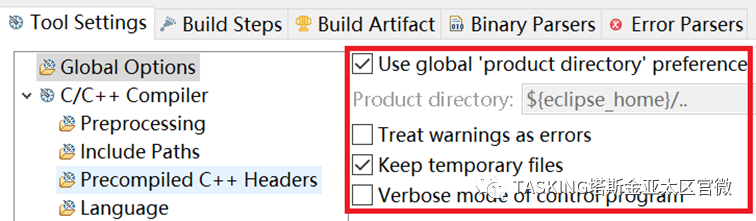
Figure 1
1. Use global ‘product directory’ preference2. Treat warnings as errors3. Keep temporary files4. Verbose mode of control programNext, we will provide a detailed introduction to these options.
2.1 Product Installation Path OptionUse global ‘product directory’ preference
This option is used to configure the installation path of TASKING VX-toolset. It is recommended to keep the default settings and not change it.
2.2 Warnings Treated as Errors“Treat warnings as errors”
During the compilation process, if warnings are encountered, the compilation will continue; if errors are encountered, the compilation will stop. This configuration will treat all warnings as errors.
2.2.1 IDEConfiguration
Check the “Treat warnings as errors” option in the global configuration, which will treat all “warning” as “error” during the compilation, assembly, and linking processes.If you need to treat warnings from compilation, assembly, and linking processes as errors individually, you can add directives in “Miscellaneous” under “Additional options”.The directive is:–warnings-as-errors[=number[-number],…]Using this option, you can treat warnings from the compilation, assembly, and linking processes as errors:• If this option is specified without a number, all warnings are treated as errors.• If numbers or ranges are used with this option, only the specified coded warnings are treated as errors.To treat specific warnings as errors for a certain tool (c、c++、assembler、linker), use the –pass-tool option to pass this option directly to that tool. For example, use –pass-c =-warnings-as-errors [= number] to treat specific C compiler warnings as errors.
2.2.2 Command Line Control Syntax“Command line syntax”
Command line control can directly use the following directive:–warnings-as-errors[=number[-number],…]where number is the Warning number, multiple numbers are separated by commas “,”.Application examples:–warnings-as-errors treats all warning as error.–warnings-as-errors[=xx], treats the warning numbered xx as an error.–warnings-as-errors[=[-xx]], does not treat the warning numbered xx as an error.When specific warnings for a specified tool need to be treated as errors, use the –pass-tool option to pass this option directly to that tool. For example, use –pass-c =-warnings-as-errors = number to treat specific warnings from the C compiler as errors.
2.3 Keep Temporary Files“Keep temporary files”
By default, the control program will delete intermediate files, such as .src files (results from the compiler phase) and .o files (results from the assembler phase), to save storage space.Using this option will allow the control program to keep the temporary files generated during the compilation and assembly phases.
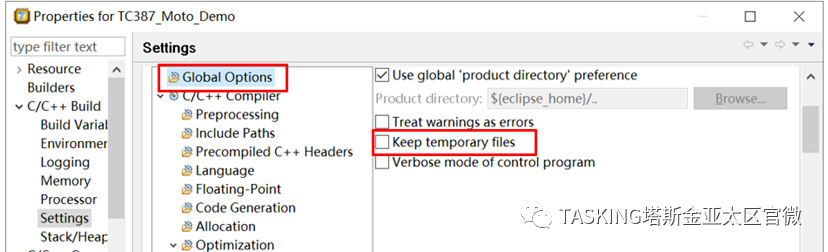
2.3.1 IDEEnvironment ConfigurationCheck the “Keep temporary files” option in “Global Options” to keep the .src files generated during the compilation phase and the .o files generated during the assembly process.
2.3.2 Command Line Control Syntax“Command line syntax”
If using the command line, long directive:–keep-temporary-filesshort directive:-tExample:cctc –keep-temporary-files test.cThe control program will keep all intermediate files generated when creating the absolute target file test.elf.
2.4 Control ProgramMode“Verbose mode of control program”
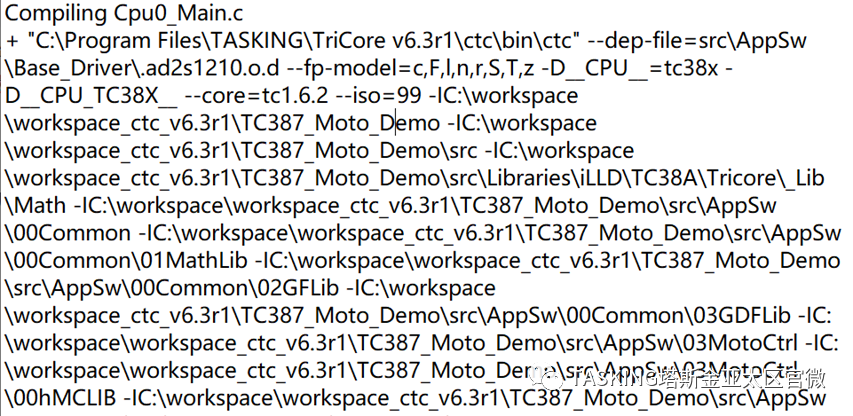
Using this option, you can set the control program to detailed mode. In the software Build, the specific effects can be compared: when compiling “Cpu0_Main.c”, if this option is not enabled, the displayed information is:“Compiling Cpu0_Main.c”; if this option is enabled, the information is displayed as shown in the figure below.
Recommendation: Use this feature based on actual needs.
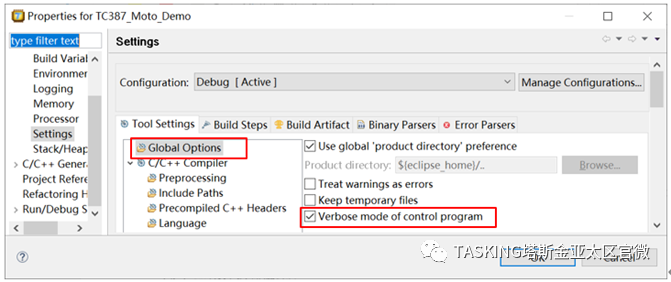
2.4.1 IDEEnvironment SettingsIn the IDE environment, check the “Verbose mode of control program” in “Global Options” to enable detailed mode.
2.4.2 Command Line Control Syntax
Add directives in the makefile:long directive:–verboseshort directive:-v
3 Contact Us
If you have technical issues, please contact TASKING China, and you will receive the most professional and timely technical support.Email:[email protected] Official Website:www.tasking.comTrial Application:https://www.tasking.com/trial
Please follow the official subscription account to get the latest TASKING information and technical documents.