Click the blue text above to follow us



DNS
DNS (Domain Name Service) is a domain name resolution service that performs the necessary conversion between domain names and IP addresses, utilizing TCP and UDP on port 53.
Functions of the DNS System:
-
Forward Resolution: Finding the corresponding IP address based on the domain name.
-
Reverse Resolution: Finding the corresponding domain name based on the IP address.
Classification of DNS Servers:
-
Primary Name Server: Stores the DNS server settings relevant to the zone, containing the original data of the zone file.
-
Secondary Name Server: Copies data from other servers; the data is a read-only copy.
-
Master Name Server: Provides data replication for DNS servers.
-
Cache Name Server: Queries root or other servers to obtain the resolution relationship between domain names and IPs, caching the results locally to improve the speed of repeated lookups.
Zone Transfer Vulnerability
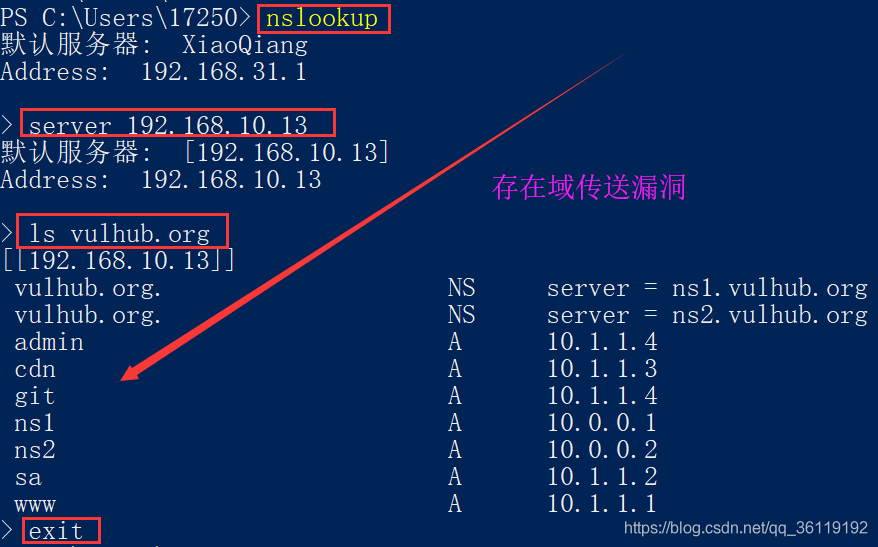
Zone Transfer: Refers to the process where a backup server copies data from the primary server and updates its own database with the obtained data. Synchronization of databases between primary and backup servers requires the use of “DNS zone transfer”.Zone Transfer Vulnerability: Occurs due to improper configuration of the DNS server, allowing anonymous users to exploit the DNS zone transfer protocol to obtain all DNS records for a specific domain.Consequences of Zone Transfer Vulnerability: Potential attackers gain insight into the network topology, including some less secure internal hosts, such as test servers, thereby accelerating and facilitating the attack process.Testing Process:
1) Enter the nslookup command to access the interactive shell: nslookup
2) Set the DNS server to query using the server command: server dns_server
3) List all domain names in a domain using the ls command: ls domain_name
4) Exit the command using exit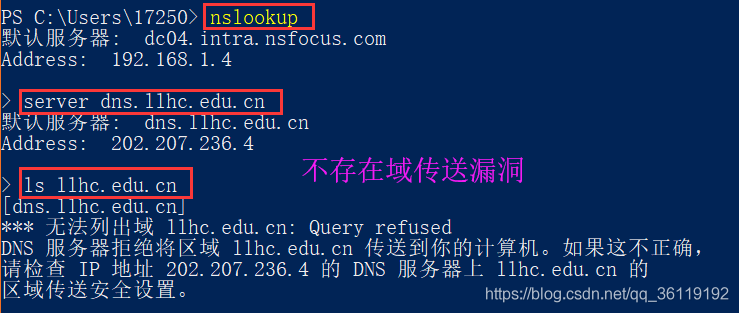
Domain Name Space Structure
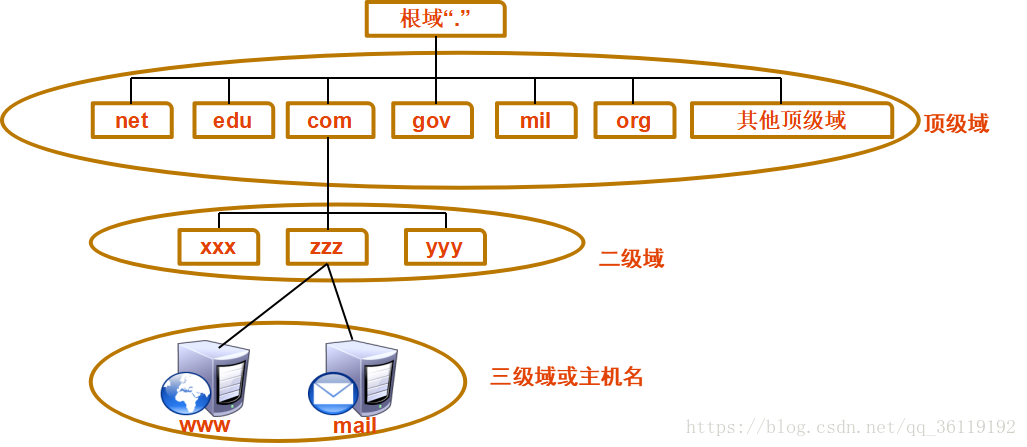
Root Domain (.) Top-Level Domain (Top-level domains include organizational domains and country/region top-level domains (net, edu, com, gov, mail, org, cn, uk....) -- Organizational Top-Level Domain (net, edu, com, gov, mail, org....) -- Country/Region Top-Level Domain (cn, uk...) Second-Level Domain (baidu, taobao...) Third-Level Domain (www, mail...)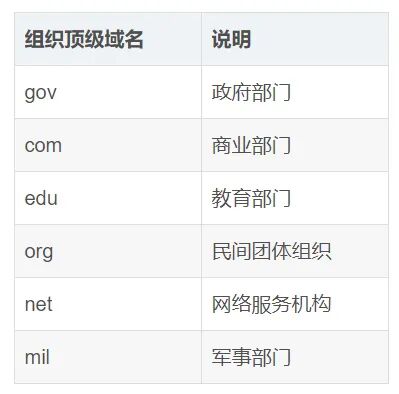
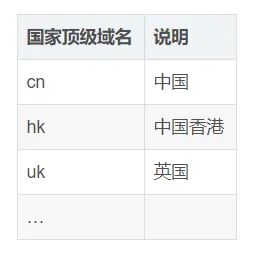
DNS Resolution Process
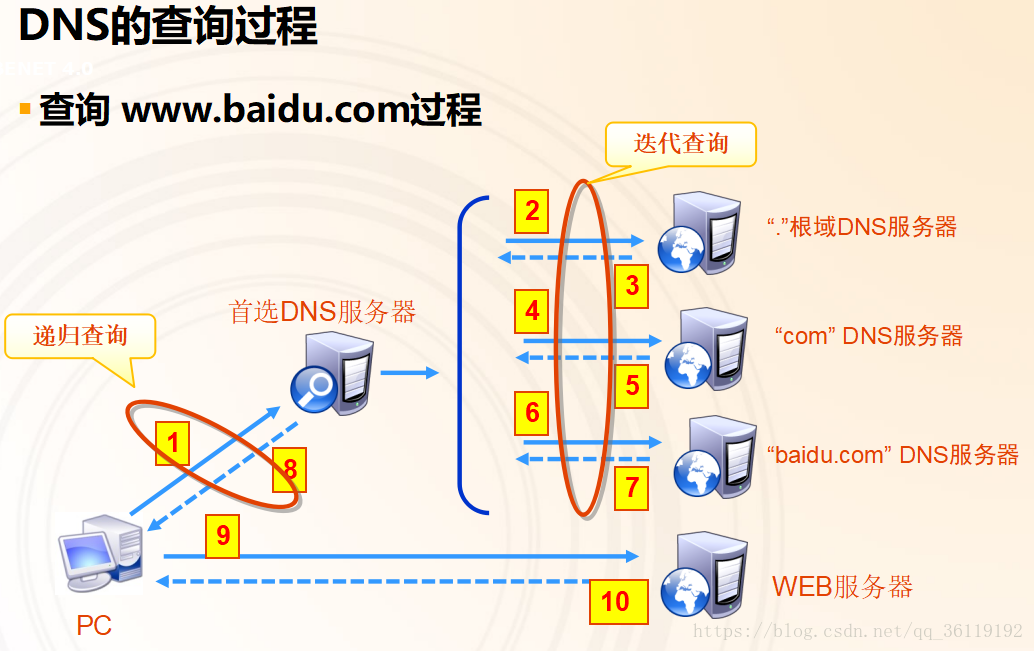
DNS Domain Name Resolution Process:
The client accesses the domain name and first checks its own DNS cache (which has a time limit). If the host’s DNS cache contains the record, it directly accesses the corresponding IP.
If the host’s DNS cache does not contain the record, it checks the local hosts file.If the hosts file does not contain the record, the request is sent to the designated domain name server. Upon receiving the request, the domain name server first checks its local cache; if the record exists, it returns the query result directly. If the specified domain name server’s cache does not contain the record, it performs the following iterative query.【Iterative Query】The local domain name server queries the root domain name server, which tells it where to query next, and then it queries downwards layer by layer based on the results until it obtains the final result. Each time, it queries various servers as a DNS client, meaning that iterative queries are operations performed by the local server.Specific process description:
(1) User host A first sends a recursive query for abc.example.com to local domain name server B
(2) B first attempts to query abc.example.com using local DNS records; if local records do not exist, B initiates an iterative query for abc.example.com as a DNS client
(3) B queries a root domain name server C for abc.example.com
(4) Root domain name server C tells B to query the .com top-level domain name server D next, providing D's IP address 1.2.3.4
(5) B queries the .com top-level domain name server D
(6) D tells local domain name server B to query the .example.com authoritative server E next, providing E's IP address 2.3.4.5
(7) B queries the .example.com authoritative server E
(8) E tells local domain name server B whether the queried domain name abc.example.com exists and provides its IP address 3.4.5.6
(9) Local domain name server B responds to user host A with the IP address corresponding to the queried domain name abc.example.com as 3.4.5.6
Thus, the priority is:
Local DNS Cache > hosts file > DNS serverPath of the hosts file in Windows:
C:\Windows\System32\drivers\etc\hostsPath of the hosts file in Linux:
/etc/hosts
Various Resolution Records
A Record
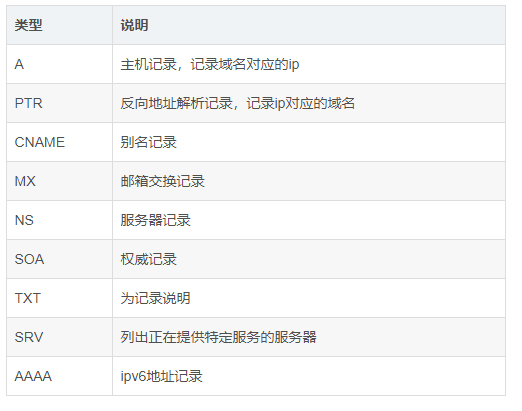
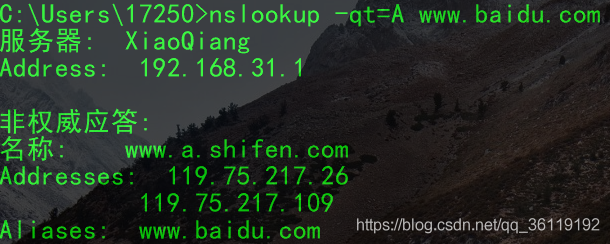
A (Address) record, also known as a host record, is used to specify the IP address corresponding to a domain name. Users can point the website server under this domain to their own web server. Subdomains can also be set. In simple terms, the A record is the server’s IP, and binding the domain name to the A record tells DNS to direct to the server corresponding to the A record when the domain name is entered. In the command line, you can view the A record using nslookup -qt=a www.baidu.com.
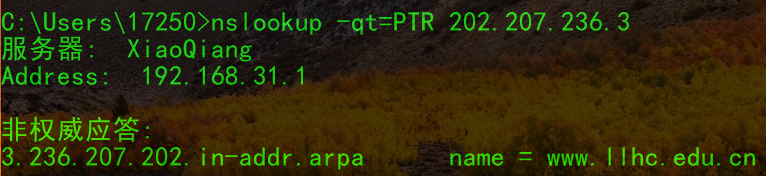
PTR Record
In contrast to the A record, the PTR record converts an IP address to a domain name.
CNAME Record
CNAME record, also known as an alias record, allows you to map multiple records to the same computer. For example, if you create the following records:

When we access a1 (a2, a3).baidu.com, the domain name resolution server will return a CNAME record pointing to a.baidu.com, and then our local computer will send another request to resolve a.baidu.com, and the domain name server will return the IP address of a.baidu.com.
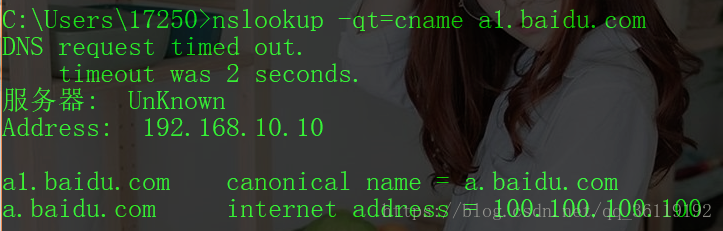
Using CNAME is more convenient when pointing many domain names to one computer, as in the above example; if the server changes IP, we only need to change the A record of a.baidu.com.
In the command line, you can view the CNAME record using nslookup -qt=cname a1.baidu.com.
MX Record
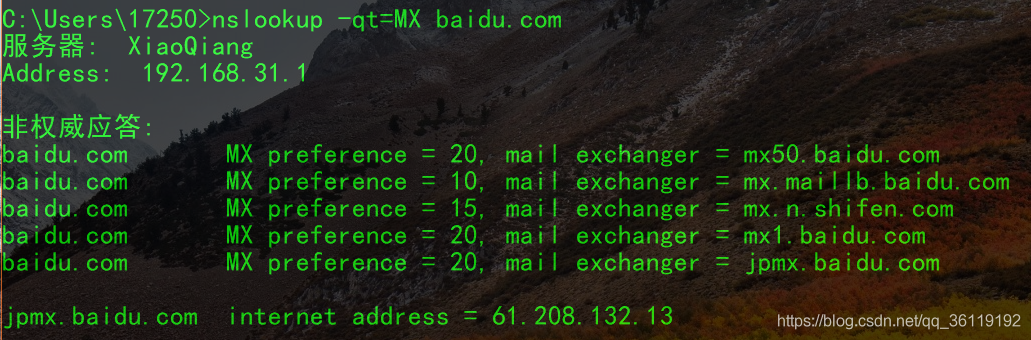
The weight of the MX record is very important for mail services. When sending an email, the mail server first resolves the domain name to find the MX record. It first looks for the server with the smallest weight (for example, 10); if it can connect, it sends the email there; if it cannot connect to the server with weight 10, it will send the email to the server with weight 20.
Here is an important concept: the server with weight 20 is only temporarily caching mail; when the server with weight 20 can connect to the server with weight 10, it will still send the email to the mail server with weight 10. Of course, this mechanism needs to be configured on the mail server.
In the command line, you can view the MX record using nslookup -qt=mx baidu.com.
TXT Record
TXT records are generally used to set descriptions for a record. For example, if you create a TXT record for a.ezloo.com with the content “this is a test TXT record,” you can see “this is a test TXT record” by using nslookup -qt=txt a.ezloo.com.
Additionally, TXT can also be used to verify domain ownership. For example, if your domain uses a Google service, Google will require you to create a TXT record, and then Google will verify whether you have administrative rights to that domain.
In the command line, you can view the TXT record using nslookup -qt=txt baidu.com.
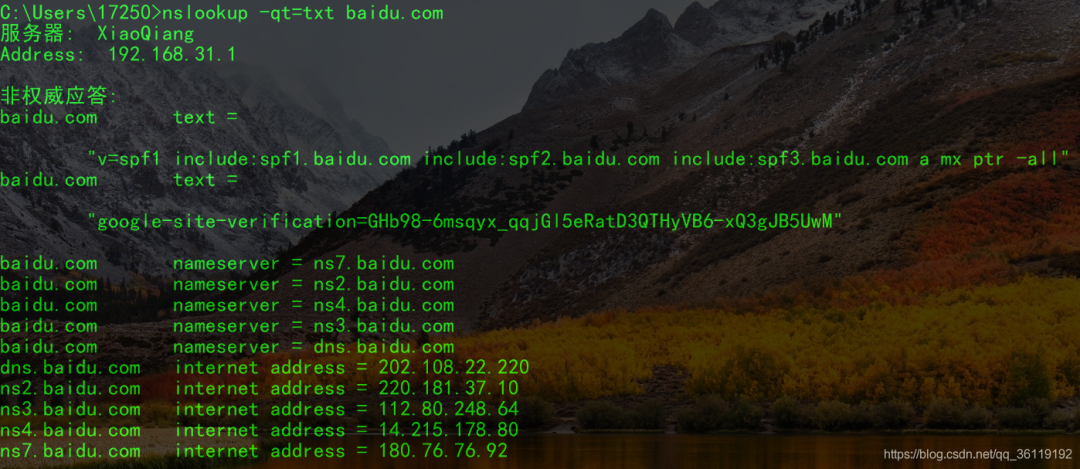
When discussing TXT records, we must mention SPF records. SPF stands for Sender Policy Framework, a technology that authenticates the identity of email senders based on IP addresses. The receiving mail server first checks the domain’s SPF record to determine whether the sender’s IP address is included in the SPF record; if it is, it is considered a legitimate email; otherwise, it is considered a forged email and rejected.
SPF can prevent others from forging your email, serving as a solution to counteract forged emails. Once you define your domain’s SPF record, the receiving mail server will use your SPF record to determine whether the incoming IP address is included in the SPF record; if it is, it is considered a legitimate email; otherwise, it is considered a forged email.
Setting the correct SPF record can improve the success rate of sending external emails from your mail system and can also help prevent others from impersonating your domain to send emails.
The role of MX records is to indicate which mail servers are associated with a domain. The role of SPF is the opposite; it indicates to the recipient which mail servers are authorized to send emails for a specific domain.
From the definitions, it is clear that the main function of SPF is to combat spam, particularly targeting spam emails that forge the sender’s domain.
AAAA Record
AAAA records point to an IPv6 address.
You can view the AAAA record using nslookup -qt=aaaa a.ezloo.com.
NS Record
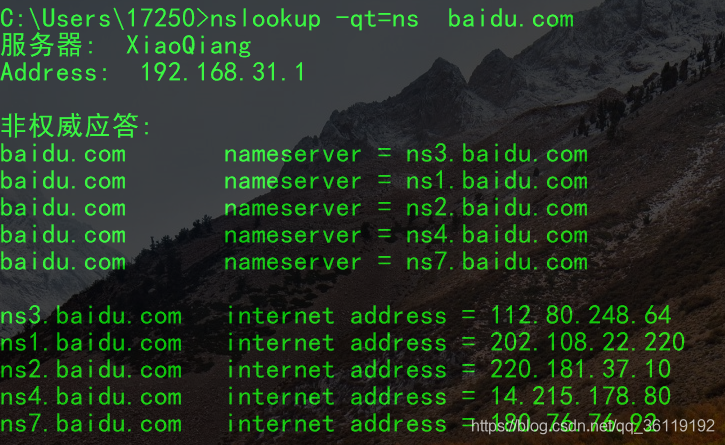
NS records are domain server records used to specify which server resolves the domain name.
You can view it using nslookup -qt=ns baidu.com.
TTL Value
TTL (time to live) indicates the cache duration of the resolution record in the DNS server. For example, when we request to resolve www.ezloo.com, if the DNS server finds no record, it will send a request to the next NS server. After obtaining the record, the DNS server will save it for the duration of TTL. When we request to resolve www.ezloo.com again, the DNS server will return the previously saved record without querying the NS server. The TTL duration is measured in seconds, typically set to 3600 seconds.
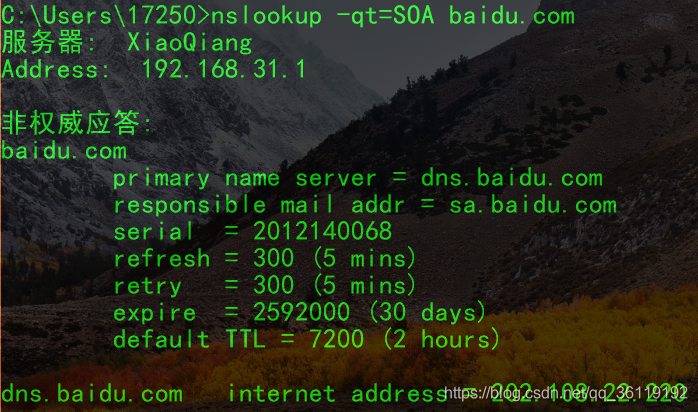
SOA Record
Defines the authoritative name server for the domain.
SRV Record
Lists servers providing specific services.
Installation and Deployment of DNS Servers
Required packages:
bind (DNS server software package), bind-utils (DNS testing tools, including dig, host, nslookup, etc.), bind-chroot (security enhancement tool to run BIND in a specified directory), caching-nameserver (basic configuration file for caching DNS servers, strongly recommended to install)Directory of executable files:
/usr/sbin/named (Rhel7) /etc/init.d/named (Rhel6)Directory of configuration files:
/etc/named.confDirectory of zone configuration files:
/var/named/xxx.zone1. Install the DNS program: yum -y install bind*
2. Modify the main configuration file: /etc/named.conf
3. Add and modify the zone configuration file /var/named/xxx.zone
4. Change file permissions: chown named:named /var/named/xxx.zone
5. Start the service and verify: systemctl start named; nslookup www.xie.comModify the main configuration file:
/etc/named.confoptions { listen-on port 53 { any; }; // Modify this line listen-on-v6 port 53 { ::1; }; directory "/var/named"; dump-file "/var/named/data/cache_dump.db"; statistics-file "/var/named/data/named_stats.txt"; memstatistics-file "/var/named/data/named_mem_stats.txt"; allow-query { any; }; // Modify this line}
zone "." IN { // System-defined root domain server, must exist type hint; file "named.ca";};
zone "xie.com." IN{ // Custom, add forward resolution type master; // Primary and secondary DNS file "xie.com.zone"; // Specify the zone configuration file name, located in /var/named/};
zone "10.168.192.in-addr.arpa" IN{ // Custom, add reverse resolution type master; file "xie.com.zone"; };
zone "mi.com." IN { // Add resolution for another domain type master; file "mi.com.zone"}In the /var/named/ directory, create the xie.com.zone and mi.com.zone files with the following configuration:
// Configuration for xie.com.zone file$TTL 1D@       IN SOA  www.xie.com.  root.xie.com. (                      // @ represents the local machine                                        0       ; serial                                        1D      ; refresh                                        1H      ; retry                                        1W      ; expire                                        3H )    ; minimum        NS      www.xie.com.        MX 10   root.xie.com.         // Email addresswww     IN A    192.168.10.100       // This must be the first line!!web     IN A    192.168.10.110root    IN A    192.168.10.120*       IN A    192.168.10.130     // Add a default match; if none match in the configuration file, this line will matchftp     IN CNAME   www              // Add an alias ftp.xie.com for www.xie.com
1       IN PTR  web1.xie.com.          // Add reverse resolution record  192.168.10.1 resolves to web1.xie.com
2       IN PTR  web2.xie.com.   // Configuration for mi.com.zone file $TTL 1D@       IN SOA  www.mi.com. root.mi.com. (                                        0       ; serial                                        1D      ; refresh                                        1H      ; retry                                        1W      ; expire                                        3H )    ; minimum        NS      www.mi.com.        MX 10   root.mi.com.www     IN A    192.168.10.100web     IN A    192.168.10.200
Setting Up Master-Slave DNS Servers
On the basis of the above configuration, add the following line to the main configuration file /etc/named.conf to allow transfers.
allow-transfer { 192.168.10.10; }; // Allow from DNS server's IP addressThen, specify which domain name the slave DNS server will synchronize; here we only synchronize the domain xie.com, and the default synchronization file path is /var/named/slaves.
zone "xie.com." IN {        type slave;        file "slaves/xie.com.zone";            // Specify configuration file directorymasters { 192.168.10.124; };              // Specify primary DNS IP};
zone "10.168.192.in-addr.arpa" IN{        type slave;        file "slaves/xie.com.zone";        masters{ 192.168.10.128; };};
After configuration, restart the named service:systemctl restart named, then synchronize the domain configuration file:rndc reload.
Configuration of Forwarding DNS Servers
A forwarding DNS server is one that forwards DNS requests to another DNS server when you request DNS resolution.
Forwarding DNS servers also require the installation of the bind package:
yum -y install bind*Then modify the main configuration file:
/etc/named.conf option{ listen-on port 53 { any; }; # Modify allow-query { any; }; # Modify forwarders { 192.168.10.10; }; # Specify which DNS server to forward requests to}Content sourced from the internet, please delete if infringing

Due to space limitations, for more detailed course outlines/knowledge systems/essential toolkits for network engineers, please scan the code to join the group!
Receive benefits

Plant a treeThe best time was ten years agoThe second best time is nowLearning is the same