PLC total shutdown? This fault simulation plan reduces downtime by 80%!
This step is like giving the PLC a “full check-up,” following the mnemonic “touch, look, smell, and listen”:
Touch Temperature: The CPU’s normal temperature should not exceed 60℃. If it feels hot to the touch, quickly simulate a “CPU overheat fault” to see if the cooling fan is working and if the cabinet is well-ventilated.
Look at Indicator Lights: Watch the module indicator lights. For example, if the ERR/ALM light on an Omron CP2E is flashing, manually trigger a “non-fatal fault” to see if you can read the error log through the software.
Smell for Odors: Use a burnt smell simulator (or just light a stick of incense? Just kidding!) to simulate a cable burning scenario and see if you can quickly locate the faulty module.
Listen for Unusual Noises: Play the sound of a relay malfunctioning on your phone to test if on-site personnel can detect issues like loose screws or poor contacts by “listening”.
🌟 Advanced Level: Scenario-based “Practical Drills” (suitable for those with over 3 years of experience)
At this point, you need to combine actual production scenarios and create some “extreme challenges”:
Power Failure Drill: Intentionally disconnect the UPS to simulate a sudden power outage and see if the PLC can automatically switch to hold mode and whether the program will be lost after a restart (remember to back up in advance!).
Module “Betrayal” Test: Replace a good digital output module with a “fake faulty module” (for example, force a certain point to turn on) and see if the control system can promptly alarm and if on-site personnel can quickly replace points and modify addresses.
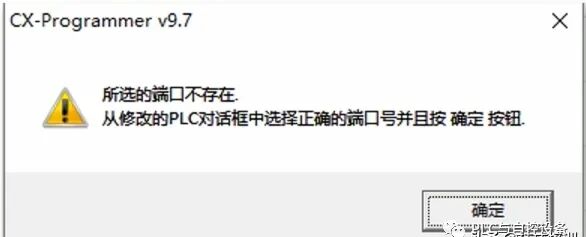
Communication “Disconnection” Exercise: Unplug the communication cable to simulate an Ethernet failure and test if the upper computer can immediately pop up an alarm, and if engineers can quickly diagnose through CX-P software whether it’s a network segment error or hardware damage.
🌟 Expert Level: Extreme “Stress Testing” (suitable for technical backbones)
Let’s get serious and tackle “difficult problems”:
Multiple Faults Overlap: Simultaneously trigger “analog input channel damage” + “output relay contact sticking” to see if the PLC can withstand the “chain attack” and whether the control program will exhibit logical confusion.
Extreme Environment Simulation: Place the PLC in a constant temperature box, raise the temperature to 55℃ (close to the critical value), and simultaneously use an electromagnetic interference generator to create high-frequency noise to test if the module can operate stably under “high temperature + strong interference”.
Counterintuitive Operation Test: Intentionally use the wrong range block (for example, connect a current signal to a voltage port) to see if the fuse will blow in time and whether there is a hardware protection mechanism to “catch” it.
Three, Scenario-based Solution Packages: “Simulation Scripts” for Different Working Conditions
We categorize the usage scenarios into three types and provide you with “scripts” directly—
Four, Pitfall Guide: Avoid These “Pits” at All Costs!❗️
❌ Misconception 1: Only simulating software faults while ignoring hardware risks
Let’s do some economic calculations (taking a medium-sized production line as an example):
1. Risk Assessment: First, draw a “fault map”
Choose a good “drill time”: Don’t do it during peak production; it’s best to choose a downtime maintenance day.
Ensure “safety isolation”: Back up the program in advance, disconnect the power supply of key equipment to prevent actually “breaking” the system during simulation.
Record the entire process for review: Afterward, watch the video to find loopholes, such as “certain steps taking too long” so that you can optimize the process accordingly.
4. Optimize Promotion: Turn experience into “corporate assets”
If the PLC suddenly goes black, can the operator accurately describe the fault light status within 3 minutes?
Does the maintenance team have a standardized process for “10 minutes to locate, 30 minutes to resolve”?
In the past six months, have you really not had repeated downtime due to the same type of fault?
If any item does not meet the standard, quickly forward this article to the workshop director! As usual, if we get over 500 likes, we’ll send out the “PLC Fault Simulation Script Template” next time, one that can be directly applied!
Finally, let me say something heartfelt: Rehearsals are not a hassle; they are insurance for the equipment. When one day others are scratching their heads at the repair site, you can sip tea and watch rehearsal videos to find optimization points, and you’ll know how sweet it is to prepare in advance—after all, we are playing “preventive measures”, not “remedial actions”!