In FreeRTOS, CPU utilization statistics are an important feature that helps you understand the performance of tasks and the system. This chapter will explain how to evaluate CPU utilization in FreeRTOS. Let’s learn together.

First, let’s discuss what CPU utilization is. CPU utilization refers to the CPU resources occupied by the programs running on the system, indicating how the machine is performing during a certain period. If during this period, the program continuously occupies the CPU, then the CPU utilization can be considered 100%. A higher CPU utilization indicates that the machine is running many programs during this time, while a lower utilization indicates fewer programs. The level of utilization is directly related to the strength of the CPU. For example, if the same program runs on a slow CPU, it may take 1000ms, while on a fast CPU, it may only take 10ms. In this case, during the 1000ms period, the CPU utilization of the former is 100%, while that of the latter is only 1%, because the former is using the CPU for calculations for the entire 1000ms, while the latter only uses 10ms, leaving the CPU free for other tasks during the remaining time.
FreeRTOS is a multitasking operating system that uses the CPU in a time-sharing manner: for example, Task A occupies 10ms, then Task B occupies 30ms, followed by 60ms of idle time, then Task A again for 10ms, Task B for 30ms, and another 60ms of idle time. If this pattern continues for a period, then the utilization during that time is 40%, because only 40% of the time is the CPU processing data.
The quality of a system’s design can be measured by its CPU utilization. A good system must be able to respond perfectly to urgent processing needs without wasting resources (high cost-performance ratio). For example, if a system’s CPU utilization frequently hovers around 90%-100%, then the system has very little idle time. If an urgent task suddenly requires CPU processing, it is likely that the CPU is occupied by other tasks, making it difficult for the urgent event to be addressed. Even if it can be addressed, the task occupying the CPU may be in a waiting state. Such a system is not perfect because resource handling is too tight. Conversely, if the CPU utilization is below 1%, we can consider that the resources of this product are being wasted. Using such a powerful CPU for trivial tasks (most of the time in idle state) is meaningless. As a product design, it should neither waste resources nor be overly tight on resources. A perfect design can handle urgent events promptly when needed, without excess resources, thus achieving a higher cost-performance ratio. So how do we determine the CPU utilization of tasks in the FreeRTOS operating system? Let me demonstrate:

FreeRTOS is a very complete and stable operating system, and it provides us with function interfaces to measure the CPU time occupied by each task. We can know how much CPU time each task occupies in the system, thus determining whether the system design is reasonable. For performance considerations, sometimes we want to know the CPU utilization to assess the CPU load and whether it can “handle the work” in the current operating environment. Therefore, it is very necessary to obtain the current CPU utilization information during debugging. However, when the product is released, this CPU utilization statistics feature can be removed, as using any feature consumes system resources. FreeRTOS uses an external variable to track the time and consumes a high-precision timer, which is set to a timing precision of 10-20 times the system clock tick. For example, if the current system clock tick is 1000HZ, then the timer’s counting tick should be 10000-20000HZ. Additionally, FreeRTOS has certain limitations when performing CPU utilization statistics, as it does not provide overflow protection for the variable that tracks CPU utilization time. We use a 32-bit variable to count the system running time, and at an interrupt frequency of 20000HZ, each interrupt occurs every 50us, incrementing the variable. The maximum supported counting time is: 2^32 * 50us / 3600s = 59.6 minutes. After running for more than 59.6 minutes, the statistics will become inaccurate. Furthermore, the system’s continuous response to the timer’s 50us interrupt can significantly affect system performance.
If users want to use CPU utilization statistics, they need to customize the configuration. First, configure the options related to system running time and task state collection in FreeRTOSConfig.h. The specific code is as follows:
//CPU utilization statistics
extern volatile uint32_t CPU_RunTime;
#define configGENERATE_RUN_TIME_STATS 1 //Enable run time statistics
#define configUSE_STATS_FORMATTING_FUNCTIONS 1
#define portCONFIGURE_TIMER_FOR_RUN_TIME_STATS() (CPU_RunTime = 0ul)
#define portGET_RUN_TIME_COUNTER_VALUE() CPU_RunTime
#define configUSE_TRACE_FACILITY 1
We also need to use a 20000HZ timer interrupt service function. Here, I use Timer 2 to implement it. The specific code is as follows:
/*****************************************************************
 *Function Name: TIM2_Config
 *Function Purpose: Initialize Timer 2 to achieve basic timing = 20000
 *Function Parameters: None
 *Function Return: None
 *Author: ZZXYD
 *Modification Date: xx/xx/xx
*******************************************************************/
void TIM2_Config(void) {
    TIM_TimeBaseInitTypeDef TIM_TimeBaseStructure = {0};
    NVIC_InitTypeDef NVIC_InitStruct = {0};
    //1. Enable timer clock
    RCC_APB1PeriphClockCmd(RCC_APB1Periph_TIM2, ENABLE);
    //2. Configure time base unit
    TIM_TimeBaseStructure.TIM_ClockDivision = TIM_CKD_DIV1; //Use system clock, no impact
    TIM_TimeBaseStructure.TIM_CounterMode = TIM_CounterMode_Up; //Up counting mode
    TIM_TimeBaseStructure.TIM_Period = 100 - 1; //Max 65535
    TIM_TimeBaseStructure.TIM_Prescaler = 36 - 1; //Max 65535 1000000HZ 20000
    TIM_TimeBaseInit(TIM2, &TIM_TimeBaseStructure);
    //3. Enable update interrupt
    TIM_ITConfig(TIM2, TIM_IT_Update, ENABLE);
    //4. Configure interrupt priority and channel
    NVIC_InitStruct.NVIC_IRQChannel = TIM2_IRQn;
    NVIC_InitStruct.NVIC_IRQChannelCmd = ENABLE;
    NVIC_InitStruct.NVIC_IRQChannelPreemptionPriority = 0;
    NVIC_InitStruct.NVIC_IRQChannelSubPriority = 0;
    NVIC_Init(&NVIC_InitStruct);
    //5. Enable timer
    TIM_Cmd(TIM2, ENABLE);
}/*****************************************************************
 *Function Name: TIM2_IRQHandler
 *Function Purpose: Timer 2 interrupt service function triggered every 500MS
 *Function Parameters: None
 *Function Return: None
 *Author: ZZXYD
 *Modification Date: xx/xx/xx
*******************************************************************/
volatile uint32_t CPU_RunTime = 0UL;
void TIM2_IRQHandler(void) {
    if (TIM_GetITStatus(TIM2, TIM_IT_Update) == SET) {
        CPU_RunTime++;
        TIM_ClearITPendingBit(TIM2, TIM_IT_Update);
    }
}
Next, we create three tasks in the main function: a key task, an LED task, and a CPU statistics task. The specific task code is as follows:
/*******************LED Task*********************/
TaskHandle_t LEDtask_Handle = NULL;
//Task function itself
void LED_Task(void * p) {
    LED_Config();
    BEEP_Config();
    while (1) {
        LED1_Toggle();
vTaskDelay(500);
    }
}/*******************Key Task*********************/
TaskHandle_t KEYtask_Handle = NULL;
//Task function itself
void KEY_Task(void * p) {
    KEY_Config();
    while (1) {
        switch (KEY_Scan()) {
            case 1: BEEP_Toggle(); break;
            case 2: vTaskSuspend(LEDtask_Handle); break;
            case 3: vTaskResume(LEDtask_Handle); break;
            case 4: vTaskDelete(LEDtask_Handle); break;
        }
vTaskDelay(10);
    }
}/*******************CPU Utilization Statistics Task*********************/
TaskHandle_t CPUtask_Handle = NULL;
void CPU_Task(void * p) {
    uint8_t CPU_RunInfo[400]; //Buffer to save task run time information
    while (1) {
        memset(CPU_RunInfo, 0, 400); //Clear buffer
        vTaskList((char *)&CPU_RunInfo); //Get task run time information
        printf("---------------------------------------------\r\n");
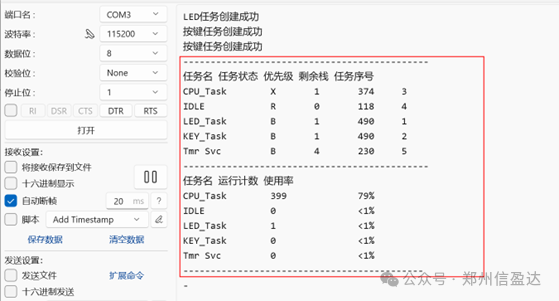
        printf("Task Name  Task State  Priority  Remaining Stack  Task Number\r\n");
        printf("%s", CPU_RunInfo);
        printf("---------------------------------------------\r\n");
        memset(CPU_RunInfo, 0, 400); //Clear buffer
        vTaskGetRunTimeStats((char *)&CPU_RunInfo);
        printf("Task Name  Run Count  Utilization\r\n");
        printf("%s", CPU_RunInfo);
        printf("---------------------------------------------\r\n\n");
vTaskDelay(1000); /* Delay 500 ticks */
    }
}
int main(void) {
    USART_Config();
    TIM2_Config();
    BaseType_t Ret = pdPASS;
    Ret = xTaskCreate(LED_Task, //Entry of task function, which is the function name
                      "LED_Task", //Task alias, convenient for FreeRTOS management
                      512, //Stack space allocated for the task, 32-bit MCU is 50*4 = 200 bytes
                      NULL, //Task function parameters, write NULL if no parameters
                      1, //Task priority
                      &LEDtask_Handle); //Task handle (pointer), can be used to manage tasks
    if (Ret == pdPASS) {
        printf("LED task created successfully\r\n");
    }
    Ret = xTaskCreate(KEY_Task, //Entry of task function, which is the function name
                      "KEY_Task", //Task alias, convenient for FreeRTOS management
                      512, //Stack space allocated for the task, 32-bit MCU is 50*4 = 200 bytes
                      NULL, //Task function parameters, write NULL if no parameters
                      1, //Task priority
                      &KEYtask_Handle); //Task handle (pointer), can be used to manage tasks
    if (Ret == pdPASS) {
        printf("Key task created successfully\r\n");
    }
    Ret = xTaskCreate(CPU_Task, //Entry of task function, which is the function name
                      "CPU_Task", //Task alias, convenient for FreeRTOS management
                      512, //Stack space allocated for the task, 32-bit MCU is 50*4 = 200 bytes
                      NULL, //Task function parameters, write NULL if no parameters
                      1, //Task priority
                      &CPUtask_Handle); //Task handle (pointer), can be used to manage tasks
    if (Ret == pdPASS) {
        printf("CPU task created successfully\r\n");
    }
vTaskStartScheduler(); //Start the scheduler
    printf("Scheduler startup failed\r\n");
    while (1) {
    }
}
The execution effect of the above code is as follows. The execution time of the LED and key tasks we created is very short, so the CPU utilization is less than 1%: