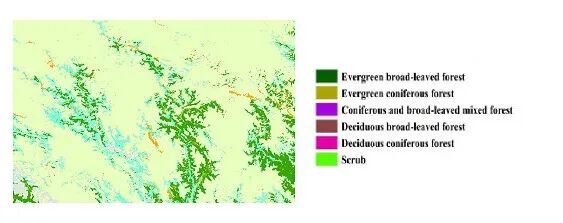
 For example, you have the above image, which contains 1-6 types of vegetation categories. You want to calculate the non-empty average value of another raster corresponding to this image, such as NPP, for the pixels of vegetation categories 1-6. You can use the following code. The code is as follows:
clear; clc;% Read veg classification map[veg, R] = geotiffread('D:\Thesis\paper1\data\veg.tif');info = geotiffinfo('D:\Thesis\paper1\data\veg.tif');% Read the sen_MK map to be analyzed[sen_MK, ~] = geotiffread('D:\Thesis\paper1\data\sen_MK_veg.tif');% Convert data to double for easier processingveg = double(veg);sen_MK = double(sen_MK);% Initialize result vectormean_values = zeros(6,1);% Loop through veg categories 1-6for i = 1:6 % Find positions where veg is the current category and sen_MK is non-empty (not NaN) mask = (veg == i) & ~isnan(sen_MK); % Extract corresponding sen_MK values values = sen_MK(mask); % Calculate average value if ~isempty(values) mean_values(i) = mean(values); else mean_values(i) = NaN; % If there are no valid values for this category, return NaN endend% Output the mean for each categoryfor i = 1:6 fprintf('Veg %d corresponding sen_MK non-empty mean: %.4f\n', i, mean_values(i));end% Calculate the overall non-empty mean of sen_MK_vegoverall_mean = mean(sen_MK(~isnan(sen_MK)));fprintf('Overall sen_MK_veg non-empty mean: %.4f\n', overall_mean);% Change original VegClass to stringveg_classes = arrayfun(@num2str, 1:6, 'UniformOutput', false);output_table = table(veg_classes', mean_values, 'VariableNames', {'VegClass','Sen_MK_Mean'});% Add overall meanoverall_row = table({'Overall'}, overall_mean, 'VariableNames', {'VegClass','Sen_MK_Mean'});% Mergeoutput_table = [output_table; overall_row];% Savewritetable(output_table, 'D:\Thesis\paper1\data\sen_veg.csv');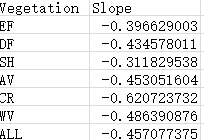 The results are shown above.