Linux Kernel (11) – Work Queue Management
Problem
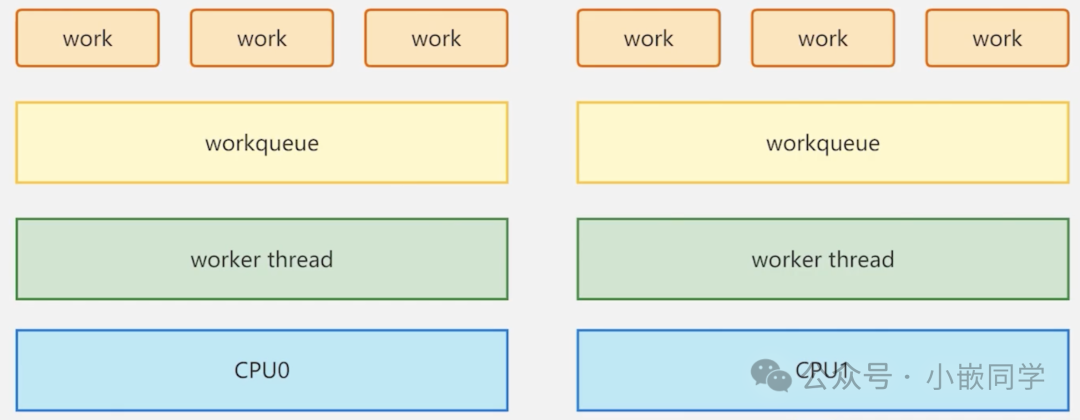
Traditional Work Queue
In previous content, we mentioned the work queues that follow interrupts, including shared work queues and custom work queues, which indicate that time-consuming tasks will be assigned threads for processing. The above image illustrates the setup of a traditional work queue.
CPU Queue: The system creates an independent work queue (workqueue) for each CPU core.
CPU Thread: Each CPU core has a dedicated, fixed kernel thread known as a worker thread (e.g., <span>events/0</span>, <span>events/1</span>, etc.).
Task Processing: When a task (a work) needs to be executed with a delay, it is queued in the work queue of the current CPU. Subsequently, the dedicated thread of that CPU will take the task from its queue and execute it.
Disadvantages: In the above image, if CPU0 is processing a particularly time-consuming task, the work queues of other CPU cores may be affected, leading to tasks on the same core queuing for execution, which can cause performance bottlenecks.
Concurrent Work Queue Management
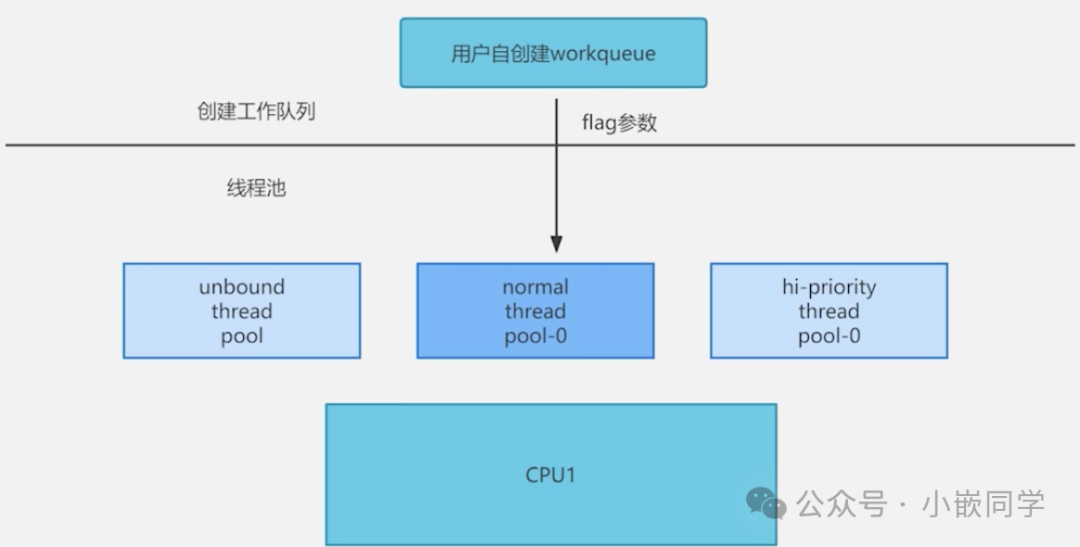
Description
Unlike traditional work queues, a single work thread has been transformed into a thread pool.
Thread Pool
A thread pool is a collection of worker threads of the same type. The kernel has pre-created various types of thread pools instead of creating dedicated threads for each work queue.
User-created work queues do not directly own threads but are bound to a specific or type of thread pool based on their <span>flag</span> parameter. When a work item (work_struct) is submitted to the work queue (<span>queue_work()</span>), it is actually added to the shared task list of its bound thread pool.
Three Types of Thread Pools:
Unbound Thread Pool
Characteristics: Worker threads in this thread pool do not have fixed CPU affinity. They can be scheduled to execute on any available CPU core.Usage: Suitable for tasks that do not have specific CPU cache locality requirements or tasks that may sleep for a long time and do not want to occupy a specific CPU’s context. This can improve overall system load balancing and CPU utilization.
Normal Thread Pool-0
Characteristics: This is a normal priority per-CPU thread pool. The <span>-0</span> in the figure likely represents the normal thread pool for CPU0. The kernel creates such a thread pool for each online CPU core.Usage: Most default work items are processed here. Work items submitted to the standard work queue (such as <span>system_wq</span>, via <span>schedule_work()</span>) will default to enter the normal thread pool corresponding to the current CPU. This ensures that work items are executed on the CPU that submitted them, which is beneficial for utilizing CPU hardware caches.
Hi-Priority Thread Pool-0
Characteristics: This is a high-priority per-CPU thread pool. Similarly, each CPU core has one.Usage: Handles work items that need to be executed as soon as possible and cannot be blocked by normal tasks. Work queues created with the <span>WQ_HIGHPRI</span> flag will be bound to this high-priority thread pool of the target CPU.
| Feature | Unbound Thread Pool | Normal Thread Pool (Per-CPU) | Hi-Priority Thread Pool (Per-CPU) |
|---|---|---|---|
| CPU Affinity | None, determined by the system scheduler | Yes, fixed to the CPU that submitted the interrupt | Yes, fixed to the CPU that submitted the interrupt |
| Priority | Normal | Normal | High |
| Typical Applications | GPU post-processing, non-urgent log writing, general background tasks | Network packet processing, block device I/O completion (main performance path) | Urgent hardware status notifications, real-time tasks with extremely high requirements |
| Advantages | Good system load balancing, does not block specific CPUs | Extreme performance, best cache locality | Timely response, low latency |
| Disadvantages | Sacrifices cache locality, single task latency may be higher | May be blocked by other work items on that CPU | Abuse can disrupt system scheduling balance |
| Creation Flags | <span>WQ_UNBOUND</span> |
(default, or no special flags specified during creation) | <span>WQ_HIGHPRI</span> |
Interface
struct workqueue_struct *alloc_workqueue(const char *fmt,
                                         unsigned int flags,
                                         int max_active, ...);
Parameter Description
fmt
- •
<span>Function</span>: Specifies the name of the work queue to be created.- •
<span>Analysis</span>: This is not just an identifier. In the kernel, when viewing processes via the ps or top command, the created worker threads (kworker) will appear in this name format, such as kworker/u4:2-myqueue. This is crucial for system debugging and performance analysis, allowing you to clearly see where the workloads of different drivers or subsystems are executed.
flags: unsigned int
- •
<span>Function</span>: Core flags that control the behavior of the work queue. Multiple flags can be combined using<span>|</span>(bitwise OR).
WQ_UNBOUND
- • Behavior: The work queue will be bound to a thread pool with no CPU affinity.
- • Usage: Suitable for CPU-intensive, potentially long-running or frequently sleeping tasks. It prevents tasks from monopolizing a specific CPU, thus benefiting overall system load balancing and scheduling flexibility. For example, a background task responsible for decompressing data.
WQ_HIGHPRI
- • Behavior: The work queue will be bound to a high-priority per-CPU thread pool.
- • Usage: Used for work items that need to be executed as soon as possible and cannot be blocked by normal tasks. The scheduling priority of its worker threads is higher (lower nice value in Linux). For example, tasks that need immediate response after a critical I/O completion in the storage subsystem.
WQ_CPU_INTENSIVE
- • Behavior: Indicates that the work items in this work queue are CPU-intensive.
- • Usage: This is a hint for the concurrency manager. For CPU-intensive tasks, the concurrency manager will limit their concurrency (even if the system is idle, it may not create multiple worker threads) to prevent a small number of such tasks from exhausting all available worker threads, starving non-CPU-intensive tasks (such as network processing). It is often used together with
<span>WQ_UNBOUND</span>.
WQ_MEM_RECLAIM
- • Behavior: Indicates that this work queue **may be used in the memory reclamation path.
- • Usage: This is a hint for the concurrency manager. This is an advanced feature used to prevent deadlocks. The kernel ensures that when memory is extremely tight (requiring memory reclamation), there are still available worker threads for this work queue to drive the reclamation process by pre-allocating a worker thread for this queue. Code related to file systems or memory management typically uses this flag.
WQ_FREEZABLE
- • Behavior: Marks the work queue as freezable.
- • Usage: During system sleep (Suspend/Hibernate), all work queues marked with this flag will be frozen, and their work items will pause execution until the system resumes. This ensures that no unexpected tasks run during system state transitions. Most drivers do not require this flag.
max_active: int
- • Function: Specifies the maximum number of work items that this work queue can execute simultaneously in each thread pool.
- • Usage: This limit is per-CPU, per-pool. For a queue bound to a per-CPU thread pool, there can be a maximum of
<span>max_active</span>work items from this queue executing simultaneously on each CPU. The default value is 0, and the kernel will automatically choose an appropriate value (usually 256 or related to the number of CPUs), which is suitable for most scenarios. Setting it to 1 has a similar effect to creating a sequential execution queue (but more efficient than<span>alloc_ordered_workqueue()</span>), suitable for work items that require strict serialization to avoid concurrency conflicts. Setting a larger value can increase throughput but may consume more system resources.
Example
#include <linux/module.h>
#include <linux/init.h>
#include <linux/interrupt.h>
#include <linux/gpio.h>
#include <linux/delay.h>
#include <linux/workqueue.h>

int irq; // Interrupt number
struct work_struct test_work; // Define work item
struct workqueue_struct *test_workqueue; // Define work queue pointer

// Work item processing function - executed in process context
void test_work_fn(struct work_struct *work) {
    msleep(1000); // Simulate time-consuming operation, can sleep
    printk("This is test work\n");
}

// Interrupt handling function - executed in interrupt context
irqreturn_t test_interrupt(int irq, void *args) {
    printk("This is test interrupt\n");
    // Submit work item to work queue, delayed execution
    queue_work(test_workqueue, &test_work);
    return IRQ_HANDLED;
}

static int __init interrupt_irq_init(void) {
    int ret;

    // Get the interrupt number corresponding to GPIO 13
    irq = gpio_to_irq(13);
    printk("irq is %d\n", irq);

    // Request interrupt, trigger mode is rising edge
    ret = request_irq(irq, test_interrupt, IRQF_TRIGGER_RISING, "test", NULL);
    if (ret < 0) {
        printk("request irq is error\n");
        return -1;
    }

    /*
     * Create concurrent management work queue
     * Parameter 1: "test_workqueue" - work queue name (will be displayed in ps command)
     * Parameter 2: 0 - flag, 0 indicates normal priority, per-CPU thread pool
     *        Optional flags:
     *        WQ_UNBOUND   - not bound to a specific CPU, suitable for CPU-intensive tasks
     *        WQ_HIGHPRI   - high priority, suitable for urgent tasks
     *        WQ_CPU_INTENSIVE - CPU-intensive, will reduce concurrency
     *        WQ_MEM_RECLAIM - can be used in memory reclamation path
     *        WQ_FREEZABLE - can be frozen, for power management
     * Parameter 3: 0 - max_active, maximum active work items per CPU, 0 indicates using default value
     */
    test_workqueue = alloc_workqueue("test_workqueue", 0, 0);

    // Initialize work item, associate processing function
    INIT_WORK(&test_work, test_work_fn);

    return 0;
}

static void __exit interrupt_irq_exit(void) {
    free_irq(irq, NULL); // Release interrupt

    // Cancel unexecuted work items
    cancel_work_sync(&test_work);

    // Flush work queue to ensure all started work items are completed
    flush_workqueue(test_workqueue);

    // Destroy work queue
    destroy_workqueue(test_workqueue);

    printk("bye bye\n");
}

module_init(interrupt_irq_init);
module_exit(interrupt_irq_exit);

MODULE_LICENSE("GPL");
MODULE_AUTHOR("XSX");
MODULE_VERSION("V1.0");