Linux Initialization System Technical Documentation: The Evolution from SysVinit to systemd
1. Overview
The Linux initialization system is the first user-space process (PID 1) during the operating system boot process, responsible for booting the user-space environment, managing system services, and processes. This document provides a detailed overview of the development history, technical characteristics, and comparisons of various Linux initialization systems.
2. Development History of Initialization Systems
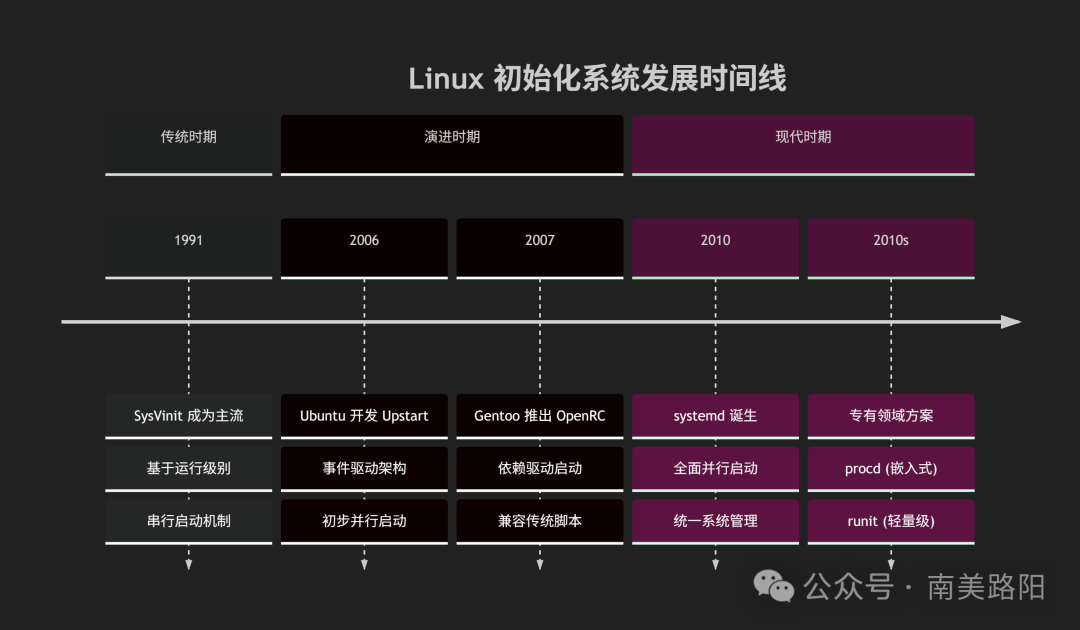
3. Detailed Explanation of Major Initialization Systems
3.1 SysVinit (System V Init)
Year of Birth: 1980s (originating from UNIX System V)
Core Features:
- System state management based on runlevels (0-6)
- Serial startup process, sequential execution of initialization scripts
- Uses Shell scripts to manage service start/stop
Script Structure:
/etc/rc.d/
├── rc0.d/   # Shutdown runlevel
├── rc1.d/   # Single-user mode
├── rc2.d/   # Multi-user without network
├── rc3.d/   # Multi-user console
├── rc4.d/   # User-defined
├── rc5.d/   # Multi-user graphical interface
├── rc6.d/   # Reboot runlevel
└── init.d/  # Actual script directory
Main Commands:
# Manage services
/etc/init.d/service_name start|stop|restart|status

# Change runlevel
init 3
telinit 5

# Shutdown/Reboot
shutdown -h now
reboot
Advantages and Disadvantages:
- ✅ Simple and stable, easy to understand and debug
- ✅ Script transparency, fully customizable
- ❌ Slow startup speed (serial execution)
- ❌ Cannot handle dynamic events (e.g., hot-plug devices)
- ❌ Complex dependency management
3.2 Upstart
Year of Birth: 2006 (developed by Ubuntu)
Core Innovations:
- Event-driven architecture, responds to system events
- Parallel service startup, significantly improves startup speed
- Better hardware hot-plug support
Configuration File Example (/etc/init/nginx.conf):
# Nginx - High-performance HTTP server
description "Nginx HTTP server"

# Start on runlevels 2, 3, 4, 5; stop on 0, 1, 6
start on runlevel [2345]
stop on runlevel [016]

# Expected to run as a daemon
expect fork

# Start service
exec /usr/sbin/nginx -g "daemon on;"
Main Commands:
# Manage tasks
start nginx
stop nginx
status nginx

# View events
initctl list
initctl emit event-name
Application Cases:
- Used in Ubuntu (9.10-14.10), RHEL 6, etc.
- Now replaced by systemd
3.3 OpenRC
Year of Birth: 2007 (developed by the Gentoo community)
Design Features:
- Dependency-driven initialization system
- Compatible with traditional SysVinit scripts
- Does not rely on specific Linux kernel features
Service File Example (/etc/init.d/sshd):
#!/sbin/openrc-run

description="OpenSSH daemon"

command="/usr/sbin/sshd"
command_args="-D"
pidfile="/var/run/sshd.pid"

depend() {
    need net
    use dns
    before firewall
}
Main Commands:
# Manage services
rc-service service_name start
rc-status
rc-update add service_name default
Application Cases:
- Gentoo Linux and its derivatives
- Alpine Linux (commonly used as a Docker base image)
3.4 runit
Year of Birth: 2004
Design Philosophy:
- Simple, reliable, minimal design
- Core function: process supervision (automatically restarts crashed services)
- Extremely fast startup speed
Directory Structure:
/etc/service/
└── nginx/
    ├── run      # Start script
    └── finish   # Stop script
Service Example (/etc/service/nginx/run):
#!/bin/sh
exec 2>&1
exec /usr/sbin/nginx -g "daemon off;"
Main Commands:
# Manage services
sv start nginx
sv status nginx
sv restart nginx
Application Cases:
- Default initialization system for Void Linux
- Lightweight container environments
- High-reliability service environments
3.5 systemd
Year of Birth: 2010 (developed by Lennart Poettering and Kay Sievers)
Architectural Innovations:
- Parallel service startup, based on dependency resolution
- Unified service management configuration (unit files)
- Integrated system management features (logging, scheduled tasks, networking, etc.)
Service Unit Example (/etc/systemd/system/nginx.service):
[Unit]
Description=The NGINX HTTP and reverse proxy server
After=network.target network-online.target
Wants=network-online.target
Documentation=https://nginx.org/en/docs/

[Service]
Type=forking
PIDFile=/var/run/nginx.pid
ExecStartPre=/usr/bin/nginx -t
ExecStart=/usr/bin/nginx
ExecReload=/bin/kill -s HUP $MAINPID
ExecStop=/bin/kill -s QUIT $MAINPID
TimeoutStopSec=5
KillMode=mixed

[Install]
WantedBy=multi-user.target
Main Commands:
# Manage services
systemctl start nginx
systemctl status nginx
systemctl enable nginx

# System management
systemctl halt        # Shutdown
systemctl reboot      # Reboot
systemctl suspend     # Suspend

# View logs
journalctl -u nginx
journalctl -f

# Analyze startup performance
systemd-analyze blame
systemd-analyze critical-chain nginx.service
Application Cases:
- Default initialization system for most mainstream Linux distributions
- Debian, Ubuntu, RHEL, CentOS, Fedora, Arch Linux, etc.
3.6 Specialized Solutions
procd:
- A lightweight initialization system for OpenWrt routers
- Focuses on resource constraints of embedded devices
- Core functions: process management and monitoring
s6:
- Another lightweight process supervision toolset
- Designed with simplicity and correctness in mind
- Commonly used in containers and minimal systems
4. Technical Comparison Analysis
4.1 Performance Comparison
| Feature | SysVinit | Upstart | OpenRC | runit | systemd |
|---|---|---|---|---|---|
| Startup Speed | Slow | Medium | Medium | Fast | Very Fast |
| Resource Usage | Low | Medium | Low | Very Low | Medium |
| Parallel Capability | No | Limited | Limited | Yes | Comprehensive |
4.2 Functional Feature Comparison
| Function | SysVinit | Upstart | OpenRC | runit | systemd |
|---|---|---|---|---|---|
| Dependency Management | Manual | Event-based | Dependency-based | Simple | Automatic dependency resolution |
| Service Monitoring | No | Limited | Limited | Yes | Yes |
| Log Integration | No | No | No | No | Yes (journald) |
| Hot-plug Support | Limited | Yes | Limited | No | Yes |
| Container Support | No | Limited | Limited | Yes | Yes |
4.3 Compatibility Comparison
| Aspect | SysVinit | Upstart | OpenRC | runit | systemd |
|---|---|---|---|---|---|
| Traditional Script Compatibility | Complete | Partial | Complete | Requires adaptation | Partial |
| Cross-distribution Support | Wide | Limited | Medium | Limited | Wide |
| Configuration Complexity | Low | Medium | Medium | Low | High |
5. Migration Guide
5.1 Migrating from SysVinit to systemd
Service Script Conversion:
- Convert /etc/init.d/ scripts to .service unit files
- Use systemd-analyze to check startup performance
Runlevel Mapping:
| SysVinit Runlevel | systemd Target |
|---|---|
| 0 | poweroff.target |
| 1 | rescue.target |
| 2, 3, 4 | multi-user.target |
| 5 | graphical.target |
| 6 | reboot.target |
Common Command Comparison:
| SysVinit Command | systemd Command |
|---|---|
| service ssh start | systemctl start ssh |
| chkconfig ssh on | systemctl enable ssh |
| runlevel | systemctl get-default |
5.2 Migrating from systemd to runit
Creating Service Directory:
mkdir -p /etc/sv/nginx
Creating Run Script:
cat > /etc/sv/nginx/run << EOF
#!/bin/sh
exec /usr/sbin/nginx -g "daemon off;"
EOF
chmod +x /etc/sv/nginx/run
Creating Service Link:
ln -s /etc/sv/nginx /var/service/
6. Selection Recommendations
6.1 Choosing Based on Use Case
Server Environment:
- ✅ systemd: Comprehensive functionality, easy management, rich ecosystem
- ✅ OpenRC: Stable and reliable, low resource usage
Desktop Environment:
- ✅ systemd: High integration with modern desktops
- ✅ runit: Lightweight and fast, responsive
Embedded Devices:
- ✅ procd: Designed for resource-constrained environments
- ✅ runit: Simple and reliable, minimal resource usage
Container Environment:
- ✅ runit: Lightweight, suitable for minimal images
- ✅ s6: Focused on process supervision
Traditional System Maintenance:
- ✅ SysVinit: Compatible with legacy systems
- ✅ OpenRC: Balances traditional and modern needs
6.2 Future Development Considerations
- systemd will continue to dominate, with ongoing feature enhancements
- Lightweight solutions will maintain importance in container and embedded domains
- Security, container integration, and resource control will become key development focuses
7. Conclusion
The Linux initialization system has evolved from simple serial booting to complex parallel dependency management. Currently, systemd has become the mainstream choice, but lightweight solutions like runit and OpenRC still hold value in specific scenarios. Choosing an initialization system should consider specific needs: functional completeness, resource constraints, compatibility requirements, and other factors.
Understanding the design philosophies and implementation characteristics of each initialization system helps make appropriate technical choices in different scenarios and effectively manage system maintenance and troubleshooting.