Chapter 1: Information Systems, the Internet, and You

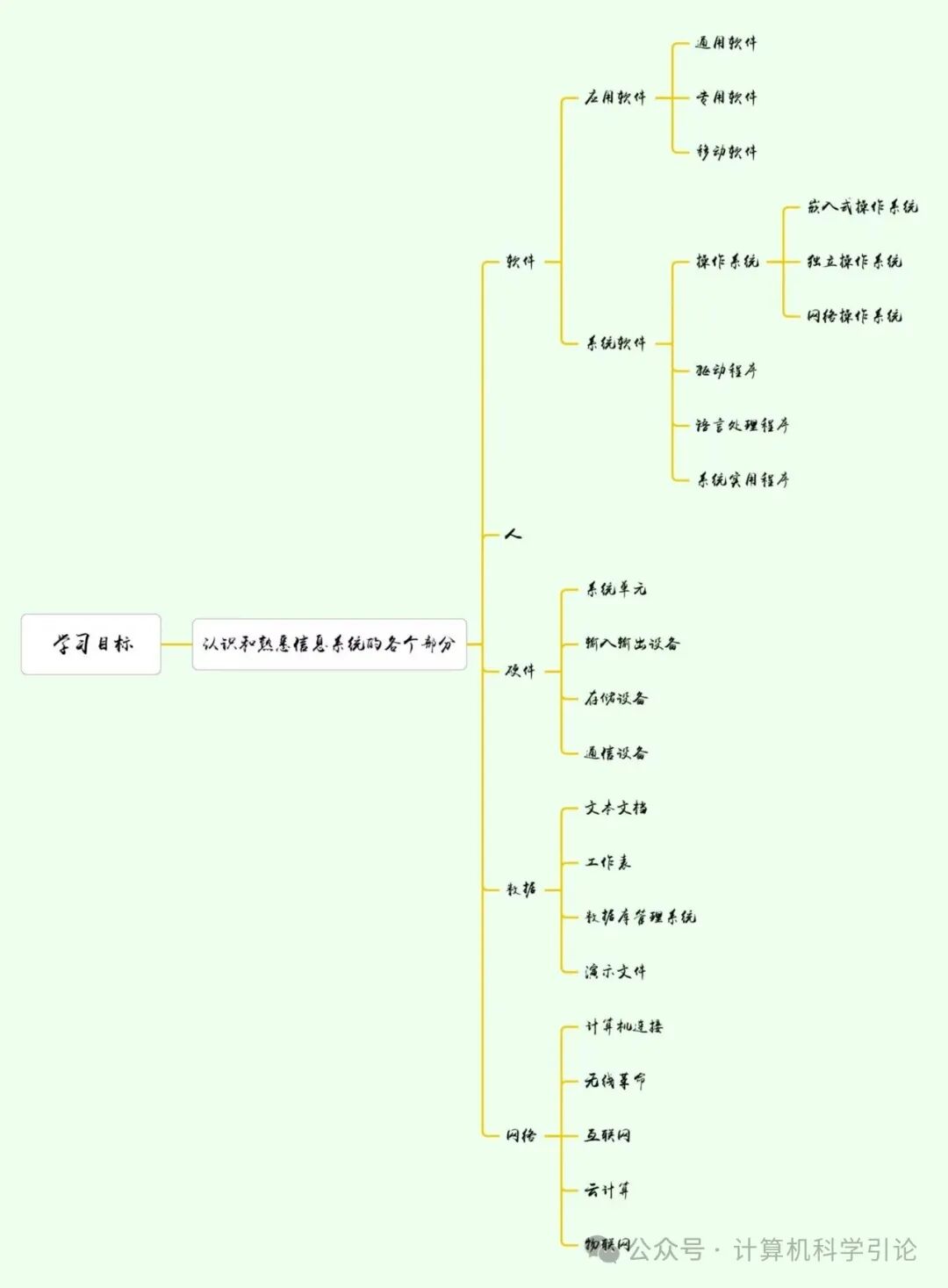
Information Systems
Information systems consist of several components: people, procedures, software, hardware, data, and the internet.
People
◆ People are a component of information systems.
◆ Features that help you become an efficient and effective end-user include: making IT work for you, tips, privacy, environment, ethics, and IT careers.
Making IT Work for You
Topics include: ① Free antivirus software. ② Cloud office suites. ③ Gaming. ④ Cloud storage. ⑤ Mobile office.
Tips
Covers everything from basic computer system maintenance to more advanced aspects.
Privacy
Is the most critical issue, informing us how to protect our personal information privacy.
Environment
We should be aware of our impact on the environment.
Ethics
We should adhere to ethical norms and follow a set of moral guidelines that govern daily life.
IT Careers
Includes job descriptions, employment requirements, educational qualifications, salary ranges, and promotion opportunities.
Procedures
Rules or guidelines that people should follow when using software, hardware, and data. Procedures are typically documented in manuals written by computer experts.
SoftwareAnother term for procedures, executing specific tasks based on user or other system requirements and producing results. Software is divided into system software and application software.System Software
★Function: Manages and controls the maintenance of computer hardware and software resources.
★Role: Enables application software to interact with computer hardware.
★Classification: Operating systems, drivers, language translators, system utilities.
●Operating Systems
◐Function: Responsible for managing computer resources. Its core role is to provide a runtime environment for application software.
◐Classification: Embedded operating systems: tablets, smartphones; standalone operating systems: desktop computers; network operating systems.
★System Tools: Antivirus programs ➔ Role: Protect computer systems from viruses and malware.
Application Software
★Also known as: End-user software.
★Classification: General applications, specialized applications, mobile applications.
●General Applications: Widely used across almost all professional fields. Includes word processors, spreadsheets, database management systems, presentation software.
●Specialized Applications: More focused on specific disciplines and professions. Example: graphic and web design programs.
●Mobile Applications: Commonly referred to as apps, small programs designed for mobile devices such as smartphones and tablets. Example: social networking, gaming, downloading music and videos.
Hardware
Computer hardware consists of electronic devices that can accept input, process it according to instructions, and generate information.
Types of Computers
Supercomputers: The most powerful type of computer, used for processing vast amounts of data, such as analyzing global weather patterns. IBM’s Blue Gene is a typical example.
Mainframe Computers: Occupy specially wired and air-conditioned rooms, fast processing speeds, and strong data storage capabilities, used by insurance companies to process millions of policy information.
Midrange Computers (Servers): Processing power between mainframe computers and personal computers, used to support data retrieval and application software access for large company end-users.
Personal Computers:
Desktops: Can be placed on a desk, feature comprehensive functionality but lack portability.
Laptops: Lightweight and durable, suitable for carrying.
Tablets: Smaller and lighter than standard keyboards, typically use touch-sensitive virtual keyboards.
Smartphones: The most widely used personal computers, equipped with wireless internet connectivity and strong processing capabilities, often outperforming computers used during the moon landing.
Wearable Devices: Such as smartwatches and other mobile computers.

Personal Computer Hardware
Personal computer systems consist of various devices. These physical devices are divided into four basic categories: system unit, input/output, auxiliary storage, and communication.
System Unit: The container that houses most of the computer’s electronic components, with the core components being the microprocessor (which controls and manipulates data to produce information) and memory (such as Random Access Memory (RAM), used to store currently processed programs and data, which is lost when power is interrupted).
Input/Output Devices:
Input Devices: Convert human-understandable data and programs into a form that can be processed by computers, commonly including keyboards and mice.
Output Devices: Convert information processed by computers into a form understandable by humans, commonly including monitors.
Auxiliary Storage: Can retain data and programs even when the computer is powered off, important types include:
Hard Disk: Uses metal platters and read/write heads to store data, commonly used for storing programs and large data files.
Solid State Storage: No moving parts, more reliable, consumes less power, data retention similar to RAM but non-volatile.
Optical Discs: Use laser technology to store data, including CD, DVD, and Blu-ray Disc (BD).
Communication Devices: Used for communication between computer systems, modems are typical devices that convert audio, video, and other data into a form that can be transmitted over the internet.

Data
Definition of Data: Unprocessed raw facts, including text, numbers, images, and sounds; processed data becomes information, which can serve as input for system units when stored in electronic form in files.
Four Common File Types:
Document Files: Generated by word processing software, used to save memos, papers, letters, and other documents.Worksheet Files: Generated by spreadsheets, used for analyzing budgets and other content.
Database Files: Created by database management programs, used to store highly structured and organized data, such as an employee database containing employee names, social security numbers, job titles, etc.
Presentation Files: Generated by presentation software, used to save presentation content, including audience information, speaker notes, electronic slides, etc., such as product introduction presentations.
Connectivity and Internet
Connectivity: Refers to the ability of personal computers to share information with other computers, with networks at its core.
Networks: Communication systems that connect two or more computers, with the largest network in the world being the internet, which acts like a vast highway, connecting users with millions of others and organizations worldwide, providing a multimedia interface to numerous resources on the internet.
Technologies Driving Computer Development and Impacting Daily Life
Cloud Computing: Utilizes the internet and networks to shift many computer activities from the user’s computer to computers on the internet, allowing users to connect to the cloud via the internet to access more powerful computers, software, and storage.
Wireless Communication: Has changed the way people communicate with each other, with devices such as tablets, smartphones, and wearables driving the development of wireless applications, significantly impacting how people communicate and use computer technology.
Internet of Things (IoT): Represents the ongoing evolution of the internet, enabling everyday items embedded with electronic devices to send and receive data over the internet, promising connectivity for all types of devices from computers, smartphones, and watches to various everyday items.
These three collectively drive the development of mobile internet, continuously impacting the computer industry and how people interact with computers and other devices.
︿︿︿︿︿︿︿︿︿︿︿︿︿︿︿︿︿︿︿︿︿︿︿︿︿︿︿︿︿︿︿︿︿︿︿︿︿︿︿︿︿︿︿︿︿︿︿︿︿︿︿︿︿︿︿︿︿︿︿︿︿︿︿︿︿︿︿︿︿︿︿︿︿︿︿︿︿︿︿︿︿︿︿︿︿︿︿︿︿︿︿︿︿︿︿︿︿︿︿︿︿︿︿︿︿︿︿︿︿︿