For most people, their introduction to computers begins with <span>Windows</span> or <span>macOS</span>, graphical user interface operating systems. These systems perform various operations through visual icons and buttons (such as <span>forward</span> and <span>backward</span>), with an operation logic that is highly intuitive. With the aid of excellent interaction design, users can complete daily tasks with minimal learning costs and mental burden. This is the advantage of graphical interfaces.
However, when you first switch from <span>Windows</span> or <span>macOS</span> to <span>Linux</span>, you may feel a bit <span>confused</span>: Where exactly is the installed software? Where are the system configuration files hidden? Where should I look for log files?
In graphical interfaces, we are accustomed to looking for software in <span>program files</span> or <span>application</span> folders, where everything seems to have a clear home. However, when you open the Linux terminal and face numerous seemingly mysterious English folders in the root directory (<span>/etc</span>, <span>/usr</span>, <span>/var</span>, <span>/opt</span>), it is easy to feel lost. Why are the components of an application scattered across multiple directories? Why can’t everything be placed in a unified location?
This confusion is precisely what the <span>Filesystem Hierarchy Standard (FHS)</span> aims to address and resolve. It is not a regulation unique to any particular <span>Linux</span> distribution, but rather a cross-system <span>planning blueprint</span>.<span>FHS</span> provides a unified specification that clearly defines the responsibilities of each system directory, such as <span>/etc</span> being dedicated to storing configuration files, <span>/bin</span> and <span>/usr/bin</span> for executable programs, while <span>/var/log</span> centrally manages log files.
Understanding <span>FHS</span> is like obtaining a <span>navigation map</span> for exploring the mysteries of the Linux system, allowing you to clearly grasp the <span>layout logic</span> of files, thus enabling efficient system management and troubleshooting.
1. What is FHS?
<span>FHS</span> stands for Filesystem Hierarchy Standard[1], which is: <span>Filesystem Hierarchy Standard</span>.
It is a reference standard that defines the <span>directory structure</span> and <span>directory purposes</span> in the Linux operating system.
In simple terms, it specifies which directories should exist in a Linux system (e.g., /bin, /etc, /home), what types of files these directories should contain (e.g., executable programs, configuration files, user data, etc.), and the hierarchical relationships between these directories.
<span>FHS</span> ensures that:
- Software can predict the locations of installed files and folders;
- Users can predict the locations of installed files and folders.
There are two definitions for the distinction between files: <span>shared and unshared files</span>, <span>variable and static files</span>. Typically, files that differ in these aspects should be placed in different folders. This makes it convenient to store files for different purposes on different file systems.
<span>Core Ideas and Classification Principles:</span>
<span>Shared</span>files can be stored on one host and used on another host.<span>Unshared</span>files are those that cannot be shared. For example, files in a user’s home folder are shared, while device lock files are unshared.<span>Static</span>files include binary files, library files, documents, and other files that do not change without intervention from the system administrator.<span>Variable</span>files are non-static files.
Basic Knowledge[2]
<span>Shared files</span>can be stored on one host and used on multiple other hosts. Typically, not all files in the filesystem hierarchy are shared, so each system has at least a local storage space for its unshared files. If all the files needed by a system are stored on another host, it is convenient to access them by mounting one or more directories from that host.
<span>Static and variable files</span>should be stored separately because static files differ from variable files; they can be stored on read-only media and do not require backups like variable files do.
Historically, the UNIX-style filesystem hierarchy stored both static and variable files under the <span>/usr</span> and <span>/etc</span> folders. To achieve the aforementioned advantages, the <span>/var</span> hierarchy was invented, moving all variable files under <span>/usr</span> to <span>/var</span>. Thus, <span>/usr</span> can now be mounted in read-only mode (if it is on a separate filesystem). Variable files under <span>/etc</span> have long been moved to <span>/var</span>, as technically allowed.
Here is an example of a system compatible with FHS. (Other layouts may also be FHS compatible)
| Shared | Unshared | |
|---|---|---|
| Static | /usr | /etc |
| /opt | /boot | |
| Variable | /var/mail | /var/run |
| /var/spool/news | /var/lock |
2. Directory Reference
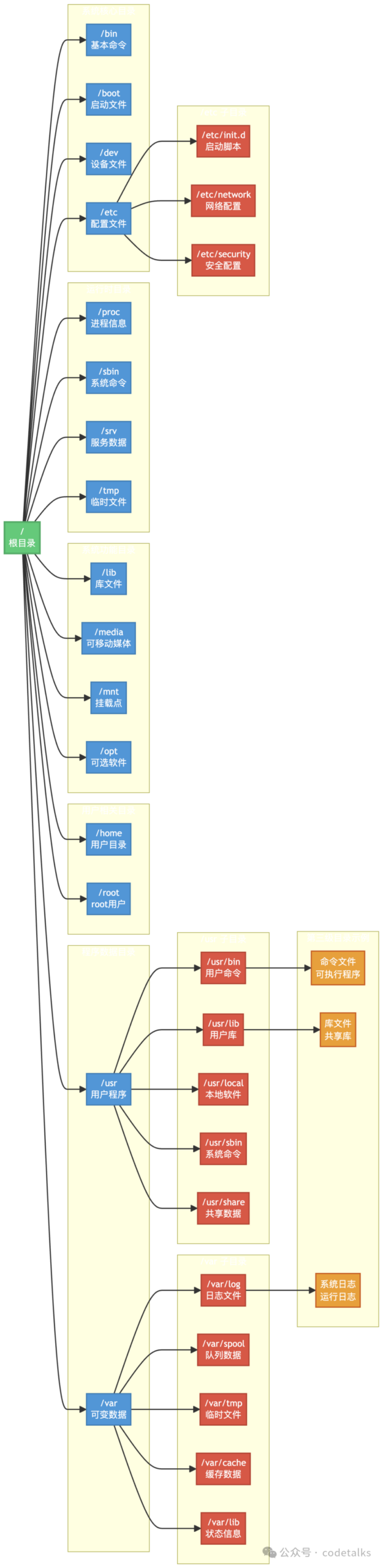
Below are some of the most important and commonly used directories defined in <span>FHS</span>:
-
<span>/</span>– Root directory: The starting point of the entire filesystem, where all other directories and files are located. -
<span>/bin</span>– User basic command binaries: ls, cp, bash, cat, mkdir, etc. -
<span>/boot</span>– Boot loader files -
<span>/dev</span>– Device files - /dev/sda (hard disk)
- /dev/tty (terminal)
- /dev/null
- /dev/zero
-
<span>/etc</span>– Host-specific system configuration - /etc/passwd
- /etc/hosts
- /etc/nginx/nginx.conf
-
<span>/home</span>– User home directories -
<span>/lib</span>– Basic shared libraries and kernel modules -
<span>/media</span>– Mount point for removable media devices -
<span>/mnt</span>– Temporary mount for filesystems -
<span>/opt</span>– Additional application software packages -
<span>/proc</span>– Virtual filesystem for process and kernel information - /proc/cpuinfo (CPU information)
- /proc/meminfo (memory information)
- /proc/[pid] (information directory for a specific process)
-
<span>/root</span>– Home directory for the root user -
<span>/run</span>– Runtime data for processes -
<span>/sbin</span>– System administration command binaries -
<span>/srv</span>– Service data -
<span>/sys</span>– Virtual filesystem for system devices -
<span>/tmp</span>– Temporary files -
<span>/usr</span>– User programs and data (read-only) - /usr/bin: Most user commands.
- /usr/lib: Shared libraries for applications.
- /usr/local: Software locally installed by the system administrator. This is the default prefix when compiling software to avoid conflicts with software managed by the system package manager.
- /usr/share: Architecture-independent read-only data, such as documentation, icons, fonts, timezone data, etc.
- /usr/sbin: Non-essential system administration commands.
-
<span>/var</span>– Variable data - /var/log: Log files for various systems and applications.
- /var/cache: Cache data for applications.
- /var/lib: State information for applications (e.g., database files).
- /var/spool: Queue data (e.g., print jobs, mail queues).
- /var/tmp: Temporary files that should be preserved between reboots.
3. Modern Development: Merging /usr
In recent years, an important trend is the <span>/usr merge</span>. To simplify the filesystem structure, many mainstream distributions (such as Fedora, Debian, Ubuntu, etc.) have merged some directories that were traditionally separated from <span>/usr</span> into <span>/usr</span>, maintaining backward compatibility through <span>symbolic links</span>.
Specifically:
<span>/bin</span>-> /usr/bin<span>/sbin</span>-> /usr/sbin<span>/lib</span>-> /usr/lib<span>/lib64</span>-> /usr/lib64
Finally, the Chinese version FHS.zh_CN[3] was provided by <span>happyaron</span>.
References
[1]
Filesystem Hierarchy Standard: https://refspecs.linuxfoundation.org/FHS_3.0/fhs/index.html
[2]
Basic Knowledge: https://refspecs.linuxfoundation.org/FHS_3.0/fhs/ch02.html
[3]
FHS.zh_CN: https://people.ubuntu.com/~happyaron/docs/FHS.zh_CN.pdf