Table of Contents
- 0. Laowang IST3931 LCD Screen (0.4 inch – 32×64 – 14pin-IIC)
- 1. Overview of the Driver Library
- 2. Hardware Configuration Requirements
- 3. Quick Start
- 0. Custom Configuration
- 1. Initialize the Screen
- 2. Display Character
- 3. Display String
- 4. Detailed Explanation of Core Functions
- 1. Font System
- 2. Display Modes
- 3. Screen Writing Functions
- 4. Character Display Implementation
- 5. Advanced Usage
- 1. Custom Display Modes
- 2. Screen Buffer Management
- 6. Detailed Explanation of Configuration Parameters
- 7. Common Issues
- 8. Performance Optimization Suggestions
- 9. Example Project
- 10. Resource Links
- 11. References
0. Laowang IST3931 LCD Screen (0.4 inch – 32×64 – 14pin-IIC)
Pin pitch: 0.7mm
Pin definitions:
-
1-6 NC
-
7 GND
-
8 VCC (3.3V)
-
9 RST (10K pull-up resistor or connected to microcontroller)
-
10 SCL (10K pull-up resistor)
-
11 SDA (10K pull-up resistor)
-
12 NC
-
13 VG (1uF capacitor to GND)
-
14 NC
Physical image:
| Front | Back |
|---|---|
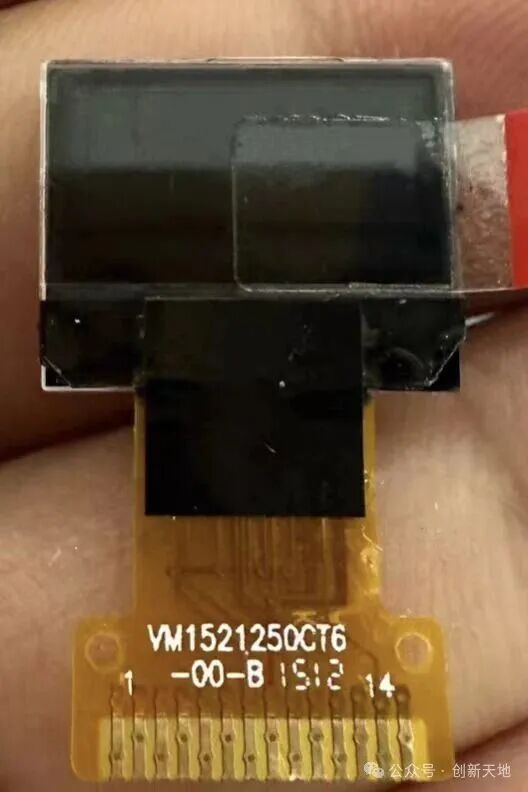 |
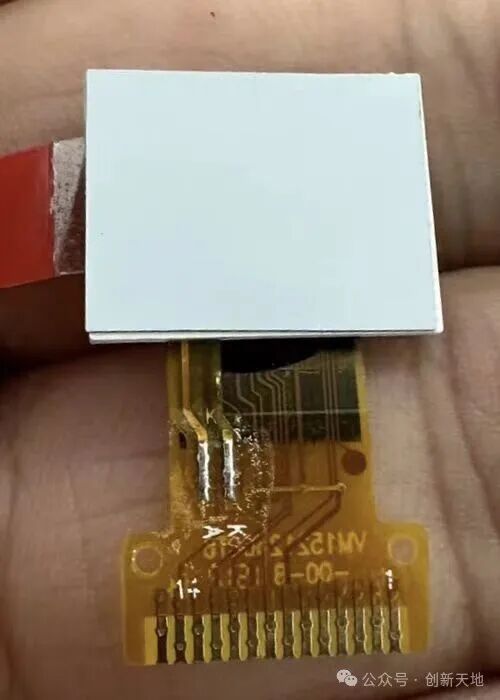 |
1. Overview of the Driver Library
This driver library is specifically designed for the IST3931 controller (Laowang screen), compiled using VSCode + Platformio + Arduino platform for the ESP8266 development board. This driver library provides complete character display functionality, supporting various fonts and display modes.
Core features include:
- Screen initialization and configuration
- Multi-size font rendering (6×8/8×16/12×24)
- Character/string display
- Multiple display modes (normal/inverted/xor/overwrite)
- Screen buffer management
Pin connections:
- RST 3.3v (directly connected to the ESP8266’s RST pin)
- SCL D5(5)
- SDA D4(4)
File structure:
main.cpp // Main program
display_char.cpp/.h // String display functions and declarations
display_font.cpp/.h // Character pattern files
display_for_laowang.cpp/.h // IST3931 screen initialization configuration function (must have)
display_ist3931.cpp/.h // IST3931 screen initialization related functions (must have)
2. Hardware Configuration Requirements
#define HEIGHT_PIX 32   // Screen height (pixels)
#define WIDTH_PIX 64    // Screen width (pixels)
#define IST3931_ADDR 0x3F // I2C device address
3. Quick Start
0. Custom Configuration
You can customize the <span>display_for_laowang.cpp</span> file to modify the IIC write function “uint8_t zxc_i2c_write_only(uint8_t device_addr, uint8_t* data, uint16_t len) “ and the delay function void zxc_delay_ms(uint16_t ms) ` to adapt to different platforms.
/**
 * @brief Implementation of I2C write function (user needs to implement based on actual hardware)
 * @param device_addr Device address
 * @param data Data pointer
 * @param len Data length
 * @return 0: success, 1: failure */
uint8_t zxc_i2c_write_only(uint8_t device_addr, uint8_t* data, uint16_t len) {
  Wire.beginTransmission(device_addr);
  Wire.write(data, len);
  return Wire.endTransmission() == 0 ? 0 : 1;
}
/**
 * @brief Millisecond delay function implementation
 * @param ms Delay in milliseconds */
void zxc_delay_ms(uint16_t ms) {
  delay(ms);
}
1. Initialize the Screen
void setup() {
    // Initialize I2C and screen
    Wire.begin();
    display_for_laowang_init();
    clear_screen(0); // Clear screen to black
}
2. Display Character
display_char(10, 5, 'A', FONT_SIZE_8x16, MODE_NORMAL);3. Display String
display_string(0, 0, "Hello World!", FONT_SIZE_8x16, MODE_NORMAL, 1);4. Detailed Explanation of Core Functions
1. Font System
Supports three font sizes:
typedef enum {
    FONT_SIZE_6x8,    // Small font
    FONT_SIZE_8x16,   // Standard font
    FONT_SIZE_12x24   // Large font
} font_size_t;
Font data structure:
typedef struct {
    uint8_t width;          // Character width (pixels)
    uint8_t height;         // Character height (pixels)
    uint8_t bytes_per_char; // Number of bytes for character data
    const uint8_t *data;    // Character pattern data pointer
} font_t;
2. Display Modes
typedef enum {
    MODE_NORMAL,      // Normal display
    MODE_INVERT,      // Inverted display
    MODE_OVERWRITE,   // Overwrite background
    MODE_XOR          // XOR mode (for blinking effect)
} char_display_mode_t;
3. Screen Writing Functions
Core pixel writing function:
uint8_t screen_write_by_pix(uint8_t x, uint8_t y,
                             uint8_t width, uint8_t height,
                             const void *buf);
// Parameter description:
// - `x`, `y`: Starting coordinates (pixels)
// - `width`, `height`: Size of the writing area
// - `buf`: Pixel data buffer (bitwise storage)
4. Character Display Implementation
Character rendering process:
- Get font data:
<span>get_font(font_size_t size)</span> - Check ASCII range (32-126)
- Calculate character pattern offset:
<span>(c - 32) * font_ptr->bytes_per_char</span> - Handle display modes (special modes may require creating a temporary buffer)
- Call
<span>screen_write_by_pix</span>to write to the screen
5. Advanced Usage
1. Custom Display Modes
// Inverted display example
display_char(20, 10, 'B', FONT_SIZE_12x24, MODE_INVERT);
// XOR mode (can create blinking effect)
display_string(5, 20, "XOR MODE", FONT_SIZE_6x8, MODE_XOR, 0);
2. Screen Buffer Management
Using a global buffer:
static uint8_t screen_buf[HEIGHT_PIX][WIDTH_PIX / 8];
// Directly manipulating the buffer allows for efficient partial refresh
6. Detailed Explanation of Configuration Parameters
IST3931 initialization configuration template:
static const struct ist3931_config config = {
    .type = LAOWANG,
    .vc = 1,        // Voltage conversion circuit enabled
    .vf = 1,        // Voltage follower circuit enabled
    .bias = 2,      // Bias ratio (0-7)
    .ct = 150,      // Contrast (0-255)
    .duty = 32,     // Scan duty cycle (1-64)
    .fr = 60,       // Frame frequency division ratio
    // More parameters...
};
7. Common Issues
-
Character display is incomplete
- Check if coordinates are out of bounds:
<span>x + width > WIDTH_PIX</span> - Ensure characters are within
<span>ASCII 32-126</span>range
Display misalignment
- Laowang screen uses special address mapping:
ay_true = (y % 2 == 0) ? (y/2) : ((y-1)/2 + 16);
I2C communication failure
- Check device address
<span>0x3F</span> - Confirm
<span>zxc_i2c_write_only()</span>implementation is correct
8. Performance Optimization Suggestions
- Prefer using
<span>MODE_OVERWRITE</span>(direct write mode) - Avoid frequent partial refreshes, use double buffering
- For static text, cache rendering results
9. Example Project
#include "display_char.h"
void setup() {
    display_for_laowang_init();
    clear_screen(0);
    // Display multiple lines with different fonts
    display_string(5, 0, "6x8 Font", FONT_SIZE_6x8, MODE_NORMAL, 1);
    display_string(5, 10, "8x16 Font", FONT_SIZE_8x16, MODE_OVERWRITE, 1);
    display_string(5, 30, "12x24", FONT_SIZE_12x24, MODE_INVERT, 0);
}
void loop() {
    // XOR mode to create blinking effect
    static bool toggle = false;
    display_string(20, 20, "BLINK", FONT_SIZE_8x16, toggle ? MODE_XOR : MODE_NORMAL, 1);
    toggle = !toggle;
    delay(500);
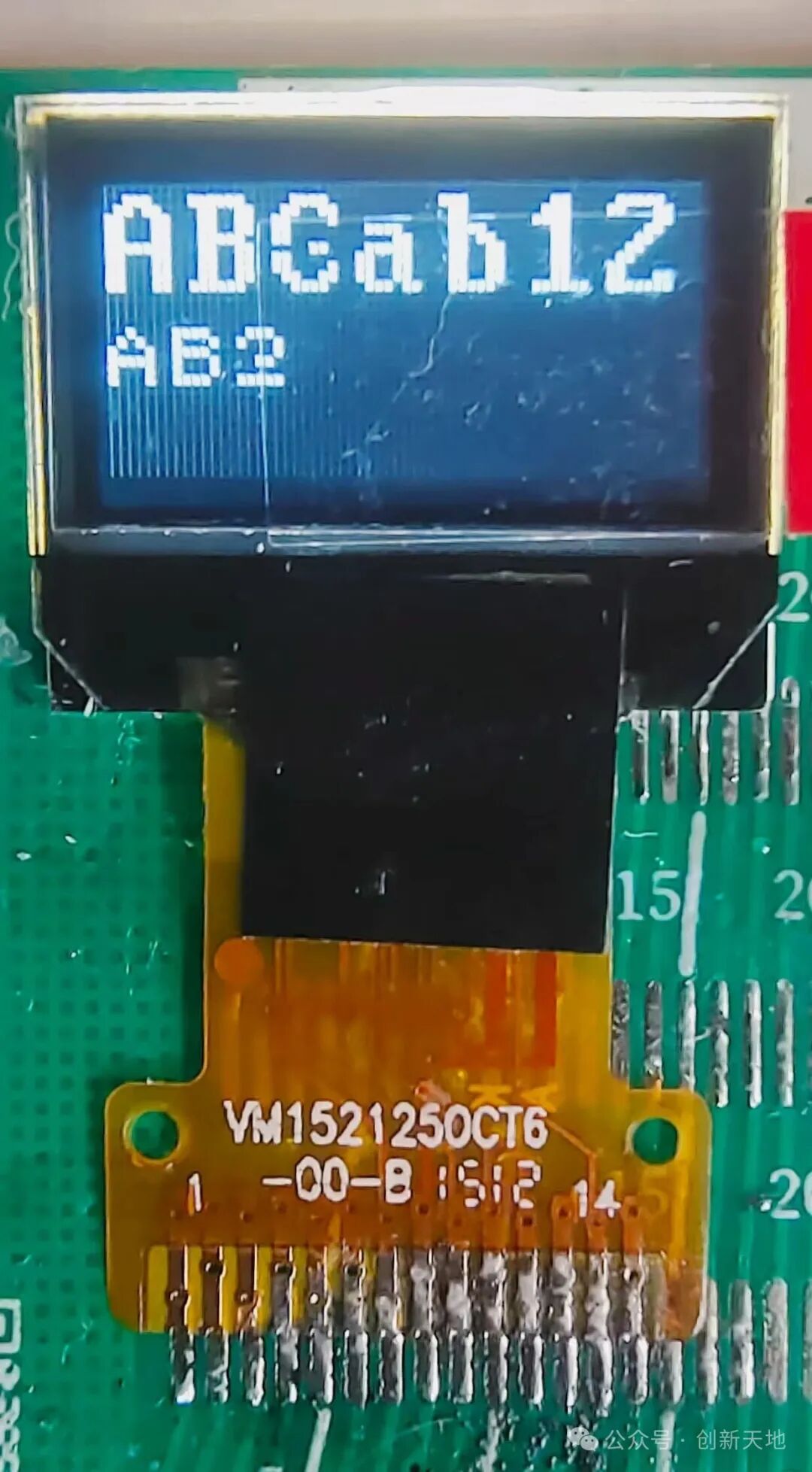
}
10. Resource Links
- IST3919 Screen Data Manual
- GitHub project link: https://github.com/CodeVoyagerHD/ScreenDriver
11. References
- https://github.com/ZxcSpace/zxc_others
- https://github.com/zephyrproject-rtos/zephyr/blob/main/drivers/display/display_ist3931.c
Note: The complete code library is included in display_char.cpp, display_font.cpp, and other files. All files must be added to the project when used.