Introduction: Due to limited resources, embedded systems cannot store important data as conveniently as databases interfacing with operating systems. Therefore, this article will introduce the principles and applications of an embedded database, TinyFlashDB, analyze its advantages in resource-constrained environments, summarize pain points and solutions in practical development, and complete the porting and functional verification of TinyFlashDB on the STM32 platform.
1. Overview of TinyFlashDB:TinyFlashDB is an open-source, lightweight embedded database designed specifically for microcontrollers (MCUs), supporting storage media such as NOR Flash, NAND Flash, and EEPROM. Its core features include:
Lightweight: Small code size and low resource usage, suitable for resource-constrained embedded systems;
Data Persistence: Ensures data reliability through wear leveling and bad block management;
Key-Value Storage: Based on the Key-Value model, simplifying data operations;
Cross-Platform: Provides a unified API interface, making it easy to port.
2. Addressing Pain Points:
1. Resource Constraints:
1) Traditional databases (like SQLite) require a large amount of RAM and ROM, which embedded devices lack;
2) Complex data structures increase development complexity, leading to slow system response.
2. Data Reliability Issues:
1) Flash has a limited number of erase/write cycles, and frequent writes shorten its lifespan;
2) Unexpected power outages may lead to data corruption or loss.
3. Development Efficiency Issues:
Lack of a unified API requires writing low-level drivers for different storage media, resulting in long development cycles.
3. Advantages and Disadvantages of TinyFlashDB
1. Advantages:
(1)Lightweight Design, Extremely Low Resource Usage:
a) Small code size: The core code consists of only a few thousand lines, and after compilation, it occupies about a few KB of ROM, with negligible RAM consumption;
b) Strong adaptability: Suitable for MCUs with less than 1MB RAM and less than 256KB Flash.
(2)Data Reliability Assurance:
a) Wear Leveling Algorithm: Dynamically allocates write positions to avoid excessive erasure of the same sector, extending the lifespan of Flash.
b) Bad Block Management: Automatically detects and marks bad blocks, migrating data to healthy sectors, reducing the risk of data loss;
c) Power Failure Protection: Ensures data recovery after unexpected power outages through a logging mechanism.
(3)Usability and Portability:
a) Unified API Interface: Provides simple APIs like tfdb_set(), tfdb_get(), etc., abstracting the differences in underlying storage;
b) Cross-Platform Adaptation: Only requires configuration of Flash parameters (such as starting address, sector size) for quick porting to different MCU platforms.
(4)Efficiency Improvements
a) Optimizes write strategies based on Flash characteristics, reducing erase cycles and improving write efficiency;
b) Data retrieval is based on an indexing mechanism, with read speeds superior to traditional linear searches.
2. Disadvantages – Every coin has two sides, and balance is key:
(1)Limited Functionality, Applicable Scenarios are Limited:
Only supports Key-Value storage, cannot perform complex queries (like SQL statements) or transaction processing;
Data structure is fixed, cannot dynamically expand fields, unsuitable for relational data management.
(2)Decreased Efficiency for Large Data Storage:
When data volume approaches Flash capacity, the overhead of index lookup and wear leveling increases, potentially slowing down write speeds;
Does not support data compression, leading to lower storage space utilization compared to dedicated compression algorithms.
(3)Hardware Adaptation Dependency:
Developers need to write or adapt Flash drivers (like erase and write operations), requiring additional work during porting;
Differences in Flash characteristics (like page size, erase cycles) among different MCUs may affect performance tuning.
(4)Concurrent Processing Requires Additional Design:
The native API does not include a locking mechanism, requiring manual addition of mutex locks in a multi-tasking environment to avoid data races, increasing development complexity.
4. Recommended Use Cases for TinyFlashDB
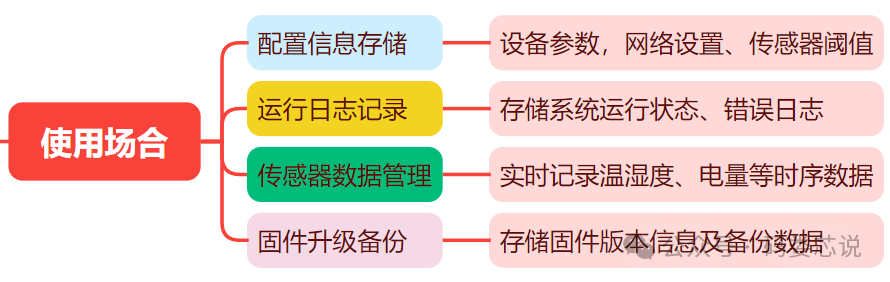
5. Porting Practice of TinyFlashDB on STM32
1. Development Platform: STM32F407VET6 (or other STM32 series, requires adaptation of corresponding Flash drivers);
2. Development Tools: Keil MDK-ARM v5/STM32CubeIDE;
3. TinyFlashDB library source code (must download the latest version from GitHub) – https://github.com/smartmx/TFDB;
Porting Steps:
(1) Add Source Code: Copy the tfdb.c and tfdb.h files to the project directory and add them to the project in Keil.
(2) Configure Storage Media: Configure parameters in tfdb_config.h according to the internal Flash characteristics of STM32, mainly flexible macro settings:
/* Define Flash starting address (refer to the chip manual)*/#define TFDB_FLASH_START_ADDR 0x08040000/* Set Flash sector size (e.g., 128KB Flash, 4KB per sector)*/#define TFDB_FLASH_SECTOR_SIZE 4096/* Enable wear leveling algorithm*/#define TFDB_WEAR_LEVELING_ENABLE 1(3) TinyFlashDB Initialization: Initialization code needs to be added in main.c:
// Include header file#include "tfdb.h"int main(void) { // Initialize hardware (clock, Flash driver, serial port, etc.) System_Init(); // Initialize TinyFlashDB tfdb_err_t ret = tfdb_init(TFDB_FLASH_START_ADDR, TFDB_FLASH_SECTOR_SIZE); if (ret != TFDB_OK) { // Handle initialization failure Error_Handler(); } // User-defined program segment //.......}(4) Writing and Reading Operations Example for TinyFlashDB:
// Example of writing datauint8_t WriteSensorDat(){ const char* key = "sensor_temp"; float value = 25.5; ret = tfdb_set(key, &value, sizeof(value)); if (ret != TFDB_OK) { // Handle write failure }}// Example of reading datauint8_t ReadSensorDat(){ float read_val; size_t len = sizeof(read_val); ret = tfdb_get(key, &read_val, &len); if (ret == TFDB_OK && len == sizeof(read_val)) { // Data processing... } else { // Read failure or data does not exist }}Conclusion: TinyFlashDB effectively addresses the pain points of data storage in embedded systems with its lightweight, reliable, and easy-to-use features, making it suitable for 8-bit and 32-bit MCUs with small capacities, applicable in fields such as IoT and industrial control. Future plans include further exploration of its advanced features (such as transaction support and data compression) and attempts to port it to more platforms, promoting its application in real projects.