👇👇Follow and reply “Join Group” to be added to the Programmer Exchange Group👇👇 Author | iOS_BookSource | Juejinhttps://juejin.cn/post/7010665487809904647
1. Classification of Encryption Algorithms
Hash (Hashing) functions: Not classified as encryption algorithms. Examples include MD5, SHA1/256/512Symmetric encryption algorithms: DES, 3DES, AES (Advanced Encryption Standard, the keychain on Mac computers uses AES)Asymmetric encryption algorithm: RSA
1. Hash
Hash, generally translated as “散列”, can also be directly translated as “Hash”, transforms an input of arbitrary length into a fixed length output through a hashing algorithm, and this output is the hash value.This transformation is a compression mapping, meaning the space of the hash value is usually much smaller than the input space, and different inputs may hash to the same output, so it is impossible to determine a unique input value from the hash value. Simply put, it is a function that compresses messages of arbitrary length into a fixed-length message digest, with MD5 being one of the most famous hash algorithms.Characteristics of Hash:
-
The algorithm is public
-
The result is the same for the same data
-
For different data operations, the result of MD5 is by default 128 bits, which is 32 characters (hexadecimal representation)
-
Cannot be reversed
-
Mainly used as information summary, information fingerprint, for data identification
Uses:
-
User password encryption: Since it cannot be restored, its encryption is very good; even if leaked, the real password of the user cannot be reverse-engineered
-
Search engines
-
Copyright
-
Digital signatures
Password encryption methods:
-
Directly using MD5
-
MD5 with salt
-
HMAC encryption scheme
-
Add something
When we need to send a password to the server, we need to encrypt the password. If we use RSA asymmetric encryption, the efficiency will be low and there are security risks because after RSA encryption, the password will be decrypted for matching. However, this means the server must store the password in plaintext, which is very insecure:There are two principles for password transmission over the network:
-
Plaintext transmission of user privacy information is not allowed over the network
-
Plaintext storage of user privacy information is not allowed locally
So we can use MD5 conversion, which means even if the ciphertext is lost, the user’s original password cannot be cracked. Let’s look at the MD5 conversion code:
- (NSString *)md5String {
    const char *str = self.UTF8String;
    uint8_t buffer[CC_MD5_DIGEST_LENGTH];
    // Pass the string pointer, the length of the string, and the space for storing the ciphertext. The space is generally 16 bytes, and the ciphertext will be stored in hexadecimal format in the storage space.
    CC_MD5(str, (CC_LONG)strlen(str), buffer);
    // After obtaining the ciphertext, we concatenate the ciphertext to get a ciphertext string
    return [self stringFromBytes:buffer length:CC_MD5_DIGEST_LENGTH];
}

- (NSString *)stringFromBytes:(uint8_t *)bytes length:(int)length {
    NSMutableString *strM = [NSMutableString string];

    for (int i = 0; i < length; i++) {
        [strM appendFormat:"%02x", bytes[i]];
    }
    return [strM copy];
}

// Encrypting 123456 gives us this hexadecimal string
e10adc3949ba59abbe56e057f20f883e
However, although MD5 cannot be cracked, the ciphertext corresponding to the same string remains unchanged, allowing us to match the corresponding string through the ciphertext. For example, on CMD5, we can match common strings through passwords.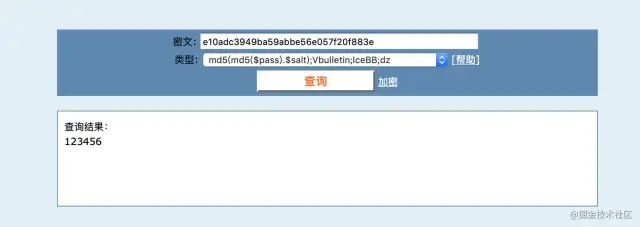 At this point, we need to salt the string before performing MD5 conversion. Salting means appending a complex string to the original string before performing MD5 conversion, but there is a downside: this salt is fixed and must be written into the program, which can also be brute-forced. Therefore, we can use HMAC for encryption:
HMAC:
-
Uses a key for encryption and performs hashing twice
-
In actual development, the key comes from the server and is dynamic
-
One account corresponds to one key, and it can also be updated. When we register or change devices, the key is sent to the client, which is then cached locally. Each time we log in, we retrieve the key from local storage to encrypt the password, allowing us to add a device lock, requiring the original device’s consent to log in on a new device.
Apple also provides the CCHmac method:
#pragma mark - HMAC Hash Function
- (NSString *)hmacMD5StringWithKey:(NSString *)key {
    const char *keyData = key.UTF8String;
    const char *strData = self.UTF8String;
    uint8_t buffer[CC_MD5_DIGEST_LENGTH];

    CCHmac(kCCHmacAlgMD5, keyData, strlen(keyData), strData, strlen(strData), buffer);

    return [self stringFromBytes:buffer length:CC_MD5_DIGEST_LENGTH];
}
Because if we only use MD5 ciphertext for each login, it would lead to the same information being sent to the server each time, which is quite dangerous. If intercepted by hackers, they could use the request data to crack it.We can add a timestamp (server time), ensuring that each request is different. Even if intercepted by hackers, it doesn’t matter due to latency issues; thus, the timestamp is only accurate to the minute. The method of adding a timestamp is as follows:
-
1. Before logging in, request the server’s timestamp
-
2. Then, on the client side, encrypt the password using HMAC and the key to obtain ciphertext 1
-
3. Append the timestamp to ciphertext 1 and encrypt it again using HMAC and the key to obtain ciphertext 2
-
4. Send ciphertext 2 to the server for verification. The server retrieves the user’s password ciphertext, which is ciphertext 1 appended with the current timestamp, and encrypts it again using HMAC and the key to match with the ciphertext sent from the client. If they match, verification is successful.
-
If they do not match, concatenate ciphertext 1 with the server’s timestamp from one minute earlier and match again. If they match, verification is successful; if not, return incorrect password.
Search Engines:
For each word, obtain the hash value, then sum these hash values for searching. Thus, regardless of the order of the input words, the content found will be the entire sentence. For example, Zhang San, Li Si, Wang Wu; the hash values of these three words are the same and are all 32-bit hexadecimal numbers. No matter which comes first, the sum will be the same.
Copyright:
By performing a hash operation on the original file, we obtain a hash value. If a pirated file is uploaded to Baidu Cloud, it will be detected due to a mismatched hash value. Also, Baidu Cloud has a feature called ‘instant upload,’ which means it already has the file. By matching the hash, it can be determined that the file is already present, so it does not need to be uploaded again.
Digital Signatures:
Why use the term signature? Because foreigners like to use checks, and the signature on a check proves that it belongs to you. Digital signatures are methods used to verify digital information.The client has payment information, and a third party may attack and alter the payment information, which could cause the client to pay more. How to prevent this?
-
Convert the payment information to MD5
-
Then encrypt the MD5 ciphertext using RSA to obtain a ciphertext, which is the digital signature
-
After sending it to the server, the server decrypts the ciphertext using RSA to obtain MD5 ciphertext 1, then converts the payment information to MD5 to obtain ciphertext 2, and matches ciphertext 1 with ciphertext 2. If they are the same, it indicates that the payment information has not been modified.
Since hash values are always 128 bits regardless of the size of the number, there will definitely be some data that produces the same hash value, which is called a hash collision.
2. Symmetric Encryption:
Symmetric encryption means that plaintext can be converted to ciphertext using a key, and ciphertext can be decrypted back to plaintext using the same key.Common Algorithms:
-
DES: Data Encryption Standard (used less due to insufficient strength)
-
3DES: Uses three keys to encrypt the same data three times, enhancing strength, but having three keys is cumbersome, so it is used less
-
AES: Advanced Encryption Standard, used for keychain access and by the FBI for encryption
XOR is generally used for conventional encryption of game data.Application Modes:
-
ECB: Electronic Codebook Mode, where each block of data is encrypted independently. The most basic encryption mode, meaning that identical plaintext will always encrypt to the same ciphertext, with no initial vector. Because each block of data is independent, it is vulnerable to replay attacks, so it is rarely used in practice.
-
CBC: Cipher Block Chaining Mode, where a key and an initialization vector (IV) are used to encrypt the data. The plaintext is XORed with the previous ciphertext before encryption, ensuring that if different initial vectors are chosen, identical passwords will produce different ciphertexts. This is the most widely used mode. CBC encryption’s ciphertext is context-dependent, but an error in plaintext will not propagate to subsequent blocks. However, if one block is lost, all subsequent blocks will be invalid, meaning the data is interrelated, and the encryption/decryption of the next block depends on the previous block. If one block is compromised, the entire data becomes irretrievable.
-
CBC can effectively ensure the integrity of the ciphertext; if a data block is lost or altered during transmission, subsequent data will not decrypt correctly.
Using terminal commands for encryption, let’s introduce the terminal encryption/decryption commands for AES:
/**
 *  Terminal test commands
 *
 *  DES(ECB) encryption
 *  $ echo -n hello | openssl enc -des-ecb -K 616263 -nosalt | base64
 *
 *  DES(CBC) encryption
 *  $ echo -n hello | openssl enc -des-cbc -iv 0102030405060708 -K 616263 -nosalt | base64
 *
 *  AES(ECB) encryption
 *  $ echo -n hello | openssl enc -aes-128-ecb -K 616263 -nosalt | base64
 *
 *  AES(CBC) encryption
 *  $ echo -n hello | openssl enc -aes-128-cbc -iv 0102030405060708 -K 616263 -nosalt | base64
 *
 *  DES(ECB) decryption
 *  $ echo -n HQr0Oij2kbo= | base64 -D | openssl enc -des-ecb -K 616263 -nosalt -d
 *
 *  DES(CBC) decryption
 *  $ echo -n alvrvb3Gz88= | base64 -D | openssl enc -des-cbc -iv 0102030405060708 -K 616263 -nosalt -d
 *
 *  AES(ECB) decryption
 *  $ echo -n d1QG4T2tivoi0Kiu3NEmZQ== | base64 -D | openssl enc -aes-128-ecb -K 616263 -nosalt -d
 *
 *  AES(CBC) decryption
 *  $ echo -n u3W/N816uzFpcg6pZ+kbdg== | base64 -D | openssl enc -aes-128-cbc -iv 0102030405060708 -K 616263 -nosalt -d
 *
 *  Note:
 *      1> The encryption process first encrypts, then base64 encodes
 *      2> The decryption process first base64 decodes, then decrypts
 */
Encryption Code:
Encryption and decryption actually both use the CCCrypt function, just with different input types.
    /** AES - ECB */
    NSString * key = @"abc";
    NSString * encStr = [[EncryptionTools sharedEncryptionTools] encryptString:@"hello" keyString:key iv:nil];

    NSLog(@"Encryption result: %@", encStr);

    NSLog(@"Decryption result: %@", [[EncryptionTools sharedEncryptionTools] decryptString:encStr keyString:key iv:nil]);

    /** AES - CBC encryption */
    uint8_t iv[8] = {1,2,3,4,5,6,7,8};
    NSData * ivData = [NSData dataWithBytes:iv length:sizeof(iv)];

    NSLog(@"CBC Encryption: %@", [[EncryptionTools sharedEncryptionTools] encryptString:@"hello" keyString:@"abc" iv:ivData]);

    NSLog(@"Decryption: %@", [[EncryptionTools sharedEncryptionTools] decryptString:@"u3W/N816uzFpcg6pZ+kbdg==" keyString:key iv:ivData]);

    - (NSString *)encryptString:(NSString *)string keyString:(NSString *)keyString iv:(NSData *)iv {

    // Set the key
    NSData *keyData = [keyString dataUsingEncoding:NSUTF8StringEncoding];
    uint8_t cKey[self.keySize];
    bzero(cKey, sizeof(cKey));
    [keyData getBytes:cKey length:self.keySize];

    // Set iv
    uint8_t cIv[self.blockSize];
    bzero(cIv, self.blockSize);
    int option = 0;
    if (iv) {
        [iv getBytes:cIv length:self.blockSize];
        option = kCCOptionPKCS7Padding;
    } else {
        option = kCCOptionPKCS7Padding | kCCOptionECBMode;
    }

    // Set output buffer
    NSData *data = [string dataUsingEncoding:NSUTF8StringEncoding];
    size_t bufferSize = [data length] + self.blockSize;
    void *buffer = malloc(bufferSize);

    // Start encryption
    size_t encryptedSize = 0;
    // Encryption and decryption use this function -- CCCrypt
    CCCryptorStatus cryptStatus = CCCrypt(kCCEncrypt,
                                          self.algorithm,
                                          option,
                                          cKey,
                                          self.keySize,
                                          cIv,
                                          [data bytes],
                                          [data length],
                                          buffer,
                                          bufferSize,
                                          &encryptedSize);

    NSData *result = nil;
    if (cryptStatus == kCCSuccess) {
        result = [NSData dataWithBytesNoCopy:buffer length:encryptedSize];
    } else {
        free(buffer);
        NSLog(@"[Error] Encryption failed | Status code: %d", cryptStatus);
    }

    return [result base64EncodedStringWithOptions:0];
}

- (NSString *)decryptString:(NSString *)string keyString:(NSString *)keyString iv:(NSData *)iv {

    // Set the key
    NSData *keyData = [keyString dataUsingEncoding:NSUTF8StringEncoding];
    uint8_t cKey[self.keySize];
    bzero(cKey, sizeof(cKey));
    [keyData getBytes:cKey length:self.keySize];

    // Set iv
    uint8_t cIv[self.blockSize];
    bzero(cIv, self.blockSize);
    int option = 0;
    if (iv) {
        [iv getBytes:cIv length:self.blockSize];
        option = kCCOptionPKCS7Padding; // CBC encryption!
    } else {
        option = kCCOptionPKCS7Padding | kCCOptionECBMode; // ECB encryption!
    }

    // Set output buffer
    NSData *data = [[NSData alloc] initWithBase64EncodedString:string options:0];
    size_t bufferSize = [data length] + self.blockSize;
    void *buffer = malloc(bufferSize);

    // Start decryption
    size_t decryptedSize = 0;
    /** CCCrypt is the core function for symmetric encryption algorithm (encryption/decryption)
     Parameters:
     1. kCCEncrypt for encryption / kCCDecrypt for decryption
     2. Encryption algorithm, default AES/DES
     3. Options for encryption method
        kCCOptionPKCS7Padding | kCCOptionECBMode; // ECB encryption!
        kCCOptionPKCS7Padding; // CBC encryption!
     4. Encryption key
     5. Key length
     6. iv initialization vector, ECB does not need to be specified
     7. Data to be encrypted
     8. Length of the data to be encrypted
     9. Buffer (address) for storing the ciphertext
     10. Size of the buffer
     11. Size of the encryption result
     */
    CCCryptorStatus cryptStatus = CCCrypt(kCCDecrypt,
                                          self.algorithm,
                                          option,
                                          cKey,
                                          self.keySize,
                                          cIv,
                                          [data bytes],
                                          [data length],
                                          buffer,
                                          bufferSize,
                                          &decryptedSize);

    NSData *result = nil;
    if (cryptStatus == kCCSuccess) {
        result = [NSData dataWithBytesNoCopy:buffer length:decryptedSize];
    } else {
        free(buffer);
        NSLog(@"[Error] Decryption failed | Status code: %d", cryptStatus);
    }

    return [[NSString alloc] initWithData:result encoding:NSUTF8StringEncoding];
}
3. Problems with Encryption Algorithms
When we encrypt, we directly convert the string to be encrypted into NSData and pass it to the system’s encryption function. However, for hackers, since the encryption function is a system function, they can hook the system function to access the data to be encrypted, which is very insecure.We can intercept the system function CCCrypt using symbolic breakpoints, as the data to be encrypted is in the seventh parameter, so we can check the data in register x6.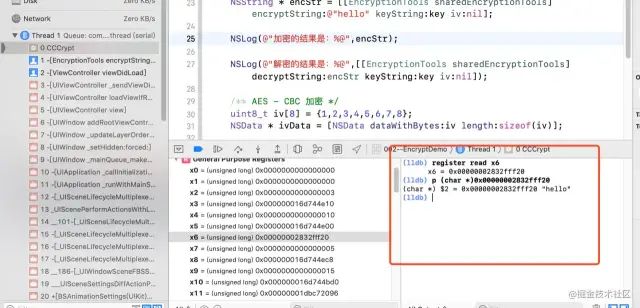
Author | iOS_BookLink | Click the “Read Original” at the bottom left to enter the author’s homepage
-End-
Recently, some friends asked me to help find some interview questions and materials, so I rummaged through my 5T collection and compiled them. It can be said to be a must-have for programmer interviews! All materials have been organized into a cloud disk, welcome to download!

Click the card above, follow and reply 【<strong>Interview Questions</strong>】 to get it