Course Details:
This course mainly introduces the development process, methods, techniques, and design concepts of STM32 microcontroller application systems through typical examples, focusing on the system design of STM32 microcontrollers, combining software and hardware, in a simple and easy-to-understand manner. This book comprehensively explains various technologies in microcontroller development through 30 module examples, including microcontroller interface expansion, memory expansion, input/output and display technologies, practical electronics production, sensor control technology, electrical drive and control technology, microcontroller communication technology, typical devices and application technology, peripheral circuit design, software programming, and more. This course is based on the Chuangxue STM32 development board. It includes: Introduction to STM32 microcontroller, register settings and usage, hardware testing, principles and usage of various application module devices, peripheral circuit design, and STM32 microcontroller C language programming.
This course is aimed at microcontroller design users in various fields, especially for readers who have mastered microcontroller development theory but lack practical development experience. It is also suitable as a textbook for various university-related majors and social training classes.
The CEPARK Chuangxue series multifunctional development learning board experimental box was designed and developed by the Electronic Garden technology team based on years of development practice experience, combined with dozens of development boards for various MCUs such as 51, AVR, PIC, MSP430, ARM, STM32, CAN, USB, and more, as well as dozens of peripheral application modules. After gathering existing functions and expanding them, the Chuangxue series multifunctional development learning board experimental box was created. The Chuangxue series adopts the Electronic Garden’s unique plug-and-play combination structure, where the functional baseboard and core board can be used separately or combined together in an open plug-and-play mode. This greatly shares basic resource functional modules and peripheral general accessories, supports various chips, and allows for endless expansion.
Course Directory:
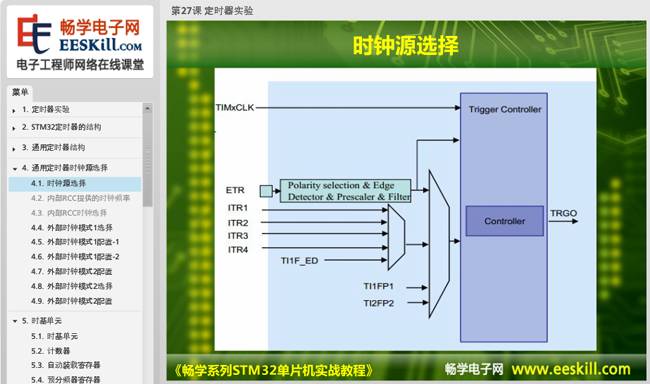
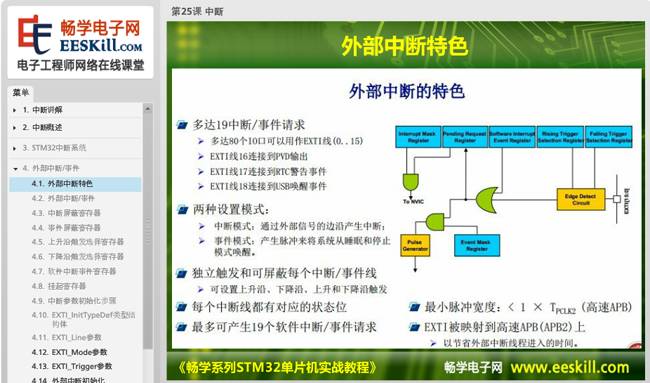
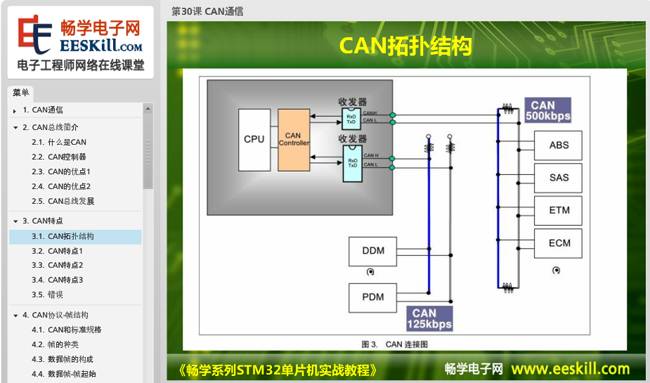
Lesson 1 Introduction to Chuangxue STM32 Development Learning Board(1). Introduction to Chuangxue STM32 Experimental Box; (2). Composition of Chuangxue STM32 Development Board; (3). Chuangxue Multifunctional Baseboard; (4). STM32 Microcontroller Core Board; (5). Introduction to Peripheral Accessories of Development Learning Board; (6). Programmer/Debugger.Lesson 2 How to Use Chuangxue STM32 Development Learning Board(1). Introduction to Chuangxue STM32 Experimental Box; (2). Composition of Chuangxue STM32 Development Board; (3). Chuangxue Multifunctional Baseboard; (4). STM32 Microcontroller Core Board; (5). Introduction to Peripheral Accessories of Development Learning Board; (6). Programmer/Debugger.Lesson 3 Hardware Testing of Chuangxue STM32 Microcontroller Development Learning Board1. Testing Instructions 2. Monochrome Flowing Light 3. Color Flowing Light 4. Two-color Light Testing 5. 8-digit Digital Tube Testing 6. 1-digit Digital Tube Testing 7. Two-color Dot Matrix Testing 8. LCD1602 9. LCD12864 Testing 10. OLED Testing 11. TFT Color Screen Display Testing 12. TFT Color Screen Touch Testing 13. 8 Independent Button Testing 14. 16-key Matrix Button Testing 15. 5-way Joystick Testing 16. DS18B20 Testing 17. 2-way DC Motor Testing 18. Stepper Motor Testing 19. 2-way Relay Testing 20. Serial Communication Testing 21. DS1302 Testing 22. Passive Buzzer Testing 23. AT24C02 Module 24. Serial to Parallel Testing 25. Parallel to Serial Module Testing 26. 38 Decoder Testing 27. 74HC573 Testing 28. Infrared Emission and Reception Testing 29. Infrared Decoding 30. SD Card Module Testing 31. PCF8591 Module AD Testing 32. PCF8591 Module DA Testing 33. ADC Testing 34. Sensor TestingLesson 4 Introduction to STM32 Microcontroller(1). Introduction to Microcontroller; (2). Introduction to STM32 Microcontroller; (3). STM32 Series Selection; (4). Minimum System of STM32 Microcontroller; (5). STM32 Development Environment and Compilation Environment.Lesson 5 Development Environment – Installation and Use of KEIL MDK1. Installation and Use of KEIL MDK – Course Introduction 2. Introduction to KEIL MDK Environment 3. Installation of KEIL MDK Environment 4. Creating a New Project in KEIL MDK 5. Using Templates to Create Projects in KEIL MDK 6. Installing KEIL MDK JLINK Driver 7. Project Settings and Compilation in KEIL MDK 8. Common Debugging Commands in KEIL MDK 9. Common Debugging Windows in KEIL MDK 10. Conclusion of KEIL MDKLesson 6 Introduction to STM32 Library(1). What is STM32 Library Function; (2). CMSIS Standard; (3). Library Directory and File Introduction; (4). Library Usage Help.Lesson 7 Explanation of STM32 Minimum System(1). Power Circuit of Development Board; (2). STM32 Clock; (3). STM32 Reset; (4). Download Circuit of Development Board.Lesson 8 Explanation of STM32 Clock System(1). STM32 High-speed External Clock HSE; (2). STM32 High-speed Internal Clock HSI; (3). Low-speed External Clock LSE; (4). Low-speed Internal Clock LSI; (5). PLL Phase-Locked Loop Frequency Doubling Output; (6). System Clock; (7). Other Clocks of STM32; (8). STM32-RCC Configuration Steps.Lesson 9 Explanation of Flowing Lights(1). Introduction and Principle of LED Lights; (2). Introduction to STM32 IO Ports; (3). Circuit Analysis of Flowing Lights; (4). Flowchart; (5). Project Files; (6). Code Analysis; (7). Software Simulation; (8). Hardware Simulation.Lesson 10 Explanation of 6-color and 1 Two-color LED(1). Introduction to Color LED; (2). Introduction to Two-color LED; (3). Circuit Analysis; (4). Color Pattern Light; (5). Two-color Light Display.Lesson 11 Explanation of 1-digit Digital Tube Module(1). Introduction to Digital Tube; (2). Structure of 1-digit Digital Tube; (3). Hardware Circuit Explanation; (4). Digital Tube Encoding; (5). Dynamic Display of Digital Tube.Lesson 12 Explanation of 8-digit Digital Tube Module(1). Introduction to 4-in-1 Digital Tube; (2). Principle of 4-in-1 Digital Tube; (3). Circuit Analysis; (4). Introduction to 74HC595 Chip; (5). 74HC595 Pins; (6). Working Principle of 74HC595; (7). Cascading of 74HC595; (8). Encoding; (9). Display Data.Lesson 13 Explanation of Red and Green Two-color Dot Matrix Display(1). Introduction to Dot Matrix Screen; (2). Introduction to 8*8 Red and Green Two-color Dot Matrix; (3). Introduction to 74HC595 Chip; (4). Hardware Circuit Explanation; (5). Row Control Function Explanation; (6). Column Control Function Explanation; (7). Two-color Dot Matrix – Two-color Column Scanning.Lesson 14 Explanation of Independent Button Module(1). Introduction to Independent Button; (2). Classification of Independent Buttons; (3). Button Debouncing; (4). Experimental Design of Independent Button; (5). Scanning of Independent Button; (6). Control Digital Tube Experiment.Lesson 15 4×4 Matrix Keyboard Module(1). Introduction to Matrix Keyboard; (2). Detection of Matrix Keyboard; (3). Jitter and Debouncing; (4). Experimental Design of Matrix Keyboard; (5). Row and Column Scanning; (6). Inversion Method 1; (7). Inversion Method 2; (8). Inversion Method 3.Lesson 16 Introduction to 5-way Joystick Button Module(1). Introduction to 5-way Joystick; (2). Experimental Design of 5-way Joystick; (3). Button Debouncing; (4). Display Button Value on Digital Tube.Lesson 17 Buzzer Sound Production(1). Introduction to Buzzer; (2). Classification of Buzzers; (3). Control of Buzzer; (4). Instance Hardware Design and Flowchart; (5). Project Establishment; (6). Delay Function; (7). Buzzer IO Port Initialization; (8). Main Function Design; (9). Calculation of Delay Time; (10). Hardware Simulation.Lesson 18 Explanation of Relay(1). Introduction to Relay; (2). Classification of Relays; (3). Main Technical Parameters of Relay; (4). Introduction to ULN2003; (5). Experimental Design; (6). Relay Switching.Lesson 19 Explanation of Serial to Parallel(1). Shift Register; (2). Introduction to 74HC164; (3). Function Introduction of 74HC164; (4). Experimental Design; (5). Lighting LED with 74HC164.Lesson 20 Introduction to Parallel to Serial(1). Shift Register; (2). Introduction to 74HC165; (3). Function Introduction of 74HC165; (4). Experimental Design; (5). Lighting LED with 74HC165.Lesson 21 Explanation of 74HC573 Latch(1). Introduction to Latch; (2). Introduction to 74HC573; (3). Function Introduction of 74HC573; (4). Experimental Design; (5). Lighting LED with 74HC573.Lesson 22 Explanation of 38 Decoder(1). Introduction to Decoder; (2). Function Introduction of 74LS138; (3). Decoder Expansion; (4). Experimental Design; (5). Lighting LED with 74LS138.Lesson 23 Explanation of DC Motor Control(1). Introduction to DC Motor; (2). Working Principle of DC Motor; (3). Introduction to ULN2003; (4). Characteristics of DC Motor; (5). Direction Control of DC Motor.Lesson 24 Explanation of Stepper Motor Control(1). Introduction to Stepper Motor; (2). Technical Parameters of Stepper Motor; (3). Reactive Stepper Motor; (4). Permanent Magnet Stepper Motor; (5). 28BYJ-48 Stepper Motor; (6). ULN2003; (7). Unidirectional Uniform Speed Rotation Experiment of Stepper Motor.Lesson 25 Explanation of Interrupts(1). Overview of Interrupts; (2). STM32 Interrupt System; (3). External Interrupt/Event; (4). Instance Design; (5). Example Code Analysis.Lesson 26 Explanation of SysTick Timer Experiment(1). Introduction to SysTick Timer; (2). Introduction to SysTick Timer Registers; (3). Calculation of SysTick Timing; (4). Method of Initial Configuration for SysTick; (5). Instance Analysis; (6). Code Analysis.Lesson 27 Explanation of Timer Experiment(1). Structure of STM32 Timer; (2). Structure of General Timer; (3). Selection of Clock Source for General Timer; (4). Time Base Unit; (5). Capture Channel; (6). Input Capture Related Registers; (7). Counting Mode; (8). Timer Initialization Steps; (9). Instance Analysis.Lesson 28 Explanation of PWM Wave Output(1). Introduction to PWM; (2). Working Principle of STM32 PWM; (3). PWM Working Modes; (4). PWM Configuration Method; (5). Instance Analysis; (6). Instance Code; (7). Related Content of Software Simulation.Lesson 29 Explanation of Asynchronous Serial Communication Experiment(1). Basic Knowledge of Serial Port; (2). RS-232 Standard; (3). RS-232 Interface; (4). STM32 USART; (5). Serial Control Register; (6). Instance Design; (7). Code Analysis.Lesson 30 Explanation of CAN Communication(1). Introduction to CAN Bus; (2). Characteristics of CAN; (3). CAN Protocol – Frame Structure; (4). CAN Protocol – Priority; (5). CAN Protocol – Others; (6). Introduction to STM32-CAN Controller; (7). CAN Controller Send/Receive Management; (8). CAN Controller – Filter; (9). CAN Controller – Initialization; (10). Instance Analysis; (11). Code Analysis.Lesson 31 Explanation of Independent Watchdog Experiment(1). Introduction to Watchdog; (2). Structure of STM32 Independent Watchdog; (3). How to Use Watchdog.Lesson 32 Explanation of IIC Experiment(1). Introduction to IIC Bus; (2). Read and Write Timing; (3). Introduction to E2PROM; (4). AT24C02-I2C; (5). STM32 I2C Structure; (6). Instance AnalysisLesson 33 Explanation of LCD1602 Liquid Crystal Display(1). Introduction to LCD; (2). Introduction to LCD1602; (3). Technical Parameters of LCD1602; (4). Character Display Principle; (5). LCD1602 Controller Instructions; (6). LCD1602 Timing Control; (7). Some Notes on 1602; (8). LCD1602 – Character Display Program; Lesson 34 Explanation of LCD12864 Liquid Crystal Display(1). Introduction to LCD; (2). Introduction to LCD12864; (3). Explanation of Internal Registers of LCD12864; (4). Explanation of System Instructions of LCD12864; (5). Timing of LCD12864 Interface; (6). Character and Image Display Principle; (7). Some Notes on Using LCD12864; (8). How to Extract Character Patterns; (9). LCD12864 – Parallel Display ProgramLesson 35 Explanation of OLED Liquid Crystal Display(1). Introduction to OLED; (2). Applications of OLED; (3). CEPARK OLED Technical Parameters; (4). Character Display Principle; (5). OLED Display.Lesson 36 Explanation of TFT Touch Color Screen(1). Basic Knowledge of TFT Color Screen. (2). Pixels and Resolution (3). Color Depth (4). CEPARK TFT Color Screen (5). TFT Initialization Function (6). TFT Color Block Display and Text DisplayLesson 37 Explanation of DS18B20 Temperature Detection(1). Introduction to DS18B20, (2). Introduction to DS18B20 Pins, (3). Internal Structure of DS18B20, (4). Timing of DS18B20, (5). Working Principle, (6). Experimental Design, (7). Display DS18B20 Temperature ValueLesson 38 Explanation of DS1302 Clock Module(1). Introduction to Real-time Clock; (2). Introduction to DS1302 Chip; (3). DS1302 Registers; (4). Timing Control of DS1302; (5). DS1302-OLED Display Time ProgramLesson 39 Explanation of AT24C02 Storage Module Experiment(1). Introduction to EEPROM; (2). AT24C02XX Series; (3). Introduction to AT24C02 Chip; (4). AT24C02-IIC; (5). Start and Stop Signals and Acknowledge Signals; (6). Write Operation; (7). Read Operation; (8). Instance AnalysisLesson 40 Explanation of AD/DA Conversion(1). A/D Conversion, (2). D/A Conversion, (3). Introduction to PCF8591, (4). PCF8591 Read Operation, (5). PCF8591 Write Operation, (6). Hardware Connection, (7). Instance AnalysisLesson 41 Explanation of Infrared Reception(1). Introduction to Infrared, (2). Infrared Remote Control System, (3). Integrated Infrared Reception, (4). Infrared Transmission Protocol, Encoding, (5). Infrared Encoding and Decoding, (6). Infrared Emission and Reception, (7). Instance AnalysisLesson 42 Explanation of SD Card Module(1). Introduction to SD Card (2). Working Principle of SD Card (3). Resetting SD Card (4). Serial Port Configuration (5). SPI Configuration (6). Main Function Module of the Program.
Course Details:
This course is based on the Chuangxue STM32 microcontroller development learning experimental box, detailing the basic knowledge of STM32 microcontrollers and common peripheral basic modules as well as practical development applications, combining theory with practice, explained based on instance development. The videos of this course are in HD, with a clear directory structure and detailed explanations in text and images; below are some screenshots from the video pages.
Microcontroller Principle Explanation:
Peripheral Device Explanation:
Click “Read the Original Text” to log in to the Electronic Chuangxue website to order online and learn online.