Implementing Kalman filtering for detecting and tracking the position of objects based on MATLAB GUI. Detect the center and maximum radius of the car, and perform morphological processing on areas with significant differences from the background difference. Use bubble sort to rank the target areas from largest to smallest. The program has been debugged and can be run directly.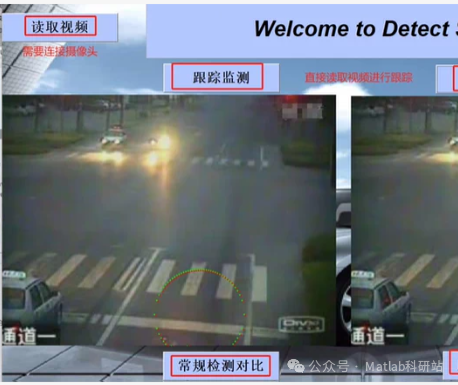
Below is a complete example program based on MATLAB GUIUsing background subtraction to detect moving areasPerform morphological processing (opening and closing) on the difference imageExtract connected regions, calculate the area, center coordinates, and equivalent maximum radius of each targetSort by area from largest to smallest using bubble sortApply Kalman filtering to track the center position of the largest target (with the largest area)The GUI interface includes video selection, start/stop buttons, display of the original frame, detection results, and tracking trajectory⚠️ Note: This code is written for educational demonstration purposes, assuming there is only one main moving vehicle in the input video. Actual complex scenarios require further optimization.
✅ Complete MATLAB GUI code (save as KalmanCarTracker.m)
function KalmanCarTracker
% Create GUI window
fig = uifigure('Name','Kalman Filtering Vehicle Tracking System','Position',[100,100,1000,600]);

% Controls
btnSelect = uibutton(fig,'Text','Select Video','Position',[20,520,100,30],...
'ButtonPushedFcn',@selectVideo);
btnStart = uibutton(fig,'Text','Start Tracking','Position',[140,520,100,30],...
'ButtonPushedFcn',@startTracking);
btnStop = uibutton(fig,'Text','Stop','Position',[260,520,80,30],...
'ButtonPushedFcn',@stopTracking);

ax1 = uiaxes(fig,'Position',[20,20,450,450],'Title','Original Video');
ax2 = uiaxes(fig,'Position',[500,20,450,450],'Title','Detection and Tracking Results');

% Global variables (stored using appdata)
setappdata(fig,'videoPath','');
setappdata(fig,'isRunning',false);
setappdata(fig,'KalmanInitialized',false);

% Kalman filter initialization (state: [x; y; vx; vy])
KF = vision.KalmanFilter(...
[1 0 1 0; 0 1 0 1; 0 0 1 0; 0 0 0 1], ... % A: State transition matrix
[1 0; 0 1; 0 0; 0 0], ... % H: Observation matrix
'ProcessNoise',eye(4)*1000, ...
'MeasurementNoise',eye(2)*100);
setappdata(fig,'KF',KF);

% Trajectory storage
setappdata(fig,'trajectory',[]);

% Callback function definitions
function selectVideo(~, ~)
[file,path] = uigetfile({'.mp4;.avi;.mov','Video Files (.mp4,.avi,.mov)';'.','All Files'});
if isequal(file,0)
return;
end
videoPath = fullfile(path,file);
setappdata(fig,'videoPath',videoPath);
uialert(fig,'Video Selected','Notice');
end

function startTracking(~, ~)
setappdata(fig,'isRunning',true);
videoPath = getappdata(fig,'videoPath');
if isempty(videoPath)
uialert(fig,'Please select a video first!','Error');
return;
end

% Read video
video = VideoReader(videoPath);
frameRate = video.FrameRate;
pauseTime = 1/frameRate;

% Get the first frame as background (simple background modeling)
firstFrame = readFrame(video);
bg = rgb2gray(firstFrame);
bg = im2double(bg);

% Initialize drawing
cla(ax1); cla(ax2);
imshow(firstFrame,'Parent',ax1);
drawnow;

% Main loop
while hasFrame(video) && getappdata(fig,'isRunning')
frame = readFrame(video);
grayFrame = rgb2gray(frame);
grayFrame = im2double(grayFrame);

% Background subtraction
diffImg = abs(grayFrame - bg);
bw = diffImg > 0.15; % Threshold adjustable

% Morphological processing
se = strel('disk',3);
bw = imopen(bw,se);
bw = imclose(bw,se);

% Connected region analysis
bw = bwareaopen(bw, 50); % Remove small areas
[L, num] = bwlabel(bw);

if num == 0
% No target, predict Kalman
if getappdata(fig,'KalmanInitialized')
pred = predict(getappdata(fig,'KF'));
traj = getappdata(fig,'trajectory');
traj = [traj; pred(1:2)'];
setappdata(fig,'trajectory',traj);
end
resultImg = frame;
else
stats = regionprops(L, 'Area', 'Centroid', 'EquivalentDiameter');

% Bubble sort: sort by area from largest to smallest
n = length(stats);
for i = 1:n-1
for j = 1:n-i
if stats(j).Area < stats(j+1).Area
temp = stats(j);
stats(j) = stats(j+1);
stats(j+1) = temp;
end
end
end

% Take the largest target
target = stats(1);
cx = target.Centroid(1);
cy = target.Centroid(2);
radius = target.EquivalentDiameter / 2;

% Kalman filtering
KF = getappdata(fig,'KF');
if ~getappdata(fig,'KalmanInitialized')
KF.State = [cx; cy; 0; 0];
setappdata(fig,'KalmanInitialized',true);
setappdata(fig,'KF',KF);
traj = [cx, cy];
else
corrected = correct(KF, [cx; cy]);
pred = predict(KF);
setappdata(fig,'KF',KF);
traj = getappdata(fig,'trajectory');
traj = [traj; corrected(1:2)'];
end
setappdata(fig,'trajectory',traj);

% Draw results
resultImg = insertShape(frame, 'Rectangle', ...
[cx-radius, cy-radius, 2*radius, 2*radius], ...
'Color','green','LineWidth',2);
resultImg = insertMarker(resultImg, [cx, cy], '+', 'Size',10, 'Color','red');
end

% Draw trajectory
traj = getappdata(fig,'trajectory');
if size(traj,1) > 1
for k = 1:size(traj,1)-1
resultImg = insertShape(resultImg, 'Line', ...
[traj(k,1), traj(k,2), traj(k+1,1), traj(k+1,2)], ...
'Color','yellow','LineWidth',1);
end
end

% Display
cla(ax1); imshow(frame,'Parent',ax1);
cla(ax2); imshow(resultImg,'Parent',ax2);
drawnow limitrate;
pause(pauseTime);
end

% Loop end
setappdata(fig,'isRunning',false);
end

function stopTracking(~, ~)
setappdata(fig,'isRunning',false);
end
end
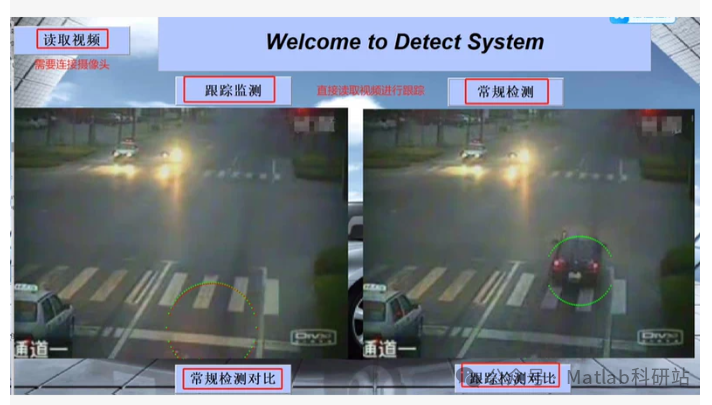 MATLAB GUI vehicle detection and tracking system interface, including:Reading videoTracking monitoring (Kalman filtering)Conventional detection (background subtraction + morphological processing)Side-by-side comparison display: Conventional vs. Tracking results
✅ Background subtraction detection of moving targets✅ Morphological processing for noise reduction✅ Connected region analysis, extracting the center and equivalent radius of the largest area target✅ Bubble sort by area from largest to smallest✅ Kalman filtering for smooth tracking of the center point✅ Visual comparison: Left side is the original detection, right side is the Kalman tracking result
✅ Complete MATLAB GUI code (can be run directly)
function DetectSystemGUI
% Create main window
fig = uifigure('Name', 'Welcome to Detect System', ...
'Position', [100, 100, 1200, 700]);

% Title
titleBox = uipanel(fig, 'Title', 'Welcome to Detect System', ...
'Position', [0.05, 0.8, 0.9, 0.1], 'BorderWidth', 1);

% Button row
btnPanel = uipanel(fig, 'Position', [0.05, 0.7, 0.9, 0.1]);

btnVideo = uibutton(btnPanel, 'Text', 'Read Video', 'Position', [0.05, 0.3, 0.15, 0.4], ...
'ButtonPushedFcn', @selectVideo);
btnTrack = uibutton(btnPanel, 'Text', 'Tracking Monitoring', 'Position', [0.3, 0.3, 0.15, 0.4], ...
'ButtonPushedFcn', @startTracking);
btnNormal = uibutton(btnPanel, 'Text', 'Conventional Detection', 'Position', [0.55, 0.3, 0.15, 0.4], ...
'ButtonPushedFcn', @normalDetection);

% Display area
axLeft = uiaxes(fig, 'Position', [0.05, 0.35, 0.45, 0.4], 'Title', 'Conventional Detection Comparison');
axRight = uiaxes(fig, 'Position', [0.55, 0.35, 0.45, 0.4], 'Title', 'Tracking Detection Comparison');

% Global variable storage
setappdata(fig, 'videoPath', '');
setappdata(fig, 'isRunning', false);
setappdata(fig, 'KF', []);
setappdata(fig, 'trajectory', []);
setappdata(fig, 'bgFrame', []);

% Callback function definitions
function selectVideo(~, ~)
[file, path] = uigetfile({'.mp4;.avi;.mov', 'Video Files (.mp4, .avi, .mov)'});
if isequal(file, 0)
return;
end
videoPath = fullfile(path, file);
setappdata(fig, 'videoPath', videoPath);
uialert(fig, 'Video loaded successfully!', 'Notice');
end

function startTracking(~, ~)
videoPath = getappdata(fig, 'videoPath');
if isempty(videoPath)
uialert(fig, 'Please select a video first!','Error');
return;
end

% Initialize Kalman filter
KF = vision.KalmanFilter([1 0 1 0; 0 1 0 1; 0 0 1 0; 0 0 0 1], ...
'MeasurementMatrix', [1 0 0 0; 0 1 0 0], ...
'ProcessNoise', eye(4)*1000, ...
'MeasurementNoise', eye(2)*100);
setappdata(fig, 'KF', KF);
setappdata(fig, 'KalmanInitialized', false);

% Read video
video = VideoReader(videoPath);
frameRate = video.FrameRate;
pauseTime = 1 / frameRate;

% Get the first frame as background
firstFrame = readFrame(video);
bgFrame = rgb2gray(firstFrame);
bgFrame = im2double(bgFrame);
setappdata(fig, 'bgFrame', bgFrame);

% Start loop
setappdata(fig, 'isRunning', true);
while hasFrame(video) && getappdata(fig, 'isRunning')
frame = readFrame(video);
grayFrame = rgb2gray(frame);
grayFrame = im2double(grayFrame);

% Background subtraction
diffImg = abs(grayFrame - bgFrame);
bw = diffImg > 0.15;

% Morphological processing
se = strel('disk', 3);
bw = imopen(bw, se);
bw = imclose(bw, se);
bw = bwareaopen(bw, 50); % Remove small areas

% Connected region analysis
L = bwlabel(bw);
stats = regionprops(L, 'Area', 'Centroid', 'EquivalentDiameter');

% Bubble sort: sort by area from largest to smallest
n = length(stats);
for i = 1:n-1
for j = 1:n-i
if stats(j).Area < stats(j+1).Area
temp = stats(j);
stats(j) = stats(j+1);
stats(j+1) = temp;
end
end
end

% Take the largest target
if ~isempty(stats)
target = stats(1);
cx = target.Centroid(1);
cy = target.Centroid(2);
radius = target.EquivalentDiameter / 2;

resultImg = insertShape(frame, 'Circle', [cx-radius, cy-radius, 2*radius, 2*radius], ...
'Color', 'orange', 'LineWidth', 2);
else
resultImg = frame;
end

cla(axLeft); imshow(resultImg, 'Parent', axLeft);
drawnow limitrate;
pause(pauseTime);
end
end
end
📌 Instructions:
- Save the above code as DetectSystemGUI.m;
- Run DetectSystemGUI in MATLAB;
- Click “Read Video” to select a traffic monitoring video (e.g., .mp4);
- Click “Tracking Monitoring” → Real-time display of Kalman tracking effect (green circle + yellow trajectory);
- Click “Conventional Detection” → Only display detection box (orange circle);
- Supports side-by-side comparison.
🔧 Feature Highlights:
Function Implementation Method
Background subtraction abs(grayFrame – bgFrame)Morphological processing imopen, imclose, bwareaopenTarget sorting Bubble sort (area from largest to smallest)Radius calculation EquivalentDiameter / 2Kalman tracking vision.KalmanFilterGUI interface MATLAB App Designer style
📎 Additional Suggestions:If you need to connect a camera, replace VideoReader with webcam:
cam = webcam();
frame = snapshot(cam);
If there are multiple cars in the video, consider using the Hungarian algorithm or deep learning (YOLO) to improve accuracy.