1 Synthetic Images
In image processing and computer vision research, we often require a large amount of image data to test and validate the performance of algorithms. However, obtaining real-world labeled image data is often costly and time-consuming.
Synthetic images provide a standardized testing environment for algorithms such as image segmentation and object detection. Since the ground truth (true labels) of synthetic images is known, we can accurately evaluate performance metrics of algorithms, such as accuracy and recall. Furthermore, in practical applications, images are often affected by various types of noise. By adding different types of noise (Gaussian noise, salt-and-pepper noise, etc.) to synthetic images, we can systematically analyze the robustness and noise resistance of algorithms.
Synthetic images allow us to precisely control various parameters:
- Shape, size, and position of the target objects
- Background complexity
- Gray levels and contrast
- Type and intensity of noise
2 Creating Synthetic Images and Adding Noise
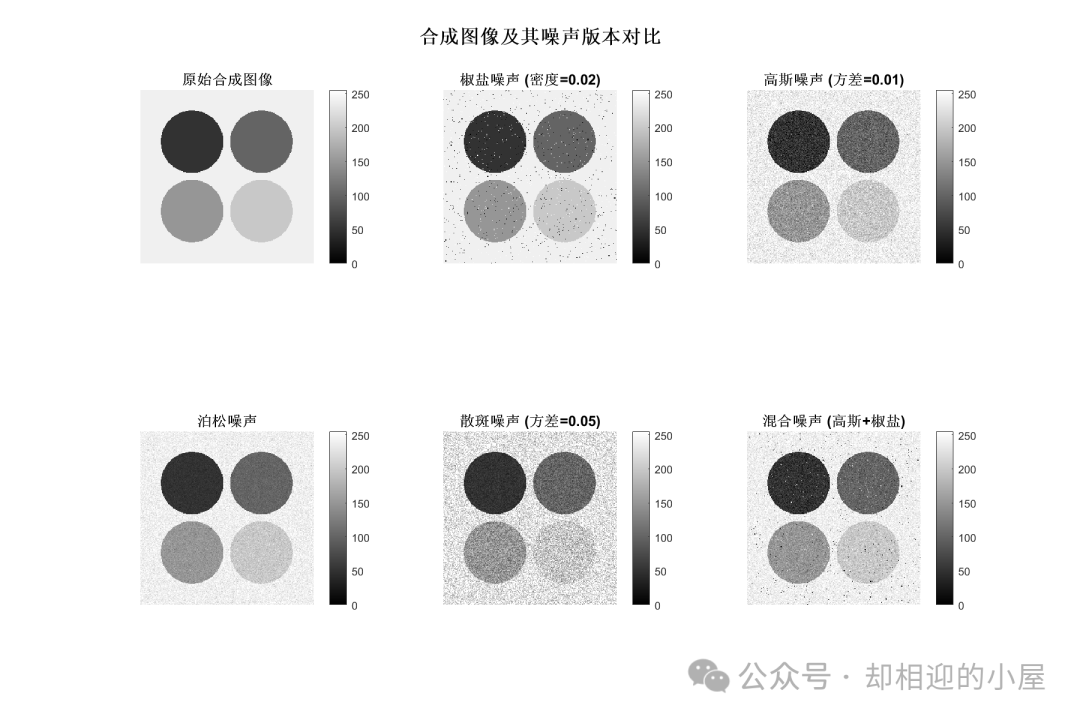
The MATLAB code is as follows:
%% Generate synthetic images and their noisy versions
% Clear workspace
clc;clear;close all;

% Set image parameters
img_size = 256;  % Image size
num_classes = 5; % Number of classes (can be modified to 2,3,4,5)

% Define gray values for different classes (from dark to bright)
gray_values = [50, 100, 150, 200, 240]; % Supports up to 5 classes

% Create figure window
figure('Position', [100, 100, 1200, 800]);

% Generate original synthetic image
synthetic_img = create_synthetic_image(img_size, num_classes, gray_values);

% Display original synthetic image
subplot(2, 3, 1);
imshow(synthetic_img);
title('Original Synthetic Image', 'FontSize', 12, 'FontWeight', 'bold');
colorbar;

% Add and display different types of noise

% 1. Salt and pepper noise
salt_pepper_img = imnoise(synthetic_img, 'salt & pepper', 0.02);
subplot(2, 3, 2);
imshow(salt_pepper_img);
title('Salt and Pepper Noise (Density=0.02)', 'FontSize', 12, 'FontWeight', 'bold');
colorbar;

% 2. Gaussian noise
gaussian_img = imnoise(synthetic_img, 'gaussian', 0, 0.01);
subplot(2, 3, 3);
imshow(gaussian_img, []);
title('Gaussian Noise (Variance=0.01)', 'FontSize', 12, 'FontWeight', 'bold');
colorbar;

% 3. Poisson noise
poisson_img = imnoise(synthetic_img, 'poisson');
subplot(2, 3, 4);
imshow(poisson_img);
title('Poisson Noise', 'FontSize', 12, 'FontWeight', 'bold');
colorbar;

% 4. Speckle noise
speckle_img = imnoise(synthetic_img, 'speckle', 0.05);
subplot(2, 3, 5);
imshow(speckle_img);
title('Speckle Noise (Variance=0.05)', 'FontSize', 12, 'FontWeight', 'bold');
colorbar;

% 5. Mixed noise (Gaussian + Salt and Pepper)
mixed_img = imnoise(synthetic_img, 'gaussian', 0, 0.005);
mixed_img = imnoise(mixed_img, 'salt & pepper', 0.01);
subplot(2, 3, 6);
imshow(mixed_img);
title('Mixed Noise (Gaussian + Salt and Pepper)', 'FontSize', 12, 'FontWeight', 'bold');
colorbar;

% Add overall title
sgtitle('Comparison of Synthetic Images and Their Noisy Versions', 'FontSize', 16, 'FontWeight', 'bold');

% Save images
% imwrite(synthetic_img/255, 'synthetic_image.png');
% imwrite(salt_pepper_img/255, 'salt_pepper_noise.png');
% imwrite(gaussian_img/255, 'gaussian_noise.png');

fprintf('Synthetic image generation completed!\n');
fprintf('Image size: %dx%d\n', img_size, img_size);
fprintf('Number of classes: %d\n', num_classes);
fprintf('Gray values used: %s\n', mat2str(gray_values(1:num_classes)));


function synthetic_img = create_synthetic_image(size, num_classes, gray_values)
    % Create synthetic image

    % Background uses the last gray value
    synthetic_img = ones(size) * gray_values(num_classes);

    center = size / 2;
radius = size * 0.18; % Uniform circular radius

    [X, Y] = meshgrid(1:size, 1:size);

    switch num_classes
        case 2
            % Two classes: one circle + background
            circle_mask = (X - center*0.6).^2 + (Y - center*0.6).^2 <= radius^2;
            synthetic_img(circle_mask) = gray_values(1);

        case 3
            % Three classes: two circles + background
            % Circle 1 - left side
            circle1_mask = (X - center*0.6).^2 + (Y - center*0.6).^2 <= radius^2;
            synthetic_img(circle1_mask) = gray_values(1);

            % Circle 2 - right side
            circle2_mask = (X - center*1.4).^2 + (Y - center*0.6).^2 <= radius^2;
            synthetic_img(circle2_mask) = gray_values(2);

        case 4
            % Four classes: three circles + background
            % Circle 1 - top side
            circle1_mask = (X - center*0.6).^2 + (Y - center*0.6).^2 <= radius^2;
            synthetic_img(circle1_mask) = gray_values(1);

            % Circle 2 - bottom left side
            circle2_mask = (X - center*1.4).^2 + (Y - center*0.6).^2 <= radius^2;
            synthetic_img(circle2_mask) = gray_values(2);

            % Circle 3 - bottom right side
            circle3_mask = (X - center*0.6).^2 + (Y - center*1.4).^2 <= radius^2;
            synthetic_img(circle3_mask) = gray_values(3);

        case 5
            % Five classes: four circles + background
            % Circle 1 - top left corner
            circle1_mask = (X - center*0.6).^2 + (Y - center*0.6).^2 <= radius^2;
            synthetic_img(circle1_mask) = gray_values(1);

            % Circle 2 - top right corner
            circle2_mask = (X - center*1.4).^2 + (Y - center*0.6).^2 <= radius^2;
            synthetic_img(circle2_mask) = gray_values(2);

            % Circle 3 - bottom left corner
            circle3_mask = (X - center*0.6).^2 + (Y - center*1.4).^2 <= radius^2;
            synthetic_img(circle3_mask) = gray_values(3);

            % Circle 4 - bottom right corner
            circle4_mask = (X - center*1.4).^2 + (Y - center*1.4).^2 <= radius^2;
            synthetic_img(circle4_mask) = gray_values(4);
    end

    % Convert to uint8 type
    synthetic_img = uint8(synthetic_img);
end
3 Adding Noise to Real Images
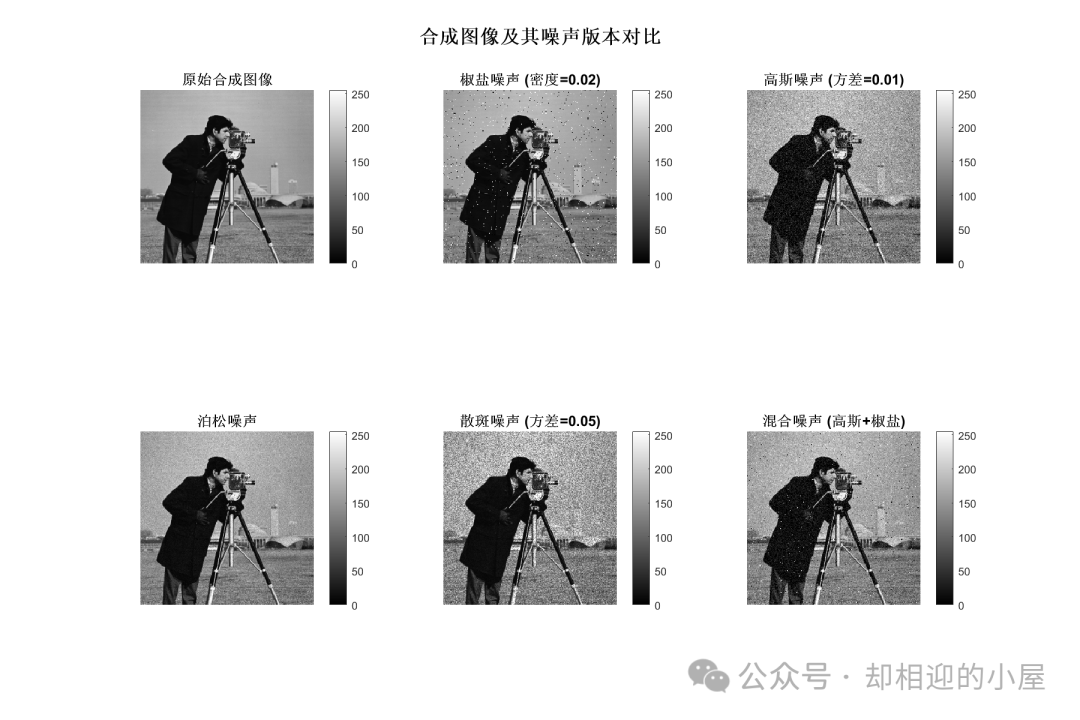
To add noise to real images, simply modify the following code:
[fileName, pathName] = uigetfile({'*.jpg;*.png;*.bmp;*.tif', 'Image Files (*.jpg, *.png, *.bmp, *.tif)'}, ...
                                 'Select the original image file');
if isequal(fileName, 0)
    error('No image file selected!');
end
imgPath = fullfile(pathName, fileName);
synthetic_img = imread(imgPath);
%synthetic_img = create_synthetic_image(img_size, num_classes, gray_values);