 / Today’s Tech News /Recently, the Ministry of Industry and Information Technology released the “Opinions on Innovating the Management of the Information and Communication Industry and Optimizing the Business Environment”, which mentioned accelerating the revision of the “Telecommunication Business Classification Directory”, promoting business classification and definition to better meet the development needs of new technologies and new businesses, and supporting enterprise innovation and development. Coordinated pilot programs for new telecommunication business commercialization will be carried out, supporting relevant regions and enterprises to orderly carry out business innovation while ensuring a safety baseline. Accelerated formulation of supporting policies for the innovative development of new technologies and new businesses will encourage enterprises to further deepen technological innovation and industrial applications in emerging fields such as 5G, artificial intelligence, and quantum information./ Author Introduction /This article is contributed byLu Yecai, mainly sharing the related content of HTTP/2, which I believe will be helpful to everyone!Lu Yecai‘s blog address:
https://juejin.cn/user/13629904404157/posts
/ Introduction /Today we will talk about a technology that makes the web fly—HTTP/2. You may have heard of HTTP/2, but do you know what it is? Why do we need it? What are the differences between it and the HTTP/1.1 we are using? Don’t worry, we will reveal everything in due course./ Basic Concepts and Background of HTTP/2 /HTTP/2, or Hypertext Transfer Protocol Version 2, is the latest version of the HTTP protocol. Its origins can be traced back to Google’s SPDY project, which aimed to solve some performance issues of HTTP/1.1. HTTP/2 inherits many advantages of SPDY and further improves upon it.So, why do we need HTTP/2? This is because HTTP/1.1, despite years of use and improvement, still has some issues, such as header redundancy and inability to process requests in parallel. HTTP/2 was born to solve these problems and improve network performance./ Main Features and Advantages of HTTP/2 /HTTP/2 introduces many new features, such as binary frames, multiplexing, header compression, and server push, making HTTP/2 more powerful than HTTP/1.1.Binary FramesIn HTTP/2, all communication is done through binary frames. Each frame consists of a small fixed-size header and an optional payload. The header includes the length of the frame, type, flags, and the identifier of the stream associated with the frame. The structure of each frame is as follows:
+-----------------+-----------------+-----------------+
| Frame Length    | Frame Type      | Flags           |
+-----------------+-----------------+-----------------+
| Stream Identifier (Associated Stream)              |
+-----------------+-----------------+-----------------+
| Optional Payload
+---------------------------------------------------+
- Frame Length: The length of the frame.
- Frame Type: The type of the frame.
- Flags: The flags of the frame.
- Stream Identifier: The identifier of the stream associated with the frame.
- Optional Payload: The optional payload.
This structure of binary frames makes the parsing, implementation, and decoupling of the protocol easier. Moreover, due to the fixed header size of the frames, unnecessary network overhead can be reduced.MultiplexingMultiplexing is a key feature of HTTP/2. In HTTP/1.1, if you want to send multiple requests in parallel, you need to create multiple TCP connections, which consumes a lot of resources. In HTTP/2, multiple requests and responses can be transmitted in parallel over the same connection. This is achieved by splitting each request or response into multiple frames and interleaving these frames on the same connection. Each frame is associated with a stream, and the stream identifier is used to distinguish different requests or responses. This mechanism greatly improves network utilization.The following is a simple diagram describing the relationship between frames, streams, stream identifiers, requests, or responses in HTTP/2:
+-------------------------------------------------+
| TCP Connection                                  |
|                                                 |
| +------------------+ +------------------+       |
| | Stream 1        | | Stream 2        |  ...  |
| | (Request/Response A) | (Request/Response B) |       |
| | +------+ +------+ | +------+ +------+ |       |
| | |Frame1| |Frame2| | |Frame1| |Frame2| |       |
| | +------+ +------+ | +------+ +------+ |       |
| +------------------+ +------------------+       |
+-------------------------------------------------+
In this diagram, there can be multiple streams (Stream 1, Stream 2, …) on each TCP connection, each corresponding to a request or response (Request/Response A, Request/Response B). Each request or response is further split into multiple frames (Frame 1, Frame 2), and these frames are sent interleaved over the same connection.Header CompressionIn HTTP/1.1, each request and response sends a large amount of header information, which occupies a lot of bandwidth. HTTP/2 effectively solves this problem by introducing the HPACK compression format. HPACK uses two main techniques to compress headers: static Huffman coding for compressing individual header fields and a dynamic table for caching and reusing previously sent header fields throughout the connection. This mechanism greatly reduces the size of headers, thereby saving bandwidth.Static Huffman Coding: Huffman coding is a lossless compression algorithm that assigns a variable-length binary code to each character based on the probability of its occurrence. Characters that occur more frequently are assigned shorter codes, while less frequent characters are given longer codes. In HPACK, static Huffman coding is used to compress individual header fields. HTTP/2 specifies a pre-computed Huffman coding table generated based on statistical analysis of many HTTP headers. During compression, for each header field character, the Huffman coding table is consulted and replaced with the corresponding code. During decompression, the same Huffman coding table is used to restore the code back to the original character.Dynamic Table: The dynamic table is a mechanism for caching and reusing previously sent header fields throughout the entire connection. The dynamic table is maintained between the client and server, initially empty. When a header field is sent, it first checks if the field already exists in the dynamic table. If it does, an index value representing its position in the dynamic table is sent; if not, the field is added to the dynamic table, and the original field is sent. The size of the dynamic table is limited, and when the table is full, the earliest added fields will be removed to free up space. Through the dynamic table, HPACK can avoid sending duplicate header fields, thereby reducing bandwidth consumption.By combining static Huffman coding and the dynamic table, HPACK can effectively compress HTTP/2 header data. Static Huffman coding is responsible for compressing individual header fields, while the dynamic table is responsible for reusing sent header fields throughout the connection, together achieving efficient header compression.Server PushServer push allows the server to send resources without client requests. This is implemented by the server sending a PUSH_PROMISE frame that contains the header fields of the resource the server is going to send. The server can then start sending the data frames of this resource as if the resource was requested by the client. This mechanism allows the client to acquire resources earlier, thus improving page load speed.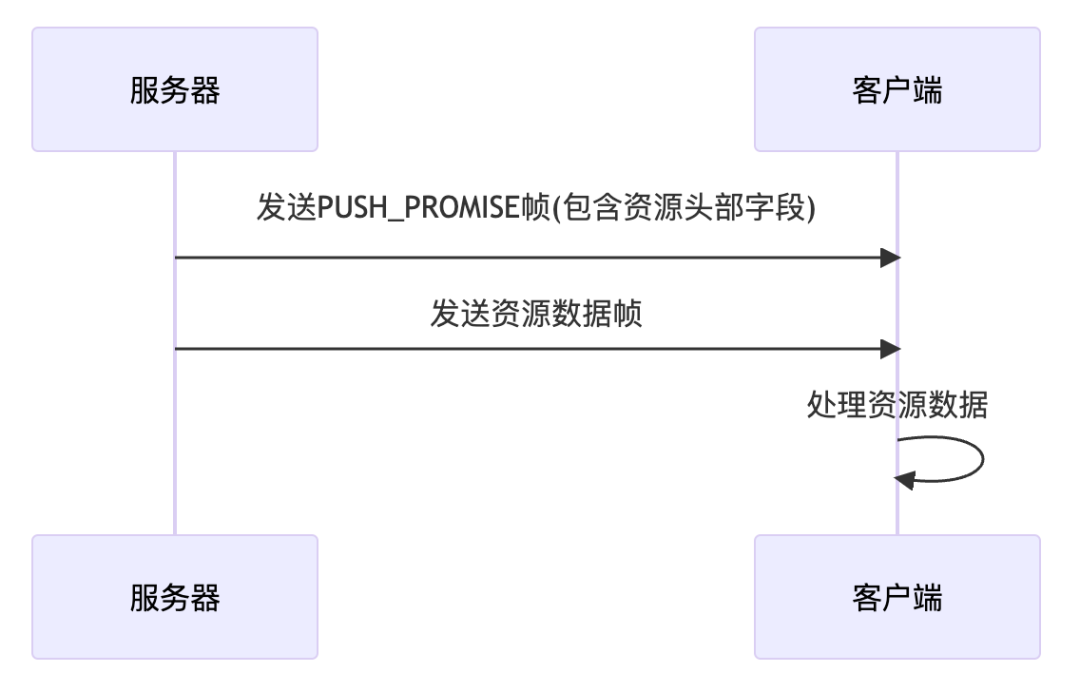 This timing diagram describes the process of server push:
- The server sends a PUSH_PROMISE frame containing the resource header fields to the client.
- The server begins sending the data frames of the resource to the client, as if this resource was requested by the client.
- The client receives and processes the server-pushed resource data.
Through this mechanism, the client can acquire resources earlier, thus improving page load speed./ Implementation and Deployment of HTTP/2 /So, how do we implement HTTP/2 on the server and client? Most modern web servers and browsers already support HTTP/2.You just need to update your web server and browser to the latest version to use HTTP/2.Deploying HTTP/2 is also very simple. Since HTTP/2 is fully compatible with HTTP/1.1, you do not need to modify any application code; just enable HTTP/2 on your web server./ Comparison of HTTP/2 with Existing Technologies /When we talk about HTTP/2, we often compare it with other network transmission protocols like HTTP/1.1, SPDY, and QUIC.Compared to HTTP/1.1, HTTP/2 has significantly improved performance, as we mentioned earlier with binary frames, multiplexing, header compression, and server push.Compared to SPDY, HTTP/2 has further improved upon it, such as introducing binary frames and enhancing the header compression algorithm.Compared to QUIC, HTTP/2 is more stable and mature, while QUIC is still in the experimental stage, but QUIC has some more advanced features, such as UDP-based transport, and we can look forward to its future development./ HTTP/2 and Web Performance Optimization /Finally, let’s discuss how HTTP/2 affects existing web performance optimization strategies.In the era of HTTP/1.1, we had many optimization strategies, such as file merging, image sprites, and domain sharding, all aimed at addressing the limitations of HTTP/1.1. However, in HTTP/2, these optimization strategies may no longer be necessary and could even be counterproductive.
- File Merging: In HTTP/2, since multiplexing is supported, we no longer need to merge multiple files into one to reduce the number of requests. Instead, keeping files separate allows the browser to better cache and process them in parallel.
- Image Sprites: In HTTP/2, since multiplexing is supported, we no longer need to merge multiple images into a sprite to reduce the number of requests. Instead, keeping images separate allows the browser to better cache and process them in parallel.
- Domain Sharding: In HTTP/2, since multiplexing is supported, we no longer need to distribute resources across multiple domains to increase the number of parallel connections. Instead, using a single domain allows the browser to better reuse connections.
Therefore, under HTTP/2, we need to rethink our web performance optimization strategies to fully leverage the features of HTTP/2./ Let HTTP/2 Empower Your Web Development /Now, through the introduction above, I believe you have a deeper understanding of HTTP/2. HTTP/2 is a powerful network transmission protocol that brings many advantages to our web development. I hope you can try using HTTP/2 in your projects to make your website fly!Recommended Reading:My new book, “The First Line of Code, 3rd Edition” has been published!Original: Jetpack Compose Tutorial for Beginners, Advanced LayoutAndroid Empire’s Logging System–logd, logcatWelcome to follow my public accountto learn technology or contribute articles

 Long press the image above to scan the QR code to follow