Original link:https://blog.51cto.com/u_15155097/2719818
In this article, we will use a packet capture analysis tool to analyze how an <span><span>HTTP</span></span> request works.
Environment Setup
Initially, I wanted to find a website for packet capture analysis, but the <span><span>HTTP</span></span> requests in the production environment were too numerous and distracting, making analysis difficult. Therefore, I created a simple <span><span>demo</span></span> to return a string for the <span><span>HTTP</span></span> request.
Environment:
1. Demo service responding to HTTP requests
2. Client IP: 192.168.2.135
3. Server: 45.76.105.92
4. Packet capture tool: Wireshark
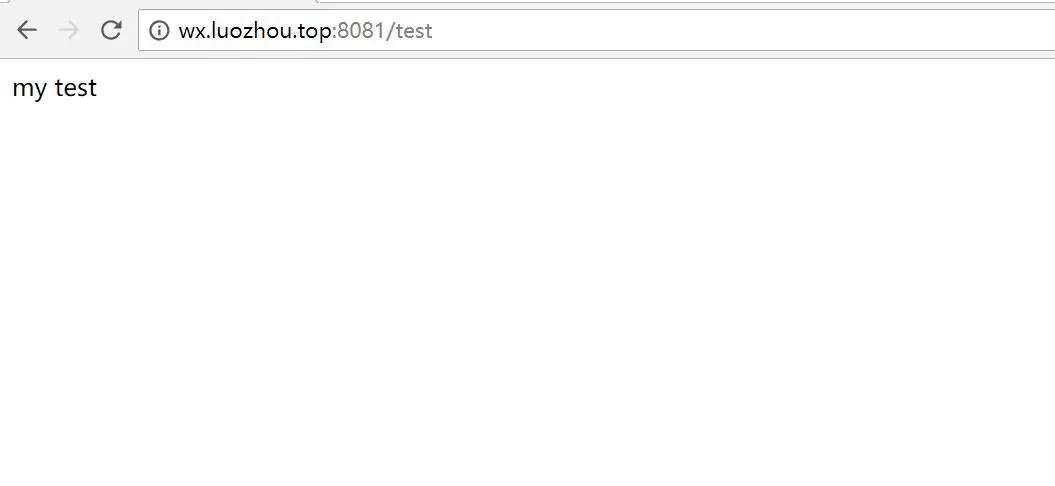
After deploying the <span><span>demo</span></span> on the server, it started successfully, and the access is as follows:
Open the packet capture tool <span><span>Wireshark</span></span> to capture packets, and the results are as follows:
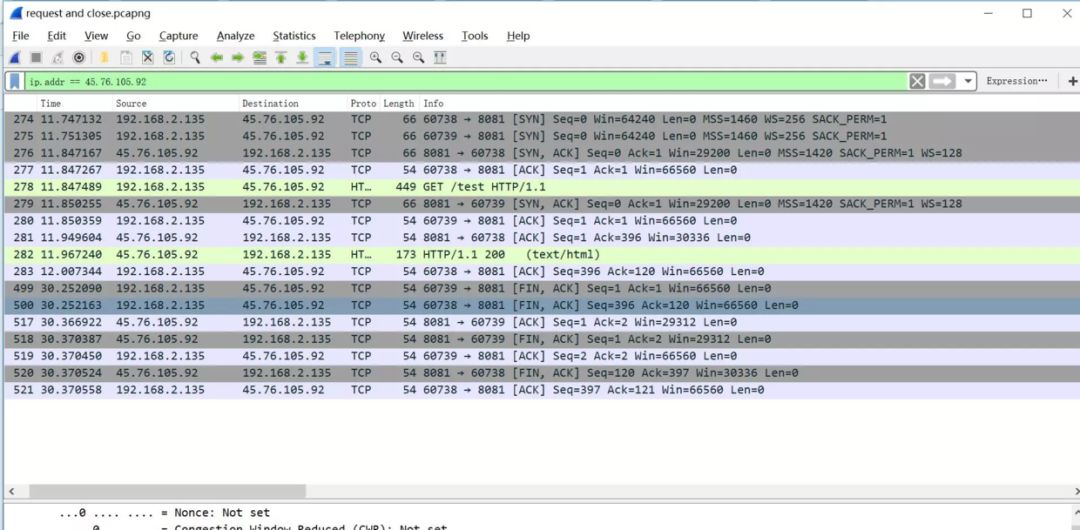
From the above image, we can see that we successfully captured an <span><span>HTTP</span></span> request and response. However, we also see many <span><span>TCP</span></span> requests. Next, let’s analyze what these <span><span>TCP</span></span> requests are for.
Packet Capture Analysis
A) Three-Way Handshake
The initial step is that the local machine sends two requests to the server. I will explain why there are two requests later. For now, let’s focus on the <span><span>HTTP</span></span> corresponding port request, as follows:
192.168.2.135:60738---->45.76.105.92:8081
From the screenshot above, we know this is the first handshake of the <span><span>TCP</span></span> protocol. Those familiar with the <span><span>TCP</span></span> protocol know that establishing a connection requires a three-way handshake, while disconnecting requires a four-way handshake.
Let’s first look at the first request:
60738 -> 8081 [SYN] Seq=0 Win=64240 Len=0 Mss=1460 Ws=256 SACK_PERM=1
Let’s analyze this packet request information:
-
<span><span>60738->8081</span></span>Port number: Source port —> Destination port -
<span><span>[SYN]</span></span>: Synchronization handshake signal -
<span><span>Seq</span></span>: Message number -
<span><span>Win</span></span>: TCP window size -
<span><span>Len</span></span>: Message length -
<span><span>Mss</span></span>: Maximum segment size -
<span><span>Ws</span></span>: Window scaling factor -
<span><span>SACK_PERM</span></span>: SACK option, where 1 indicates SACK is enabled.
For the above concepts, I will briefly explain them. Before that, let’s look at the data structure diagram of the <span><span>TCPHeader</span></span> to have an intuitive understanding of the <span><span>TCP</span></span> header data structure.
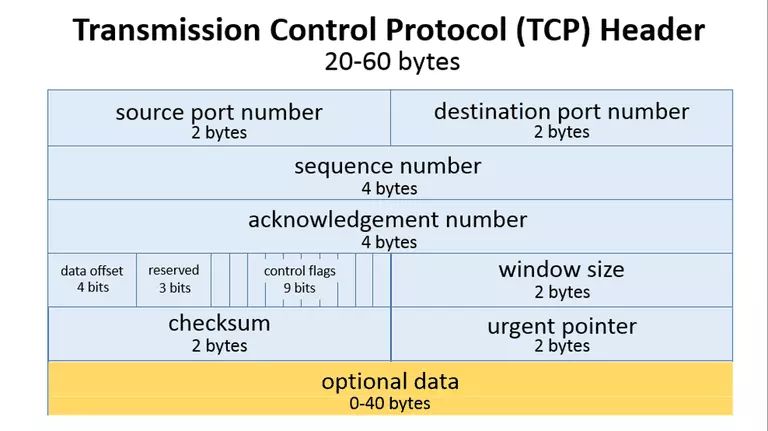
1. Win: TCP Window Size refers to the maximum number of bytes that can be accepted for <span><span>TCP</span></span> transmission. This can be dynamically adjusted, which is the sliding window of <span><span>TCP</span></span>. By dynamically adjusting the window size, the sending rate of data can be controlled. The above image occupies <span><span>2</span></span> bytes, which is <span><span>16</span></span> bits, so the maximum number supported is <span><span>2^16=65536</span></span>. Therefore, under default conditions, the maximum window size supported by the <span><span>TCP</span></span> header is <span><span>65536</span></span> bytes, which is <span><span>64KB</span></span>.
2. Len: Message Length refers to the length of the data segment. Since the entire <span><span>TCP packet</span></span> = <span><span>Header</span></span> + <span><span>packSize</span></span>, this message length refers to the total length of the data packet to be transmitted, which in this analysis is the size of the <span><span>HTTP</span></span> message.
3. Mss: Maximum Segment Size: This specifies the maximum length of the packet that can be transmitted. To achieve optimal transmission efficiency, the <span><span>TCP</span></span> protocol usually negotiates the <span><span>MSS</span></span> value between both parties when establishing a connection. This value is often replaced by the <span><span>MTU</span></span> value (after subtracting the size of the <span><span>IP</span></span> packet header of <span><span>20Bytes</span></span> and the <span><span>TCP</span></span> segment header of <span><span>20Bytes</span></span>). Therefore, the general <span><span>MSS</span></span> value is <span><span>1460</span></span>, which is consistent with the value in our packet capture image.
4. Ws: Window Scaling Factor: As mentioned earlier, the default maximum window size for <span><span>TCP</span></span> can only support <span><span>64KB</span></span> of buffered data. In today’s high-speed internet era, this size is certainly insufficient. Therefore, to support more buffered data, RFC 1323 specifies the extension options for <span><span>TCP</span></span>, among which the window scaling factor is one. How does this work? First, this parameter is negotiated during the <span><span>[SYN]</span></span> synchronization phase. Referring to the packet data analysis above, we see that the result of the first request negotiation is <span><span>WS=256</span></span>, and then in the <span><span>ACK</span></span> phase, the scaling factor takes effect, adjusting the window size. The effective packet capture is as follows:
60738 ->8081 [ACK] Seq=1 ACK=1 Win=66560 Len=0
We find that the window has become <span><span>66560</span></span>, larger than the default window. Let’s check the packet details:
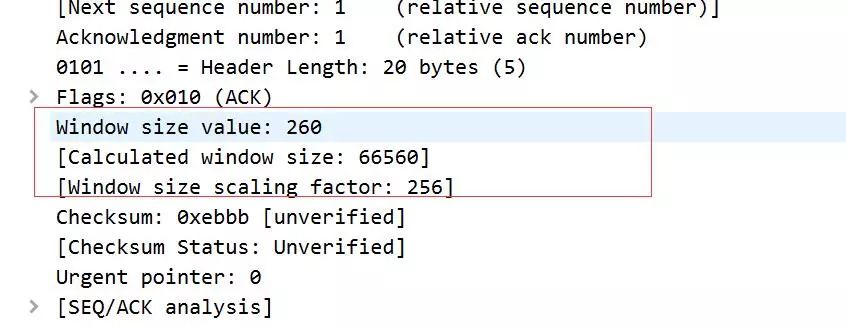
We find that the actual declared window is <span><span>260</span></span>, and the <span><span>WS</span></span> scaling factor is <span><span>256</span></span>, so the final calculated window size is <span><span>66560</span></span>. Thus, we know that the role of this scaling factor is to multiply the original window size by the scaling factor to obtain the final window size, which is <span><span>260*256=66560</span></span>.
5. SACK_PERM: SACK Option: We know that <span><span>TCP</span></span> transmission has a packet acknowledgment mechanism. By default, when the receiving end receives a packet, it sends an <span><span>ACK</span></span> acknowledgment. However, it only supports sequential acknowledgment by default. This means that if packets <span><span>A</span></span>, <span><span>B</span></span>, and <span><span>C</span></span> are sent, and I receive packets <span><span>A</span></span> and <span><span>C</span></span> but not <span><span>B</span></span>, then for <span><span>C</span></span>, I will not acknowledge it until I receive packet <span><span>B</span></span>. Therefore, <span><span>TCP</span></span> has a timeout retransmission mechanism. If a packet is not acknowledged for a long time, it will be considered lost and retransmitted, which can lead to unnecessary retransmissions and waste of transmission space. To solve this problem, the <span><span>SACK</span></span> (Selective Acknowledgment) mechanism was proposed. When <span><span>SACK</span></span> is enabled, the receiving end acknowledges all received packets, so the sending end only needs to retransmit the truly lost packets.
After briefly introducing the above basic concepts, let’s summarize the process of the <span><span>HTTP</span></span> request based on the packet capture. The local port for the <span><span>HTTP</span></span> request is <span><span>60378</span></span>, and the summarized process is as follows:
------------------------Request Connection--------------------------
1) 60738 -> 8081 [SYN] Seq=0 Win=64240 Len=0 Mss=1460 Ws=256 SACK_PERM=1
2) 8081 -> 60738 [SYN,ACK] Seq=0 ACK=1 Win=29200 Len=0 MSS=1420 SACK_PERM=1 WS=128
3) 60738 -> 8081  [ACK] Seq=1 ACK=1 Win=66560 Len=0
4) Get /test HTTP/1.1
5) 8081 -> 60738  [ACK] Seq=1 ACK=396 Win=30336 Len=0
6) HTTP/1.1 200 (text/html)
7) 60738 -> 8081  [ACK] Seq=396 ACK=120 Win=66560 Len=0

------------------Disconnect Connection-----------------------------
8) 60738 -> 8081 [FIN ACK] Seq=396 Ack=120 Win=66560 Len=0
9) 8081 -> 60738  [FIN ACK] Seq=120 Ack=397 Win=30336 Len=0
10) 60738 -> 8081 [ACK] Seq=397 Ack=121 Win=66560 Len=0
From the above process, we can see that <span><span>1</span></span> to <span><span>3</span></span> is the obvious three-way handshake. Then, <span><span>4</span></span> is an <span><span>HTTP</span></span> request, followed by <span><span>5</span></span>, which is an acknowledgment of the <span><span>HTTP</span></span> request, and <span><span>6</span></span> is the response to the <span><span>HTTP</span></span> request, while <span><span>7</span></span> is the acknowledgment of the response.
B) Four-Way Handshake
The above sequence numbers <span><span>8</span></span>, <span><span>9</span></span>, and 10 are the packets captured after I closed the browser. Since we know that closing the browser means the <span><span>TCP</span></span> connection is closed, some may have noticed a problem: our disconnection involves <span><span>4</span></span> handshakes, but the captured packets only show three records. Did I make a mistake? I want to tell you that I did not make a mistake; this is the actual packet capture. As for why there are only three, let’s analyze it:
Under normal circumstances, disconnecting a connection involves <span><span>4</span></span> handshakes. The process of the <span><span>4</span></span> handshakes is as follows:
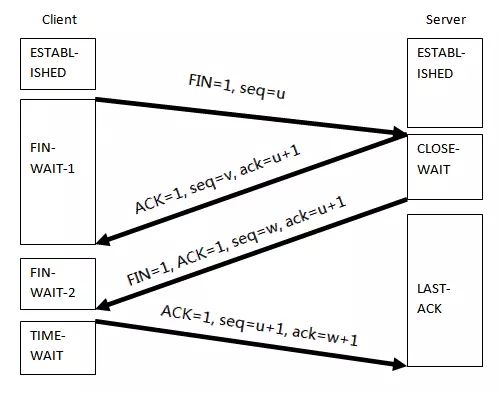
We analyze this diagram, and the handshake process is as follows:
1. The client initiates a disconnect request and enters the FIN-WAIT state.
2. The server acknowledges the disconnect request.
3. The server immediately sends a disconnect request and enters the CLOSE-WAIT state.
4. The client acknowledges the server's disconnect request and enters the TIME-WAIT state.
We find that the above <span><span>process 2</span></span> and <span><span>process 3</span></span> are both initiated by the server. So is it possible to merge these two requests and send them to the client in one go?The answer is yes. In RFC 2581, section <span><span>4.2</span></span> mentions that <span><span>ACK</span></span> can be delayed, as long as it is guaranteed that the acknowledgment packet arrives within <span><span>500ms</span></span>. Under this standard, <span><span>TCP</span></span> acknowledgment can be merged and delayed. Therefore, based on this, we deduce the following packet:
9) 8081 -> 60738 [FIN ACK] Seq=120 Ack=397 Win=30336 Len=0
This packet merges the acknowledgment to the client and the server’s <span><span>FIN</span></span> disconnect signal. We click on the details of this packet, and as shown in the red box, this <span><span>packet 9</span></span> is the acknowledgment for <span><span>Frame500</span></span>. From the initial screenshot, we know that this packet is <span><span>packet 8</span></span>.
8) 60738 -> 8081 [FIN ACK] Seq=396 Ack=120 Win=66560 Len=0
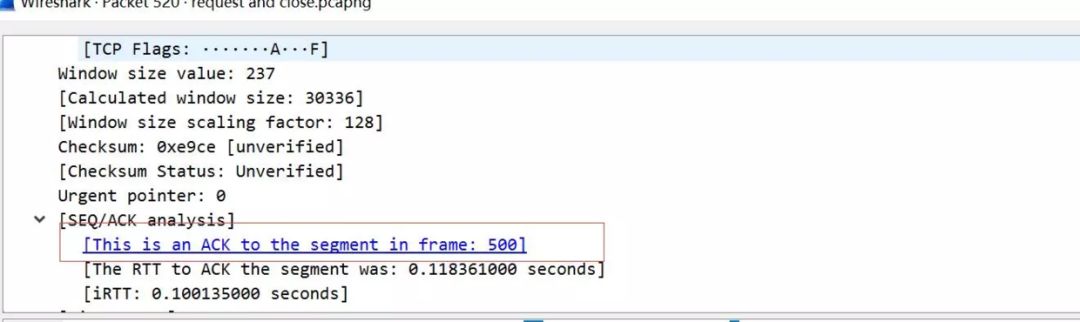
Moreover, <span><span>packet 9</span></span> itself is a <span><span>FIN</span></span> signal packet, so we can consider that <span><span>packet 9</span></span> merges the contents of <span><span>ACK</span></span> and <span><span>FIN</span></span>. Therefore, the usual <span><span>4</span></span> handshakes, after merging, become <span><span>3</span></span> handshakes.
This concludes a complete <span><span>HTTP</span></span> request, and the entire process is illustrated as follows:
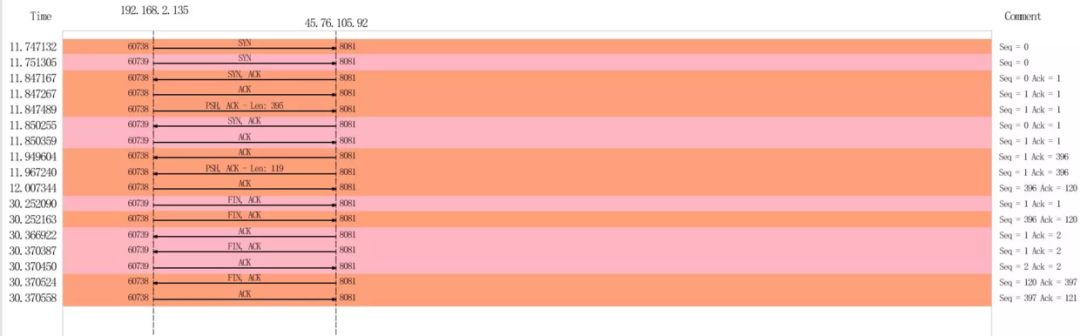
C) Keep-Alive
-
Some may ask, since this is a complete
<span><span>HTTP</span></span>request, does every request involve three-way handshakes?
The answer is: Currently, the protocol does not require it.
In the <span><span>HTTP0.9</span></span> and <span><span>HTTP1.0</span></span> versions, every request-response required three-way handshakes. However, starting from <span><span>HTTP1.0</span></span>, persistent connections were attempted, which is the <span><span>Keep-Alive</span></span> parameter. However, it was not officially supported. In the <span><span>HTTP1.1</span></span> protocol, the <span><span>Keep-Alive</span></span> parameter is officially supported by default, allowing for persistent connections.
The main functions of <span><span>Keep-Alive</span></span> are as follows:
1. Check for dead nodes
2. Prevent connections from being closed due to inactivity
-
Check for Dead Nodes
This is mainly to quickly detect failed connections for reconnection. For example, if nodes <span><span>A</span></span> and <span><span>B</span></span> have established a connection, and node <span><span>B</span></span> goes down for some reason, while node <span><span>A</span></span> is unaware, there are two scenarios:
1. If node <span><span>B</span></span> has not yet recovered, then node <span><span>B</span></span> will not reply with an <span><span>ACK</span></span>, and node <span><span>A</span></span> will keep retrying until it realizes that node <span><span>B</span></span> is a dead node.
2. If node <span><span>B</span></span> successfully restarts before node <span><span>A</span></span> sends data, when node <span><span>A</span></span> sends data, node <span><span>B</span></span> will not accept it but will send a <span><span>RST</span></span> signal (when data is received on a closed <span><span>socket</span></span>, a <span><span>RST</span></span> packet is sent to request the other end to close the abnormal connection without requiring an <span><span>ACK</span></span> response), and only then will node <span><span>A</span></span> know that node <span><span>B</span></span> needs to reconnect.
In both scenarios, it will only be known that the other party has encountered an exception when data is sent. However, <span><span>Keep-Alive</span></span> sends a heartbeat at regular intervals, allowing for quick awareness of the server node’s status.
-
Prevent Connections from Being Closed Due to Inactivity
We know that establishing and maintaining network connections consumes resources, and the number of connections that can be established on a server is limited. Therefore, firewalls or operating systems may release inactive connections to save resources. The <span><span>Keep-Alive</span></span> sends a heartbeat packet at regular intervals to inform the firewall or operating system that this connection is active and should not be terminated.
I later captured packets with <span><span>Keep-Alive</span></span>, and the screenshot is as follows:
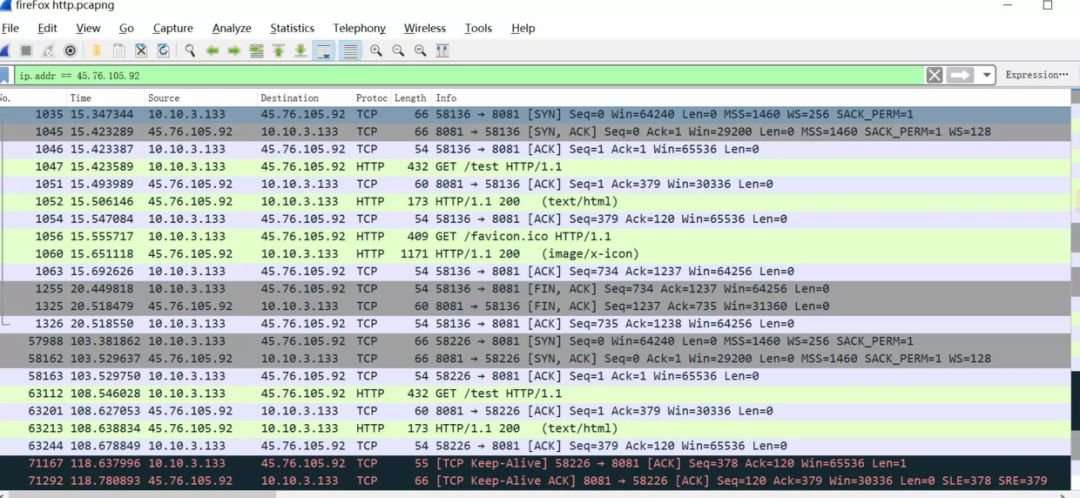
In the above image, the last two packets are the sent <span><span>Keep-Alive</span></span> packets, and the server acknowledges them. We see that the <span><span>keep-alive</span></span> packet actually sends a packet with one byte, which is the implementation of <span><span>keep-alive</span></span>.
After discussing <span><span>Keep-Alive</span></span>, let’s return to the initial question: why does an <span><span>HTTP</span></span> request involve two port handshakes? In fact, this has nothing to do with the protocol itself. The first packet capture screenshot was taken using Google Chrome, while the last packet capture was taken using Firefox. A careful comparison reveals that Firefox only has one port for the three-way handshake. Therefore, this situation arises from the browser’s own implementation. Why does Google Chrome implement it this way? It is speculated that it aims to ensure the availability of HTTP access. If one port is unavailable, it can immediately switch to another port to complete the HTTP request and response. (This is a personal guess; if there is an authoritative answer, please feel free to discuss in the comments.)
Summary
-
<span><span>HTTP</span></span>requests rely on<span><span>TCP</span></span>connections, and the first connection involves a<span><span>TCP</span></span>three-way handshake. -
<span><span>HTTP</span></span>uses<span><span>Keep-Alive</span></span>for persistent connections, sending a heartbeat packet at regular intervals to inform the server that it is still active. -
<span><span>HTTP</span></span>connection disconnection also involves a<span><span>TCP</span></span>four-way handshake, but if the server determines that conditions are met, it can merge the<span><span>ACK</span></span>and<span><span>FIN</span></span>signals, thus converting it into a three-way handshake.

Previous Recommendations
-
Why Can’t Your Nginx Handle High Concurrency?
-
Batch Management Tool for Servers: Ansible, Very Detailed!
-
Is Our CMDB Model Wrong in Operations?
-
Keepalived: The Magic Tool for Hot Standby, Achieving Zero Downtime!
-
Linux Shell Tricks: sed
-
Automation Operations Tool in the Cloud: Terraform
-
How to Handle Mining Viruses on Online Linux Servers?
-
Jenkins Setup, Permission Management, Parameterization, Pipeline, etc., Very Detailed!
-
Detailed Explanation of Jenkins Pipeline, Recommended for Collection!
-
Finally Understood Nginx Reverse Proxy!
-
How to Troubleshoot Network Packet Loss in Linux? Finally Understood!
-
How to Achieve Canary/Gray Release in K8s?
-
More than 20 Linux Commands for Log Analysis, Very Comprehensive!
-
Deploying a MySQL Cluster in K8s, Stable!
-
40 Common Nginx Interview Questions (with Answers)
-
Jenkins Production Environment Notes, Very Detailed!
-
19 Common Issues in K8s Clusters, Recommended for Collection
-
Nginx Working Principles and Optimization Summary (Super Detailed)
-
Six High-Frequency Linux Operations Troubleshooting Notes!
-
17 Common Metrics for Operations, 90% of People Don’t Know!
-
Why Does Performance Drop So Much After Containerizing Applications?
-
Detailed Explanation of Nginx Rate Limiting, Responding to Traffic Surges and Malicious Attacks
-
How to Troubleshoot When Linux Disk is Full?
-
What to Do When the CPU Spikes to 900%?
-
Nginx Performance Optimization is Covered in This Article!
-
K8s Pod “OOM Killer”, Found the Reason
-
Summary of Nginx High Concurrency Performance Optimization Notes from Major Companies
-
Building a CI/CD System Based on Jenkins
-
Seven Major Application Scenarios of Nginx (with Configuration)
- The Most Comprehensive Detailed Explanation of Jenkins Pipeline
- Learning Guide for Mainstream Monitoring System Prometheus
- 40 Common Nginx Interview Questions
-
Common Linux Operations Interview Questions, A Must-Read for Job Seekers!
-
25 Common MySQL Interview Questions and Answers
Light it up, and the server will not go down for three years