
When repairing a circuit board, we sometimes need to measure the potential at a certain point on the board to determine where the problem lies. The reference point is usually chosen as the negative terminal of the power supply, which is the GND ground line. Therefore, knowing how to quickly locate the ground line on the board is essential. Below are several methods summarized for your reference.

1. Locate GND using electrolytic capacitors
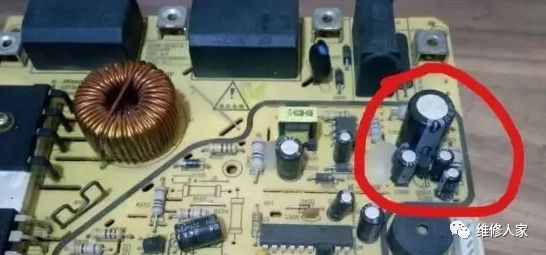
The image above shows a mainboard of an induction cooker. To find the ground line, we first need to locate the largest electrolytic capacitor on the board. Generally, larger electrolytic capacitors are used as power filtering components, and their negative terminal is GND. The largest electrolytic capacitor you see in the image is a power filter capacitor, which smooths the approximately 300 volts of pulsating DC output from the rectifier bridge. Its negative terminal is the negative terminal of the DC power supply, which is the GND line we are looking for.
2. Confirm GND by examining large copper foils
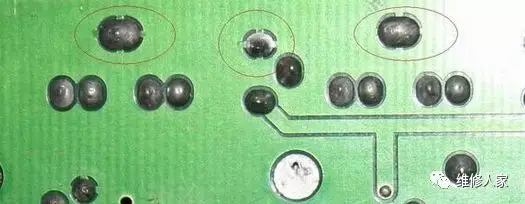
The image above shows a two-layer board. The points marked with a red circle are the ground lines, which can be seen connected to large copper foils. This is because ground lines have a shielding effect, which can effectively reduce interference caused by ground loops. Therefore, ground copper foils on circuit boards generally appear in large areas.
3. Confirm GND by checking the markings on connectors
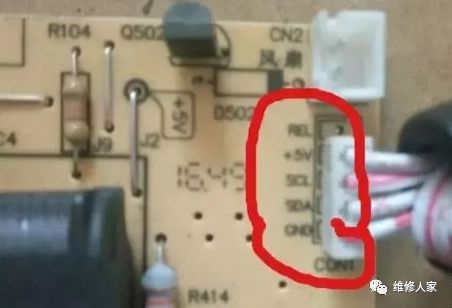
As shown in the image, there are various signal markings at the connector points on the board. We can confirm the ground line by checking these markings. For example, the GND inside the red circle in the image is the ground line.
4. Locate GND using integrated circuits
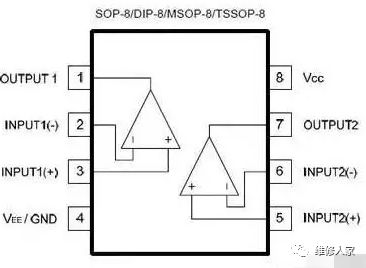
There are various integrated circuits on the circuit board, and these integrated circuits require a power supply to function properly. We can confirm the GND line by checking the pins of the chips. For example, the image shows an 8-pin LM358 comparator. By looking up its specifications, we can see the function of each pin, and we only need to know that pin four is GND to locate the ground line on the board.


Screenshots of electronic books from the resource collection

[Complete Set of Hardware Learning Materials Collection]