More content can be added to the Linux system knowledge base package (tutorials + videos + Q&A).
Back to school season “Linux Driver Comprehensive Course” promotion.

Table of Contents
- 1. Linux Kernel Boot Process Flowchart
- 2. Self-Extraction Phase
- 3. Kernel Entry Point
- 4. Assembly Phase
- 5. C Function Phase
- 6. Kernel Boot Scene
- 7. Executing the First Application Init Program
Accumulation, sharing, and growth, allowing both yourself and others to gain something! 😄
1. Linux Kernel Boot Process Flowchart
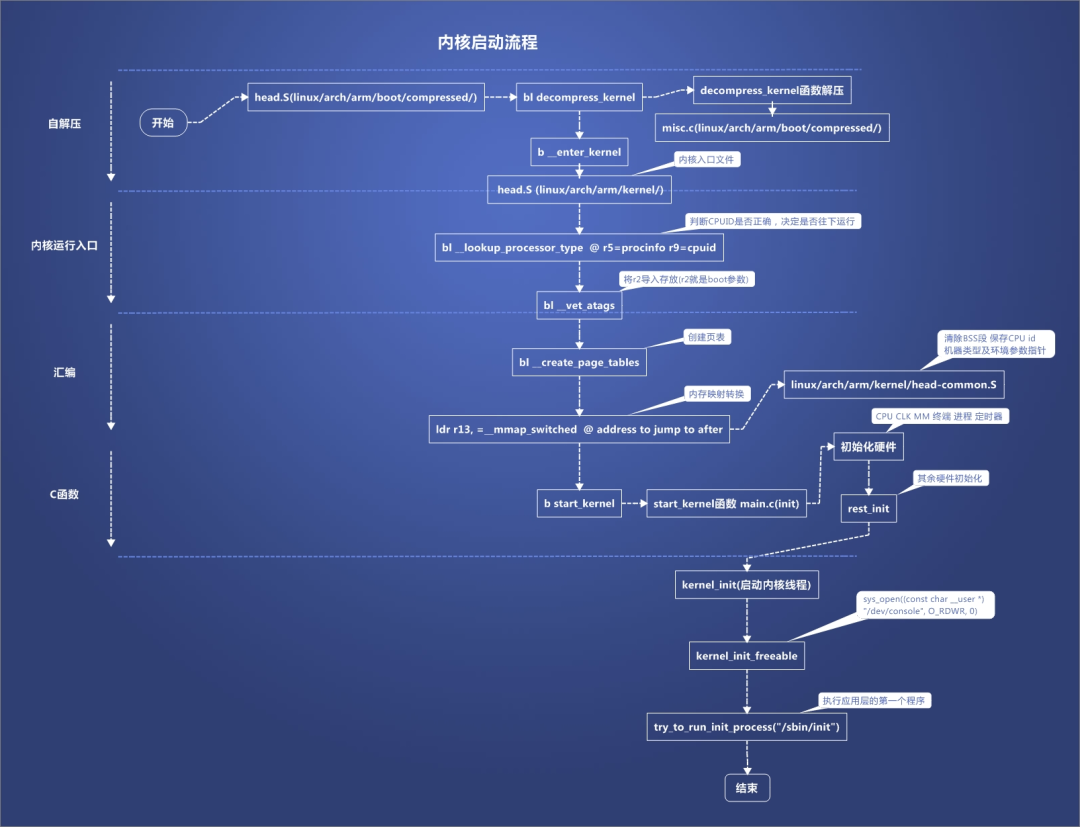
- Self-Extraction: The Bootloader loads the compressed kernel image, and the kernel self-extracts into memory.
- Kernel Entry Point: Starts from assembly code (e.g., stext), initializing CPU and memory management.
- Assembly Phase: Completes low-level hardware initialization, sets up stack, segmentation, and paging.
- C Function Phase: Enters start_kernel(), initializing core kernel subsystems.
- Kernel Boot Scene: Creates the first user process and mounts the root filesystem.
- Executing Init Program: Starts the first user-space process init, completing system initialization.
2. Self-Extraction Phase
Kernel Image Format The Linux kernel is typically stored in a compressed format, such as Image.gz or Image.lz4, to reduce storage space. The kernel image for the ARM64 platform usually exists in the form of Image or compressed Image.gz.
Bootloader Loads Kernel The Bootloader (e.g., U-Boot) is responsible for loading the compressed kernel image into memory. U-Boot reads the header information of the kernel image to determine its size and loading address, and loads it into the specified memory location.
Self-Extraction Code The self-extraction code for the ARM64 kernel is typically located in arch/arm64/boot/compressed/head.S. This code is responsible for decompressing the kernel image to the specified memory location.
// arch/arm64/boot/compressed/head.S
ENTRY(_start)
// Set stack pointer
    ldr     x0,=boot_stack_end
    mov     sp, x0

// Call decompress function
    bl      decompress_kernel

// After decompression, jump to the entry of the decompressed kernel
    ldr     x0,=KERNEL_START
    br      x0
ENDPROC(_start)
Decompression Complete After decompression, control is transferred to the decompressed kernel code. At this point, the kernel image has been decompressed into memory and is ready for execution.
3. Kernel Entry Point
Entry Point The entry point of the decompressed kernel is stext, located in arch/arm64/kernel/head.S. This is the starting point for ARM64 kernel execution.
// arch/arm64/kernel/head.S
ENTRY(stext)
// Initialize CPU registers
    mov     x0, #0
    msr     spsel, x0

// Set up segmentation and paging
    bl      __create_page_tables

// Enable MMU
    bl      __enable_mmu

// Jump to C code
    b       start_kernel
ENDPROC(stext)
Environment Initialization At the entry point, the kernel sets up the basic environment, including:
- Initializing CPU registers.
- Setting up segmentation and paging mechanisms (ARM64 uses MMU for virtual memory management).
- Enabling the Memory Management Unit (MMU).
4. Assembly Phase
Low-Level Initialization In the kernel’s assembly code, some low-level hardware initialization tasks are completed, including:
- Setting up the stack pointer.
- Initializing the Interrupt Descriptor Table (IDT) and Global Descriptor Table (GDT).
- Detecting CPU features (e.g., FPU, NEON, etc.).
// arch/arm64/kernel/head.S
__create_page_tables:
// Create page tables
    ldr     x0,=init_pg_dir
    ldr     x1,=init_pg_end
    bl      __create_pgd_entry
    ret
ENDPROC(__create_page_tables)

__enable_mmu:
// Enable MMU
    mrs     x0, sctlr_el1
    orr     x0, x0, #SCTLR_EL1_M
    msr     sctlr_el1, x0
    isb
    ret
ENDPROC(__enable_mmu)
Jump to C Code The last part of the assembly code jumps to the C language entry function start_kernel().
5. C Function Phase
start_kernel() start_kernel() is the main entry function for kernel initialization, located in init/main.c. It is responsible for initializing the core subsystems of the kernel.
// init/main.c
asmlinkage __visible void __init start_kernel(void)
{
// Initialize memory management
setup_arch(&command_line);
mm_init();

// Initialize process management
sched_init();

// Initialize interrupt management
init_IRQ();

// Initialize device drivers
platform_devices_init();

// Initialize file system
vfs_caches_init();

// Call rest_init()
rest_init();
}
rest_init() At the end of start_kernel(), the rest_init() function is called to complete the kernel startup process.
// init/main.c
static void __init rest_init(void)
{
// Create the first user process
kernel_thread(kernel_init,NULL, CLONE_FS);

// Start the scheduler
cpu_startup_entry(CPUHP_ONLINE);
}
6. Kernel Boot Scene
Creating the First User Process In rest_init(), the kernel creates the first user-space process:
- Calls the kernel_init() function to prepare for starting the user-space init program.
- If initramfs is used, the kernel first mounts initramfs as a temporary root filesystem.
// init/main.c
static int __init kernel_init(void* unused)
{
// Mount the root filesystem
if(initramfs_in_use)
populate_rootfs();

// Mount the real root filesystem
mount_root();

// Start the user-space init program
run_init_process("/sbin/init");
return 0;
}
Mounting the Root Filesystem The kernel attempts to mount the real root filesystem (e.g., ext4, xfs, etc.) and switch to that filesystem.
7. Executing the First Application Init Program
Init Program Init is the first process in user space, with PID 1. Its main task is to start user-space services and manage system run levels.
Path of Init If the init= kernel parameter is specified, the kernel will attempt to execute the specified program. Otherwise, the kernel will try to find the following paths in order:
- /sbin/init
- /etc/init
- /bin/init
- /bin/sh
Systemd or SysV Init Modern Linux distributions typically use systemd or the traditional SysV init as the init program.
// init/main.c
static int run_init_process(const char* init_filename)
{
    argv_init[0] = init_filename;
return do_execve(getname_kernel(init_filename), argv_init, envp_init);
}