Click  ”Jinan CNC Mould Technology Research Institute” for updates.
Industry trends, mechanical videos, CNC processing technology, 3D printing, industrial robots, production processes, moulds, machine tools, and other cutting-edge information await you here!
1. Transferring the compiled program from the computer to the PLC is generally called “downloading”, i.e., download;
2. Transferring the program from the PLC to the computer is generally called “uploading”, i.e., upload.
Different manufacturers’ PLCs have slight variations in the details of downloading and uploading programs, but the principles are quite similar. Here, we will take the Siemens S7-300 series PLC as an example for explanation.
1. Setting Up the Compilation Environment
The establishment of engineering projects, hardware configuration, programming, downloading, installation, and program status diagnosis and monitoring for the S7-300 series PLC are managed and maintained by Siemens’ supporting software, SIMATIC Manager, as shown in the figure below.
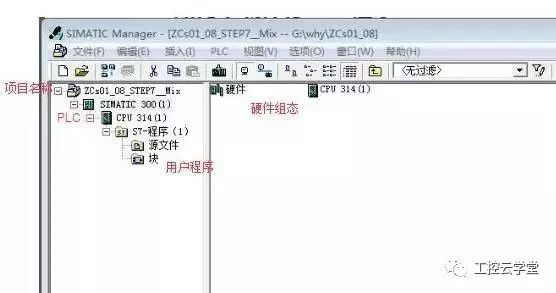
SIMATIC Manager is a comprehensive management software. If you only need to write and maintain PLC programs, you only need to download and install STEP7.
2. Choosing the Communication Method Between the PLC and the Computer (Engineer Station)
The PLC and the engineer station can generally communicate via MPI, Profibus DP, or Ethernet.
-
All S7-300/400 series CPUs have an interface that supports the MPI communication protocol.
-
Some S7-300/400 series CPUs provide an interface that supports the Profibus DP protocol. If the CPU does not have this interface, a Profibus DP network card, such as CP342-5, can be configured in the hardware setup.
-
Some S7-300/400 series CPUs provide an interface that supports the TCP/IP protocol. If the CPU does not have this interface, an Ethernet module, such as CP343-1, can be configured in the hardware setup.
-
If choosing MPI or Profibus DP for communication, the engineer station must install a CP5611 or CP5613 network card, or purchase a USB adapter to communicate via USB.
-
If choosing Ethernet for communication, only the engineer station needs to be equipped with an Ethernet card.
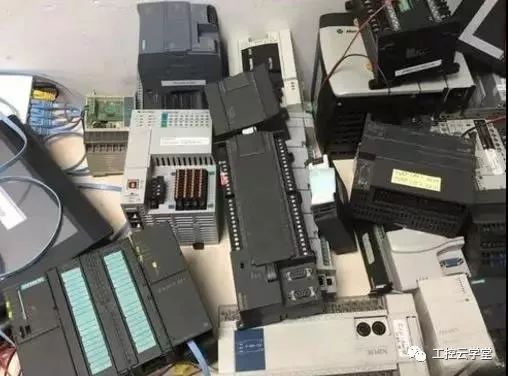
Below, we will take the MPI communication method as an example to explain how to configure communication.
-
Assuming that the physical connection between the PLC and the engineer station has been completed, i.e., they are connected via a DP cable.
-
In “SIMATIC Manager”, set the network port through the menu command: “Options -> Set PG/PC Interface”, as shown in the figure below.
-
This step can also be set in the “Control Panel” under “Set PG/PC Interface”. The engineer station needs to communicate with the PLC, so the application access point should be selected as “STEP7”, and the interface should be chosen based on the actual situation (here we use PLCSIM, so we select PLCSIM (MPI)).
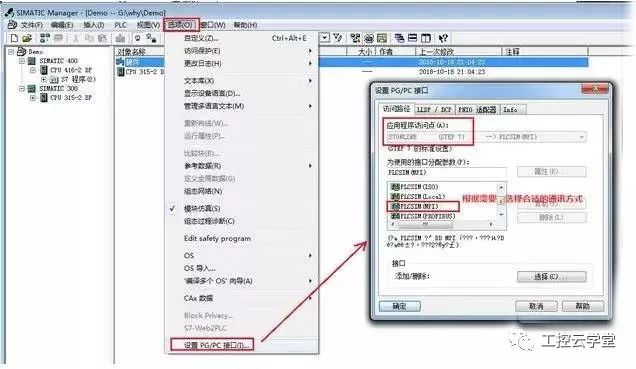
After the above settings, downloading and uploading operations can be performed.
3. Downloading and Installing
1. Installation
When we need to back up or view the program in the PLC, we can choose to upload the PLC program to the PG/PC.
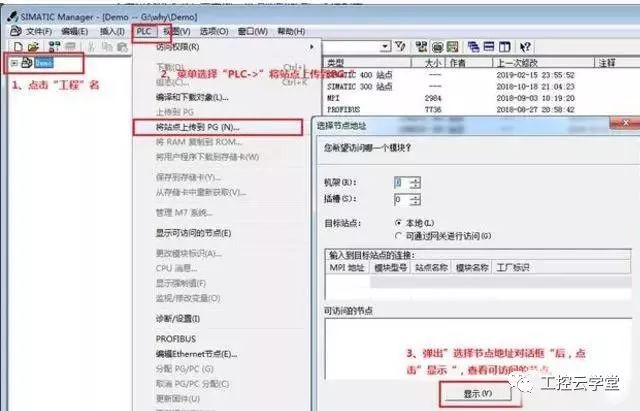
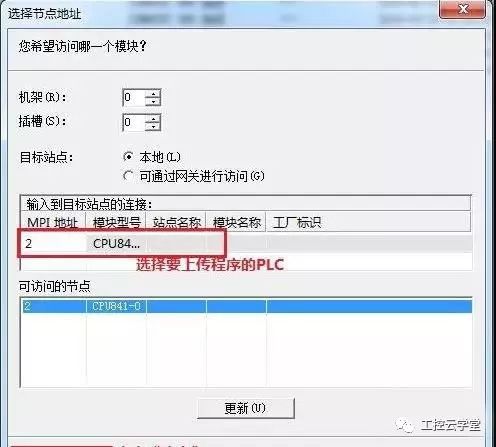
Follow the above steps and wait for the upload to complete.
2. Downloading
Download the program from the engineer station to the PLC for execution. This consists of hardware compilation and downloading as well as program downloading.
Prerequisite: The PLC must be set to “RUN-P” or “STOP” mode.
(1) Hardware Compilation and Downloading
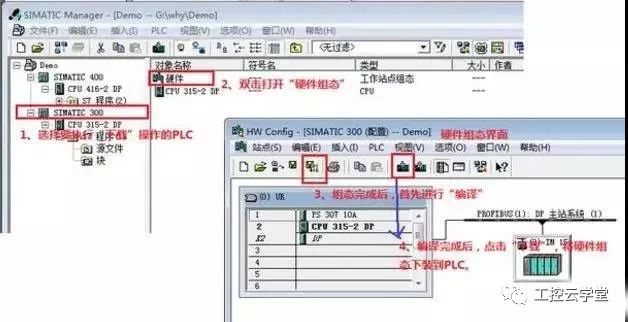
(2) Program Downloading
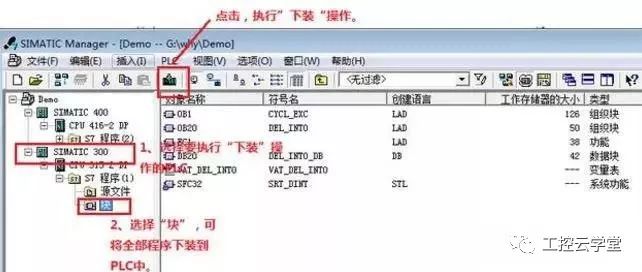
The above steps are for downloading all user programs. To download a specific program block, select them and then perform the “download” operation.
Produced by the New Media Center of Jinan CNC Mould Technology Research Institute
End
Source: Internet
Jinan CNC Mould Technology Research Institute
Vocational training base for college graduates— Jinan CNC Mould Technology Research Institute has been mainly engaged inCAD/CAM advanced programming, UG five-axis programming, CNC machine tool maintenance, UG mould design, reverse modeling, industrial robots, 3D printing, etc. pre-job training. One-time registration for lifelong learning, during the training, teachers use periodic testing to fully control the learning progress of students, small class teaching, one-on-one tutoring, combining theory with practice, until learned. After completion, free job placement is provided. The institute provides long-term technical support and employment services for students. All faculty and students of Jinan CNC Mould Technology Research Institute welcome your visit and learning. The institute is currently located at 2510 Century Avenue, Zhangqiu District, Jinan City.
Consultation hotline: 0531-85708996
 Here | Read Electrical Institute | Read Life
At Jiyuan | Learn Skills | Read Life