In the world of 3D printing, hardware varies greatly, with a wide range of motherboards and inconsistent protocol standards. Achieving harmonious coexistence among all devices is not an easy task.Compatibility differences and configuration complexity have become the biggest obstacles to the widespread adoption of 3D printing.
The emergence of Marlin firmware has completely changed this situation. As the leader in open-source 3D printer firmware, Marlin supports over 200 motherboard platforms, from Arduino to STM32, and with its powerful configuration management and precise motion control, it has become the “brain” of most 3D printers worldwide, achieving a unified hardware platform.
For more information on hardware DIY and ESP32 software tutorials, please follow our public account.
Core Value: A Smart Control System with Full Platform Compatibility
The core advantage of Marlin lies in itspowerful hardware compatibility and precise control algorithms, which can adapt to almost all mainstream 3D printer platforms. This includes:
- • Classic Platforms: Arduino Mega 2560, RAMPS 1.4/1.6 series
- • High-Performance ARM: STM32F103/F407/F429, LPC1768/1769
- • Modern IoT: ESP32 dual-core processor, supporting WiFi and Bluetooth
- • Professional MCUs: SAM3X8E (Arduino Due), GD32, HC32 series
- • Emerging Platforms: Raspberry Pi Pico RP2040 dual-core
Technical Architecture: A Precision System with Modular Design
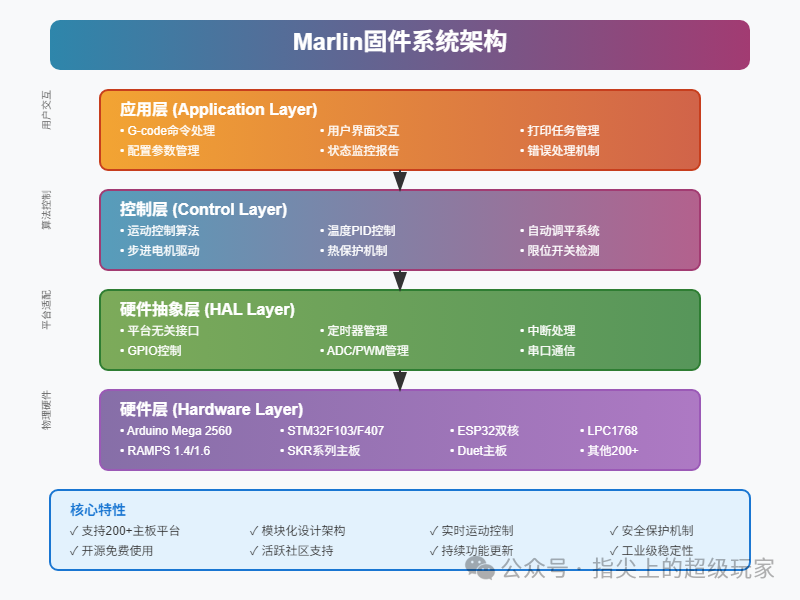
Marlin adopts ahighly modular layered architecture design to ensure stable operation across different hardware platforms:
- • Hardware Abstraction Layer: A unified HAL interface that shields hardware differences
- • Motion Control Core: High-precision stepper motor control and path planning
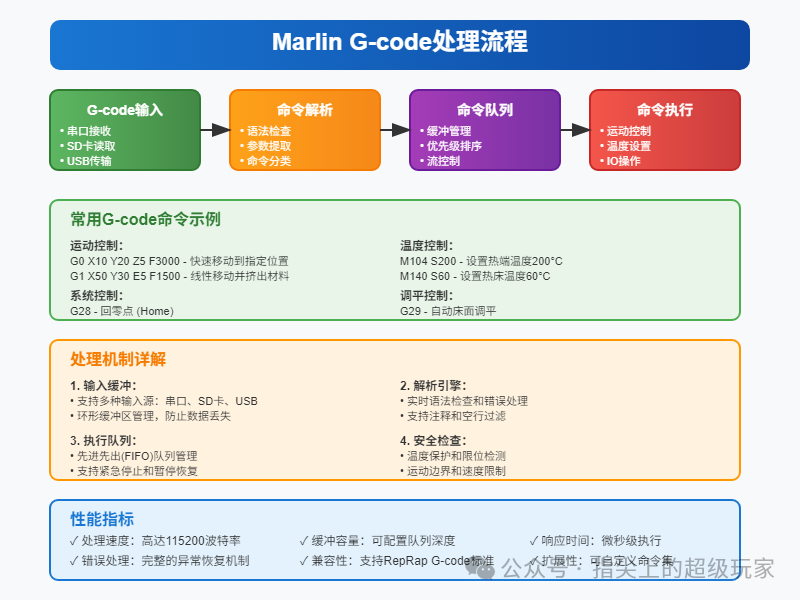
- • G-code Parser: Fully supports the RepRap G-code standard
- • Thermal Management System: Multi-point temperature monitoring and PID control algorithms
- • Safety Protection Mechanisms: Thermal runaway protection, limit switch detection
Smart Features: Making 3D Printing Simpler and More Reliable
Marlin integrates numerousintelligent features, significantly enhancing print quality and user experience:
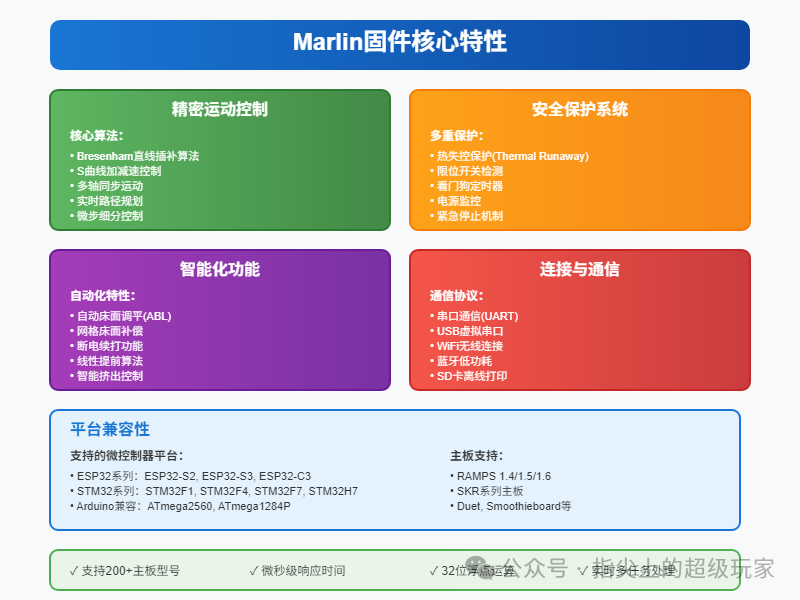
- • Automatic Bed Leveling System: Supports various probes such as BLTouch, inductive, and mechanical
- • Mesh Bed Compensation: Supports up to 15×15 grid precision compensation
- • Thermal Protection Algorithm: Real-time monitoring of temperature anomalies to prevent equipment damage
- • Power Recovery: Resumes printing progress after unexpected power loss
- • Linear Advance Algorithm: Optimizes the balance between print speed and quality
Application Scenarios: Comprehensive Coverage from Beginners to Professionals
Marlin is suitable forvarious scales and types of 3D printing applications:
- • Personal Makers: Entry-level printers like Ender 3, Prusa i3
- • Educational Institutions: Bulk deployment with unified configuration management
- • Small Factories: Collaborative production with multiple devices
- • R&D Laboratories: Custom feature development and testing
- • Industrial Applications: High-precision, large-scale professional equipment
Configuration Code Examples
Basic Heated Bed Configuration
// Heated bed temperature sensor configuration
#define TEMP_SENSOR_BED 1        // Thermistor type
#define BED_MAXTEMP 130          // Maximum bed temperature
#define DEFAULT_bedKp 10.00      // PID parameters
#define DEFAULT_bedKi 0.023
#define DEFAULT_bedKd 305.4
Automatic Leveling Settings
// Enable automatic bed leveling
#define AUTO_BED_LEVELING_BILINEAR
#define GRID_MAX_POINTS_X 5      // Leveling grid 5x5
#define GRID_MAX_POINTS_Y 5
#define MULTIPLE_PROBING 2       // Probe each point 2 times for averaging
Safety Protection Configuration
// Thermal protection features
#define THERMAL_PROTECTION_HOTENDS  // Hotend protection
#define THERMAL_PROTECTION_BED      // Bed protection
#define THERMAL_PROTECTION_CHAMBER  // Chamber protection
Advantages and Disadvantages Analysis
| Advantages | Disadvantages |
| Supports over 200 motherboard platforms with strong compatibility | Initial configuration can be complex |
| Open-source and free, with an active community | Requires a certain level of programming knowledge |
| Rich features with continuous updates | Long compilation times |
| Safe and reliable, industrial-grade stability | Relatively high memory usage |
| Flexible configuration, highly customizable | Scattered documentation, steep learning curve |
Applicable Scenarios: Suitable for users with a certain technical background, especially in scenarios requiring customized features or using non-standard hardware. For users pursuing stability and professional features, Marlin is the best choice.
Conclusion and Access
Marlin firmware is like the “operating system” of the 3D printing world, unifying the industry’s standards with a single codebase. Whether you are a beginner maker or an experienced engineer, Marlin can inject powerful “intelligence” into your 3D printer. Although the configuration process requires some patience, once mastered, you will have the ability to build a professional-grade 3D printer.
Project Address: https://github.com/MarlinFirmware/MarlinOfficial Website: https://marlinfw.org/Configuration Documentation: https://marlinfw.org/docs/configuration/configuration.html
Previous Highlights:
ESP32 + VNC Protocol Cross-Platform Display + Control, Making Microcontrollers Easily Display Computer Desktops!!
Only 2 files needed to achieve embedded debugging with hierarchical logging, multiple output targets, and dynamic control, saying goodbye to printf debugging!
ESP32 Creates a High-Quality Control Web Page, Cross-Platform UI, Intranet Penetration, Easy Development, It’s Amazing!
Low-Cost ESP32 Oscilloscope, Wi-Fi Direct Connection + Web Interface + Real-Time Sampling Doubles Debugging Efficiency!
Tired of the Ordinary HomeAssistant Interface? A Beginner Gives HomeAssistant an iOS Advanced Interface!