Example
Remove spaces at the beginning and at the end of the string:
|
txt = ” banana “x = txt.strip() print(“of all fruits”, x, “is my favorite”) |
Definition and Usage
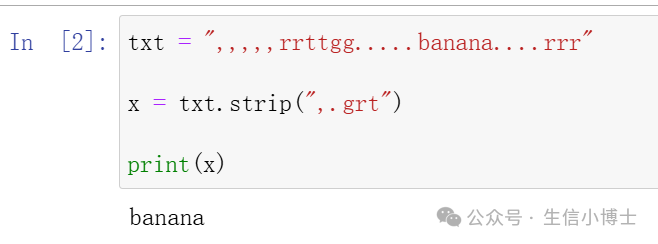
The <span>strip()</span> method removes any leading and trailing whitespaces.
Leading means at the beginning of the string, trailing means at the end.
You can specify which character(s) to remove; if not, any whitespaces will be removed.
Syntax
string.strip(characters)
Parameter Values
| Parameter | Description |
|---|---|
| characters | Optional. A set of characters to remove as leading/trailing characters |
More Examples
Example
eg1
|
>>> submitted_username = “_!__Yo_JohnDoe!__!!” >>> cleaned_username = submitted_username.strip(“!_”) >>> cleaned_username ‘Yo_JohnDoe’ |
eg2
>>> review = "¡¡¡Este producto es increíble!!!">>> review.strip("¡!")'Este producto es increíble'eg3
>>> filename = " Report_2025 FINAL.pdf ">>> filename.strip().lower().replace(" ", "_")'report_2025_final.pdf'eg4
>>> data = [" Alice ", " Bob ", " Charlie\n", "\tDora"]>>> cleaned_data = [name.strip() for name in data]>>> cleaned_data['Alice', 'Bob', 'Charlie', 'Dora']Compare <span><span>.strip()</span></span> With Other Python Strip Methods
Python provides several string methods to remove unwanted characters from the beginning or end of a string. While <span><span>.strip()</span></span> removes any specified characters from both ends, <span><span>.lstrip()</span></span> and <span><span>.rstrip()</span></span> allow for targeted character removal on a single side. Additionally, <span><span>.removeprefix()</span></span> and <span><span>.removesuffix()</span></span> remove exact substrings from the beginning or end of the string, respectively.
https://realpython.com/python-strip/