A scenario for troubleshooting language version exceptions in a Linux deployment.
In the Euler environment, there was a language version issue when deploying software, where the system environment needed to be set to Chinese, but it defaulted to English. Therefore, adjustments were made using the conventional locale command, but after setting it, neither source nor reboot had any effect, and the current system language remained English.
As shown in the image, this mode prevents software deployment.
Analysis
Initially, it was thought that the modification of the file was ineffective, so the command #localectl set-locale LANG=zh_CN.UTF-8 was used again, and the /etc/locale.conf file was checked, which showed no issues.
After rebooting, the problem persisted. At this point, it was suspected that the user’s environment variables might be causing the issue. Files such as ~/.bashrc were checked, but there was no information related to LANG.
At this point, most of the possible troubleshooting ideas had been tried without progress. It was discovered by chance that since the project belonged to a secure environment, remote access was strictly prohibited. For cloud resources, only virtual terminal access was allowed. The debugging was done by logging into the server via a virtual terminal, but it was recalled that there wasn’t much difference between virtual terminal login and remote login. With a mindset of trying anything, it was found that there was indeed a problem.
In the /etc/profile.d/ directory, there are many script files, and among them, there is a file named lang.sh, which contains the following content:
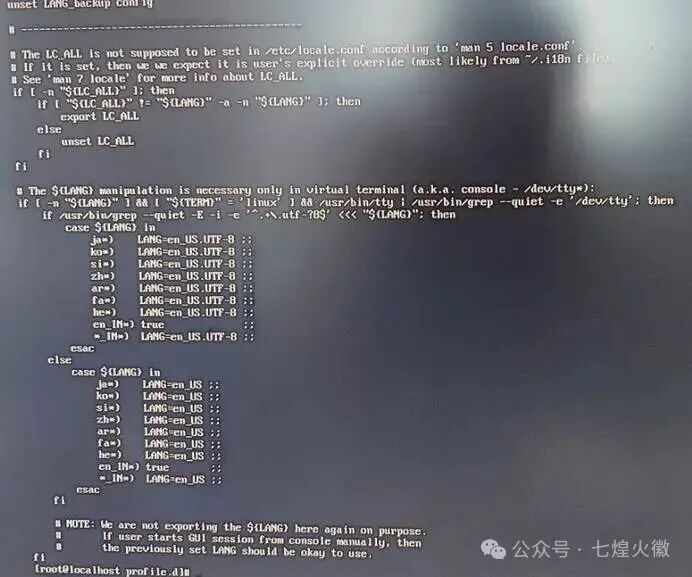
The content in this section has two parts in the case statement, which generally means that if LANG is not empty, TERM=linux (virtual terminal), and the device path includes /dev/tty, it triggers language processing, forcibly converting various languages, including Chinese (zh*), to English…
The purpose of this mechanism is likely to avoid display garbled characters in virtual terminals by defining the conversion of non-Latin languages to English. Therefore, no matter how the system language is modified during debugging, it remains English!
Handling
Once the cause was identified, the solution was straightforward. The mechanism above is clearly targeted only at virtual terminal logins, specifically tty, which can be checked using the who command, such as tty1, tty2, etc.
Only logins via tty are subject to this restriction; if logged in via ssh, there would be no such restriction, as ssh corresponds to pts, such as pts/0

However, due to current security requirements, remote access is not allowed, so we return to terminal login. How to handle this?
There are two possible approaches:
1. Modify the /etc/profile.d/lang.sh file to comment out the zh* content in the two case sections.
As shown in the image
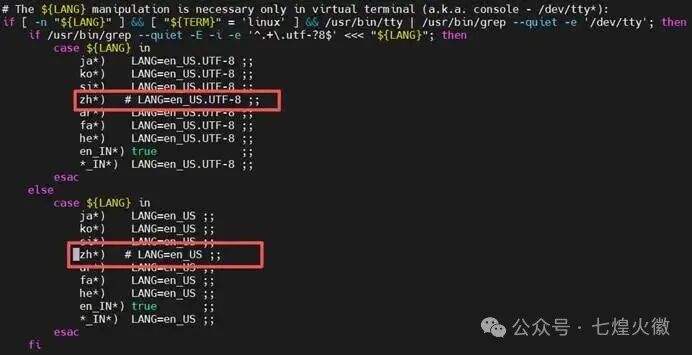
Modify as shown, and it will take effect after reboot.
2. Modify the /etc/profile file to add export statements to directly set LANG and LC_ALL.
As shown in the image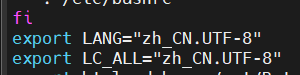
Edit the /etc/profile file and add these two lines at the end. Remember to run source /etc/profile to test if it works.
Summary
By using the above methods, the language version issue after logging in via the virtual terminal can be effectively resolved. Initially, it was thought that this strategy mechanism was unique to Huawei Euler, but upon review, it was found that it is not. The Longxin 8.6, Euler 22.03sp1, and centos7.9 all have this mechanism, indicating that it exists across various distributions, but is limited to virtual terminal login scenarios.