The application of progress bars is ubiquitous in software; copying a file requires a progress bar, and loading a file also necessitates a progress bar to indicate completion status.
So, what elements does a progress bar have?
-
A container that continuously grows to the right (visually indicating the current progress).
-
A percentage that quantitatively reflects the progress.
-
A marker (this marker indicates whether the progress bar is working or has stalled).
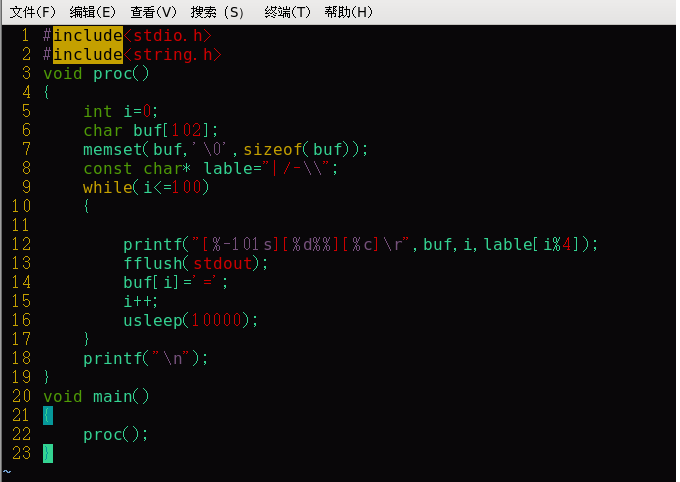
First, we need to fix the [ ] at both ends, leaving space in the middle, and then fill it with “=”. Here, we use printf(“[%-101s]\r”, str); for formatted output, where ‘-’ indicates left alignment, 100 specifies a fixed column width, and ‘\r’ indicates a carriage return, which moves the cursor back to the start position after each print.
To clarify, the concepts of ‘\n’ and ‘\r’: ‘\n’ indicates a new line, moving to the next line, which means the cursor points to the start of the next line; ‘\r’ indicates a carriage return, which moves the cursor back to the start position.
If we do not add a sleep time, the result will print all at once, but we want it to be a bit slower since it is a progress bar. In Linux, the default sleep time unit is seconds (s), which feels too long, so we have usleep, which is measured in microseconds.
The printf function in C is line-buffered output. What does this mean? It means that it does not output until a line is filled; it relies on \n for output. Without \n, we must force the buffered data to output, so we need to use the fflush() function.
Program source code:
The effect is shown in the figure below: