The 51 microcontroller has become the first choice for electronic beginners due to its low cost and ease of use. The running light, as a basic experimental project, allows for quick mastery of core skills such as GPIO control and delay functions. This article breaks down the implementation steps from hardware setup to software programming.
1. Hardware Preparation: Basic Component List
Core Components
51 Microcontroller Development Board (or minimal system board)
LEDs (8 pieces, color optional)
220Ω current limiting resistors (8 pieces, to prevent LED burnout)
Connection Method
The positive terminal of the LED is connected to the microcontroller’s P1 port (P1.0-P1.7) through a resistor.
The negative terminal of the LEDs is connected to ground (GND).
Ensure stable power supply to the microcontroller (5V or 3.3V).
2. Software Design: Key Code Modules
Header File and Port Definition
Include the reg51.h header file and define the P1 port as output mode.
Example Code:
#includeDelay Function Implementation
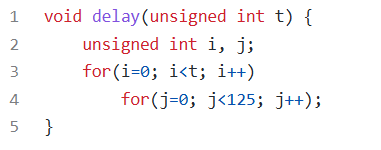
Use a for loop to create a simple delay (when precision is not critical).
Example Framework:
Main Loop Logic
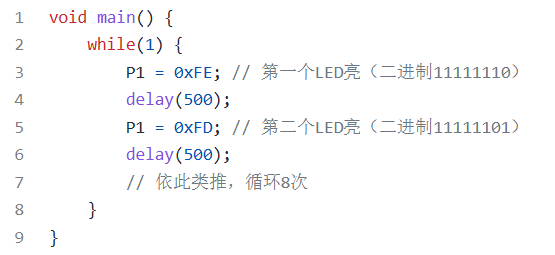
Control the LEDs to light up or turn off one by one using bit manipulation.
Example Flow:
3. Advanced Optimization: Enhancing Visual Effects
Direction Control of the Flowing Light
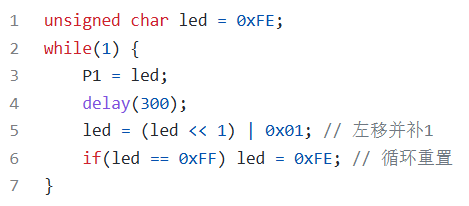
Implement bidirectional flow using left shift (<<) or right shift (>>) operations.
Example Code Snippet:
Multi-mode Switching
Add key detection to switch the running light mode (e.g., fast, slow, blinking) through external interrupts.
Configuration of the interrupt vector table and key debounce logic is required.
4. Debugging Tips: Quickly Locating Issues
Hardware Check
Confirm that the LED polarity is connected correctly (the longer leg is the positive terminal).
Use a multimeter to measure the resistance value to ensure it is 220Ω.
Software Verification
First, test a single LED to see if it lights up, eliminating port configuration errors.
Gradually increase the number of LEDs and observe if the flowing effect is continuous.
This article is an original piece by Yiy Education. Please indicate the source when reprinting!