Click the above blue text to follow us

6. VMware SDDC Solutions
Software-Defined Data Center (SDDC).
Companies are adopting software-defined data centers to virtualize computing, networking, and storage resources. SDDC accelerates the migration to a private cloud, enabling on-demand IT services for employees and customers.
As IT administrators, our task is to assist in implementing SDDC. To achieve this successfully, one must be familiar with VMware’s solutions.
Learning Objectives
-
Identify VMware solutions integrated with vSphere in SDDC.
6.1 Integration Solutions at the SDDC LayerIntegration of vSphere with every layer of the SDDC infrastructure.
- Which VMware solutions integrate with vSphere at each layer of SDDC?
- What problems can these solutions solve?
Learn more about vSphere solutions in SDDC.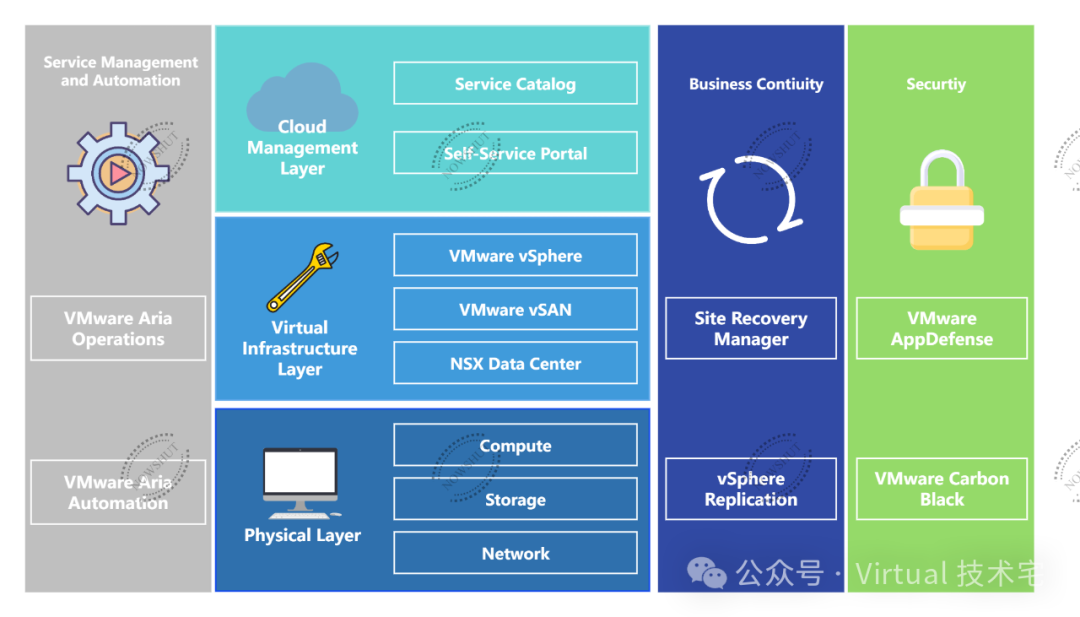 1 Physical LayerThe physical infrastructure team is responsible for managing physical servers, storage, and network connection devices.This team needs to select tested and approved hardware vendors from the VMware by Broadcom compatibility guide.vSphere administrators must work closely with the physical infrastructure team as they manage the physical resources such as hosts, storage, and networks running vSphere. 2 Virtual Infrastructure LayerManage virtual infrastructure by integrating three VMware solutions:
- vSphere manages multiple ESXi hosts and virtual machines (VMs) through vCenter Server.
- NSX Data Center provides software-defined networking resources to manage connections between all SDDC layers.
- vSAN integrates with vSphere to manage the physical storage disks of ESXi hosts as a single virtual storage device for VMs.
The above solutions in order are server (compute) virtualization, network virtualization, and storage virtualization. 3 Cloud ManagementWith cloud management software, companies provide online services for employees and customers. These service catalogs include applications, monitoring, storage, identity management, etc.Administrators are both users and providers of cloud services:
- Users: When administrators request storage space for VMs, they can issue requests through the service catalog.
- Providers: When administrators deploy new VMs to run applications for other departments in the company.
4 Service Management and AutomationBy integrating VMware Aria Automation with the service catalog and VMware Aria Operations, companies can automate and monitor the entire service and operations portfolio of their private cloud.So, what happens when we request more storage space from the service catalog?
- The VMware Aria Automation system checks the predefined custom roles, policies, and approval processes set by the cloud team.
- VMware Aria Automation approves requests without any manual intervention.
- Administrators begin using additional storage space for VMs.
- With VMware Aria Operations, the cloud team can proactively monitor storage usage to predict when new storage is needed.
5 Business ContinuityIn the business continuity plan, the company’s team includes data protection and disaster recovery solutions for critical SDDC management components.As administrators, these solutions help us protect vSphere components, such as:
- To ensure that the data center continues to operate during anticipated typhoons or landslides, the team uses Site Recovery Manager to relocate the data center to a remote location unaffected by the typhoon or landslide.
- With vSphere Replication, the team can create copies of critical business VMs. If the data of a VM is corrupted, administrators can use the copy for recovery.
6 SecurityVMware AppDefense and VMware Carbon Black provide security protection for workloads running on the data center.These solutions are powered by machine learning to understand the state and behavior of critical business applications and monitor them to detect suspicious behavior and prevent attacks in real-time.For example, AppDefense uses ESXi to monitor the behavior of guest VM applications.If the behavior of the application is abnormal or shows malicious activity, the system can pause or shut down the VM to prevent the issue from spreading to other parts of the infrastructure.SummaryVMware SDDC solutions: Some VMware solutions integrate with vSphere to help manage the company’s SDDC. Knowing which solutions to integrate and use is key to maintaining a well-performing SDDC.
——The End——