Author: Jikesong, Deputy Director of Heterogeneous Computing R&D at Tencent CSIG
〇. Background of This Article
About two years ago, I discussed the current state and issues of GPU virtualization with many colleagues on Tencent’s internal network. Since then, some new research directions have emerged, and some industry changes may completely overturn some of the previous conclusions.
This article is not meant to reintroduce the complete spectrum of GPU virtualization solutions. Instead, we will focus on the NVIDIA GPU + CUDA computing field, introducing our latest technological breakthrough, qGPU, and what its significance is. I will directly quote the discussions from that time regarding the historical introduction of GPU virtualization.
This is also not an article introducing the product features of TKE qGPU. Instead, we will delve into an unprecedented depth to explore the essence of GPU scheduling and QoS. This article is not a meticulous systematic exploration, but you can find knowledge here that has not appeared elsewhere.
This article involves speculative technical introductions from some vendors and does not guarantee accuracy.
1. Terminology Introduction
GPU ————— Graphics Processing Unit, graphics card
CUDA ———— Compute Unified Device Architecture, a computing API launched by NVIDIA in 2006
VT/VT-x/VT-d — Intel Virtualization Technology. -x indicates x86 CPU, -d indicates Device.
SVM ————— AMD Secure Virtual Machine. AMD’s equivalent technology to Intel VT-x.
EPT ————— Extended Page Table, hardware support for page table virtualization in Intel’s CPU virtualization.
NPT ————— Nested Page Table, AMD’s equivalent to Intel EPT technology.
SR-IOV ——— Single Root I/O Virtualization. PCI-SIG’s PCIe virtualization technology launched in 2007.
PF ————— Physical Function, i.e., physical card
VF ————— Virtual Function, i.e., virtual PCIe device of SR-IOV
MMIO ——— Memory Mapped I/O. Registers or storage on the device accessed by the CPU using memory read/write instructions.
CSR ———— Control & Status Register, registers on the device used for control or reflecting status. CSR is typically accessed in MMIO fashion.
UMD ———— User Mode Driver. User-space driver for the GPU, for example, the UMD for CUDA is libcuda.so
KMD ———— Kernel Mode Driver. PCIe driver for the GPU, for example, the KMD for NVIDIA GPU is nvidia.ko
GVA ———— Guest Virtual Address, CPU virtual address in the VM
GPA ———— Guest Physical Address, physical address in the VM
HPA ———— Host Physical Address, physical address seen by the Host
IOVA ———— I/O Virtual Address, DMA address sent out by the device
PCIe TLP —— PCIe Transaction Layer Packet
BDF ———— Bus/Device/Function, an ID for a PCIe/PCI function
MPT ———— Mediated Pass-Through, a method of implementing device virtualization
MDEV ——— Mediated Device, MPT implementation in Linux
PRM ———— Programming Reference Manual, hardware programming manual
MIG ———— Multi-Instance GPU, a hardware partitioning solution supported by high-end GPUs like the A100 in the Ampere architecture
2. History and Spectrum of GPU Virtualization
2.1 What Can GPUs Do
GPUs are inherently suitable for vector computation. Common scenarios and APIs include:
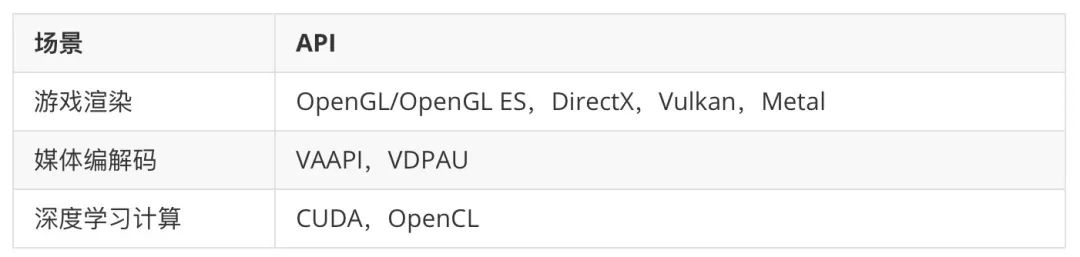 There are also scenarios such as encryption/decryption and hashing, for example, in recent years’ mining.Rendering was the original application of GPUs: the G in GPU stands for Graphics.
For desktop and server-level GPUs, there have long been only three manufacturers:
- NVIDIA: The king of GPUs. The main R&D power is in the USA and India.
- AMD/ATI: ATI was acquired by AMD in 2006. Its rendering is slightly inferior to NVIDIA, and the gap in computation is even larger.
- Intel: Long had only integrated graphics, but in recent years has started to push independent graphics cards.
In 2006, three major events occurred in the GPU industry: ATI was acquired by AMD; NVIDIA’s Jensen Huang proposed CUDA computing; Intel announced plans to develop independent graphics cards.
There is nothing new under the sun. As is often the case, there were both successes and failures: Intel quickly abandoned its independent graphics cards, only to realize in 2018 what it had given up and decided to produce independent graphics cards; AMD’s integration of ATI was not very successful, nearly dragging the entire company down, with its stock plummeting to below $2; meanwhile, CUDA, which was not well regarded at the time, achieved incredible success a few years later.
Starting in 2012, deep learning methods in the artificial intelligence field began to rise, and during this time, CUDA gained favor and quickly dominated this field.
2.2 System Virtualization and OS Virtualization
The evolution of system virtualization initially evolved orthogonally to that of GPUs:
- In 1998, VMware was founded, implementing system virtualization using Binary Translation.
- In 2001, the Cambridge University Xen Source proposed PV virtualization (Para-Virtualization), which is the active collaboration of Guest and Host to achieve virtualization.
- In 2005, Intel introduced VT, initially implemented on Itanium CPUs with VT-i (VT for Itanium), and soon after on x86 with VT-x.
- In 2007, Intel introduced VT-d (VT for Device), which is the IOMMU for x86.
- In 2008, Intel proposed EPT, supporting memory virtualization.
- In 2010, Rusty Russell, the author of the PV Hypervisor lguest in Linux (his more famous work is iptables/netfilter), proposed VirtIO, a PV device virtualization scheme for Guest-Host.
It can be said that during the PV and Binary Translation eras, virtualization was risky. Only when VT solved CPU isolation at the hardware level and ensured security did public cloud become possible. VT-x emerged around 2005-2006, and Amazon AWS proposed cloud computing in 2006, which was very forward-looking.
The three elements of a system: CPU, memory, and devices. CPU virtualization is solved by VT-x/SVM, memory virtualization is solved by EPT/NPT, and these are very certain. But what about device virtualization? Its situation is much more complex; whether it’s VirtIO or VT-d, they cannot completely solve the device virtualization problem, which we will discuss later.
In addition to this complete system virtualization, there is also a method often referred to as “virtualization”: at the OS level, bundling a series of libraries and processes in one environment, but all environments share the same OS Kernel.
Strictly speaking, this container technology is fundamentally different from system virtualization represented by KVM. With the popularity of containers, the term “virtualization” has also been used to refer to this OS-level container technology. Therefore, we also count it as a form of virtualization, but to distinguish it, we call it “OS virtualization”.
This OS virtualization was first implemented by Sun in 2005 on Solaris 10, named “Solaris Zone”. Linux began to follow suit in 2007-2008, leading to LXC containers, and by 2013, Docker emerged, completely changing the software distribution ecosystem and becoming the de facto standard.
2.3 Spectrum of GPU Virtualization
2.3.1 GPU as a PCIe Device
Without considering embedded platforms, a GPU is primarily a PCIe device. The virtualization of a GPU must be considered first from the perspective of PCIe device virtualization.
So what resources does a PCIe device have? What capabilities does it possess?
There are 2 types of resources:
- Configuration space
- MMIO
- (Some also have PIO and Option ROM, which are omitted here)
There are 2 types of capabilities:
- Interrupt capability
- DMA capability
A typical GPU device’s workflow is as follows:
- The application layer calls a supported API for the GPU, such as OpenGL or CUDA.
- The OpenGL or CUDA library submits the workload to the KMD (Kernel Mode Driver) via the UMD (User Mode Driver).
- The KMD writes the CSR MMIO and submits it to the GPU hardware.
- The GPU hardware begins to work… Upon completion, it performs DMA to memory and sends an interrupt to the CPU.
- The CPU finds the interrupt handler registered with the OS Kernel by the KMD and calls it.
- The interrupt handler determines which workload has been completed… Finally, the driver wakes up the corresponding application.
2.3.2 PCIe Passthrough
We first arrive at the most conservative implementation of GPU virtualization: PCIe device passthrough.
As mentioned earlier, a PCIe device has 2 types of resources and 2 types of capabilities. If you give both of these resources (directly or indirectly) to a VM and connect the device and VM for both capabilities, then the VM can fully utilize this PCIe device just as if it were on a physical machine. This scheme is called PCIe passthrough. It can only be 1:1 and does not support 1:N. In fact, it cannot be considered true virtualization, and there is no possibility of overselling.
In the VM, the native GPU driver is used. It allocates memory to the VM kernel, fills the GPA into the GPU’s CSR register, and the GPU uses it as IOVA to initiate DMA access. VT-d ensures that the GPA is translated to the correct HPA, allowing DMA to reach the correct physical memory.
In the PCIe protocol, at the transaction layer, there are various TLPs, with DMA being one of them: MRd/MWr. In this type of TLP, the initiator’s Routing ID must be carried, and in the IOMMU, different IOMMU page tables can be used for translation based on this Routing ID.
Clearly, PCIe passthrough can only support a 1:1 scenario and cannot meet the 1:N requirement.
2.3.3 SR-IOV
So how does the industry achieve 1:N PCIe virtualization? We immediately think of SR-IOV. SR-IOV is a specification launched by PCI-SIG in 2007, aimed at the virtualization of PCIe devices. What is the essence of SR-IOV? Considering the 2 types of resources and 2 types of capabilities we mentioned, let’s see what a VF has:
- The configuration space is virtual (privileged resource)
- MMIO is physical
- Interrupts and DMA, because the VF has its own PCIe protocol layer identifier (Routing ID, which is BDF), thus having an independent address space.
So, what devices are suitable for implementing SR-IOV? They must meet two points:
- Hardware resources must be easy to partition
- Stateless (or at least close to stateless)
Among common PCIe devices, the most suitable for SR-IOV is the network card: one or more pairs of TX/RX queues + one or more interrupts, combined with the previous Routing ID, can be abstracted as a VF. Moreover, it is nearly stateless.
Consider NVMe devices; their resources are also easy to partition, but they have stored data, which raises more concerns in implementing SR-IOV.
Returning to GPU virtualization: why did the SR-IOV specification appear in 2007, yet it wasn’t until 2015 that the first “seemingly” SR-IOV-capable GPU appeared in the industry? This is because, although GPUs are fundamentally stateless, their hardware complexity is extremely high, far exceeding that of NICs and NVMe devices, making it difficult to implement hardware resource partitioning.
Note
[1] AMD S7150 GPU. Used in Tencent Cloud GA2 model.
On the surface, it supports SR-IOV, but in fact, the hardware only abstracts the VF at the PCIe layer. A Virtualization-Aware pGPU driver is still required on the Host to handle VF simulation and scheduling.
2.3.4 API Forwarding
<ptherefore, 1:n,="" a="" absence="" and="" application="" demand="" emerged.="" first="" for="" gpus="" gpus:
- Rendering (OpenGL, DirectX, etc.)
- Computation (CUDA, OpenCL)
- Media encoding/decoding (VAAPI…)
The industry has implemented “GPU virtualization” at the software level based on these APIs. For example, AWS Elastic GPU:
- In the VM, there is no real or fake GPU, but it can call the OpenGL API for rendering.
- At the OpenGL API layer, the software captures the call and forwards it to the Host.
- The Host requests the GPU for rendering.
- The Host forwards the rendering result back to the VM.
API layer GPU virtualization is currently the most widely used GPU virtualization scheme in the industry. Its advantages include:
- Flexibility. For the N in 1:N, the software can decide how many to set; which VM has higher priority and which has lower priority is the same.
- Independence from GPU hardware vendors. Microsoft, VMware, Citrix, Huawei, etc., can all implement this. These APIs are publicly available.
- Not limited to system virtualization environments. Whether containers or ordinary physical machines, they can forward APIs to remote locations.
What are the drawbacks?
- Extremely high complexity. The same functionality has multiple sets of APIs (rendering with DirectX and OpenGL), and each API has different versions (like DirectX 9 and DirectX 11), leading to complicated compatibility issues.
- Incomplete functionality. There has yet to be a widely known API forwarding solution for computation rendering media. Moreover, the encoding/decoding APIs do not even exist as public APIs in the industry! [1]
Note
[1] Vulkan’s encoding/decoding support was just added, and is expected to be supported by all GPU manufacturers. See the “Future Outlook” section below.
2.3.5 MPT/MDEV/vGPU
Given these difficulties, the industry has proposed a third solution beyond SR-IOV and API forwarding. We call it MPT (Mediated Pass-Through). MPT is essentially a universal PCIe device virtualization scheme and can even be used for devices outside of PCIe. Its basic idea is:
- Sensitive resources like configuration space are virtual
- Critical resources like MMIO (CSR part) are virtual to enable trap-and-emulate
- Performance-critical resources like MMIO (GPU memory, NVMe CMB, etc.) are directly assigned to the VM after hardware partitioning
- There must be a Virtualization-Aware driver on the Host to handle simulation and scheduling, which is essentially the device model for vGPU
Thus, the VM can see a “seemingly” complete GPU PCIe device, which can also attach the native GPU driver. For rendering, the basic workflow of vGPU is:
- The GPU driver in the VM prepares a memory block that holds the rendering workload.
- The GPU driver in the VM writes the physical address (GPA) of this memory block into the MMIO CSR.
- The Host/Hypervisor/driver captures this MMIO CSR write operation and retrieves the GPA.
- The Host/Hypervisor/driver converts the GPA into HPA and pins the corresponding memory pages.
- The Host/Hypervisor/driver writes the HPA (not GPA) into the real MMIO CSR of the pGPU.
- The pGPU works, completes the rendering workload, and sends an interrupt to the driver.
- The driver finds out which interrupt corresponds to which workload — which vGPU submitted this workload? — and injects a virtual interrupt into the corresponding VM.
- The GPU driver in the VM receives the interrupt, knows that the workload has completed, and the result is in memory.
This is the basic implementation idea of NVIDIA GRID vGPU and Intel GVT-g (KVMGT, XenGT). It is generally believed that the graphics stack is the most complex in the OS, and the complexity increases tremendously after virtualization. Any programming error can make debugging extremely painful. However, once stabilized, this MPT solution can balance 1:N flexibility, high performance, and complete functionality for rendering, computation, and media… Isn’t it perfect?
Actually, it is not.
The biggest flaw of this solution is that it must have a pGPU driver responsible for vGPU simulation and scheduling work. Logically, it serves as a device model implemented in kernel mode. Moreover, since GPU hardware usually does not disclose its PRM, only GPU vendors can provide such Virtualization-Aware pGPU drivers. Using vendor-provided MPT solutions essentially creates a dependence on the vendor.
2.3.6 SR-IOV: Revisited
Returning to GPU’s SR-IOV. Starting with the S7150, AMD and NVIDIA from the Turing architecture have supported SR-IOV on data center GPUs. However, again, it is not the same SR-IOV as NICs; it requires a vGPU device model on the Host to simulate VF access from the VM.
Therefore, as of now, GPU’s SR-IOV merely encapsulates the VF routing identifier at the PCIe TLP layer, thereby avoiding runtime software DMA translation, and aside from that, it does not differ fundamentally from the MDEV-based MPT solution.
2.3.7 Spectrum Table
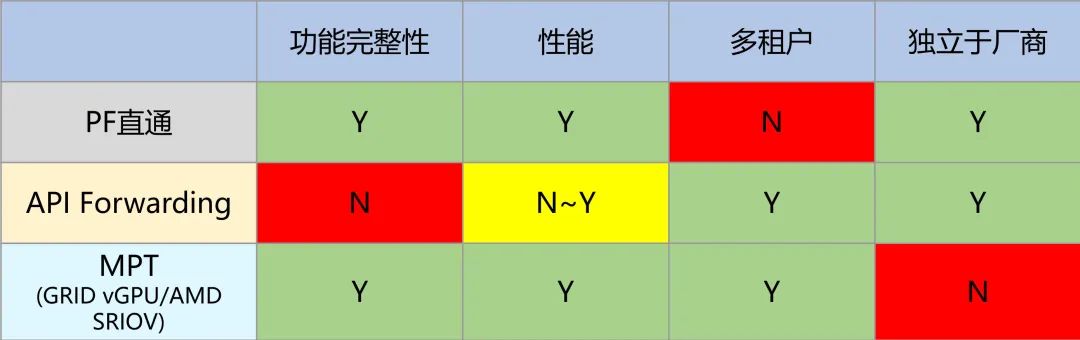
After introducing the above schemes, let’s take another look at the software stacks for CUDA computation and OpenGL rendering scenarios to see what we can discover:
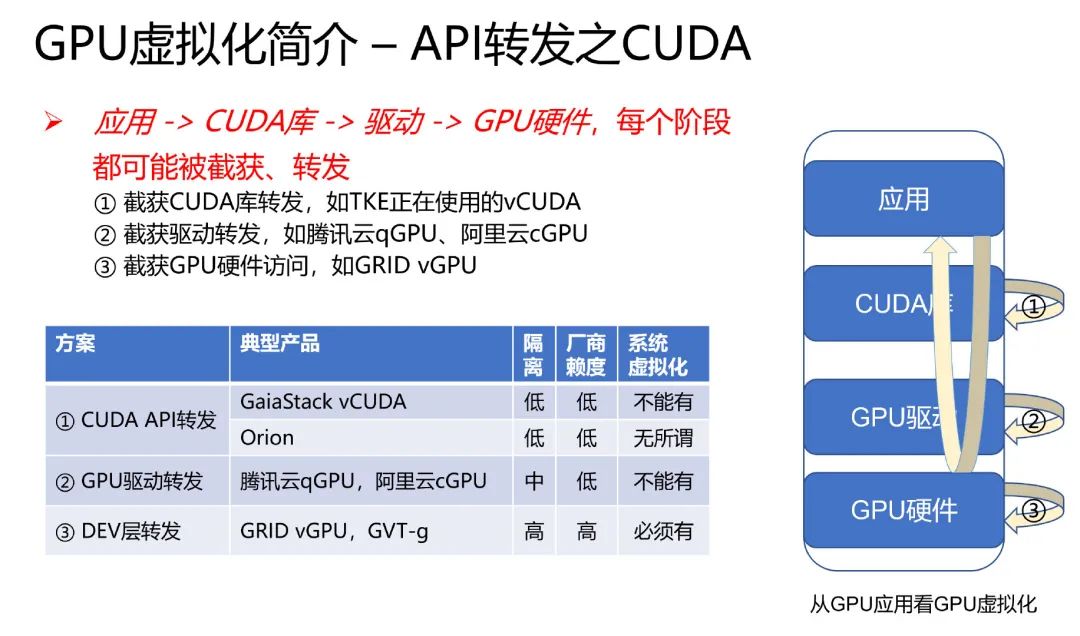
CUDA computation stack:
OpenGL rendering stack:
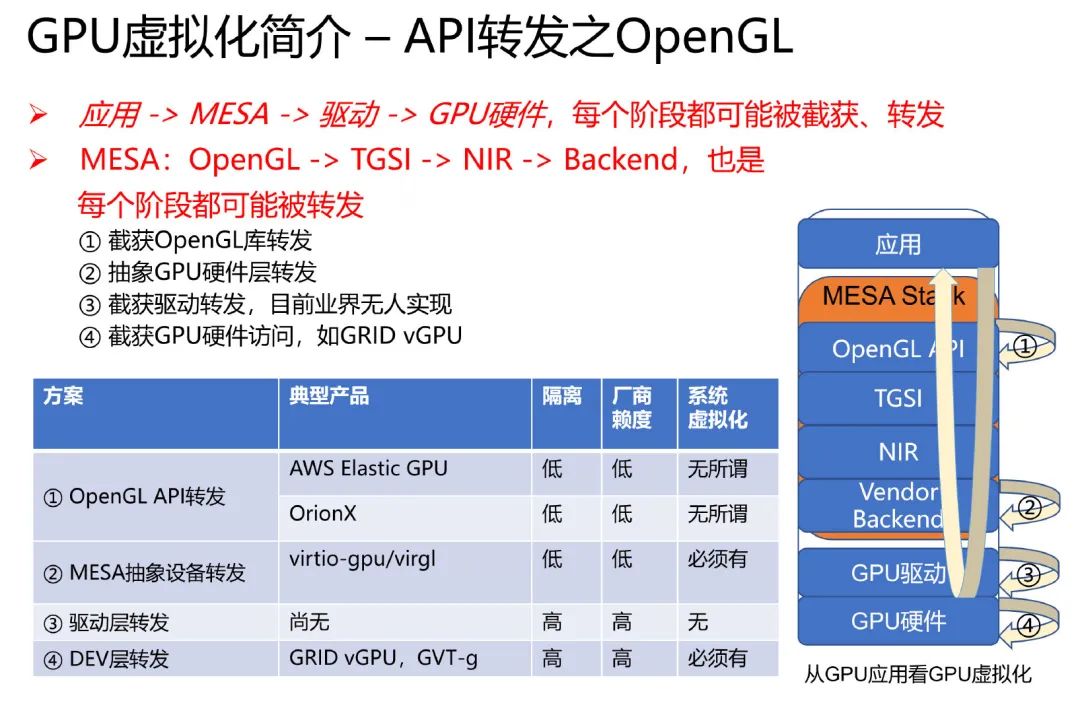
It can be seen that from the API library to the GPU hardware, every stage in the stack has the potential to be intercepted and forwarded. Moreover, it is not appropriate to refer to it simply as “API forwarding” — the DEV forwarding, as seen in GRID vGPU and GVT-g, is essentially MPT and has nothing to do with any API.
3. Container GPU Virtualization
First, what we are discussing here are GPUs produced by NVIDIA, and we only consider CUDA computing scenarios. Secondly, the virtualization here refers to OS-level virtualization container technology and is not applicable to KATA-like security containers based on system virtualization.
3.1 The CUDA Ecosystem
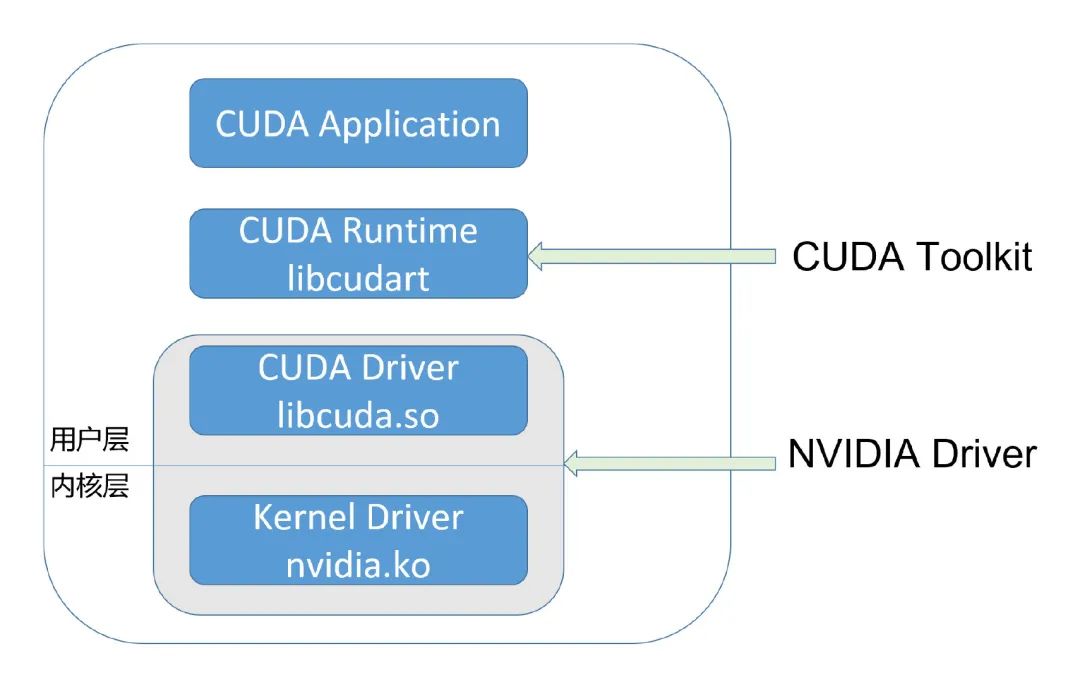
CUDA developers typically use the CUDA Runtime API, which is high-level; while the CUDA Driver API is low-level, allowing for more precise control over programs and GPU hardware. The Runtime API is a wrapper around the Driver API.
The CUDA Driver is the UMD, which interacts directly with the KMD. Both belong to the NVIDIA Driver package, and their ABI is internal to the NVIDIA Driver package and not publicly disclosed.
NVIDIA’s software ecosystem is closed:
- Whether it’s nvidia.ko, libcuda.so, or libcudart, they all have stripped symbol tables.
- Most function names are encrypted or replaced.
- Other anti-debugging and anti-reverse engineering measures.
For instance, to be compatible with different versions of Linux kernel APIs, nvidia.ko provides a rich compatibility layer, and thus some code has been open-sourced:
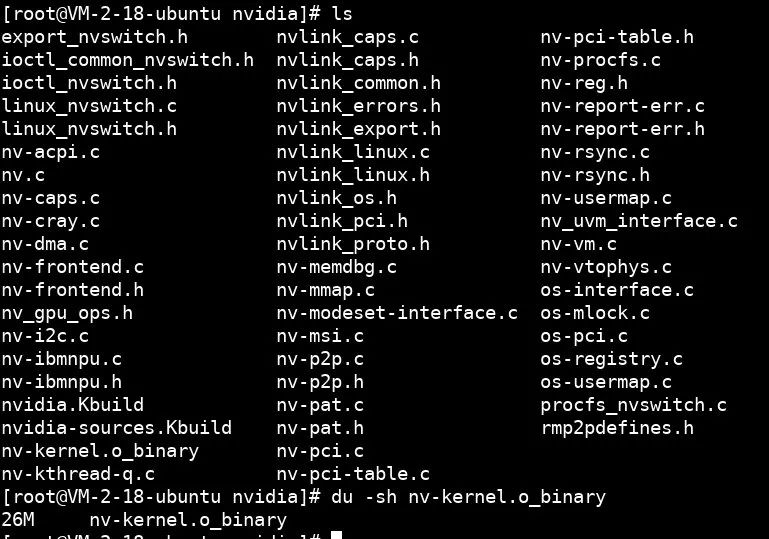
This 26MB file, stripped of symbol tables, nv-kernel.o_binary, contains the core code of the GPU driver, concealing all GPU hardware details.
3.2 vCUDA and Competing cGPU
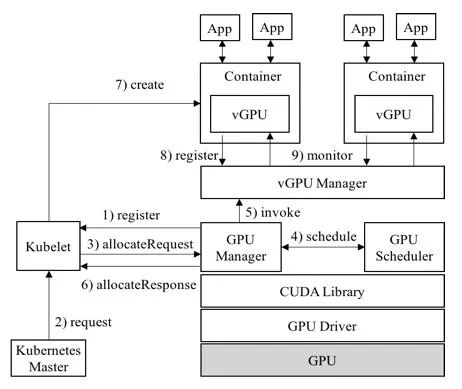
To allow multiple containers to share the same GPU and to limit the GPU share each container can use, various solutions have emerged in the industry, such as vCUDA and cGPU:
vCUDA architecture:
cGPU architecture:
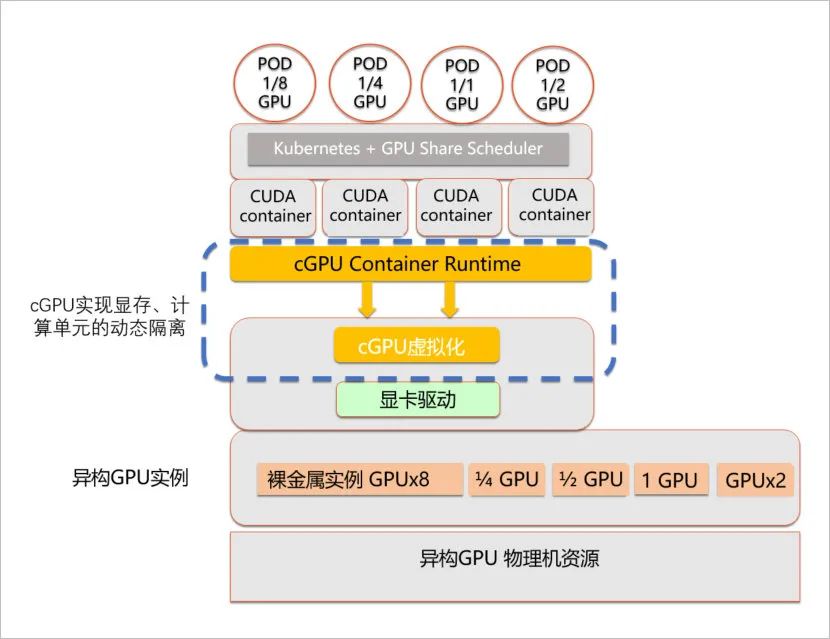
The implementation strategies of the two are different; cGPU is lower-level than vCUDA, thus achieving non-intrusive user environments.
3.3 Introduction to GPU Pooling
From the interception position, let’s look at the spectrum of GPU pooling:
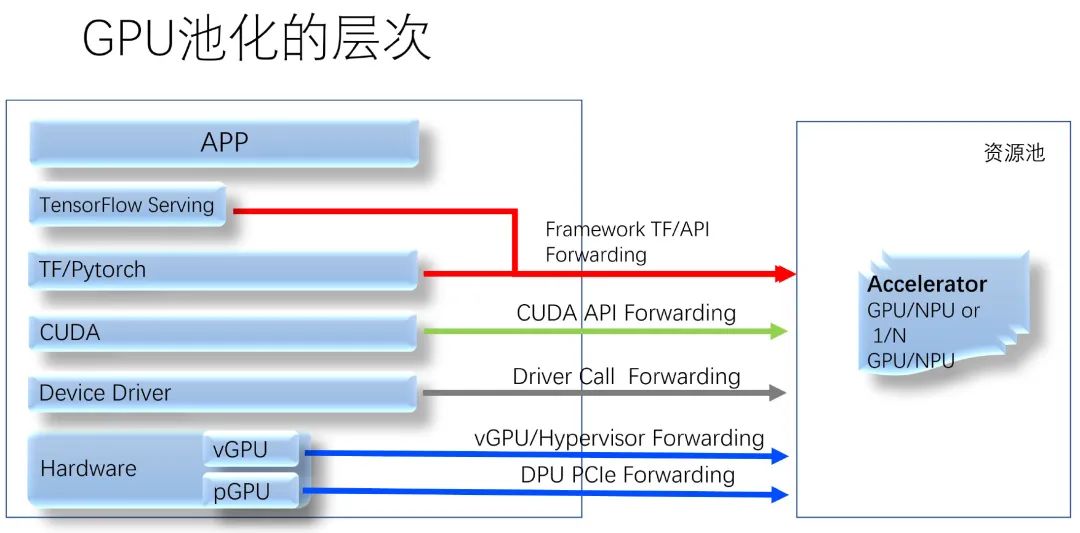
In a pooling scheme based on CUDA API forwarding, for example, in a certain product, since a single GPU card may run multiple GPU tasks on the backend machine, there still needs to be compute isolation between these tasks. To achieve this, NVIDIA MPS is enabled by default on the backend — which is the scheme with the worst fault isolation. What does this lead to? If a CUDA program in one VM accesses memory out of bounds, a bunch of unrelated CUDA applications in other VMs will be killed.
Thus, it is clear that GPU pooling must also be based on a scheme that meets both fault isolation and compute isolation.
3.4 The Essence of Compute Isolation
From the above introduction, we can see that compute isolation and fault isolation are both key to GPU virtualization and GPU pooling, and neither can be omitted. Without compute isolation, regardless of how low the virtualization overhead is, the value of the scheme will decrease; and without fault isolation between instances, it would be nearly impossible to use in a production environment.
In fact, NVIDIA GPUs provide rich hardware features that support Hardware Partitioning and Time Sharing.
1. Hardware Partitioning, i.e., space division
The MIG supported by the A100 GPU in the Ampere architecture is a form of Hardware Partitioning. Hardware resource isolation and fault isolation are both implemented at the hardware level — this is indisputable. Its issue is inflexibility: only high-end GPUs support it; it only supports CUDA computing; the A100 only supports 7 MIG instances.
2. NVIDIA MPS
Aside from MIG, the best performance for compute isolation is MPS — it merges multiple processes’ CUDA contexts into one, eliminating the overhead of context switching, and achieves compute isolation within the context. However, as mentioned earlier, the fatal flaw of MPS is that it merges many processes’ CUDA contexts into one, leading to additional fault propagation. Therefore, despite its excellent compute isolation effects, it has not been widely used in the industry for a long time, especially in multi-tenant scenarios.
3. Time Sharing, i.e., time division
NVIDIA GPUs support context switching based on Engine. Regardless of which generation of GPU, its Engine supports multi-task scheduling. Multiple CUDA tasks running simultaneously in an OS share the GPU in a Time Sharing manner.
Given the high cost and inflexibility of MIG, and the fatal flaws in fault isolation of MPS, in fact, only one possibility remains: Time Sharing. The only question is how to support good compute isolation while utilizing Time Sharing in cases where the original manufacturer does not support it, which is the biggest challenge faced by academia and industry.
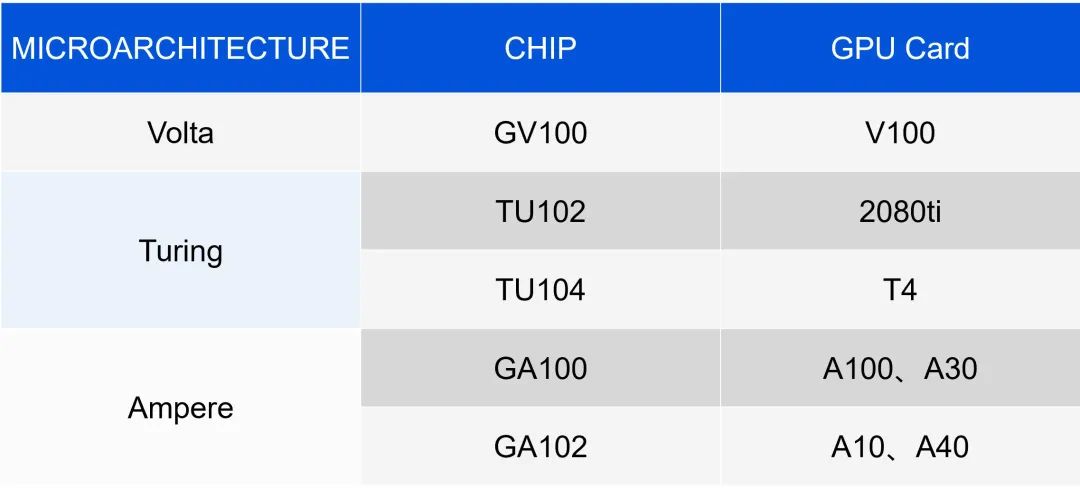
3.4.1 GPU Microarchitecture and Chip
The chip model is what truly determines how the GPU hardware operates. Whether it’s GRID Driver or Tesla Driver, to command GPU hardware, it is first necessary to determine which chip the GPU belongs to, thereby deciding the appropriate software and hardware interfaces to drive it.
3.4.2 PFIFO: GPU Scheduling Internals
PFIFO architecture:
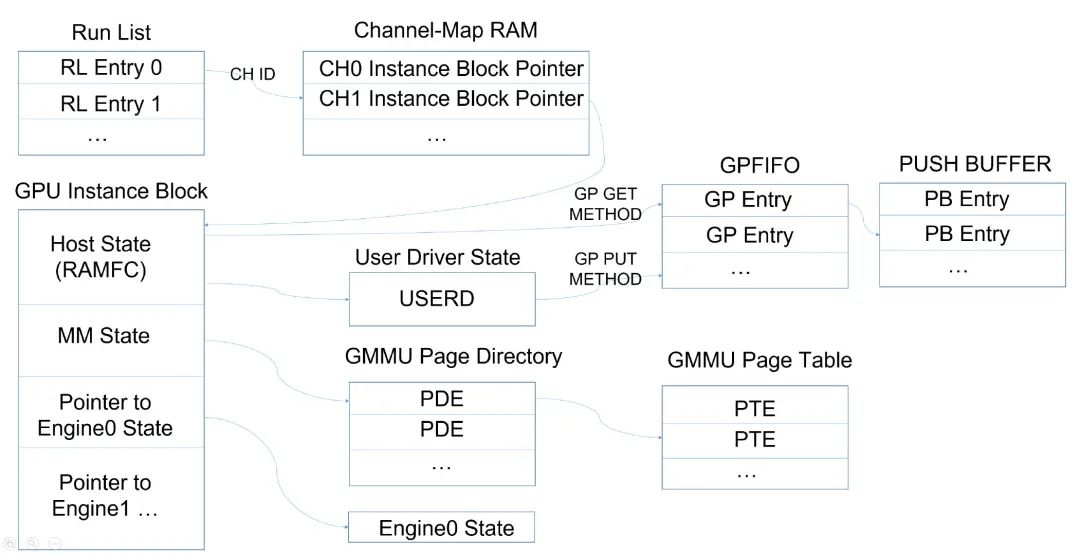
Concept explanations:
PFIFO
The GPU scheduling hardware is collectively called PFIFO.
Engine
Execution units of specific types of GPU hardware. Common engines include:
- PGRAPH — CUDA/Graphics
- PCOPY — Copy Engine
- PVENC — Video Encoding
- PVDEC — Video Decoding
- …
The most important is the PGRAPH Engine, which is the hardware execution unit for CUDA and rendering.
Channel
The abstraction of the Engine exposed to software. An app can correspond to one or more channels, and during execution, the GPU hardware executes one channel at a time on one engine.
A channel is the smallest scheduling unit for the GPU to execute at the software layer.
TSG
Timeslice Group.
Composed of one or more channels. A TSG shares a context and is executed by the GPU as a scheduling unit.
runlist
The largest unit of GPU scheduling. During scheduling, the GPU typically extracts TSG or channel from the head of the current runlist to run. Thus, switching the runlist also means switching the active TSG/channel.
PBDMA
pushbuffer DMA. Hardware on the GPU used to fetch pushbuffers from memory.
Host
The part of the GPU that interacts with SYSMEM (via the PCIe system). PBDMA is part of the Host. Note that the Host is the only bridge between the Engine and SYSMEM.
Instance Block
Each Channel corresponds to an Instance Block, which contains the state of various Engines for Save/Restore during Context Switch; contains GMMU pagetable; contains RAMFC — which includes USERD controlled by UMD.
3.4.3 Relationship Between runlist/TSG/channel
-
The Tesla driver maintains one or more runlists for each GPU, which may reside in GPU memory or system memory.
-
The runlist contains many entries, each entry is a TSG or a channel.
- A TSG can be multi-channel or single-channel.
- A channel must belong to a certain TSG.
- When the hardware executes a TSG or channel, it performs a Context Switch when encountering any of the following scenarios:
- Execution is complete
- Timeslice has expired
- Preemption occurs
3.4.4 Pending Channel Notification
Pending channel notification is a mechanism provided by USERD. UMD can use it to notify the GPU that a certain channel has a new task【1】. Thus, after the current channel is switched (either completed or timeslice expired), the GPU hardware will execute the corresponding channel.
Note
[1] Different chips have different implementations.
3.4.5 GRID vGPU from the Perspective of Hardware Scheduling
GRID vGPU supports three types of schedulers:
1. Best Effort: All vGPU tasks are submitted freely, and the GPU tries its best to execute them.
Phenomenon: If N vGPUs are started, and their load is sufficiently high, the result is that compute power is evenly divided.
Principle: All vGPUs use the same runlist. The scheduling within the runlist is still done at the channel granularity, just like running multiple CUDA tasks on a native machine.
2. Equal Share: All active vGPUs strictly have the same GPU quota.
Phenomenon: If N vGPUs are started, they strictly have the same compute power, regardless of whether they need so much.
Principle: A runlist is maintained for each vGPU. When its timeslice expires, the GRID Host Driver writes GPU registers to trigger the current runlist to be preempted and the next runlist to be scheduled.
3. Fixed Share: Each vGPU has its own fixed GPU quota.
Phenomenon: Each vGPU is strictly allocated compute power according to the specifications at creation.
Principle: Ditto.
3.5 Introduction to Tencent Cloud qGPU
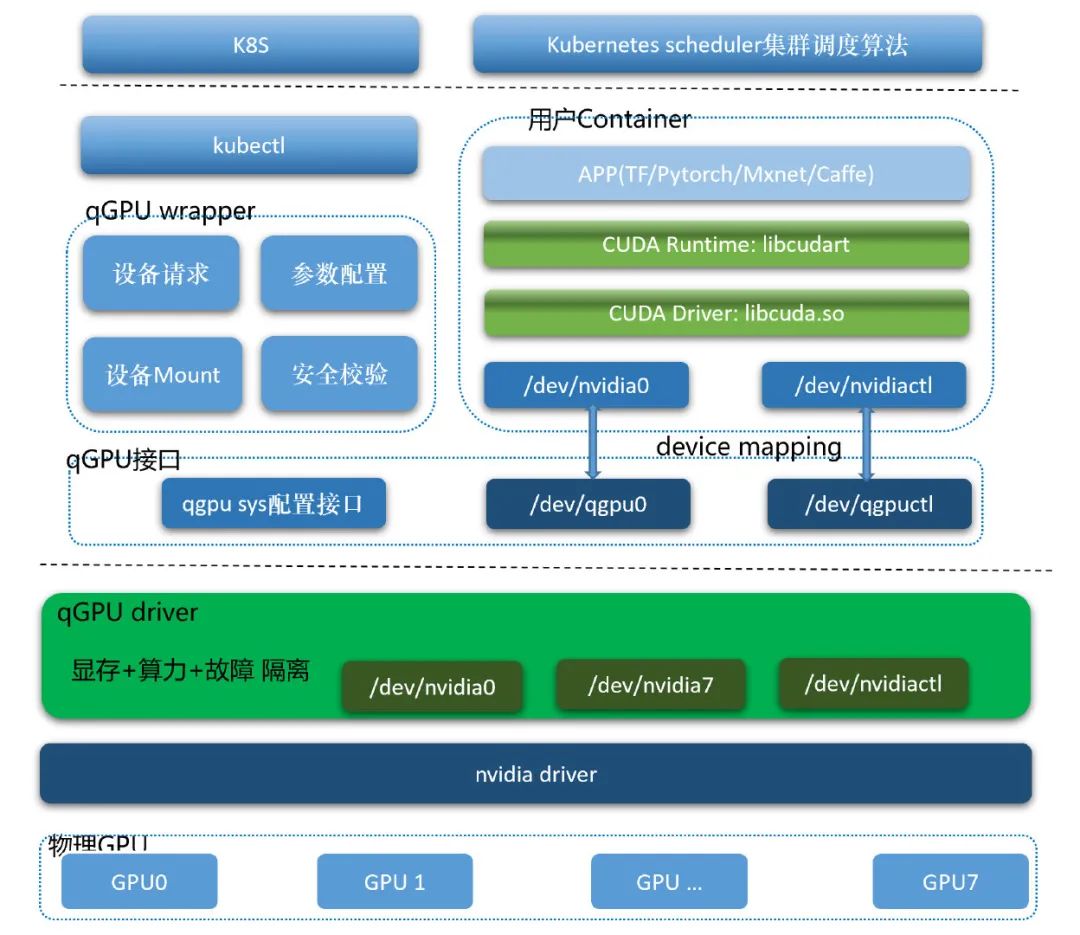
qGPU == QoS GPU. It is currently the only technology in the industry that truly achieves fault isolation, memory isolation, compute isolation, and does not intrude on the ecosystem for container GPU sharing.
3.5.1 Basic Architecture of qGPU
Basic architecture of qGPU:
3.5.2 QoS Effects of qGPU
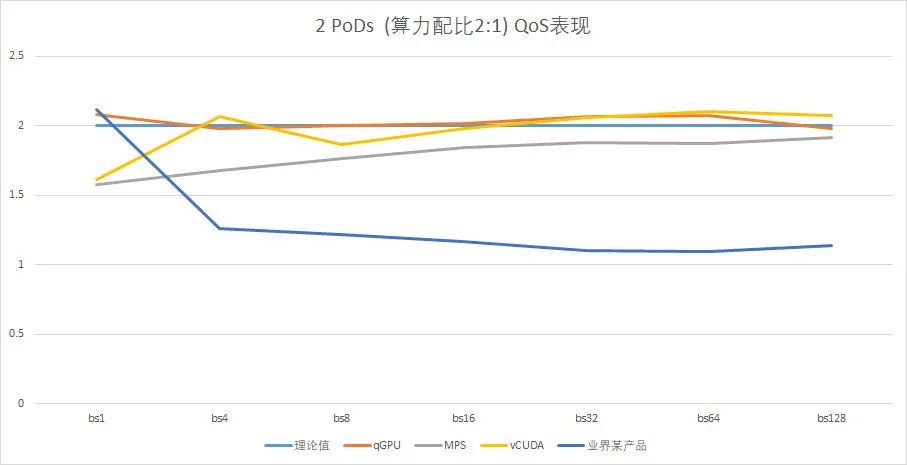
Note
[1] Test data from T4 (chip: TU104). On other chips, correctness, functionality, and performance are yet to be verified, although the principles are similar.
[2] The compute power ratio of the two PoDs is 2:1. The horizontal axis represents the batch value, and the vertical axis represents the actual compute power ratio of the two PoDs during runtime. As can be seen, with smaller batches, the load is low, making it impossible to reflect the compute power ratio; as the batch increases, both qGPU and MPS approach the theoretical value of 2, while vCUDA also deviates not far, but the industry product lacking compute isolation gradually approaches 1.
4. GPU Virtualization: Future Outlook
Since 2021, some changes have occurred in the GPU industry, e.g.:
1. NVIDIA GPU’s Breakthrough in QoS
NVIDIA holds an overwhelming advantage in CUDA computing, but its QoS performance has not been satisfactory.
For a long time, both academia and industry have made significant efforts to achieve some degree of compute isolation without NVIDIA’s support for QoS. Unfortunately, these efforts either focused on the CUDA API layer, achieving certain compute isolation but also bringing side effects; or attempted to break through at the low-level — but unfortunately, all failed.
qGPU is the biggest breakthrough in achieving QoS on NVIDIA GPUs in over a decade. Based on it:
- The multi-container shared GPU of Tencent Cloud TKE will undoubtedly lead the entire industry.
- Online inference + offline training mixing will become possible.
- The backend implementation of GPU pooling, regardless of the scheme used, has a solid foundation.
- Rendering virtualization in Linux/Android scenarios also has a solid foundation.
2. Vulkan Spec Supports Video Encode/Decode
It’s likely that the chaotic situation of non-unified encoding/decoding APIs is about to end, which has significant implications for API forwarding schemes. In the near future, a certain API scheme’s vGPU may become mainstream. Google’s activities in the community indicate that it may have such a plan.
5. References and Project Introduction
1. NVIDIA MPS
Official. Some documents are public.
2. Nouveau Driver in Linux Kernel
Open-source community version of NVIDIA GPU driver, based on DRM, with hardware details primarily relying on reverse engineering. It does not support CUDA and only supports OpenGL rendering. The code is large and contains much useful information.
3. Envytools and its NVIDIA Hardware Documentation
Supporting project of nouveau. In addition to providing various tools to profile GPU hardware details, it maintains a documentation repository recording all successfully reverse-engineered information.
4. GDEV project, an open-source implementation of CUDA
Implemented CUDA driver and CUDA runtime based on nouveau, the code is old and no longer maintained. A master-level work.
5. Libcudest, a partially RE-ed CUDA driver
CUDA Driver reverse-engineered by an NVIDIA intern. Only a small part of the interface between UMD and KMD has been reverse-engineered. No longer maintained.
6. vCUDA
Open-source project.
7. NVIDIA official: nvidia-uvm driver for Tesla
Official, open-source. UVM driver accompanying the Tesla Driver, code is open-source. There are many low-level interactions with the Tesla Driver, providing insight into many GPU hardware details.
8. Tesla Driver
Official. Details are all hidden in the nv-kernel.o_binary file.
9. GRID vGPU
Official. Details are also all in the nv-kernel.o_binary file. Unlike the Tesla Driver, it implements a per-vGPU runlist for vGPU’s Fixed Share and Equal Share scheduling strategies, thus having high reference value.
6. Thoughts & Acknowledgments
“Lasciate ogne speranza, voi ch’intrate.” — Dante Alighieri
“Καιρὸν γνῶθι.” — Πιττακός ο Μυτιληναίος
Using NVIDIA GPUs for computation, there are two scenarios: 1) Inference business, often online; 2) Training business, often offline. It is difficult to mix these two businesses on the same GPU. Even between two online inference businesses, it is also challenging to mix them. Because without QoS isolation, you cannot know which business will have a traffic surge that affects another business. Thus, for a long time, critical online businesses have low GPU utilization, and as far as we know, it is mostly below 50%, with some specific BG’s inference business only reaching about 20%. Even if the GPU is expensive, even if one business does not fill the GPU, it can only be so.
We naturally ask: is NVIDIA not doing well in QoS? Obviously not. Both MPS and GRID vGPU have excellent QoS performance. However, why does MPS redundantly introduce CUDA Context Merging? Is it really because it brings some performance benefits? I am skeptical. In my view, a more credible explanation is that NVIDIA, with its market dominance, does not wish to enhance GPU utilization. Excellent hardware combined with a closed software ecosystem can certainly yield substantial profits.
Efforts in CUDA compute isolation from academia and industry are not listed here one by one【1】. Among them are both master-level works like GDEV done by one person, and nutrient-less, spam-like papers. Interestingly, almost all efforts have been at the upper level, with few having the courage to dive into the details of GPU hardware. We have dived in and are fortunate to have succeeded.
- Thanks to all my colleagues in the Tencent Cloud virtualization team for working late together, analyzing various reliable and unreliable projects and papers, brainstorming various possible software and hardware details, and discussing various technical possibilities;
- Thanks to all my colleagues in the Tencent Cloud TKE team for coordinating with customers to gather requirements and collaborating on product development;
- Thanks to colleagues from WXG for helping us sort out the pain points of GPU utilization;
- Thanks to similar products from competitors, whose ideas are undoubtedly excellent;
Note
[1] A partial list can refer to Yan Shuhan’s article: GPU Sharing for Deep Learning
The “Code with Fun” video challenge is here!
Upload videos to win HHKB keyboards and Logitech mice!
For more information about the event, add WeChat:teg_helper (Note: Code with Fun)

Latest video on the video account