Flame Alarm Experiment (Flame Detection Sensor)
1. Course Content
Understand the principles of flame sensors, use flame sensors and buzzer modules to create a simple flame alarm experiment, and output the corresponding results to the serial assistant.
2. Course Objectives
1.Understand the principles of flame sensors
2.Drive the flame sensor
3.Drive the buzzer
4.Output results to the serial port
3. Hardware Overview
3.1 STM32 Overview
Refer to the “STM32F4 Series Chinese Reference Manual” provided by the simulation system.
3.2 Overview of Flame Sensors
Refer to the documentation provided by the simulation system “Flame Sensor Manual” or “Introduction to Flame Sensors“.
3.3 Overview of Buzzers
Refer to the documentation provided by the simulation system “Buzzer Manual“.
4. Hardware Design
The hardware resources involved in this course and the corresponding pin connections are shown in the diagram below1.
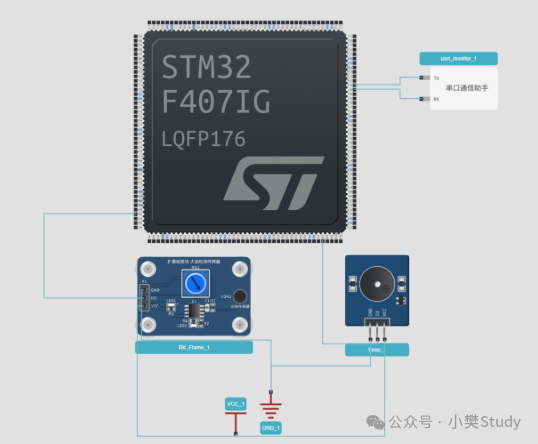
Figure1-Simulation Experiment Hardware Connection Circuit Diagram
|
|
BuzzerIO |
FlameDO |
|
STM32F407IG |
PH7 |
PA1 |
Table1-Simulation Experiment Pin Connection Relationship Table
5. Software Design
1.Initialize the flame sensor
2.Initialize the buzzer
3.Initialize serial port1
4.Implement alarm logic
5.Continuously check if the flame sensor is triggered
6.Output flame detection results to the serial port
/** ****************************************************************************** * @ Name Flame Alarm Experiment * @ Version STD Library V3.5.0 * @ Description Suitable for embedded virtual simulation platform * Run simulation, open serial port, serial assistant outputs flame monitoring information, buzzer alarms when fire is detected. * Flame:DO——>PA1 * BEEP: IO——>PH7 * @ Note This program is for learning purposes only ****************************************************************************** */ #include "sys.h"#include "delay.h"#include "stm32f4xx.h"#include "stm32f4xx_conf.h"#include "usart.h"#include "beep.h"#include "flame.h"int main(void){ Flame_Init(); //Initialize flame sensor Beep_Init(); //Initialize buzzer uart_init(115200); while (1) { Flame(); }}6. Simulation
Refer to the platform user manual to set up the flame alarm experiment environment on the simulation platform and conduct the simulation experiment.
7. Experimental Phenomena
Compile the program to run the simulation, simulate triggering the flame. Observe the action of the buzzer on the simulation experiment platform, as well as the flame information output by the serial assistant.
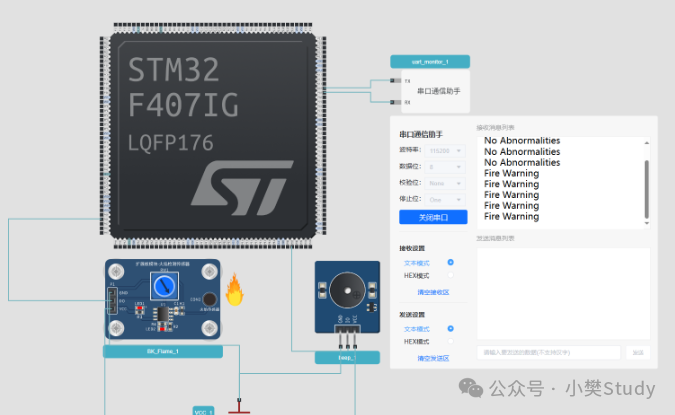
Figure2-Simulation Experiment Phenomena
Simulation website address:https://app.puliedu.com/#/
Contact information: When adding me, please specify the purpose.

Hardware R&D engineer is “open for business”! Accepting various hardware project orders to bring your ideas to reality!
Professional PCB design services are now available! High cost-performance + fast delivery, helping you double your product development efficiency!Parking Space Magnetic Detection Experiment (Hall Sensor)