“An ESP32-S2, synchronizing the radio with the world!”This project builds a “dual-mode Internet + FM radio” using the Espressif ESP32-S2. The device automatically calibrates the time upon startup and connects to a preset Wi-Fi to listen to online radio stations like Qingting FM. It can also switch to receive FM radio stations in the frequency range of 87–108 MHz, with one-click mute and unmute options, and allows users to switch between network, radio, and time display pages using buttons. The project is based on ESP-IDF, ESP-ADF, and the LVGL graphics library, achieving a complete radio experience that balances hardware interaction and visual interface.
Project GitHub link:
https://github.com/Daweiandhislittlefriend/esp32s2-radio
Clone the project
git clone https://github.com/Daweiandhislittlefriend/esp32s2-radio.git
Implemented Features

1. Automatic time calibration upon startup; if calibration fails within 20 seconds, the device will restart and attempt calibration again until successful.
2. Automatically connects to preset Wi-Fi to listen to HLS protocol online radio programs upon startup.
3. Receives FM radio stations in the frequency range of 87 MHz to 108 MHz.
4. Mute and unmute operations can be performed in both modes.
5. Switches between network radio page, FM radio page, and time display page using buttons.
6. Switches between radio stations in network mode and frequencies in FM mode using buttons.
Hardware Introduction
 1. Reference materialsFor the components used, PCB, and schematic files, please refer tohttps://www.eetree.cn/project/detail/419
2. Brief introduction to the radio schematic
USB to serial circuit, automatic download circuit.
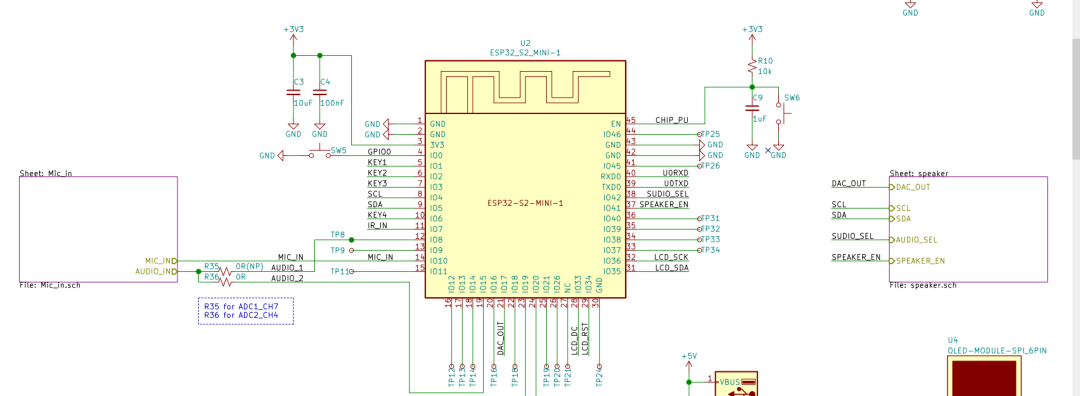
Surrounding circuit of the ESP32-S2 module.
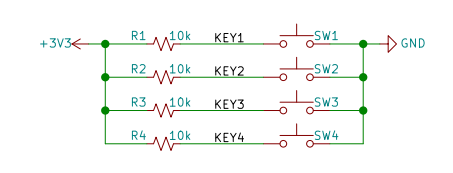
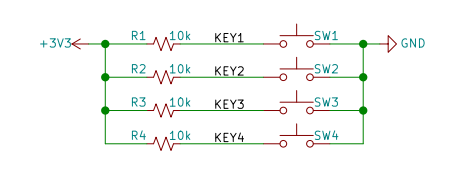
Button circuit, low level when pressed.
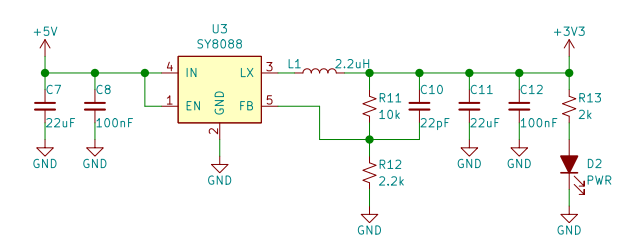
Power circuit, 5V->3.3V.
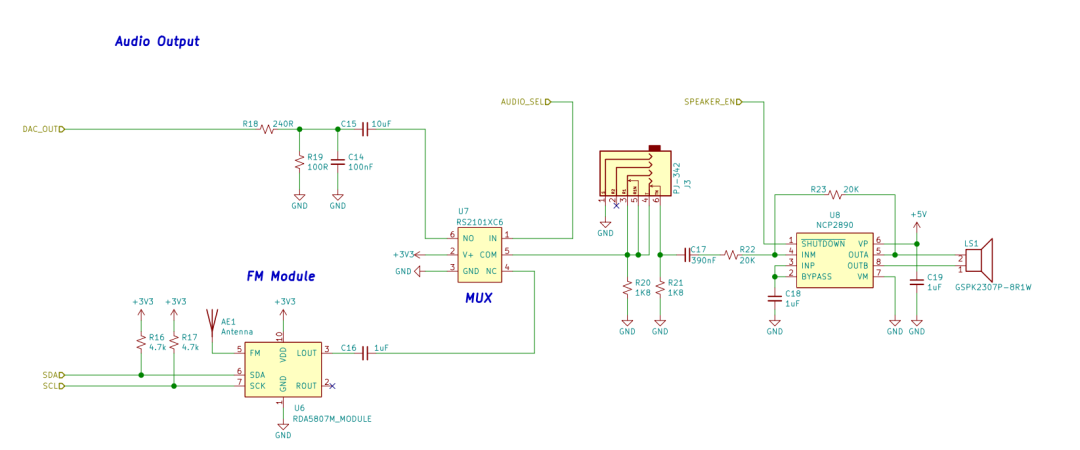
FM, analog switch, audio amplifier circuit.

Design Concept

1. Project foresight
When I first saw this project, I had not previously worked with the ESP32’s esp-idf framework, and I had never heard of the ESP32-S2. I truly had no solutions, especially regarding the audio part of the network radio. Through my research, I found that most peers were using the Arduino development environment, which I have also encountered. The interface is simple, and writing code is relatively easy, but I do not prefer this environment mainly because it does not allow viewing the source code (or it is cumbersome to view), so I decided to use the official esp-idf framework. Since many students had already completed the radio project during the summer, the primary reference documents were their codes written during that time. After studying several classmates’ codes, I found one classmate, DamingBear, who implemented all the functions and demonstrated good results:
https://www.eetree.cn/project/detail/520, I was determined to study his code. After two weeks of research, with the help of this enthusiastic senior, I roughly understood the development process of the ESP32-S2 and the entire setup of the radio. I then began to port those functions and modify some known issues. Finally, I utilized a month of winter vacation to implement all the required functions of the project.
2. Design block diagram
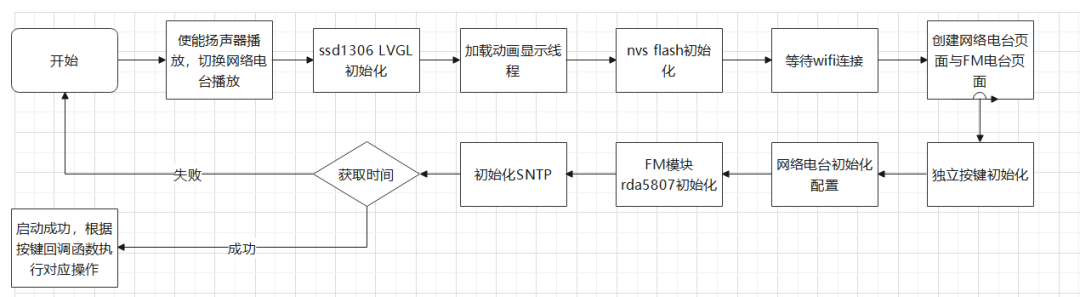
3. Program logic
As shown in the block diagram, after powering on, a series of component initializations are performed, followed by SNTP time calibration. If SNTP calibration is not successful within 20 seconds, the device will restart until calibration is successful.
SSD1306 initialization reference
https://docs.espressif.com/projects/esp-iot-solution/zh_CN/latest/index.html, initialize SPI frequency to 80MHz, then calllvgl_init(&g_lcd, NULL) function to initialize LVGL configuration. Since this project does not use a touchscreen, the second parameter is null and no adaptation for touch is made.
Loading animation display thread simply creates a thread with the lowest priority, which creates a screen and changes the content on the screen every 50ms. After the time acquisition success callback function, this thread is deleted.
NVS flash initialization and Wi-Fi connection reference play_living_stream_example example. It is worth noting that the Kconfig.projbuild file of this example needs to be copied to the main folder of your own project. This is for pre-configuring the Wi-Fi name and password before compilation. Note that Wi-Fi only supports the 2.4GHz band.
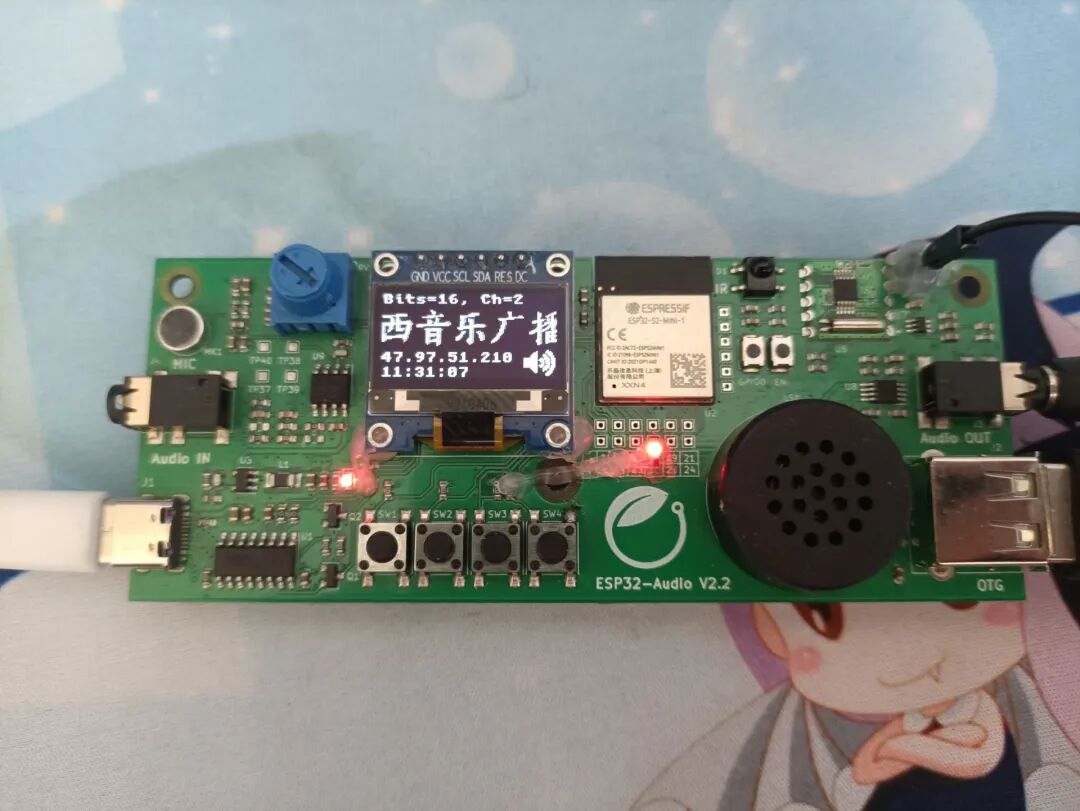
Creating the network radio page and FM radio page mainly involves creating screens and labels, while setting the fonts used for each label (this design only uses three fonts, lv_font_montserrat_20,Chinese_characters (custom font), UNSCII 8 (default)) display positions, display content, display screens, etc. One screen is responsible for displaying information from the network radio, while the other is responsible for displaying information from the FM radio. The network radio displays: IP address, program name, audio information, current time. The FM radio displays: frequency, RSSI, current time. Along with the time screen, three screens exist simultaneously, controlled by buttons for switching. When switching, there is a simple sliding animation; the program can set the animation time. When switching to another screen, the previous screen is not deleted and still occupies memory (only a few kB), effectively running in the background.
Independent buttons also refer to the examples in the ESP-IoT-Solution programming guide:
https://docs.espressif.com/projects/espressif-esp-iot-solution/zh_CN/latest/index.html, which can detect single clicks, double clicks, multiple clicks, and long presses. Two methods are provided for detection: polling and callback. The project uses single click and long press of buttons, employing the callback method for independent buttons. The configuration of button timing can be done in menuconfig. It is worth noting that, as stated in the official documentation, it is best not to use delay functions in the button callback function, as I have tested this can affect system operation. In long press, I do not need to quickly adjust the FM reception frequency, so I used a variable in the update time thread that increases every 100ms. Thus, during a long press, only when this variable changes do I adjust the FM reception frequency. I find this method somewhat clumsy, but I have not yet deeply researched other methods; perhaps functions in FreeRTOS could be useful, and readers can try other methods.
Network radio initialization configuration references pipeline_living_stream, pipeline_play_mp3_with_dac_or_pwm, and play_mp3_control. During operation, the first network radio will be automatically prepared for playback, first obtaining the m3u8 file, then downloading, decoding, and playing the AAC audio address in the file. The functions for obtaining, decoding, and playing are referred to as elements in ADF. DamingBear has already ported them, and I used them directly. Our own porting method is to carefully study the meaning of each line of code in these three examples and port the necessary functions to our own project. Using the official audio development framework can save developers a lot of effort and time; we do not need to reinvent the wheel.
FM5807 initialization references esp-idf-lib\examples\rda5807m. Using the official library, we do not need to worry about how to drive it specifically, but when encountering problems, we have to study whether the underlying driver has issues.
Time calibration directly uses the SNTP example in IDF and registers the callback function after successful calibration. In the callback function, a time screen and an update time thread are created. We only need to calltime(&now) function to update the time, which is very simple. After that, it is just preparation for display. To facilitate time segmentation, I processed the time into this format, e.g., 2022-01-28#20:59:59#Friday, then called the C standard library functionchar *strtok(char *str, const char *delim) to split the time into three segments for display.
Regarding some files for CMAKE builds, such as CMakeLists.txt, sdkconfig, Kconfig.projbuild, component.mk, and component.cmake syntax and usage, I also have a little knowledge, just reaching a level of simple usage. Everyone can find relevant materials to study. This is the content of my CMakeLists.txt.
# The following lines of boilerplate have to be in your project's# CMakeLists in this exact order for cmake to work correctlycmake_minimum_required(VERSION 3.5)include($ENV{IDF_PATH}/tools/cmake/project.cmake)include($ENV{ADF_PATH}/CMakeLists.txt)include(${CMAKE_CURRENT_LIST_DIR}/components/esp-iot-solution/component.cmake)add_definitions(-DCONFIG_LVGL_TFT_DISPLAY_MONOCHROME)project(esp32s2-radio)
Main Challenges Encountered and Solutions

As the saying goes, “Those who plant trees benefit later generations.” DamingBear has helped us avoid many pitfalls, and I am particularly grateful to this senior.
1. SSD1306 issue
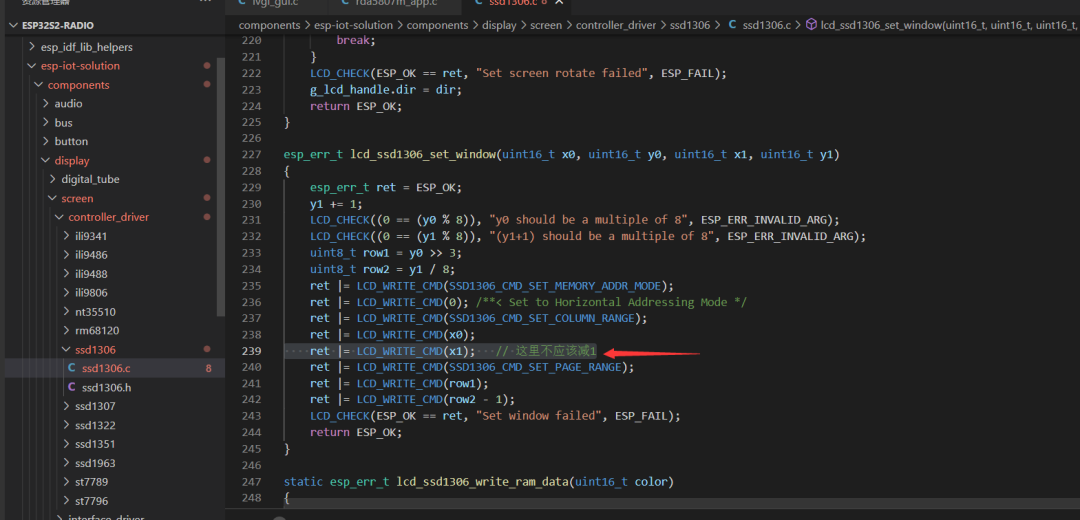
SSD1306 horizontal termination range error:
https://github.com/espressif/esp-iot-solution/issues/103
We need to change according to the image below.
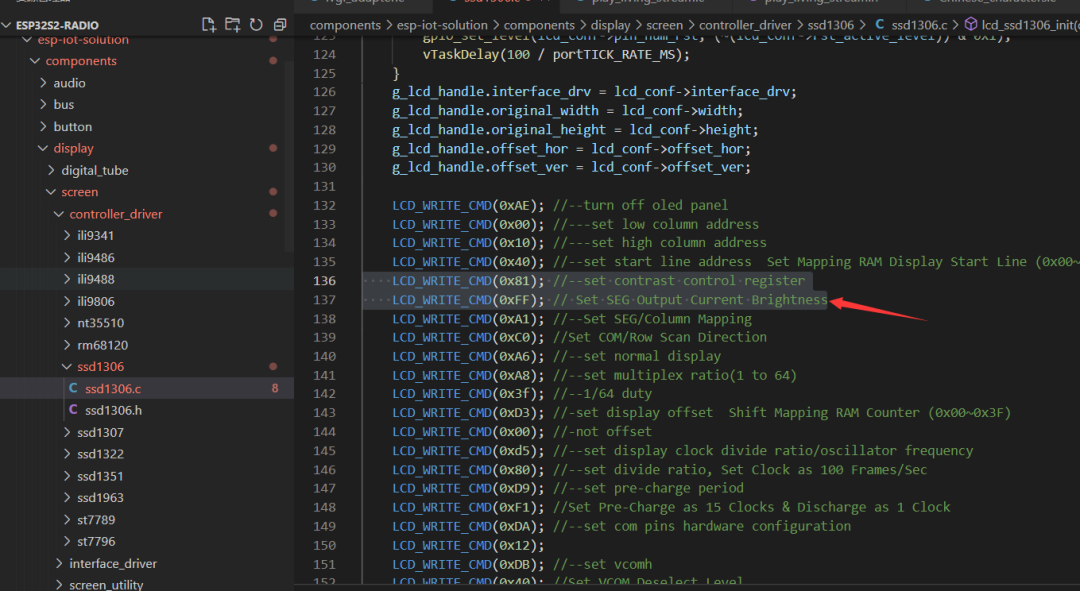
2. Solving the low brightness issue of the OLED display, adjusting the screen to the brightest.
3. RDA5807 not functioning properly; for specific issues, please refer to that senior. My solution is as follows:
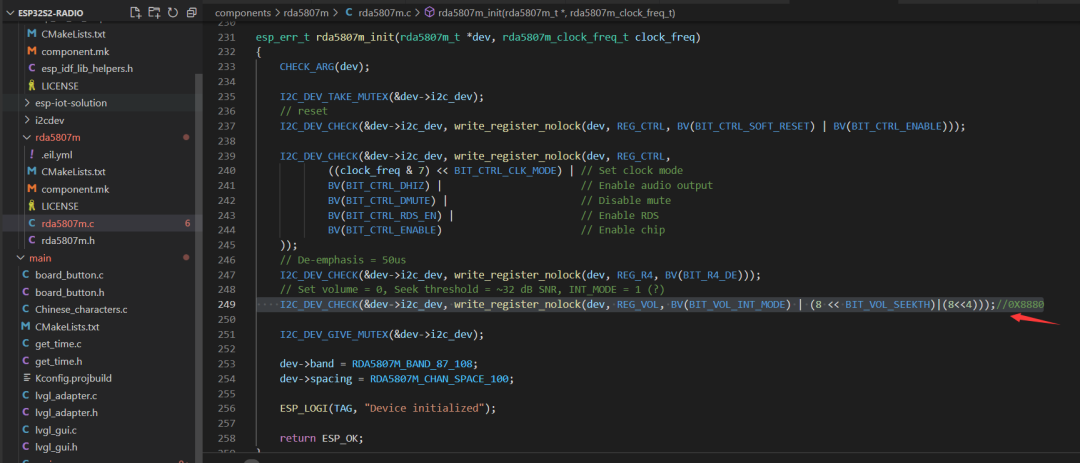
4. SSD1306 porting issue
Refer to the lvgl example in lv_port_esp32 and the file esp-iot-solution\components\gui\lvgl_gui\lvgl_adapter.c from Espressif.
We need to copy the ex_disp_rounder and ex_disp_set_px functions. The specific ported code is as follows:
#include <stdio.h>#include <stdlib.h>#include <string.h>#include "esp_log.h"#include "freertos/FreeRTOS.h"#include "freertos/task.h"#include "freertos/event_groups.h"#include "freertos/semphr.h"#include "lvgl_adapter.h"#include "sdkconfig.h"static const char *TAG = "lvgl adapter";static scr_driver_t lcd_obj;static touch_panel_driver_t touch_obj;static uint16_t g_screen_width = 128;static uint16_t g_screen_height = 64;static lv_disp_t * disp;#define BIT_SET(a,b) ((a) |= (1U<<(b)))#define BIT_CLEAR(a,b) ((a) &= ~(1U<<(b)))static void ex_disp_rounder(lv_disp_drv_t * disp_drv, lv_area_t *area){ uint8_t hor_max = disp_drv->hor_res; uint8_t ver_max = disp_drv->ver_res; area->x1 = 0; area->y1 = 0; area->x2 = hor_max - 1; area->y2 = ver_max - 1;}static void ex_disp_set_px(lv_disp_drv_t * disp_drv, uint8_t * buf, lv_coord_t buf_w, lv_coord_t x, lv_coord_t y, lv_color_t color, lv_opa_t opa){ uint16_t byte_index = x + (( y>>3 ) * buf_w); uint8_t bit_index = y & 0x7; if ((color.full == 0) && (LV_OPA_TRANSP != opa)) { BIT_SET(buf[byte_index], bit_index); } else { BIT_CLEAR(buf[byte_index], bit_index); }}/*Write the internal buffer (VDB) to the display. 'lv_flush_ready()' has to be called when finished*/static void ex_disp_flush(lv_disp_drv_t *drv, const lv_area_t *area, lv_color_t *color_map){ lcd_obj.draw_bitmap(area->x1, area->y1, (uint16_t)(area->x2 - area->x1 + 1), (uint16_t)(area->y2 - area->y1 + 1), (uint16_t *)color_map); /* IMPORTANT!!! * Inform the graphics library that you are ready with the flushing*/ lv_disp_flush_ready(drv);}#define DISP_BUF_SIZE (g_screen_width * (g_screen_height / 8))#define SIZE_TO_PIXEL(v) ((v) / sizeof(lv_color_t))#define PIXEL_TO_SIZE(v) ((v) * sizeof(lv_color_t))#define BUFFER_NUMBER (2)esp_err_t lvgl_display_init(scr_driver_t *driver){ if (NULL == driver) { ESP_LOGE(TAG, "Pointer of lcd driver is invalid"); return ESP_ERR_INVALID_ARG; } lcd_obj = *driver; scr_info_t info; lcd_obj.get_info(&info); g_screen_width = info.width; g_screen_height = info.height; static lv_disp_drv_t disp_drv; /*Descriptor of a display driver 8.0后的版本需要设置为static! */ lv_disp_drv_init(&disp_drv); /*Basic initialization*/ disp_drv.hor_res = g_screen_width; disp_drv.ver_res = g_screen_height; disp_drv.flush_cb = ex_disp_flush; /*Used in buffered mode (LV_VDB_SIZE != 0 in lv_conf.h)*/ disp_drv.rounder_cb = ex_disp_rounder; disp_drv.set_px_cb = ex_disp_set_px; size_t free_size = heap_caps_get_free_size(MALLOC_CAP_INTERNAL | MALLOC_CAP_8BIT); const size_t remain_size = 60 * 1024; /**< Remain for other functions */ size_t alloc_pixel = DISP_BUF_SIZE; if (((BUFFER_NUMBER * PIXEL_TO_SIZE(alloc_pixel)) + remain_size) > free_size) { size_t allow_size = (free_size - remain_size) & 0xfffffffc; alloc_pixel = SIZE_TO_PIXEL(allow_size / BUFFER_NUMBER); ESP_LOGW(TAG, "Exceeded max free size, force shrink to %u Byte", allow_size); ESP_LOGW(TAG, "Free Size : %u Byte", free_size); ESP_LOGW(TAG, "Used Size : %u Byte", (BUFFER_NUMBER * PIXEL_TO_SIZE(alloc_pixel))); } lv_color_t *buf1 = heap_caps_malloc(PIXEL_TO_SIZE(alloc_pixel), MALLOC_CAP_INTERNAL | MALLOC_CAP_8BIT); if (NULL == buf1) { ESP_LOGE(TAG, "Display buffer memory not enough"); return ESP_ERR_NO_MEM; }#if (BUFFER_NUMBER == 2) lv_color_t *buf2 = heap_caps_malloc(PIXEL_TO_SIZE(alloc_pixel), MALLOC_CAP_INTERNAL | MALLOC_CAP_8BIT); if (NULL == buf2) { heap_caps_free(buf1); ESP_LOGE(TAG, "Display buffer memory not enough"); return ESP_ERR_NO_MEM; }#endif ESP_LOGI(TAG, "Alloc memory total size: %u Byte", BUFFER_NUMBER * PIXEL_TO_SIZE(alloc_pixel)); static lv_disp_draw_buf_t disp_buf; /* Actual size in pixels */ alloc_pixel *= 8;#if (BUFFER_NUMBER == 2) lv_disp_draw_buf_init(&disp_buf, buf1, buf2, alloc_pixel);#else lv_disp_draw_buf_init(&disp_buf, buf1, NULL, alloc_pixel);#endif disp_drv.draw_buf = &disp_buf; /* Finally register the driver */ disp = lv_disp_drv_register(&disp_drv); return ESP_OK;}/*Function pointer to read data. Return 'true' if there is still data to be read (buffered)*/static void ex_tp_read(struct _lv_indev_drv_t *indev_drv, lv_indev_data_t *data){ data->state = LV_INDEV_STATE_REL; touch_panel_points_t points; touch_obj.read_point_data(&points); // please be sure that your touch driver every time return old (last clcked) value. if (TOUCH_EVT_PRESS == points.event) { int32_t x = points.curx[0]; int32_t y = points.cury[0]; data->point.x = x; data->point.y = y; data->state = LV_INDEV_STATE_PR; } return ;}/* Input device interface,Initialize your touchpad */esp_err_t lvgl_indev_init(touch_panel_driver_t *driver){ if (NULL == driver) { ESP_LOGE(TAG, "Pointer of touch driver is invalid"); return ESP_ERR_INVALID_ARG; } touch_obj = *driver; lv_indev_drv_t indev_drv; /*Descriptor of an input device driver*/ lv_indev_drv_init(&indev_drv); /*Basic initialization*/ indev_drv.type = LV_INDEV_TYPE_POINTER; /*The touchpad is pointer type device*/ indev_drv.read_cb = ex_tp_read; /*Library ready your touchpad via this function*/ lv_indev_drv_register(&indev_drv); /*Finally register the driver*/ return ESP_OK;}
Main Code Snippets

1. Button callback function
static void button_num_0_cb(void *arg){ if (iot_button_get_event((button_handle_t)arg) == BUTTON_SINGLE_CLICK) { if (lv_scr_act() == display_time_scr) { lv_scr_load_anim(internet_scr, LV_SCR_LOAD_ANIM_MOVE_LEFT, 400, 0, false); play_living_stream_restart(); ESP_LOGI(TAG, "changed to internet_scr\n"); } else if (lv_scr_act() == internet_scr&&cnt%2==0) { /* Stop living_stream */ play_living_stream_end(); lv_scr_load_anim(FM_scr, LV_SCR_LOAD_ANIM_MOVE_LEFT, 400, 0, false); xTaskCreate(updata_rda5807m_info_task, "updata_rda5807m_task", 2048, NULL, 0, &updata_rda5807m_info_task_handle); // Switch to FM output gpio_set_level(GPIO_NUM_42, 0); ESP_LOGI(TAG, "changed to FM_scr\n"); } else if (lv_scr_act() == FM_scr) { // Switch to network radio output gpio_set_level(GPIO_NUM_42, 1); lv_scr_load_anim(display_time_scr, LV_SCR_LOAD_ANIM_MOVE_LEFT, 400, 0, false); vTaskDelete(updata_rda5807m_info_task_handle); // Delete FM screen RDA5807M info update task ESP_LOGI(TAG, "changed to display_time_scr\n"); } }}uint32_t num_button=0;static void button_num_1_cb(void *arg){ if (iot_button_get_event((button_handle_t)arg) == BUTTON_SINGLE_CLICK) { if (internet_scr == lv_scr_act()&&cnt%2==0) { // When the button is pressed, and the current screen is internet_scr, can switch radio stations // Switch to the next station URL reference mp3_control HLS_list_index++; if (HLS_list_index == MAX_HLS_URL_NUM) HLS_list_index = 0; audio_pipeline_stop(pipeline); audio_pipeline_wait_for_stop(pipeline); audio_pipeline_reset_ringbuffer(pipeline); audio_pipeline_reset_elements(pipeline); audio_element_set_uri(http_stream_reader, HLS_list[HLS_list_index].hls_url); audio_pipeline_run(pipeline); lv_label_set_text_fmt(radio_label, "%s", HLS_list[HLS_list_index].program_name); } else if (FM_scr == lv_scr_act()) { rda5807m_app_add_frequency(100); lv_label_set_text_fmt(fre_label, "%.1fMHz", ((float)rda5807m_current_fre/1000)); } } else if (iot_button_get_event((button_handle_t)arg) == BUTTON_LONG_PRESS_HOLD) { if (FM_scr == lv_scr_act()) { if(num_button!=num_time) { num_button=num_time; rda5807m_app_add_frequency(100); lv_label_set_text_fmt(fre_label, "%.1fMHz", ((float)rda5807m_current_fre/1000)); } } }}static void button_num_2_cb(void *arg){ if (iot_button_get_event((button_handle_t)arg) == BUTTON_SINGLE_CLICK) { if ( internet_scr == lv_scr_act()&&cnt%2==0) { // Switch to the previous station URL reference mp3_control HLS_list_index--; if (HLS_list_index == 255) HLS_list_index = MAX_HLS_URL_NUM - 1; audio_pipeline_stop(pipeline); audio_pipeline_wait_for_stop(pipeline); audio_pipeline_reset_ringbuffer(pipeline); audio_pipeline_reset_elements(pipeline); audio_element_set_uri(http_stream_reader, HLS_list[HLS_list_index].hls_url); audio_pipeline_run(pipeline); lv_label_set_text_fmt(radio_label, "%s", HLS_list[HLS_list_index].program_name); } else if(FM_scr==lv_scr_act()) { rda5807m_app_reduce_frequency(100); lv_label_set_text_fmt(fre_label, "%.1fMHz", ((float)rda5807m_current_fre/1000)); } } else if (iot_button_get_event((button_handle_t)arg) == BUTTON_LONG_PRESS_HOLD) { if(FM_scr==lv_scr_act())//400ms reduce once { if(num_button!=num_time) { num_button=num_time; rda5807m_app_reduce_frequency(100); lv_label_set_text_fmt(fre_label, "%.1fMHz", ((float)rda5807m_current_fre/1000)); } } }}static void button_num_3_cb(void *arg){ static bool mute=0; if (iot_button_get_event((button_handle_t)arg) == BUTTON_SINGLE_CLICK) { if ( internet_scr == lv_scr_act()) { if(cnt%2==0) { audio_pipeline_stop(pipeline); audio_pipeline_wait_for_stop(pipeline); lv_label_set_text(int_sound_icon,LV_SYMBOL_MUTE); } else { audio_pipeline_reset_ringbuffer(pipeline); audio_pipeline_reset_elements(pipeline); audio_pipeline_run(pipeline); lv_label_set_text(int_sound_icon,LV_SYMBOL_VOLUME_MAX); } cnt++; } else if(FM_scr==lv_scr_act()) { rda5807m_get_mute(&rda5807m_dev, &mute); if(mute==false) { rda5807m_set_mute(&rda5807m_dev, true); lv_label_set_text(fm_sound_icon,LV_SYMBOL_MUTE); } else { rda5807m_set_mute(&rda5807m_dev, false); lv_label_set_text(fm_sound_icon,LV_SYMBOL_VOLUME_MAX); } } }}2. Time acquisition thread
void time_task(void *pvParameters){ time_t now = 0; struct tm timeinfo = { 0 }; char strftime_buf[64]; gpio_reset_pin(LED_GPIO); /* Set the GPIO as a push/pull output */ gpio_set_direction(LED_GPIO, GPIO_MODE_OUTPUT); setenv("TZ", "CST-8", 1); tzset(); vTaskDelete( anim_xHandle ); // Delete startup animation task lv_scr_load(display_time_scr); while (1) { if(num_time%10==0) { time(&now); // update 'now' variable with current time localtime_r(&now, &timeinfo); strftime(strftime_buf, sizeof(strftime_buf), "%Y-%m-%d#%H:%M:%S#%A", &timeinfo); // e.g., 2022-01-28#20:59:59#Friday //ESP_LOGI(TAG, "The current date/time in Shanghai is: %s", strftime_buf); lv_label_set_text(time_label1, strtok(strftime_buf, "#"));// Split string strcpy(data_time_label,strtok(NULL, "#")); lv_label_set_text(time_label2,data_time_label); lv_label_set_text(time_time_label1, data_time_label); lv_label_set_text(time_time_label2, data_time_label); lv_label_set_text(time_label3, strtok(NULL, "#")); } num_time++; gpio_set_level(LED_GPIO,(num_time/10)%2); vTaskDelay(pdMS_TO_TICKS(100)); }}3. Network radio initialization function
void play_living_stream_start(void){ esp_log_level_set("*", ESP_LOG_INFO); esp_log_level_set(TAG, ESP_LOG_DEBUG); ESP_LOGI(TAG, "[1.0] Create audio pipeline for playback"); audio_pipeline_cfg_t pipeline_cfg = DEFAULT_AUDIO_PIPELINE_CONFIG(); pipeline = audio_pipeline_init(&pipeline_cfg); ESP_LOGI(TAG, "[1.1] Create http stream to read data"); http_stream_cfg_t http_cfg = HTTP_STREAM_CFG_DEFAULT(); http_cfg.event_handle = _http_stream_event_handle; http_cfg.type = AUDIO_STREAM_READER; http_cfg.enable_playlist_parser = true; http_stream_reader = http_stream_init(&http_cfg); ESP_LOGI(TAG, "[2.2] Create PWM stream to write data to codec chip"); pwm_stream_cfg_t pwm_cfg = PWM_STREAM_CFG_DEFAULT(); pwm_cfg.pwm_config.gpio_num_left = 17; pwm_cfg.pwm_config.gpio_num_right = 18; output_stream_writer = pwm_stream_init(&pwm_cfg); ESP_LOGI(TAG, "[2.3] Create aac decoder to decode aac file"); aac_decoder_cfg_t aac_cfg = DEFAULT_AAC_DECODER_CONFIG(); aac_decoder = aac_decoder_init(&aac_cfg); ESP_LOGI(TAG, "[2.4] Register all elements to audio pipeline"); audio_pipeline_register(pipeline, http_stream_reader, "http"); audio_pipeline_register(pipeline, aac_decoder, "aac"); audio_pipeline_register(pipeline, output_stream_writer, "output"); ESP_LOGI(TAG, "[2.5] Link it together http_stream-->aac_decoder-->pwm_stream-->[codec_chip]"); const char *link_tag[3] = {"http", "aac", "output"}; audio_pipeline_link(pipeline, &link_tag[0], 3); ESP_LOGI(TAG, "[2.6] Set up uri (http as http_stream, aac as aac decoder, and output is PWM)"); audio_element_set_uri(http_stream_reader, HLS_list[0].hls_url); ESP_LOGI(TAG, "[ 3 ] Set up event listener"); // audio_pipeline_run(pipeline); xTaskCreate(living_stream_task, "living_stream_task", 4096, NULL, 25, NULL); //play_living_stream_end();}4. Declaration and definition of the URL structure
#define MAX_HLS_URL_NUM (20)typedef struct{ const char * hls_url; const char * program_name;} HLS_INFO_t;uint8_t HLS_list_index = 0; HLS_INFO_t HLS_list[MAX_HLS_URL_NUM] = { {.hls_url = "http://open.ls.qingting.fm/live/386/64k.m3u8?format=aac", .program_name = "CNR中国之声"}, {.hls_url = "http://open.ls.qingting.fm/live/4985/64k.m3u8?format=aac", .program_name = "CNR中国交通广播"}, {.hls_url = "http://open.ls.qingting.fm/live/274/64k.m3u8?format=aac", .program_name = "上海动感101"}, {.hls_url = "http://open.ls.qingting.fm/live/4804/64k.m3u8?format=aac", .program_name = "怀集音乐之声"}, {.hls_url = "http://open.ls.qingting.fm/live/1005/64k.m3u8?format=aac", .program_name = "CRI环球资讯"}, {.hls_url = "http://open.ls.qingting.fm/live/387/64k.m3u8?format=aac", .program_name = "CNR经济之声"}, {.hls_url = "http://open.ls.qingting.fm/live/398/64k.m3u8?format=aac", .program_name = "阅读之声"}, {.hls_url = "http://open.ls.qingting.fm/live/1006/64k.m3u8?format=aac", .program_name = "轻松调频EZFM"}, {.hls_url = "http://open.ls.qingting.fm/live/5022405/64k.m3u8?format=aac", .program_name = "亚洲音乐台"}, {.hls_url = "http://open.ls.qingting.fm/live/20091/64k.m3u8?format=aac", .program_name = "中国校园之声"}, {.hls_url = "http://open.ls.qingting.fm/live/4900/64k.m3u8?format=aac", .program_name = "太原交通广播"}, {.hls_url = "http://open.ls.qingting.fm/live/20006/64k.m3u8?format=aac", .program_name = "太原综合广播"}, {.hls_url = "http://open.ls.qingting.fm/live/1654/64k.m3u8?format=aac", .program_name = "石家庄音乐广播"}, {.hls_url = "http://open.ls.qingting.fm/live/20485/64k.m3u8?format=aac", .program_name = "山西文艺广播"}, {.hls_url = "http://open.ls.qingting.fm/live/4900/64k.m3u8?format=aac", .program_name = "太原交通广播"}, {.hls_url = "http://open.ls.qingting.fm/live/5022396/64k.m3u8?format=aac", .program_name = "大同交通广播"}, {.hls_url = "http://open.ls.qingting.fm/live/15318393/64k.m3u8?format=aac", .program_name = "河南电台网络戏曲广播"}, {.hls_url = "http://open.ls.qingting.fm/live/1649/64k.m3u8?format=aac", .program_name = "河北音乐广播"}, {.hls_url = "http://open.ls.qingting.fm/live/4932/64k.m3u8?format=aac", .program_name = "山西音乐广播"}, {.hls_url = "http://open.ls.qingting.fm/live/1007/64k.m3u8?format=aac", .program_name = "CRI HIT FM"}, };
Code Usage

Please refer to the configuration in my video or DamingBear’s configuration, which is basically the same.

Related Demonstrations

1. Total code size after compilation:
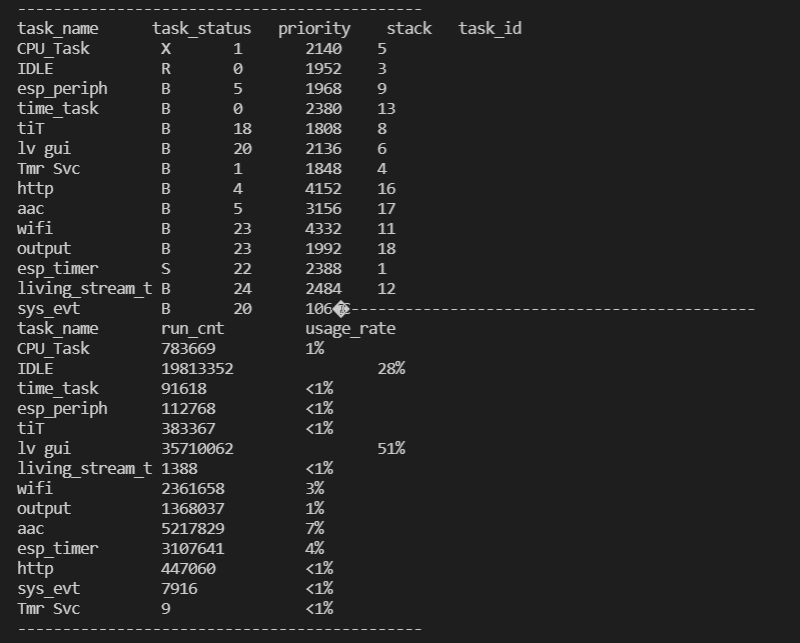
Total sizes: DRAM .data size: 15864 bytes DRAM .bss size: 20568 bytesUsed static DRAM: 0 bytes ( 0 available, nan% used)Used static IRAM: 0 bytes ( 0 available, nan% used)Used stat D/IRAM: 101759 bytes ( 275073 available, 27.0% used) Flash code: 779963 bytes Flash rodata: 202052 bytesTotal image size:~1063206 bytes (.bin may be padded larger)2. Resource usage of each thread after running the network radio for 1 minute; it can be seen that LVGL occupies the longest CPU time, possibly due to the screen refreshing at 66 frames and the label looping display requiring a large amount of computation.
3. Project image display
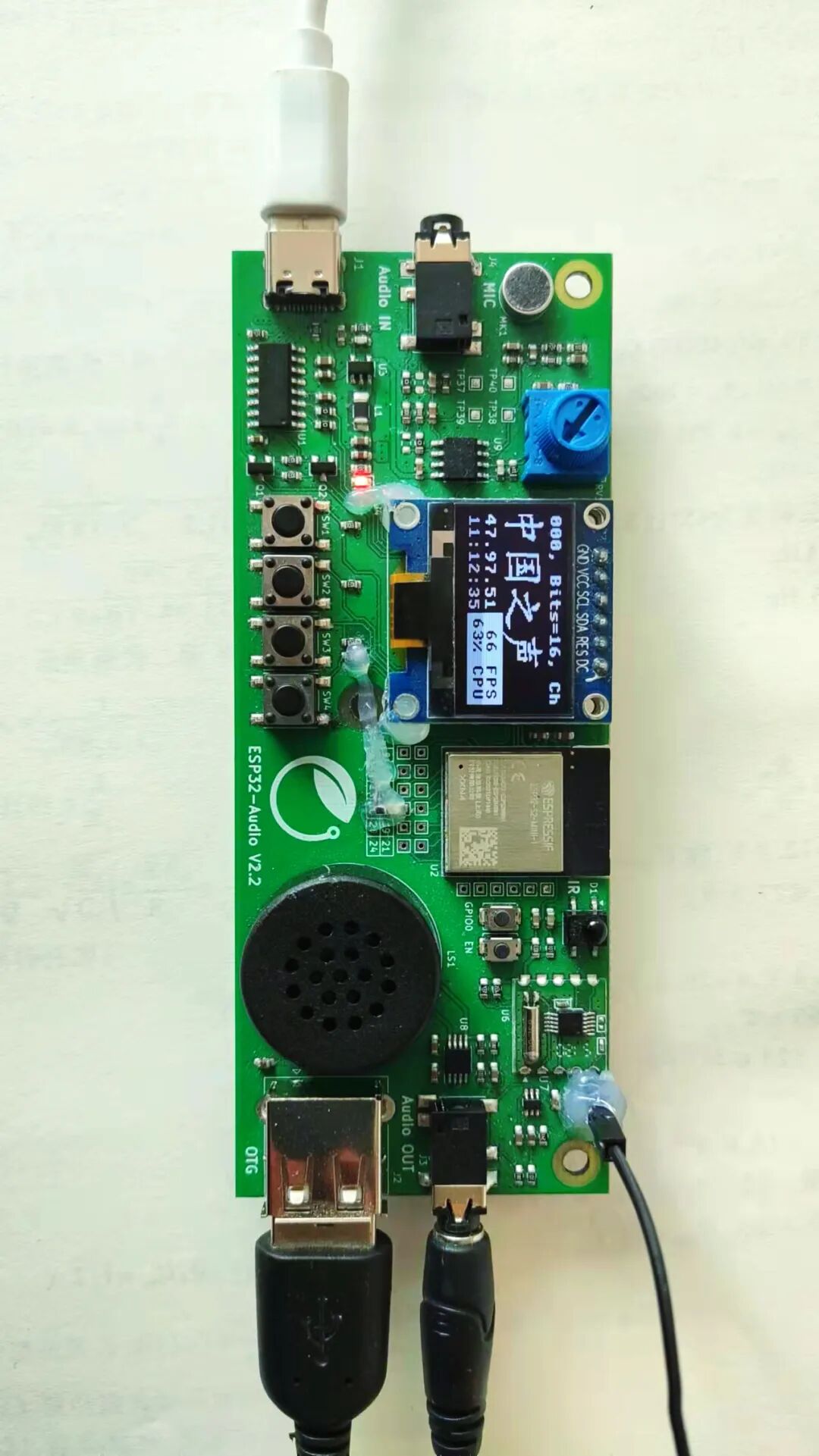
LVGL frame rate display:
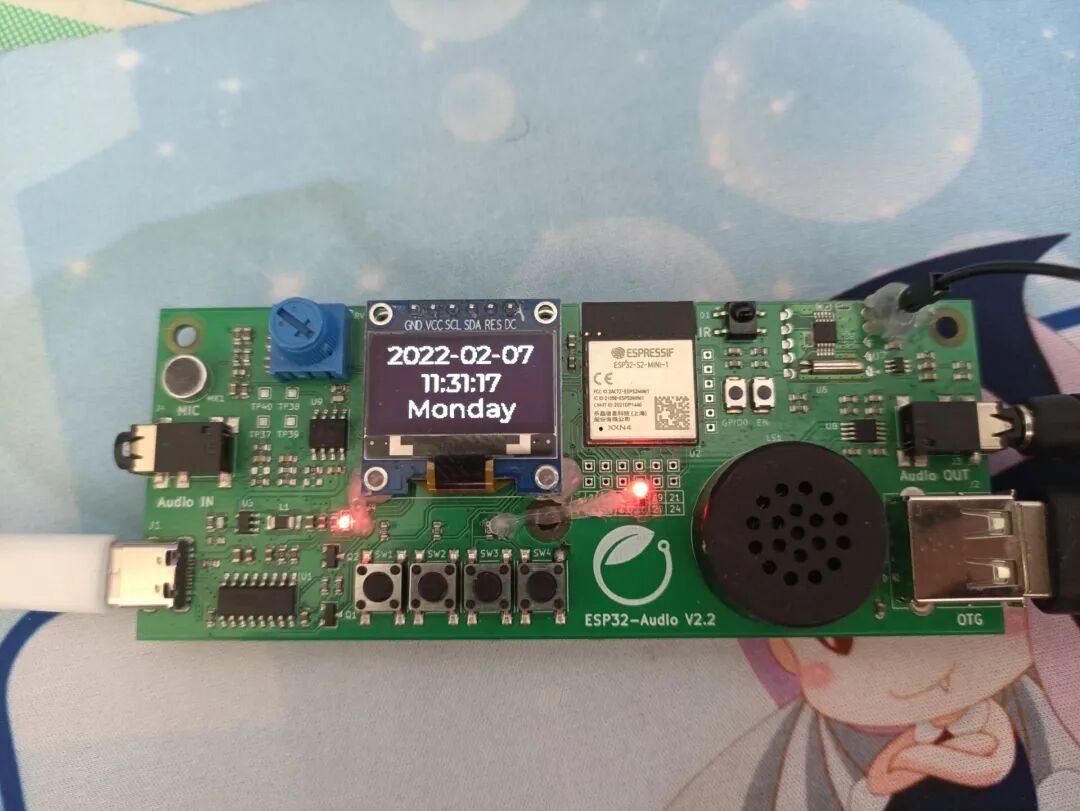
Time display page:
Network radio:
FM radio:
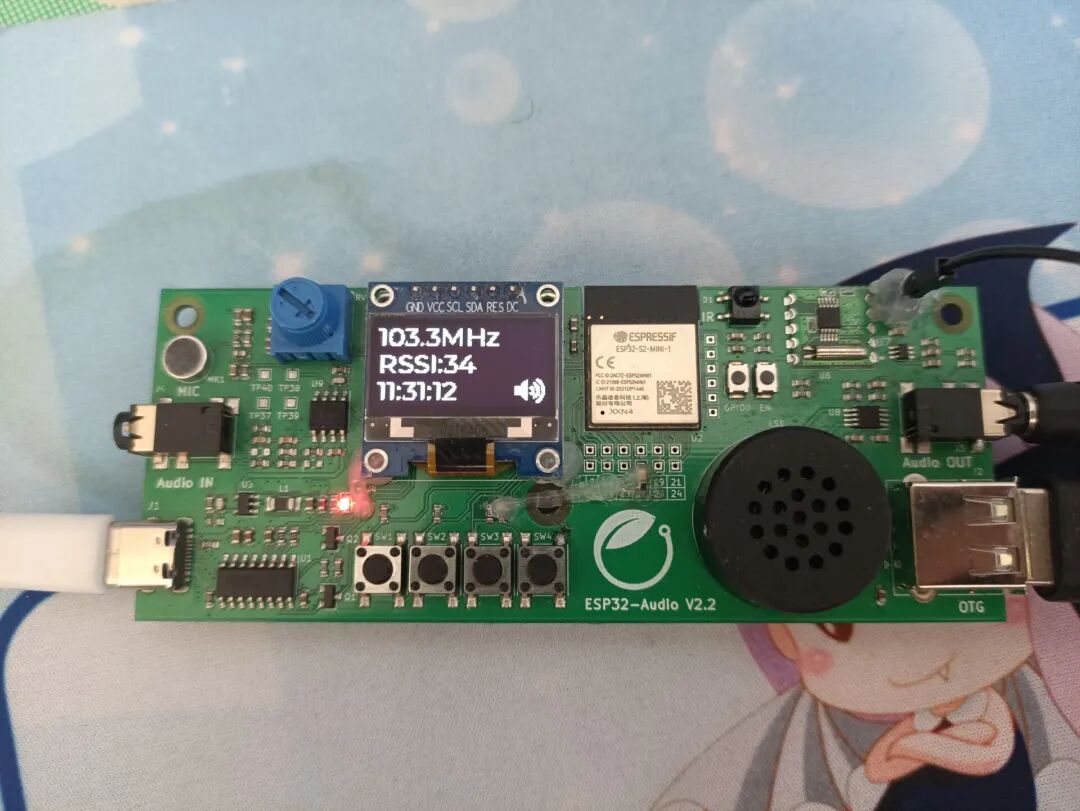

Future Plans

Through this project, I have indeed learned a lot, especially about the IDF development method without an IDE. My biggest realization is that the components we use in ordinary projects are generally already written by predecessors. After receiving the project requirements, we should first look for available resources, and then we only need to do an “assembly” step. For example, in this project, I hardly wrote any low-level drivers; I could directly call interfaces.
I believe the radio I made has certain practical functions, such as students being able to place it on their desks, switching to the time display page while studying seriously, so as not to be disturbed, and still being able to check the time; during relaxation, they can switch to the network radio or FM radio page, balancing work and rest, which can enhance learning efficiency.
In the future, we can add a QR code configuration for Wi-Fi, enable playback of all stations on Qingting FM without modifying code, modify hardware for stereo instead of single-channel playback, add dedicated audio decoding chips to improve sound quality instead of using PWM playback methods, which would also allow for volume adjustment, and add batteries and power management circuits for easier portability.
At the same time, I have some reflections on radios. When I was young, the radios at home were about the size of a CRT TV, very heavy, and it was not easy to listen to the radio with headphones while trying to sleep; just lifting it to the bed was quite a challenge. With the development of technology, it has become quite easy to fit a radio into a watch. The transistor has only been around for about 70 years, which shows how astonishing the speed of electronic technology development is. We live in a rapidly changing technological world, and we should feel proud and honored for this!
For more environmental configurations and reference articles, please click to read the original text for viewing and learning!
Click “Read the original text” to view the project