1. Introduction: Why Scrape Douban Books Top 250?
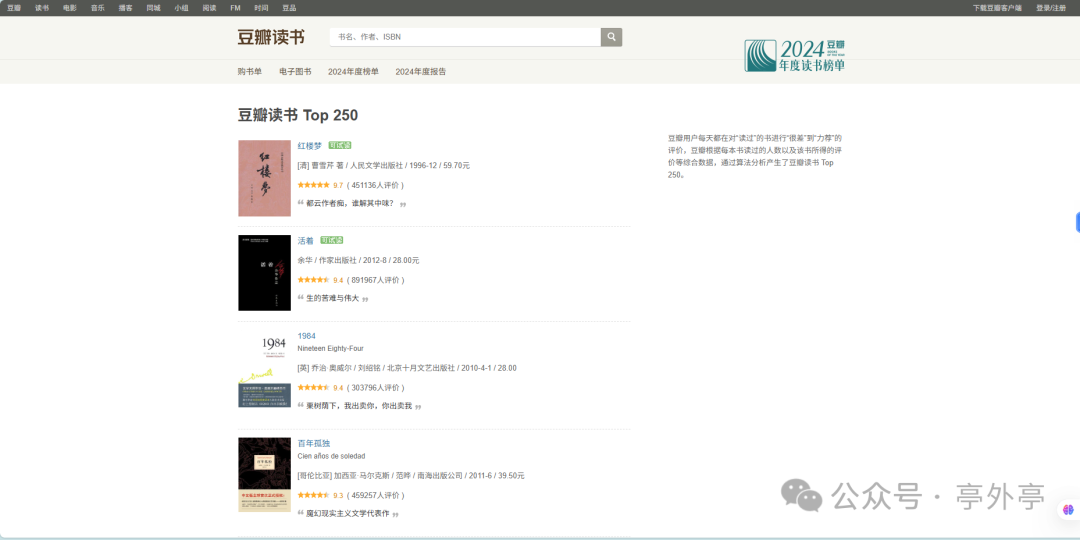
In the age of information explosion, data is like a mine filled with countless treasures waiting for us to excavate. For those who love reading and data analysis, the Douban Books Top 250 list is undoubtedly a shining gold mine.
As a highly influential cultural community in China, Douban’s Top 250 list gathers classic works from various fields and eras, with each book carrying the wisdom and thoughts of its author. The ratings and number of reviews for these books intuitively reflect their popularity and reputation among readers. By using Python web scraping technology to obtain this data, it is like having a key to unlock a treasure trove of knowledge, which not only helps us hone our scraping skills but also provides a rich data source for subsequent data analysis. We can analyze trends in popular books, understand readers’ preferences for different types of books, and even discover some niche yet highly acclaimed works.
For Python learners and data enthusiasts, scraping the Douban Books Top 250 is an excellent entry-level project. It is both practical, helping us better understand the book market and reader demands, and challenging, as we will encounter issues such as anti-scraping mechanisms and data parsing during the scraping process. Solving these problems is a valuable experience for enhancing our technical skills. Now, let us embark on this fun and challenging journey of web scraping!
2. Preparation: To do a good job, one must first sharpen their tools
001. Required Libraries
-
requests: As the “vanguard” of web scraping, the requests library is responsible for sending HTTP requests, communicating with the target server, and retrieving web page content. It acts like an indefatigable messenger, quickly and accurately delivering our requests and bringing back the server’s response. It is simple to use, supports various request methods and custom headers, and is the core library for handling network requests in web scraping. When scraping the Douban Books Top 250, we use the requests library to send GET requests to the Douban book page to retrieve the HTML page containing book information.
-
BeautifulSoup: Once the requests library retrieves the web page content, it is time for BeautifulSoup to shine. This powerful HTML parsing library can easily extract the required data from complex HTML structures, like a finely crafted scalpel. It supports various parsers, making it easy to traverse and search web pages, helping us accurately locate each book’s title, author, rating, and other information.
-
pandas: The pandas library is mainly used for data processing and storage. It can organize the scraped data into data frames, facilitating cleaning, transformation, and other operations, like an efficient data manager that tidies up chaotic data. Additionally, pandas supports saving data in common formats like CSV and Excel, making it easy for subsequent data analysis and sharing.
-
time: The time library plays the role of the “rhythm controller” in web scraping, used to control the scraping frequency. When writing scraping code, we use the time.sleep() function to add appropriate delays between requests to avoid putting too much pressure on the target server due to frequent requests, which is also a common method to cope with anti-scraping mechanisms.
002. Environment Setup
-
Ensure that Python is installed, preferably version 3.12 or above, to fully utilize Python’s new features and better compatibility. If not installed, you can download the installation package for your operating system from the Python official website. During installation, remember to check the “Add Python to PATH” option for easy command line access to Python.
-
Install the required libraries via pip by entering the following command in the command line. Pip will automatically download and install these libraries and their dependencies from the Python Package Index.
pip install requests beautifulsoup4 pandas -
Prepare a user-friendly development tool, such as PyCharm or VS Code. For example, PyCharm has rich features like intelligent code completion, code debugging, and project management, which can greatly improve coding and debugging efficiency. After installation, create a new Python project where we can write our scraping code.
3. Core Technology Analysis: Web Scraping Principles and Key Steps
001. Basic Principles of Web Scraping
-
Request-Response: Simulate a browser to send HTTP requests (with User-Agent spoofing) to obtain the HTML content returned by the server;
-
HTML Parsing: Locate data tags (such as book titles and ratings) from the web page structure;
-
Data Extraction: Use BeautifulSoup’s find_all(), CSS selectors, and other tools to extract text or attribute values from tags.
002. Douban Books Top 250 Web Page Structure
-
Target: https://book.douban.com/top250, a total of 10 pages, with 25 books per page, and the pagination parameter is start (0, 25, 50…225)
-
Core Tags: All book information is within tr.class=”item”, with book titles in…
003. Anti-Scraping Mechanisms and Responses
-
Douban’s anti-scraping points: Detecting request frequency, User-Agent, and IP access counts;
-
Response Methods:
-
Configure a real User-Agent request header;
-
Use time.sleep(1-3) to control scraping intervals;
-
For large-scale scraping, consider using proxy IP rotation (optional).
4. Code Implementation
import requests
from bs4 import BeautifulSoup
import time
import csv
import matplotlib.pyplot as plt
import pandas as pd
import re
from collections import Counter

# Set matplotlib to support Chinese display (adapt to different systems)
plt.rcParams["font.family"] = ["SimHei", "Microsoft YaHei"]
plt.rcParams["axes.unicode_minus"] = False  # Correctly display negative signs

def crawl_douban_books(page=0):
    """Scrape book information from the specified page of Douban Books Top 250"""
    url = f'https://book.douban.com/top250?start={page * 25}'
    headers = {
        'User-Agent': 'Mozilla/5.0 (Windows NT 10.0; Win64; x64) AppleWebKit/537.36 (KHTML, like Gecko) Chrome/91.0.4472.124 Safari/537.36'
    }
    try:
        response = requests.get(url, headers=headers, timeout=10)
        response.raise_for_status()
        soup = BeautifulSoup(response.text, 'html.parser')
        book_list = soup.find_all('tr', class_='item')
        result = []
        for book in book_list:
            title = book.find('div', class_='pl2').find('a')['title']
            info = book.find('p', class_='pl').text.strip()
            rating = book.find('span', class_='rating_nums').text
            people_count = book.find('span', class_='pl').text
            people_count = re.findall(r'\d+', people_count)[0] if re.findall(r'\d+', people_count) else '0'
            comment_tag = book.find('span', class_='inq')
            comment = comment_tag.text if comment_tag else 'No comment'
            result.append({
                'title': title,
                'info': info,
                'rating': float(rating),
                'people_count': int(people_count),
                'comment': comment
            })
        return result
    except Exception as e:
        print(f"Error scraping: {e}")
        return None

def save_to_csv(data, filename='douban_books_top250.csv'):
    """Save book information to a CSV file"""
    if not data:
        print("No data to save")
        return
    fieldnames = ['title', 'info', 'rating', 'people_count', 'comment']
    try:
        with open(filename, 'w', newline='', encoding='utf-8-sig') as csvfile:
            writer = csv.DictWriter(csvfile, fieldnames=fieldnames)
            writer.writeheader()
            for book in data:
                writer.writerow(book)
        print(f"Data successfully saved to {filename}")
    except Exception as e:
        print(f"Error saving CSV file: {e}")

def visualize_data(filename='douban_books_top250.csv'):
    """Data visualization analysis (each chart displayed separately)"""
    try:
        df = pd.read_csv(filename)
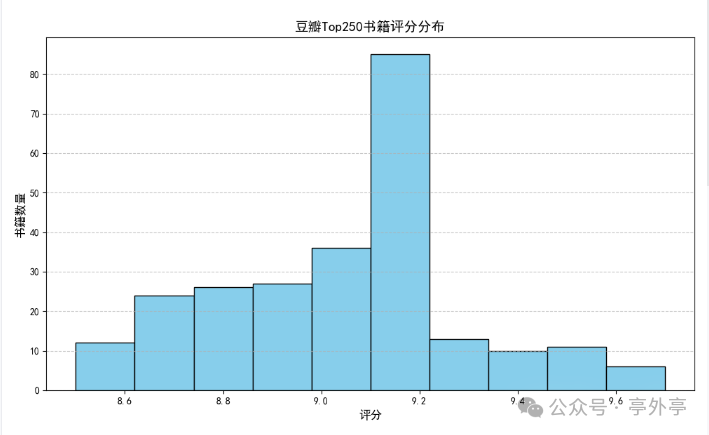
        # 1. Rating distribution histogram - shows overall rating distribution
        plt.figure(figsize=(10, 6))
        plt.hist(df['rating'], bins=10, color='skyblue', edgecolor='black')
        plt.title('Douban Top 250 Book Rating Distribution', fontsize=14)
        plt.xlabel('Rating', fontsize=12)
        plt.ylabel('Number of Books', fontsize=12)
        plt.grid(axis='y', linestyle='--', alpha=0.7)
        plt.tight_layout()
        plt.show()
        # 2. Top 10 books by number of reviews - reflects book popularity
        plt.figure(figsize=(10, 6))
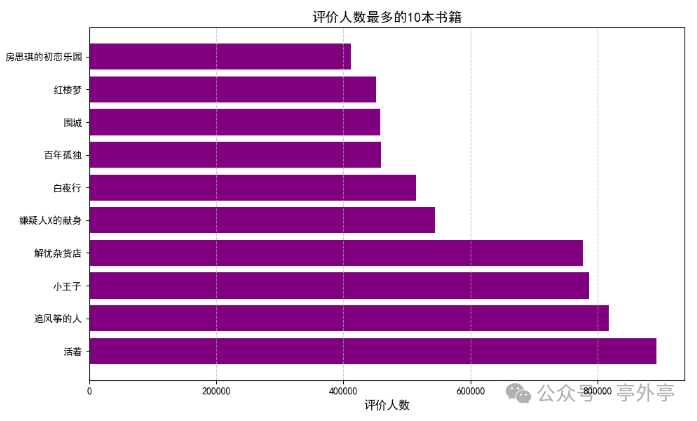
        most_popular = df.sort_values('people_count', ascending=False).head(10)
        plt.barh(most_popular['title'], most_popular['people_count'], color='purple')
        plt.title('Top 10 Books by Number of Reviews', fontsize=14)
        plt.xlabel('Number of Reviews', fontsize=12)
        plt.grid(axis='x', linestyle='--', alpha=0.7)
        plt.tight_layout()
        plt.show()
        # 3. Top 10 highest-rated books - reflects book quality recognition
        plt.figure(figsize=(10, 6))
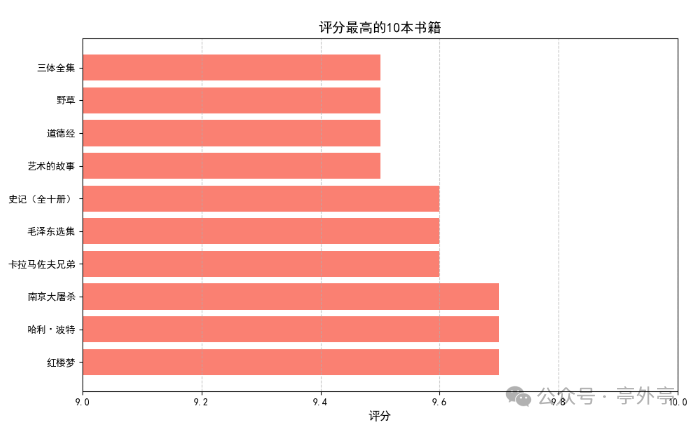
        top_rated = df.sort_values('rating', ascending=False).head(10)
        plt.barh(top_rated['title'], top_rated['rating'], color='salmon')
        plt.title('Top 10 Highest-Rated Books', fontsize=14)
        plt.xlabel('Rating', fontsize=12)
        plt.xlim(9, 10)  # Focus on high score range
        plt.grid(axis='x', linestyle='--', alpha=0.7)
        plt.tight_layout()
        plt.show()
        # 4. Publisher analysis - reflects distribution of quality publishers
        def extract_publisher(info):
            parts = info.split('/')
            if len(parts) >= 3:
                return parts[-3].strip()
            return 'Unknown'
        df['publisher'] = df['info'].apply(extract_publisher)
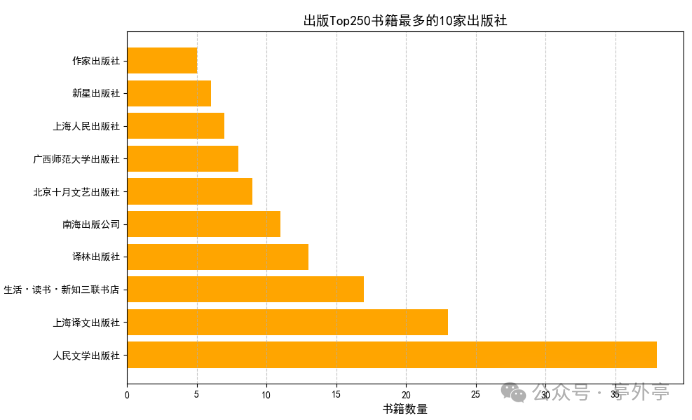
        top_publishers = Counter(df['publisher']).most_common(10)
        plt.figure(figsize=(10, 6))
        publishers, counts = zip(*top_publishers)
        plt.barh(publishers, counts, color='orange')
        plt.title('Top 10 Publishers of Douban Top 250 Books', fontsize=14)
        plt.xlabel('Number of Books', fontsize=12)
        plt.grid(axis='x', linestyle='--', alpha=0.7)
        plt.tight_layout()
        plt.show()
    except Exception as e:
        print(f"Error in data visualization: {e}")

if __name__ == "__main__":
    all_books = []
    total_pages = 10  # Total of 250 books
    for page in range(total_pages):
        print(f"Scraping page {page + 1}...")
        books = crawl_douban_books(page)
        if books:
            all_books.extend(books)
        time.sleep(2)  # Control scraping frequency
    save_to_csv(all_books)
    if all_books:
        visualize_data()
5. Data Processing and Analysis: Unlocking the Value of Data
Once we successfully scrape the data from Douban Books Top 250, this raw data is like uncut jade, rich in information but requiring careful data processing and analysis to truly unlock its value and reveal the mysteries of the book world.
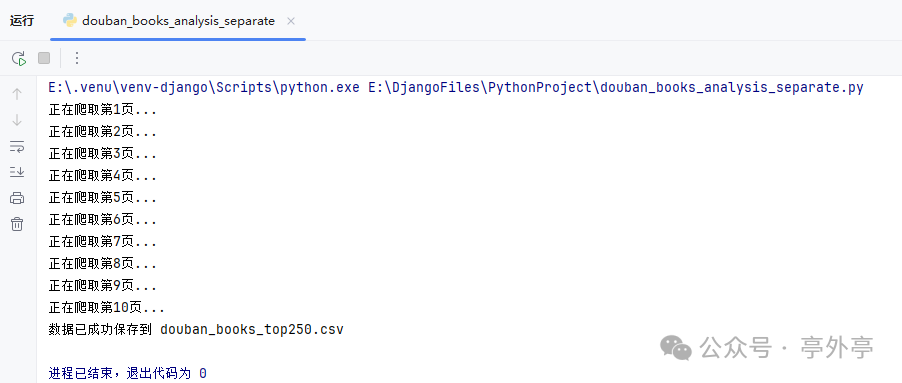
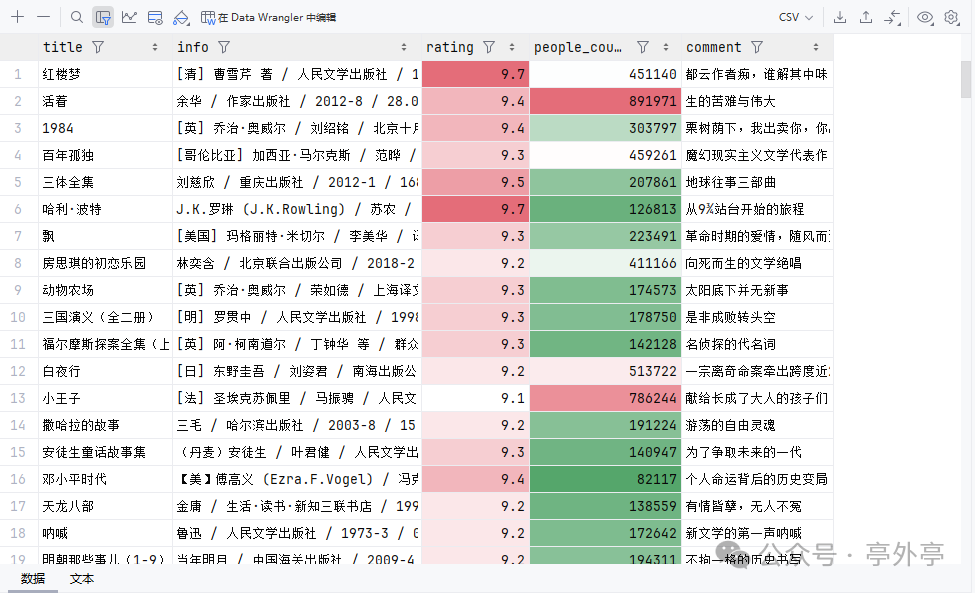
Simple Data Analysis Examples:
001. Rating Distribution (Count the number of books in different rating ranges, draw charts to understand the overall rating level of Douban Books Top 250)
002. Publisher Analysis (Count the most frequently appearing publishers to see which publishers’ books are more popular among readers)
003. Books with the Most Reviews (reflects public attention)
004. Highest Rated Books (reflects professional recognition)
6. Precautions: Compliant Scraping to Avoid Legal Risks
While enjoying the convenience brought by web scraping technology, we must not overlook the potential legal risks and ethical norms behind it. Compliant scraping is not only a respect for website operators but also a responsibility we should uphold as developers.
-
Follow the robots.txt protocol: Check the target website’s robots.txt file to understand its scraping restrictions.
-
Control scraping frequency:Set reasonable request intervals to avoid putting too much load on the target server.
-
Data usage legality:Only for legitimate purposes such as learning and research, and not for commercial profit or other infringement activities.
7. Conclusion: Learn from Practice, Grow through Exploration
Through this Douban Books Top 250 scraping project, we have not only mastered the core technologies of Python web scraping (such as network requests, HTML parsing, and data storage) but also learned about strategies to cope with anti-scraping mechanisms and basic methods of data processing. Web scraping technology is an important means of data acquisition, but in practical applications, we must always maintain compliance awareness and technical ethics. I hope everyone can apply the knowledge learned to more practical projects and continuously improve their programming and data analysis skills.