Adhering to high-quality original content, rejecting content piling, if you like it, click the star above to receive updates immediately, thank you for your attention!
From this section, we enter the chapter on system calls. Before diving into the details, let’s take a macro view of our knowledge framework. The overall process we analyzed in the last section includes system calls, the file system, and finally the drivers.
This chapter focuses on analyzing the implementation principles of system calls, which include glibc encapsulation, exception modes, svc, and the kernel implementation of system calls.
In the next chapter on file systems, we will further dissect how <span>sys_read/write</span> is dispatched to <span>VFS</span>.
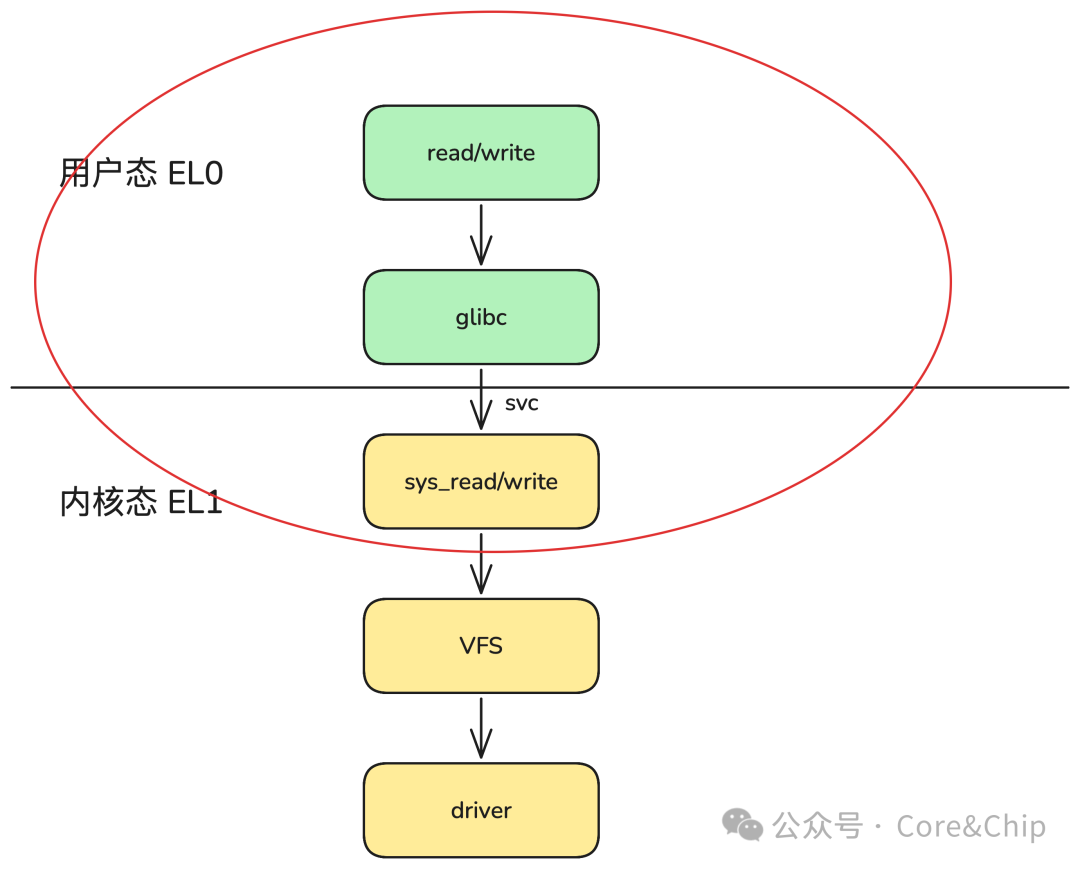
This chapter will involve some concepts related to CPU architecture, and we will focus on the arm64 architecture, which is currently the mainstream architecture for embedded SoCs. The updated technologies and more focused platforms are, I believe, the reason for the existence of this public account and column.
1. What is a System Call? Why Do We Need System Calls?
In the previous section, we thoroughly outlined the process from user mode <span>read</span> to the implementation of the driver’s <span>.read</span> function. The functions used by user programs, such as <span>open/read/write</span>, are all system calls.
int fd = open("test.txt", O_RDONLY);
ssize_t n = read(fd, buf, 128);
ssize_t m = write(fd, buf, 128);
A system call is a function interface provided by the Linux kernel for user programs to run in kernel mode, and it is the only entry point for user mode to access system resources.
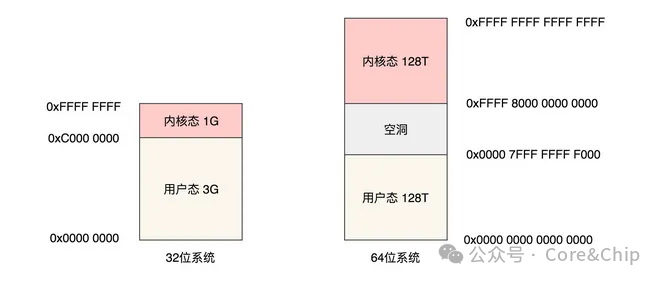
We previously discussed that to ensure system security, the Linux system divides the system space into kernel mode and user mode. User programs use system calls to have the kernel perform tasks that they cannot do themselves, such as opening files, creating processes, and accessing device drivers.
These actions are essentially operations on system resources, which cannot be modified arbitrarily by user programs, so they can only be accessed through interfaces provided by the kernel, which are called system calls.
A system call is the entire Linux kernel’s API (Application Binary Interface) for user space
2. glibc
The system calls we use are encapsulated by glibc, which is the GNU-released libc library, i.e., the C runtime library. glibc is the lowest-level API in the Linux system, and almost any other runtime library will depend on glibc.
glibc official website: https://www.gnu.org/software/libc/
glibc source code download: https://ftp.gnu.org/gnu/glibc/
<span>glibc</span> has a complex implementation for encapsulating system calls because it needs to consider cross-platform compatibility, POSIX compliance, multi-path I/O, and other factors. We will simplify this here and discuss the internal implementation details and principles in a separate chapter later.
In summary, the implementation of system calls in glibc is as follows:
-
Save the parameters passed by the user into CPU registers, such as
<span>fd, buf, count</span>, etc. -
Use an instruction to cause the system to enter kernel mode.
The instruction that causes the kernel entry varies by hardware platform:
-
<span>AArch64</span>triggers kernel entry with the instruction<span>svc 0</span>(Supervisor Call), which is the system call instruction for ARMv8. -
<span>x86-64</span>uses the<span>syscall</span>instruction (64-bit fast system call entry). You may often see<span>int $0x80</span>mentioned in various materials, but this is actually used in the older 32-bit<span>x86</span>architecture or compatibility paths. Modern 64-bit<span><span>glibc stub</span></span>uses<span><span>syscall</span></span>.
<span>glibc</span> automatically selects the corresponding architecture’s system call implementation during compilation and linking through the <span>sysdeps</span> directory. Each architecture has its own independent low-level <span>read/write</span> syscall encapsulation.
<span>glibc</span>’s high-level API (read/write) remains the same, but the underlying assembly (<span>SVC</span> or <span>syscall</span> instruction) switches automatically based on architecture.
The implementation corresponding to the <span>arm64</span> architecture in the latest glibc source code is shown below. I have added simple comments; we will not elaborate on it for now, but you can take a look, and we will explain the principles in detail later.
#define INTERNAL_SYSCALL_RAW(name, nr, args...)
  ({ long _sys_result;
     {
       LOAD_ARGS_##nr (args)        /* 1. Write parameters into register variables */
       register long _x8 asm ("x8") = (name); /* 2. syscall number */
       asm volatile ("svc 0  // syscall " # name
             : "=r" (_x0)
             : "r" (_x8) ASM_ARGS_##nr
             : "memory");                /* 3. Execute svc 0 */
       _sys_result = _x0;
     }
     _sys_result; })
3. svc, Exceptions, and Privilege Modes
<span>glibc</span> ultimately executes via inline assembly: <span>svc #0</span>. This instruction is the core of the entire system call mechanism. Before discussing SVC, we must first talk about the ARM64 privilege levels (Exception Level, EL). x86-64 also has corresponding Ring0 – Ring3, but here we will focus on arm64.
ARM64 (ARMv8-A) divides privileges into four levels:
Most of our daily development involves EL0 ~ EL1.
-
User programs run at EL0
-
Linux Kernel + Drivers run at EL1
In the future, after we finish discussing BSP, we may talk about ATF (Arm Trusted Firmware), which divides the boot process into several stages: BL1, BL2, BL31, etc., where BL31 involves security-related parts that run at EL3, as it is security-related, it has the highest priority.
Additionally, as chip computing power increases, concepts like integrated cockpit in automobiles are becoming very popular, all belonging to the virtualization development field. If it is related to virtualization, the privilege level will also be higher than the ordinary kernel, at EL2.
The CPU will only switch from <span>EL0</span> to <span>EL1</span> when an exception occurs, and the <span>svc</span> instruction is an exception instruction provided by arm64.
ARM64 (ARMv8-A) exceptions are uniformly divided into four categories:
In the ARM architecture manual, the design purpose of SVC (Supervisor Call) is very broad: to allow lower privilege level software to send service requests to higher privilege levels as synchronous exceptions.
It is a type of trap instruction, essentially:
-
Generate a synchronous exception
-
Trigger privilege level switching (EL0 → EL1 or EL1 → EL2)
Thus, SVC is a mechanism for “requesting services”, not an exclusive instruction for “system calls”. However, Linux made a very important architectural design decision: in Linux, SVC #0 is dedicated to “entering the kernel to execute system calls”.
Therefore, combining all exceptions, we can see that svc is the only instruction provided by the CPU for actively entering the kernel, which explains what we initially said: system calls are the only way for user mode to actively enter the kernel.
4. entry.S
After executing the svc instruction, the hardware will first perform context saving, stack switching, page table switching, and other operations. After the CPU completes all state switching, it hands over control to the Linux kernel’s exception vector.
The entry point for kernel mode EL1 is in entry.S. We will elaborate on the specific implementation later; here is a brief introduction to the workflow:
-
The kernel will first determine the type of exception and find that it is an svc exception, entering the
<span>el0_svc</span>call flow. -
After a series of framework checks and judgments, it ultimately calls
<span>invoke_syscall</span>. -
<span>invoke_syscall</span>will look up the system call table based on the system call number and ultimately call the corresponding sys_read/sys_write functions.
Next, the process will enter the VFS scope we initially illustrated; we will not cover that in this chapter.
5. Summary
In this section, we outlined the framework of the system call process and introduced concepts related to system calls, including glibc encapsulation, svc instructions, CPU exception modes, privilege levels, etc. In the next section, we will elaborate on the details of the process. If you find this helpful, please like, view, and share; it really matters to me, thank you!
– END –
If you have any questions, feel free to add me on WeChat for discussion. I have created a small group, and I will gradually add some industry leaders I know, all of whom are engineers from first-line companies at P7 level and above. Any questions related to the industry, work, or job-hopping can be discussed in the group~~

Self-introduction:Previously worked at AMD, currently a senior BSP engineer in a chip department at a major company.Advocating pragmatism, I believe in learning by doing.Series introduction:Essential kernel skills for BSP engineers, aimed at explaining kernel knowledge and underlying principles that will be used by driver and BSP engineers in their work.Previous recommendations:Ubuntu 24.04 + Qemu + ARMV8 + Linux 6.12 comprehensive development environment setup tutorialAs we enter the AI era, the irreplaceability of low-level software engineers is becoming increasingly prominent.