IO-Link to EtherCAT – ADFWEB Gateway Converter– Guangzhou Xinyu IoT
Author:www.adfweb.com.cn Zou Wuyi Mobile185-020-77899 Email: [email protected]
1 Features:
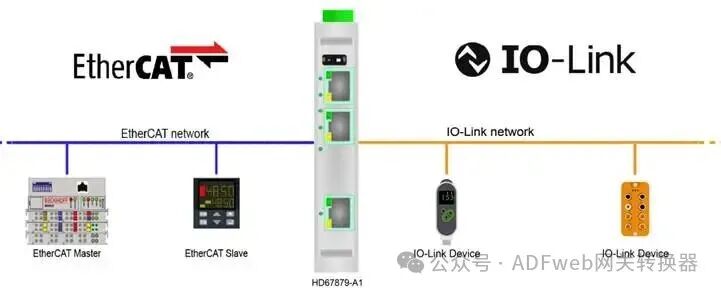
HD67879-A1 is an IO-Link master / EtherCAT slave converter.
It has the following features:
Read and write up to 1499 bytes;
Bidirectional information transfer between EtherCAT and IO-Link;
Can be mounted on a 35mm DIN rail;
Wide power input range: 18…30V DC;
Wide temperature range: -40°C / 85°C [-40°F / +185°F].
Configuration:
You need to install the Compositor SW67879 software on your PC to perform the following actions:
Define IO-Link parameters;
Define EtherCAT parameters;
Define the IO-Link variables read by the EtherCAT master;
Define the IO-Link variables written by the EtherCAT master;
Define the IO-Link variables to read and write EtherCAT variables;
Export ESI files to configure the EtherCAT master;
Update the device.
2 New Configuration/ Open Configuration:
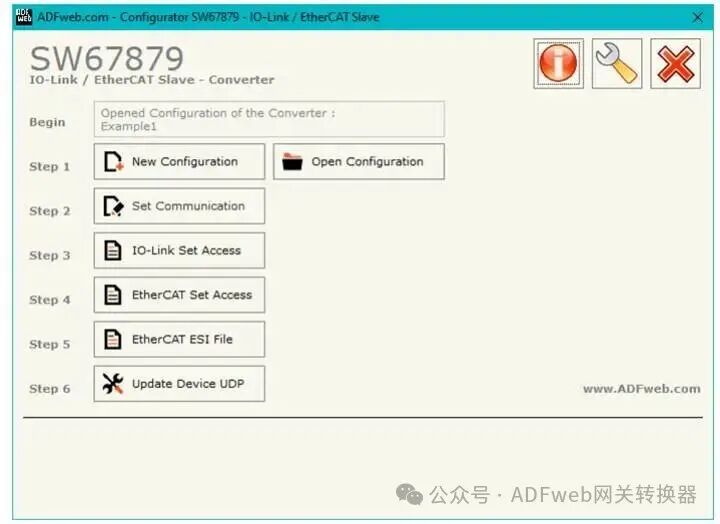
The “New Configuration” button creates a folder containing the entire device configuration.
The device configuration can also be imported or exported:
To configure another device in the same way, the folder and all its contents must be retained to clone the programmable “IO-Link master / EtherCAT slave – converter” configuration;
To obtain different versions of the project, simply copy the project folder and change the name, then use the “Open Configuration” button to open the new folder.
3 Setting Communication:
This section defines the basic communication parameters for the two buses, EtherCAT and Modbus TCP.
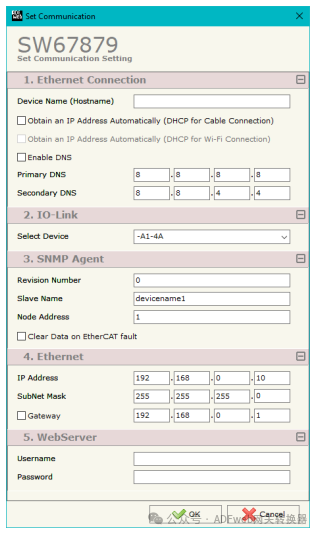
By pressing the “Set Communication” button on the main window of SW67E04 (Figure 2), the “Set Communication” window will appear (Figure 3).
The meaning of the “Ethernet Connection” fields is as follows:
In the “Device Name (Hostname)” field, define the hostname to be assigned to the converter;
If “Automatically obtain IP address (DHCP for cable connection)” is checked, enable DHCP for the LAN connection;
If “Enable DNS” is checked, enable the DNS protocol;
In the “Preferred DNS” field, define the IP address of the preferred DNS server;
In the “Alternate DNS” field, define the IP address of the alternate DNS server.
The meaning of the “IO-Link” fields is as follows:
In the “Select Device” field, define the type of IO-LINK channel.
The meaning of the “EtherCAT Slave” fields is as follows:
In the “Revision Number” field, define the revision number of the converter;
In the “Slave Name” field, define the name of the converter;
In the “Node Address” field, define the ID of the converter.
4 IO-LINK Settings Access:
By pressing the “IO-Link Settings Access” button in the main window (Figure 2), the “IO-Link Settings Access” window will be displayed (Figure 4).
This section is used to define the list of IO-Link variables accessible from the EtherCAT side.
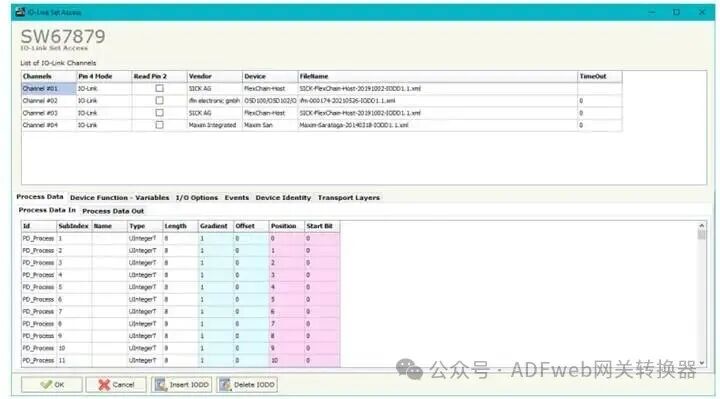
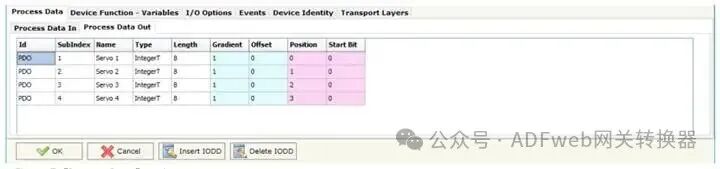
5 The “Process Data” section is used to define the IO-Link process data to be linked to the EtherCAT side (see Figure 7).
The meanings of the fields are as follows:
In the “Id” field, define the IO-Link process data ID;
In the “Subindex” field, define the IO-Link process data subindex;
In the “Name” field, define the IO-Link process data name;
In the “Type” field, define the IO-Link process data data format;
In the “Length” field, define the IO-Link process data bit length;
In the “Gradient” field, define the IO-Link process data multiplication factor;
In the “Offset” field, define the IO-Link process data offset;
In the “Position” field, define the starting byte for mapping / obtaining values in the internal memory array;
In the “Starting Bit” field, define the starting bit of the byte in the “Position” field.