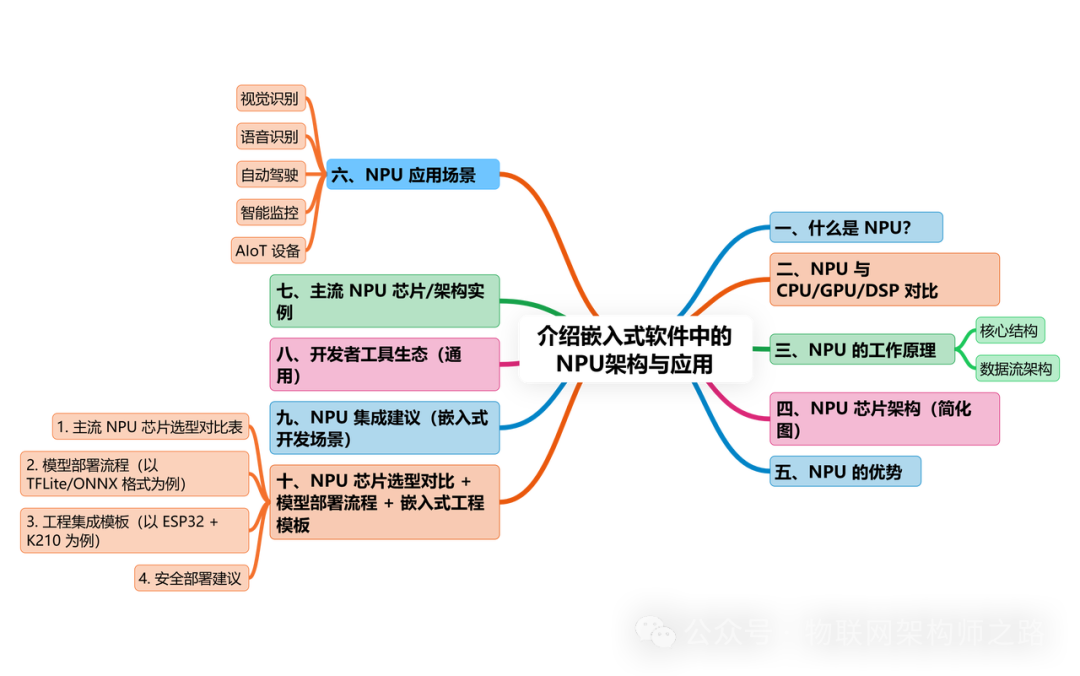
1. What is an NPU?
NPU (Neural Processing Unit) is a processor specifically designed for inference and training of artificial neural networks, featuring high parallelism, low power consumption, and low latency. It is a key hardware component in scenarios such as edge AI, autonomous driving, smart cameras, and voice recognition.
2. Comparison of NPU with CPU/GPU/DSP
| Item | CPU | GPU | DSP | NPU |
|---|---|---|---|---|
| Design Goal | General processing | Graphics/matrix parallel processing | Signal processing | Neural network inference and training |
| Instruction Structure | Sequential execution | SIMD parallel | Custom instructions | Dedicated instructions/hardware convolution engine |
| Parallel Capability | Low | High (thousands of threads) | Medium | Extremely high (neuron-oriented parallelism) |
| Energy Efficiency | Average | High power consumption | Medium-low | High performance + low power consumption |
| Applicable Scenarios | General tasks | Image rendering, AI training | Audio processing, filtering | AI inference, image recognition, voice recognition, etc. |
3. Working Principle of NPU
Core Structure:
- MAC Unit Array: Used for matrix multiplication (Multiply-Accumulate), the basic computing unit of neural networks
- Weight Cache: High-speed SRAM cache for neural network weights
- Activation Function Unit: Supports ReLU, Sigmoid, Softmax, etc.
- Data Flow Engine: Optimizes read/write paths to achieve parallel pipelining
Data Flow Architecture:
Adopts a data-driven computing model (Dataflow), allowing data to flow at the “tensor” level within the chip, enabling hardware acceleration for operations such as convolution and pooling.
4. NPU Chip Architecture (Simplified Diagram)
┌──────────────┐
│ Input Interface │◀──── Image, audio data
└────┬─────────┘
▼
┌───────────────────────┐
│ NPU Main Structure (MAC Array + Activation + Controller) │
└────────┬──────────────┘
▼
┌──────────────┐
│ Weight Cache │
└──────────────┘
▼
┌──────────────┐
│ Output Buffer │───▶ Output classification results / feature maps
└──────────────┘
5. Advantages of NPU
1. High throughput: Completes inference tasks more efficiently than CPU/GPU
2. High energy efficiency: Suitable for edge devices (e.g., cameras, IoT terminals)
3. Specialized optimized instruction set: Supports low-precision computations such as INT8, FP16
4. Strong customizability: Can work in conjunction with FPGA/SoC embedded systems
5. Low latency response: Suitable for real-time detection tasks
6. Application Scenarios of NPU
Visual Recognition
- Face recognition, license plate recognition, object detection (e.g., YOLO, SSD, Mobilenet)
Voice Recognition
- Local offline voice command recognition (wake-word, ASR module)
Autonomous Driving
- Traffic condition recognition, obstacle avoidance strategies, local image processing inference modules
Smart Surveillance
- Video structured analysis (human recognition, action detection, behavior judgment)
AIoT Devices
- Smart locks, robotic vacuum cleaners, smart doorbells, security cameras, etc.
7. Mainstream NPU Chip/Architecture Examples
| Manufacturer | Chip / Architecture | Features |
|---|---|---|
| Huawei HiSilicon | Ascend / Kirin NPU | Self-developed architecture, supports FP16/INT8, high integration |
| Cambricon | Cambricon-1H/MLU | Representative of domestic AI chips, active model ecosystem |
| GigaDevice | GD32 AI / NPU SoC | Targeted at MCU-level lightweight AI inference scenarios |
| Edge TPU | Supports TFLite inference, extremely low power consumption | |
| Intel | Movidius VPU/NPU | Embedded OpenVINO toolchain, focused on visual processing |
| NVIDIA | Jetson series + DLA | NPU + GPU collaboration, suitable for edge AI video analysis |
| Rockchip | RK3568 / RK3588 | NPU up to 6 TOPS, mainstream embedded AI platform |
8. Developer Tool Ecosystem (General)
- TFLite / ONNX Runtime / NCNN: Lightweight AI inference frameworks
- OpenVINO / TensorRT: Intel/NVIDIA optimized inference tools
- KPU Toolchain / MaixPy / Kendryte IDE: Adapted for domestic lightweight NPUs (e.g., K210)
9. NPU Integration Recommendations (Embedded Development Scenarios)
1. Prefer chips that support TFLite Micro / ONNX model formats
2. Avoid excessive fully connected layers, and try to use lightweight structures like Mobilenet
3. Local testing should consider: power consumption, temperature rise, inference speed, model compatibility
4. Communicate with MCU/CPU via shared memory or DMA to reduce latency
5. Model encryption deployment (to prevent extraction)
10. NPU Chip Selection Comparison + Model Deployment Process + Embedded Engineering Template
Applicable for edge AI projects (e.g., smart cameras, smart locks, voice recognition devices) during the development process for NPU chip selection, model deployment, and engineering integration.
Includes the following content:
- Mainstream NPU chip selection comparison table (K210 / RK3568 / Edge TPU / Ascend, etc.)
- Complete model deployment process (Training → Conversion → Compilation → Deployment → Inference)
- ESP32 + K210 engineering structure template (UART cooperative communication)
- Model security deployment recommendations (encryption, verification, threshold judgment)
1. Mainstream NPU Chip Selection Comparison Table
| Chip Model | Manufacturer | Peak Computing Power | Supported Model Formats | Interface Type | Power Consumption | Development Toolchain |
|---|---|---|---|---|---|---|
| K210 | Kendryte | 0.5 TOPS | KModel / TFLite | SPI / UART / I2C | 0.3W | MaixPy, KPU SDK |
| RK3568 NPU | Rockchip | 1~3 TOPS | TFLite / ONNX | GPIO / MIPI / PCIe | 1~3W | RKNN Toolkit, TensorFlow Lite |
| Edge TPU | 4 TOPS | TFLite | USB / PCIe | ~2W | Edge TPU Compiler | |
| Ascend 310 | Huawei | 16 TOPS | MindSpore | PCIe / Network Interface | 8~10W | MindStudio IDE |
| Jetson Nano | NVIDIA | 0.5 TFLOPS | ONNX / TensorRT | GPIO / USB / HDMI | 5~10W | JetPack + TensorRT |
| Cambricon MLU | Cambricon | 2~32 TOPS | ONNX / TFLite | PCIe / M.2 | 5~15W | MagicMind SDK |
2. Model Deployment Process (Using TFLite/ONNX Format as an Example)
Step 1: Model Training (PC Side)
- Train the original model using PyTorch / TensorFlow
- Output .pt / .h5 / .pb formats
Step 2: Model Conversion
- Convert to .onnx or .tflite
Bash
# Convert TensorFlow model to TFLite
python3 export.py --output=model.tflite
# Convert PyTorch model to ONNX
torch.onnx.export(model, input_tensor, "model.onnx")
Step 3: Model Compilation (Target Platform)
- Use toolchain to convert model to NPU runnable format
Bash
# Compile Rockchip model with RKNN Toolkit
rknn_toolkit_lite -i model.tflite -o model.rknn
# Compile for Google Edge TPU
edgetpu_compiler model.tflite
Step 4: Model Deployment
- Copy the model to the embedded device file system (SPIFFS/SD card/USB)
- Load using SDK or inference engine
Step 5: Run Inference & Optimization
- Use camera frame / audio input to access the model
- Optimize memory usage / inference frequency / latency response
3. Engineering Integration Template (Using ESP32 + K210 as an Example)
Project Structure
smart_lock_ai/
├── esp32/ # Main control, responsible for communication, UI, logic
│   ├── main.c # MQTT, button control, state machine
│   └── uart_k210_driver.c # Communication with K210
├── k210/ # Neural network subsystem
│   ├── face_model.kmodel # Compiled model file
│   ├── main.py # MaixPy + camera + inference + UART send results
│   └── kpu_loader.py # KPU loading module
├── docs/ # Model description, interface protocol
Communication Protocol Example (K210 → ESP32)
JSON
{
"event": "face_detected",
"confidence": 0.92,
"timestamp": 1718910000
}
4. Security Deployment Recommendations
- Model encryption (KModel / RKNN format encryption options)
- Model integrity verification (SHA256)
- Use CRC verification and frame header/footer for communication with the main control device
- Incorporate threshold judgment + two-factor verification for local inference results