Implementing the CANopen to EtherCAT gateway connection for servo drives involves multiple steps and technical points. Here is a basic guide to help you understand how to achieve this: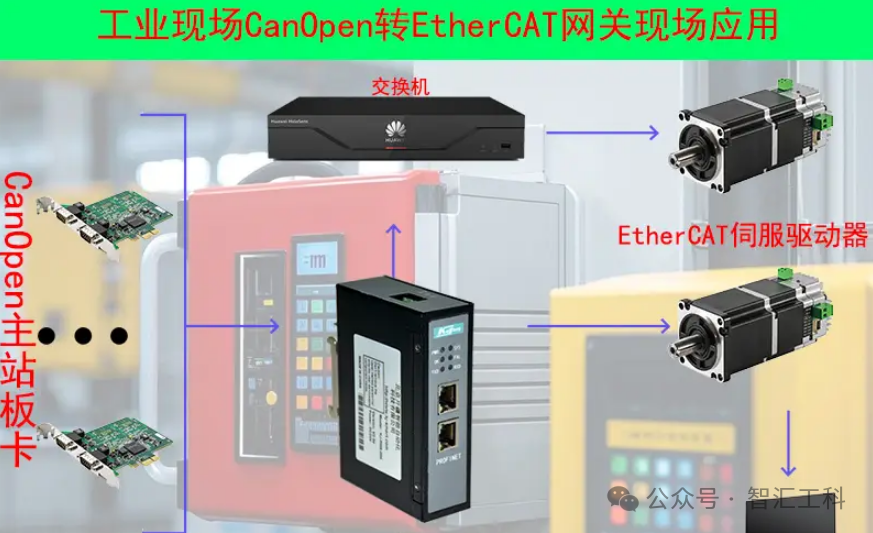 1. Hardware Selection CANopen to EtherCAT Gateway: ● Choose a gateway device that supports both CANopen and EtherCAT communication protocols. Ensure the gateway has enough input/output (I/O) points to meet your servo drive system requirements. ● Verify the compatibility of the gateway, including power supply, communication rate, connectors, etc. Servo Drives: ● Ensure your servo drive supports CANopen or EtherCAT (depending on your gateway configuration and conversion needs). ● Select a servo drive model and power rating that matches your application. Connection Cables: ● Prepare the necessary connection cables and connectors for CANopen and EtherCAT. ● Ensure the quality and length of the cables meet your communication needs. 2. Software Configuration Gateway Configuration: ● Use the configuration tool or software provided by the gateway to set the parameters for CANopen and EtherCAT. ● Configure the address, baud rate, and other parameters for the CANopen slave. ● Configure the parameters for the EtherCAT master, including network topology, I/O mapping, etc. Servo Drive Configuration: ● Use the configuration software or tool for the servo drive to set the parameters of the drive. ● Ensure the communication parameters of the drive match those of the gateway, including baud rate, address, etc. PLC or Motion Controller Configuration: ● If you are using a PLC or motion controller to manage the servo drive, ensure they are compatible with the EtherCAT network. ● Configure the EtherCAT master parameters of the PLC or motion controller to recognize and manage the servo drives. 3. Network Connection Physical Connection: ● Use a CANopen connection cable to connect the servo drive to the CANopen port of the gateway. ● Use an EtherCAT connection cable to connect the gateway to the EtherCAT network of the PLC or motion controller. Network Topology: ● Ensure the topology of the EtherCAT network meets your application needs, such as linear, star, etc. ● Use appropriate network components, such as switches and couplers, to build your EtherCAT network. 4. Debugging and Testing Communication Testing: ● Use communication testing tools or software to verify the communication status of the CANopen and EtherCAT networks. ● Ensure the gateway can communicate correctly with the servo drive and PLC or motion controller. Functional Testing: ● In a safe environment, conduct functional tests on the servo drive to ensure it operates as expected. ● Monitor and record any communication or performance issues for debugging and fixing. 5. Maintenance and Optimization Monitoring and Diagnosis: ● Regularly check the communication status of the CANopen and EtherCAT networks. ● Use the monitoring and diagnostic tools provided by the gateway and servo drive to identify and resolve potential issues. Performance Optimization: ● Optimize the performance parameters of the gateway and servo drive based on your application needs. ● Consider using more efficient communication protocols or algorithms to improve the overall performance of the system. By following these steps, you can achieve the goal of connecting servo drives via a CANopen to EtherCAT gateway. Please note that the specific implementation process may vary depending on your devices and applications, so it is recommended to refer to the documentation and guidelines of the relevant devices for more detailed information and guidance.