


1. Founding Time and Author
-
Founding Time:smtplib, as part of the Python standard library, first appeared in Python 1.5.2 released in April 1999. Its design is based on RFC 821 (SMTP protocol) and RFC 1869 (ESMTP extension).
-
Core Developers:
-
Guido van Rossum: Founder of Python, early designer of the standard library
-
Barry Warsaw: Major contributor to Python’s email library
-
Python Core Team: Continues to maintain and update
-
Project Positioning: Provides an implementation of the SMTP protocol client for sending emails to any server that supports SMTP
2. Official Resources
-
Python Documentation Link:https://docs.python.org/3/library/smtplib.html
-
Source Code Location (CPython Repository):https://github.com/python/cpython/blob/main/Lib/smtplib.py
-
Related Protocol Standards:RFC 821 (SMTP), RFC 1869 (ESMTP), RFC 2554 (SMTP AUTH), RFC 3207 (STARTTLS)
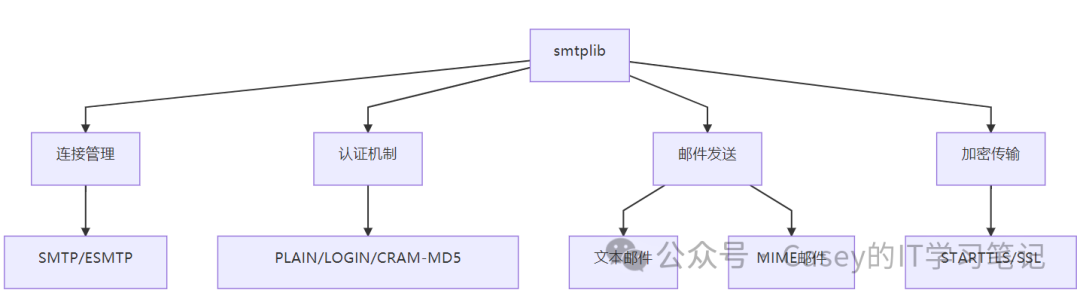
3. Core Features
4. Application Scenarios
1. Sending Plain Text Emails
import smtplib

server = smtplib.SMTP('smtp.example.com', 587)
server.starttls()
server.login("[email protected]", "password")
message = "Subject: Hello\n\nThis is the email body."
server.sendmail("[email protected]", "[email protected]", message)
server.quit()
2. Sending Emails with Attachments
from email.mime.multipart import MIMEMultipart
from email.mime.text import MIMEText
from email.mime.application import MIMEApplication
import smtplib

msg = MIMEMultipart()
msg['Subject'] = 'Document'
msg['From'] = '[email protected]'
msg['To'] = '[email protected]'

# Add body
msg.attach(MIMEText("See attached document", "plain"))

# Add PDF attachment
with open("document.pdf", "rb") as f:
    part = MIMEApplication(f.read(), Name="document.pdf")
    part['Content-Disposition'] = 'attachment; filename="document.pdf"'
    msg.attach(part)

# Send email
with smtplib.SMTP_SSL('smtp.example.com', 465) as server:
    server.login("[email protected]", "password")
    server.send_message(msg)
3. Sending Bulk Emails
import smtplib
from email.utils import formataddr

recipients = ["[email protected]", "[email protected]"]
server = smtplib.SMTP('smtp.example.com', 25)

for to_addr in recipients:
    message = f"""From: {formataddr(('Sender', '[email protected]'))}\nTo: {formataddr(('Recipient', to_addr))}\nSubject: Batch Email\n\nThis email is sent to {to_addr}."""
    server.sendmail("[email protected]", to_addr, message)

server.quit()
4. Sending Emails via Proxy
import smtplib
import socks  # Requires PySocks installation

# Set SOCKS5 proxy
socks.set_default_proxy(socks.SOCKS5, "proxy.example.com", 1080)
socks.wrapmodule(smtplib)

# Send email via proxy
server = smtplib.SMTP('smtp.gmail.com', 587)
server.starttls()
server.login("[email protected]", "password")
server.sendmail("[email protected]", "[email protected]", "Subject: Proxy Test\n\nEmail sent via proxy")
5. Underlying Logic and Technical Principles
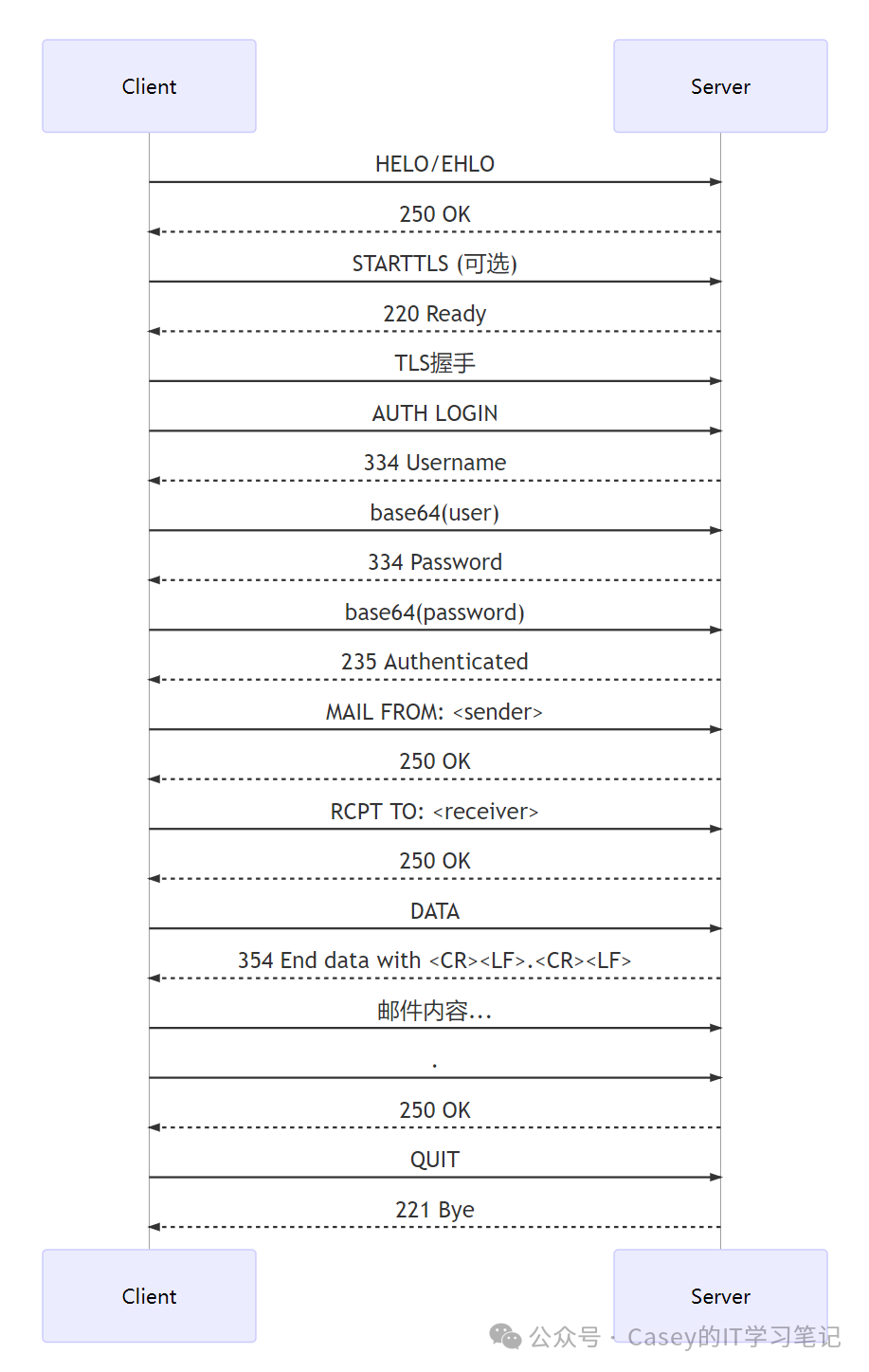
SMTP Protocol Interaction Process
Key Technologies
-
Protocol Support:
-
SMTP (Simple Mail Transfer Protocol)
-
ESMTP (Extended SMTP)
-
SMTP AUTH (RFC 2554)
-
STARTTLS (RFC 3207)
Authentication Mechanisms:
-
PLAIN: Plain text username and password
-
LOGIN: Base64 encoded authentication
-
CRAM-MD5: Challenge-response mechanism
Email Construction:
-
Seamless integration with
<span>email</span>standard library -
Supports MIME multipart messages
-
Automatically handles header encoding
Error Handling:
-
SMTPException base class
-
SMTPConnectError
-
SMTPAuthenticationError
-
SMTPRecipientsRefused
6. Installation and Configuration
Installation Instructions
smtplib is a component of the Python standard library, no separate installation is required and requires Python version ≥ 2.2 (recommended Python 3.6+)
Optional Dependencies
| Function | Required Libraries | Description |
|---|---|---|
| SSL/TLS Support | Python compiled with SSL enabled | Standard distributions usually include this |
| SOCKS Proxy Support | PySocks (<span>pip install pysocks</span>) |
Send emails via proxy |
| Advanced Email Construction Features | email standard library | Included with Python |
Port Configuration Reference
| Service Type | Port | Encryption Method |
|---|---|---|
| SMTP | 25 | No encryption |
| SMTP (SSL) | 465 | SSL/TLS |
| SMTP (STARTTLS) | 587 | Upgrade encryption |
| Custom | Any | Depends on the server |
7. Security Considerations
-
Avoid Plain Text Passwords:
# Use environment variables or secret management services import os password = os.getenv("SMTP_PASSWORD") -
Enforce Encrypted Connections:
# Always use STARTTLS or SSL server = smtplib.SMTP_SSL('smtp.example.com', 465) # Method 1 server = smtplib.SMTP('smtp.example.com', 587); server.starttls() # Method 2 -
Validate Server Certificates:
import ssl context = ssl.create_default_context() server = smtplib.SMTP('smtp.example.com', 587) server.starttls(context=context) # Validate certificate -
Prevent Injection Attacks:
# Use email library to construct emails instead of string concatenation
from email.utils import formataddr
msg['From'] = formataddr(("Sender Name", "[email protected]"))
8. Comparison with Similar Tools
| Feature | smtplib (Python) | Nodemailer (Node.js) | JavaMail (Java) | System.Net.Mail (.NET) |
|---|---|---|---|---|
| Protocol Support | SMTP/ESMTP | SMTP/ESMTP | SMTP/IMAP/POP3 | SMTP |
| TLS Support | ⭐⭐⭐⭐ | ⭐⭐⭐⭐⭐ | ⭐⭐⭐⭐ | ⭐⭐⭐⭐ |
| Asynchronous Support | ❌ (requires threads) | ⭐⭐⭐⭐⭐ | ⭐⭐ | ⭐⭐⭐⭐ (async/await) |
| Ease of Use | ⭐⭐⭐⭐ | ⭐⭐⭐⭐⭐ | ⭐⭐ | ⭐⭐⭐⭐ |
| Cross-Platform | ⭐⭐⭐⭐⭐ | ⭐⭐⭐⭐⭐ | ⭐⭐⭐⭐ | ⭐⭐⭐ (mainly Windows) |
9. Enterprise Application Cases
-
Monitoring and Alert System:
-
Prometheus + Alertmanager using smtplib to send alert emails
-
Server status monitoring notifications
User Registration System:
-
Django sending account activation emails
-
Password reset email service
Reporting System:
-
Daily sales report automatically sent via email
-
Monthly financial report push
Automated Office:
-
Meeting reminders sent automatically
-
Bulk customer notification emails sent
Summary
smtplib is the core tool for sending emails in the Python ecosystem, with core value in:
-
Complete Protocol Support: Fully supports SMTP/ESMTP protocol standards
-
High Integration: Seamlessly integrates with Python’s
<span>email</span>email construction module -
Simple and Reliable: Basic sending requires only 10 lines of code
-
Cross-Platform: No additional dependencies, ready to use out of the box
Technical Highlights:
-
Supports multiple authentication mechanisms (PLAIN, LOGIN, CRAM-MD5)
-
Provides TLS encrypted transmission (STARTTLS and SSL modes)
-
Detailed debugging log support
-
Internationalized email sending capability
Applicable Scenarios:
-
Automated email notifications
-
Bulk email sending
-
Monitoring alert system integration
-
User registration verification system
-
Automated enterprise report pushing
Basic Example:
import smtplib

with smtplib.SMTP_SSL('smtp.example.com', 465) as server:
    server.login("user", "password")
    server.sendmail(
        from_addr="[email protected]",
        to_addrs="[email protected]",
        msg="Subject: Hello\n\nBody text"
    )
Learning Resources:
-
Official Documentation:https://docs.python.org/3/library/smtplib.html
-
Email and MIME Handling:https://docs.python.org/3/library/email.html
-
Security Best Practices Guide:OWASP Email Security
As a component of the Python standard library, smtplib is pre-installed in over 20 million Python environments, becoming the de facto standard solution for automated email sending.