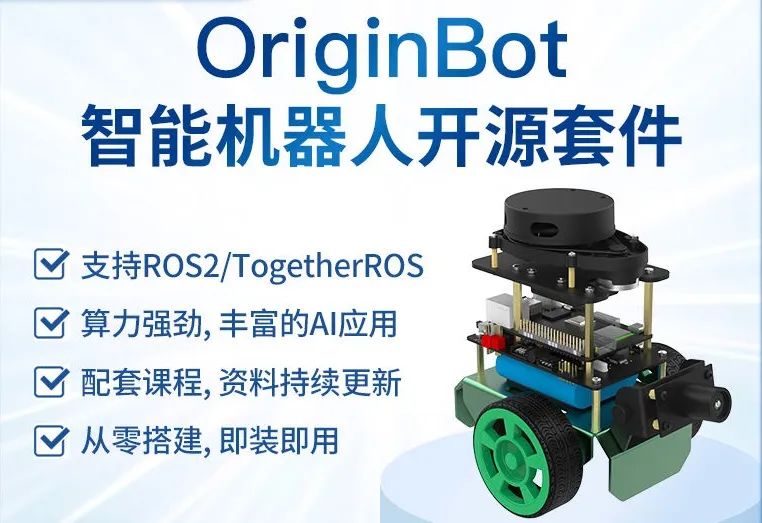
This article mainly discusses how to use OriginBot to take care of babies. When the baby’s face is not within the camera’s range, a message is sent to the DingTalk group to notify family members to check promptly.
Introduction
Last month, I had a baby, and to make it easier to look after the baby, I bought a camera with baby monitoring features. However, the product was not satisfactory, and most importantly, the face obscuring feature did not work, so I returned it. After returning it, I had the idea to create a similar function using OriginBot, which led to this blog~
Function Flowchart (Architecture Diagram)
The specific process, or architecture, is as follows:
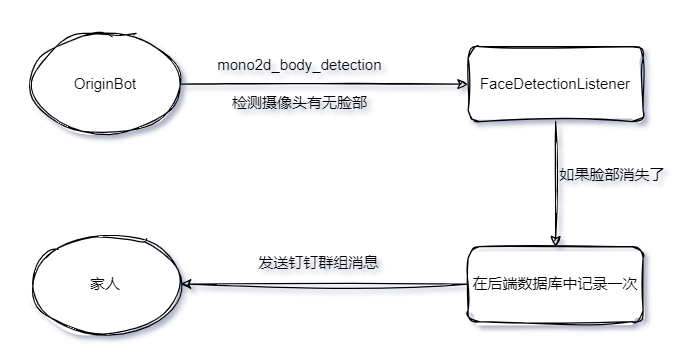
It is not complicated overall. On OriginBot, there is a MIPI camera, and it utilizes the human detection and tracking feature of Horizon TogetheROS.Bot (https://developer.horizon.cc/documents_tros/boxs/function/mono2d_body_detection#%E5%9C%B0%E5%B9%B3%E7%BA%BFrdk%E5%B9%B3%E5%8F%B0) to detect if there is a face in the camera in real-time. If there is no face, it sends data to the backend, which then sends a message to the DingTalk group to notify family members. A webhook needs to be created in the DingTalk group in advance.
Next, we will document the three parts: human detection, face detection, and backend operation.
Human Detection
This part uses the ready-made functionality of Horizon TogetheROS.Bot (https://developer.horizon.cc/documents_tros/boxs/function/mono2d_body_detection#%E5%9C%B0%E5%B9%B3%E7%BA%BFrdk%E5%B9%B3%E5%8F%B0). After starting OriginBot, run the following command in the command line:
# Configure tros.b environment
source /opt/tros/setup.bash
# Copy the configuration files needed for running examples from the installation path of tros.b.
cp -r /opt/tros/lib/mono2d_body_detection/config/ .
# Configure MIPI camera
export CAM_TYPE=mipi
# Start launch file
ros2 launch mono2d_body_detection mono2d_body_detection.launch.py
You can check the detection effect through http://IP:8000. This module detects human bodies, heads, faces, hand detection boxes, detection box types, target tracking IDs, and human key points, but I only take the face part. Of course, in the future, we can add human detection and more.
After running the above command, execute ros2 topic list on OriginBot; there should be a topic called hobot_mono2d_body_detection, which is what we need. We will subscribe to this topic and analyze the data sent to determine if there is a face.
Determining Whether There Is a Face in the Camera
According to the TogetheROS.Bot documentation, the message type of hobot_mono2d_body_detection is ai_msgs.msg.PerceptionTargets, as follows:
# Perception results
# Message header
std_msgs/Header header
# The processing frame rate of the perception results
# fps val is invalid if fps is less than 0
int16 fps
# Performance statistics, such as recording the inference time of each model
Perf[] perfs
# Perception target collection
Target[] targets
# Disappeared target collection
Target[] disappeared_targets
The disappeared_targets is our focus. If a face appears in disappeared_targets, it means there was a face before, but now it is gone. At this time, we need to send data to the backend for further processing.
To determine whether there is a face, I wrote a Node, and the code is as follows:
import rclpy
from rclpy.node import Node
from ai_msgs.msg import PerceptionTargets
from cv_bridge import CvBridge
import time
from api_connection import APIConnection
BabyMonitorMapping = {    # The k-v here needs to be determined according to the values in the backend Django    "face": "Face not visible",    "body": "Not in camera range",}

class FaceDetectionListener(Node):    """    Detect whether the baby's face is in the camera    """    def __init__(self):        super().__init__("face_detection")        self.bridge = CvBridge()        self.subscription = self.create_subscription(            PerceptionTargets, "hobot_mono2d_body_detection", self.listener_callback, 10        )        self.conn = APIConnection()        self.timer = time.time()        self.counter = 0
    def listener_callback(self, msg):        targets = msg.targets        disappeared_targets = msg.disappeared_targets        targets_list = []        disappeared_targets_list = []        if disappeared_targets:            for item in disappeared_targets:                disappeared_targets_list.append(item.rois[0].type)        if targets:            for item in targets:                targets_list.append(item.rois[0].type)        print(f"Detected objects: {targets_list}")        print(f"Disappeared objects: {disappeared_targets_list}")        if disappeared_targets_list:            self.sending_notification(disappeared_targets_list)
    def sending_notification(self, disappeared_targets_list):        for item in disappeared_targets_list:            if BabyMonitorMapping.get(item):                event = BabyMonitorMapping.get(item)                if self.counter == 0:                    # The baby's ID here is simulated, it should be checked in the database                    data = {"event": event, "baby": "6b56979a-b2b9-11ee-920d-f12e14f97477"}                     self.conn.post_data(item=data, api="api/monitor/face-detection/")                    self.counter += 1                    self.timer = time.time()                else:                    if time.time() - self.timer >= 60.0:                        # Do not resend DingTalk message for 60 seconds                        data = {"event": event, "baby": "6b56979a-b2b9-11ee-920d-f12e14f97477"}                        self.conn.post_data(item=data, api="api/monitor/face-detection/")                        self.timer = time.time()                        self.counter += 1

def main(args=None):    rclpy.init(args=args)    try:        face_detection_listener = FaceDetectionListener()        rclpy.spin(face_detection_listener)    except KeyboardInterrupt:        print("Terminating")    finally:        face_detection_listener.destroy_node()        rclpy.shutdown()

if __name__ == "__main__":    main()
The code overall is not difficult, but a few necessary explanations are still needed:
1. BabyMonitorMapping
This dictionary is used to map the fields in TogetheROS.Bot to the fields in the backend for ease of use later.
2. API Calls
In the code, there are two lines as follows:
data = {"event": event, "baby": "6b56979a-b2b9-11ee-920d-f12e14f97477"}
self.conn.post_data(item=data, api="api/monitor/face-detection/")
The uri and data format here are determined by the backend, so there is no need to go into details. For those who want to know the details, you can check the backend code.
3. APIConnection
APIConnection is a wrapper class for making API requests, and the code is as follows:
"""API CONNECTION FOR IMPORTING WRAPPER"""
import json
import logging
import requests
import envs

logging.basicConfig(    format="%(asctime)s %(levelname)-8s %(message)s",    level=logging.INFO,    datefmt="%Y-%m-%d %H:%M:%S",)

class APIConnection:    """    Api Connection    """    def __init__(self):        self.api_url = envs.API_URL        self.token = None        self.headers = {            "Content-Type": "application/json",            "Cache-Control": "no-cache",        }        self.request_jwt()
    def request_jwt(self):        """        Request JWT token.        """        logging.info("Requesting JWT..")        api_url = f"{self.api_url}api/token/"        data = {            "username": envs.SCRIPT_USER,            "password": envs.SCRIPT_PASSWORD,        }        res = requests.post(api_url, data=json.dumps(data), headers=self.headers)        if res.status_code == 200:            data = res.json()            self.token = data["access"]            self.headers["Authorization"] = f"Bearer {self.token}"        else:            logging.error(                f"Failed to obtain JWT. Status code: {res.status_code}, Message: {res.text}"            )    def upload_video(self, api, file):        """        post data        :param item: items to be posted in json format        :param api: path of endpoint        """        api_url = f"{self.api_url}{api}"        try:            res = requests.post(api_url, files=file, headers=self.headers, timeout=1)            if res.status_code == 401:                self.request_jwt()                self.post_data(api, file)            elif res.status_code in [200, 201]:                logging.info(f"{res.status_code} - video uploaded successfully")                return res.status_code            else:                logging.error(                    f"{res.status_code} - {res.json()}- unable to upload video"                )                return res.status_code        except Exception as err:            logging.error(err)            return 500    def post_data(self, item, api):        """        Create a new data entry        """        api_url = f"{self.api_url}{api}"        try:            response = requests.post(                api_url, data=json.dumps(item), headers=self.headers, timeout=1            )            if response.status_code == 403:                self.request_jwt()                self.post_data(item, api)            elif response.status_code not in [200, 201]:                logging.error(                    f"post data to backend failed,
                     status code is {response.status_code},
                     error message is:
 			{response.text}"                )        except Exception as err:            logging.error(                f"post data to backend failed,
                  error message is:
 			{err}"            )
Backend Operation
After the previous two parts, if face data is found to have disappeared from the OriginBot’s camera, it will have sent the record to the backend. Now let’s talk about the backend part.
The backend operation is actually quite simple. It receives the data, stores a copy in the database, and then sends a message to DingTalk to remind family members.
In the OriginBot family assistant plan (https://www.guyuehome.com/44812), it is mentioned that the backend is developed based on Django + Django Rest Framework, and the following content requires some basic understanding of Django to comprehend.
First, two Django models are created to store the data.
class Baby(models.Model):    """    Record of the baby's data    """    id = models.UUIDField(primary_key=True, default=uuid.uuid1, editable=False)    name = models.CharField(max_length=256)    birth_date = models.DateField()    gender = models.CharField(max_length=1, choices=(("男", "男"), ("女", "女")))    def __str__(self):        return self.name

class BabyMonitorData(models.Model):    """    Record of data related to baby monitoring    """    event_choices = (        ("看不到脸", "Face not visible"),        ("哭", "Crying"),        ("翻身", "Rolling"),        ("不在摄像头范围内", "Not in camera range"),    )    baby = models.ForeignKey(Baby, on_delete=models.PROTECT)    event = models.CharField(max_length=128, choices=event_choices)    timestamp = models.DateTimeField(auto_now_add=True)    def __str__(self):        return f"{self.baby.name} {self.event} {self.timestamp}"    class Meta:        ordering = ["-timestamp"]
It is important to note that there is a foreign key relationship between the Baby and BabyMonitorData classes.
The uri requested in FaceDetectionListener api/monitor/face-detection/ ultimately executes the following code in the backend:
class BabyMonitorView(viewsets.ModelViewSet):    queryset = BabyMonitorData.objects.all().order_by("-timestamp")    serializer_class = BabyMonitorSerializer
    def create(self, request, *args, **kwargs):        response = super().create(request, *args, **kwargs)        message = request.data        try:            event = message.get("event")            baby = Baby.objects.filter(id=message.get("baby"))[0].name        except IndexError:            print("Cannot find corresponding baby data")            return response        send_msg_to_dingtalk(f"{baby} {event} has occurred!")        # Return the original response        return response
What this does is store a record in BabyMonitorData and send a message to the DingTalk group through send_msg_to_dingtalk.
The code for send_msg_to_dingtalk is as follows:
import json
import requests
from utils import envs
from datetime import datetime

def send_msg_to_dingtalk(msg):    webhook = envs.DING_TALK_URL    headers = {"Content-Type": "application/json;charset=utf-8"}    data = {        "msgtype": "text",        "text": {            "content": msg            + f"[From OriginBot, {datetime.now().strftime('%Y-%m-%d %H:%M:%S')}]"        },    }    response = requests.post(webhook, headers=headers, data=json.dumps(data))    return response.text

if __name__ == "__main__":    message = "Hello from my Python script!"    send_msg_to_dingtalk(message)
The code webhook = envs.DING_TALK_URL actually retrieves the DingTalk group robot link from the environment variable. There are many tutorials online on how to create a DingTalk group robot, so I won’t elaborate on that.
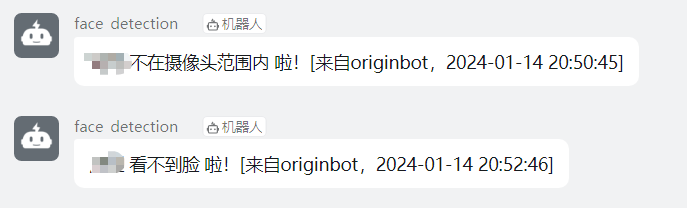
At this point, if everything goes smoothly, you should be able to see messages in DingTalk, as shown below:
Source Code
Source code address: https://github.com/yexia553/originbot_home_assistant
Areas for Optimization
Although a basic demo has been completed, there are still many areas that need optimization:
The car can only run on the ground, but the baby is generally on the bed. The car must be placed in a specific position to achieve the above functions, which limits practical applications and needs to be resolved.
Battery life issue, currently the car’s battery can only last about 2 hours.
Currently, it only detects whether there is a face in the camera, rather than detecting the baby’s face. Optimization can be considered.
Similar features like crying detection, rolling, and other action recognition can be added, along with data analysis.