Hello everyone, welcome to <span>LiXin Embedded</span>.
The ability to retain data (stored in Flash or EEPROM) after a power failure is a well-known yet crucial topic. Whether due to unexpected power outages or software bugs, carefully preserved data can turn into a pile of garbled information. For instance, losing calibration data might require sending the device back to the manufacturer for recalibration, which is quite a headache. Today, we will share some experiences from a software perspective.
Pain Points of Flash Data
Flash storage, such as EEPROM or Flash, can ensure data is not lost after a power failure at the hardware level, but this does not guarantee the data is reliable. For example, if a 4-byte integer is being updated and the system crashes halfway through, the value read after a reboot may be a mix of old and new data, rendering it unusable. In a motor control system, if speed and direction are updated simultaneously and only one is completed, the device may run off course. This data consistency issue is familiar to everyone dealing with interrupts or multitasking.
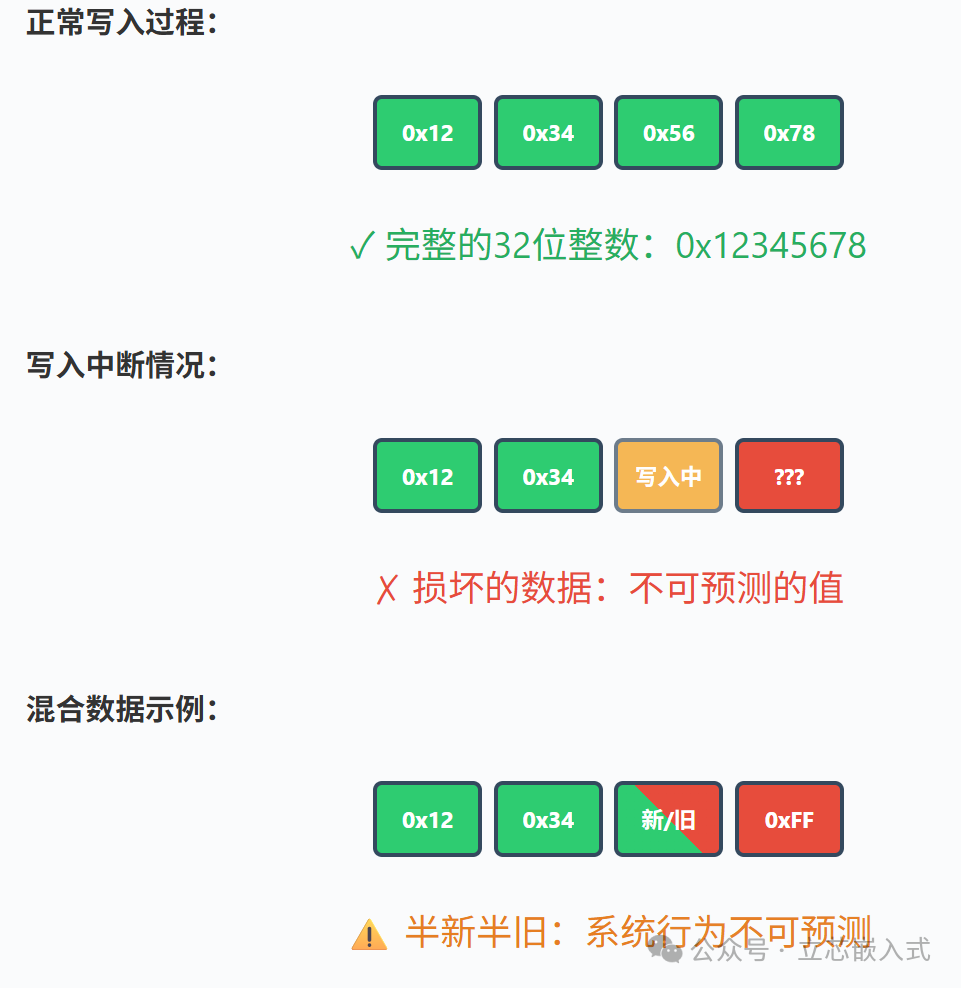
What complicates matters further is the myriad reasons for system restarts. Power outages, watchdog timeouts, illegal address accesses, or even hidden bugs can cause data to be corrupted during writing. Relying solely on hardware to ensure data integrity is far from sufficient; software must also be robust to ensure that data not only exists but is trustworthy.
Limitations of Power Failure Interrupts
A common approach is to use a power failure detection circuit that triggers an interrupt, prompting the processor to quickly save data to Flash. This method sounds good in theory, but it has many pitfalls in practice. First, it is essential to ensure that the time from detecting a power failure to complete power loss is sufficient for the processor to finish writing the data. If a capacitor is used to maintain power, one must calculate the capacitor’s discharge time under various loads and consider the effects of capacitor aging. If using serial EEPROM, the write time can be frustratingly long, and if the amount of data changes significantly, the time window may not be enough.
Moreover, during data operations, interrupts must be disabled; otherwise, the data in RAM may not be fully updated before being interrupted, resulting in a jumble of garbled data. However, if interrupts are disabled for too long, the response time for power failure detection increases, leading to a significant rise in design complexity. I have seen a project that used a backup battery to address power failure issues. After the power failure interrupt is triggered, the software organizes the data and then notifies the battery circuit to cut off power through an IO port, effectively controlling the timing of the power failure. This approach is clever and solves some problems, but it still cannot guarantee data reliability in all situations. For example, restarts caused by watchdog timeouts or illegal pointer accesses can still lead to data issues.
Therefore, the power failure interrupt method is only reliable when the software is simple and the cost of data loss is low. For complex systems, the risks remain too high.
Using Checksums to Safeguard Data
Since restarts are inevitable, data integrity must be ensured through checksums. Compared to simple addition checks, cyclic redundancy checks (CRC) are stronger in error detection and can identify more types of errors. The checksum approach is straightforward: each time data is written, a checksum value is calculated and stored; when reading, it is recalculated and compared for consistency. If they do not match, it indicates that the data is corrupted, and a follow-up strategy must be in place.
The specific implementation of checksums depends on the data scale and storage method. For example, if you have a 4KB Flash storage area, the last two bytes can be used to store the checksum. If you need to change 10 bytes, you must traverse the entire 4KB to recalculate the checksum. If using serial EEPROM, the read/write speed can be painfully slow, making this operation costly. If there is a copy of the data in RAM, calculating the checksum will be faster, but in a multitasking environment, care must be taken to prevent other tasks from modifying the data while calculating the checksum.
To reduce overhead, large data blocks can be divided into smaller chunks, each with its own checksum. For instance, calibration data can be one chunk, and user settings can be another, each with its own checksum strategy. Calibration data may need to be stored every time it changes, while user settings can be saved once a minute. This way, even if one chunk of data is corrupted, the others can still be used, minimizing the loss.
Data Recovery Strategies
Assuming the system restarts and detects that a chunk of data has an incorrect checksum, what should be done? The simplest method is to restore it to default values. If it is a non-critical setting like TV volume, having the user readjust it is not a big deal. However, some scenarios are not so simple. I once heard of a case where the EEPROM data for a car airbag was interfered with by noise, and restoring it to default values unexpectedly enabled a previously disabled side airbag, resulting in severe consequences during an accident. Such latent faults are the most frightening, as they may have occurred in countless vehicles without anyone noticing until an accident happens.
For calibration data, restoring to default values may be entirely unfeasible. If the sensor calibration values are replaced with averages, the device’s accuracy may plummet. One approach is to require the user to recalibrate, which, while cumbersome, is manageable if the calibration data rarely changes, as the probability of being interrupted halfway through is low, making the cost of recalibration minimal. If calibration can only be done at the factory, then calibration data and user settings must be validated separately to prevent one from affecting the other in case of corruption.
The Savior of Double Buffering
To more reliably protect data, double buffering is a good method. The core idea is to store two copies of the data, with at most one being updated at any time, while the other remains intact. If the system crashes while writing data, the incomplete copy may be corrupted, but the other copy is guaranteed to be good. Although the latest update may be lost, users typically accept this, as an incomplete update is equivalent to no change.
When implementing double buffering, a flag can be added to indicate which copy of the data is the latest and best. During writing, first update copy A, calculate the checksum, then point the flag to A, and finally synchronize the data from A to copy B before changing the flag back to B. When reading data, check the flag first to read the corresponding copy. The flag itself may also become corrupted, but that is not a concern; checking the checksums of both copies will reveal which one is good. For added safety, the flag can use non-0/1 values, such as 0x55 and 0xAA, to prevent misjudgment when the storage device is completely cleared.
The cost of double buffering is that storage space is doubled. If storage resources are tight, double buffering can be applied only to critical data, while non-critical data can use single buffering. Another point to note is to place the two copies on different storage chips or at distant address spaces to reduce the risk of bugs corrupting both copies. Serial EEPROM has an advantage in this regard, as its write operations are complex, making accidental writes less likely.
Conclusion
Ultimately, protecting Flash data is about ensuring that software reliability matches hardware capabilities. Methods such as power failure interrupts, checksums, and double buffering each have their pros and cons, and must be chosen based on the specific scenario. When designing, do not focus solely on hardware; software strategies must be considered in advance. For example, double buffering will take up more space, and the slow read/write speed of serial EEPROM may hinder performance; these factors must be carefully considered during circuit design.
In many projects, there is often no absolutely perfect solution. There is an old fisherman’s saying: “Don’t take two watches out to sea, or you won’t know which one to trust.” But in Flash data protection, we are luckier than the fisherman, as we have checksums and flags to help us always identify the reliable data.