 (Starting with a diagram, the content relies on compilation)IntroductionRecently, while testing software for internal network penetration, I encountered many protocols that I do not specialize in and could not understand. I gathered relevant information to educate myself.Here’s a summary diagram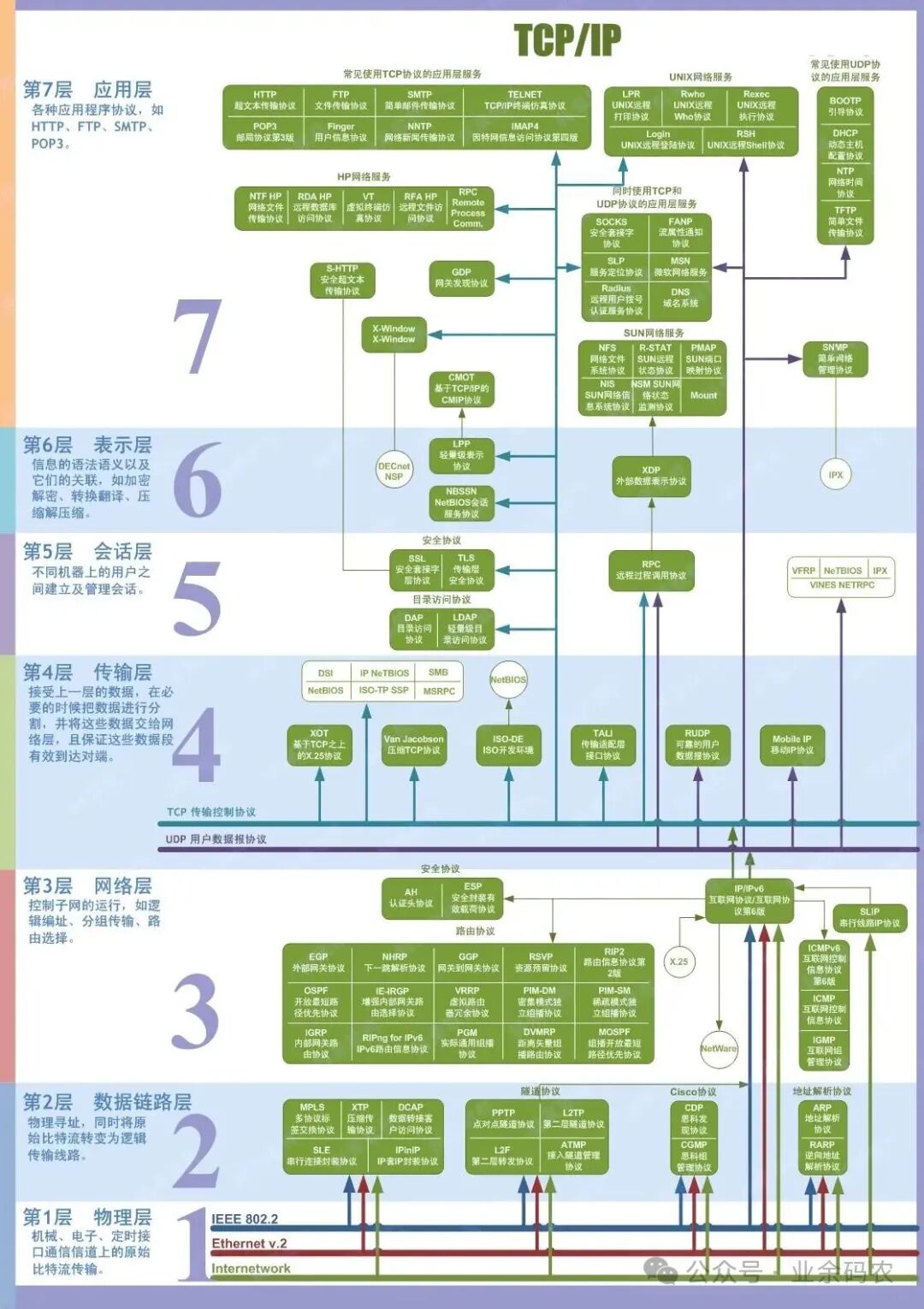
Application Layer Protocols
Application layer protocols are those that directly serve user applications in network communication, fulfilling various specific network application needs.
HTTP (HyperText Transfer Protocol)
The core function is to transfer hypertext data, using a request-response interaction model. The most common application scenario is web browsing, where users enter a URL in the browser and retrieve hypertext content such as text and images via the HTTP protocol.
HTTPS (HTTP Secure)
Built on HTTP, it uses TLS/SSL protocols for encryption, providing security for data transmission and effectively preventing data from being stolen or tampered with during transmission. It is widely used in secure web access scenarios, such as online payments and user logins, which involve the transmission of sensitive information.
**Check your browser address; these two protocols are generally used for web pages.**
WS (WebSocket)Breaks the unidirectional communication limitation of the HTTP protocol’s “request-response” model, enabling full-duplex communication between the client and server. It allows the server to actively push data to the client without the client frequently initiating requests. It is widely used in scenarios requiring real-time data updates, such as online chat software, real-time stock market displays, and collaborative tools, significantly reducing network latency and enhancing real-time interaction experience.WSS (WebSocket Secure)Is a secure version of the WS protocol, providing encryption protection for transmitted data through TLS/SSL, preventing data from being eavesdropped or tampered with during real-time interactions. It is suitable for real-time communication scenarios with high security requirements, such as real-time transaction instruction transmission in finance and sensitive information collaboration systems within enterprises, ensuring security for full-duplex communication.**In the field of real-time communication and data interaction, I wonder why I haven’t seen much of this.****
FTP (File Transfer Protocol)
Specifically used for transferring files between different devices on a network, supporting both upload and download operations. Whether for personal users transferring data between computers or employees uploading work files to servers, FTP protocol is commonly utilized.
SMB (Server Message Block)
Primarily provides shared access services, enabling not only file sharing but also shared use of devices like printers. It is widely used in local area network environments, such as multiple computers in an office sharing a printer or employees accessing shared files on a local server, all relying on the SMB protocol.
**FTP is used for remote management on mobile devices, while SMB is used for Windows shared folders.**
POP3 (Post Office Protocol v3)
Its function is to download emails from the mail server to local devices. When users use email clients that support the POP3 protocol, emails are downloaded to local computers or phones, allowing users to view emails offline. However, there may be inconveniences in synchronizing emails across different devices, commonly seen in scenarios where local email storage is required.
SMTP (Simple Mail Transfer Protocol)
Responsible for the email sending process. When a user clicks send in an email client, the email is sent from the user’s client to the mail server via the SMTP protocol, which then forwards it to the recipient’s mail server.
IMAP (Internet Message Access Protocol)
Unlike POP3, it allows users to access and manage emails directly on the mail server. When users log into their email accounts from different devices, they see the real-time status of emails on the server, including read, unread, and folder classifications, facilitating multi-device email management. It is one of the mainstream email receiving protocols today.
**If you have used email software, you should be familiar with these three.**RDP (Remote Desktop Protocol)Allows users to remotely connect to another computer’s desktop environment over a network, enabling complete control over the remote computer, including file operations, running programs, and configuring systems. It is commonly used in scenarios such as employees working remotely (e.g., accessing company computers from home) and IT administrators remotely maintaining client devices, providing users with a remote experience close to local operation.**The protocol for Windows Remote Desktop, which is much smoother than other software.**MQTT (Message Queuing Telemetry Transport)Uses a publish-subscribe model, characterized by low overhead, low bandwidth usage, and support for disconnection and reconnection, efficiently achieving message transmission between devices and servers. It is widely used in IoT device data collection and control, such as reporting the status of smart appliances (e.g., air conditioning temperature, light switch status), industrial sensor data transmission (e.g., monitoring operating parameters of workshop equipment), and agricultural IoT (e.g., remote monitoring of soil moisture and greenhouse temperature).CoAP (Constrained Application Protocol)Is designed for resource-constrained devices (e.g., sensors with limited computing power and storage capacity) and constrained networks (e.g., low bandwidth, high packet loss wireless networks). It adopts a request-response model similar to HTTP but with a more concise data format and lower transmission overhead, supporting message acknowledgment and retransmission mechanisms. It is suitable for remote control and data interaction of IoT devices, such as remote meter reading for smart water and electricity meters and communication between low-power sensors and gateways in smart homes, achieving efficient network communication in resource-limited environments.**Used in IoT and low bandwidth, high latency network scenarios.**DNS (Domain Name System)The key function is to resolve user-friendly domain names into IP addresses that computers can recognize. Since devices on the network communicate using IP addresses, while domain names like “www.baidu.com” are easier for users to remember, when a user enters a domain name in the browser, the DNS protocol converts it into the corresponding IP address, enabling access to the target website. All scenarios relying on domain names to access the network depend on the support of the DNS protocol.DHCP (Dynamic Host Configuration Protocol)Automatically assigns IP addresses, subnet masks, gateways, and other network configuration information to devices on the network without requiring manual setup by users. Whether for mobile phones and computers in a home wireless network or office devices in an enterprise LAN, most devices obtain network configurations automatically through the DHCP protocol upon connecting to the network, simplifying the process of connecting network devices.**If your company has network control, you should be quite familiar with these.**SSH (Secure Shell)Provides secure remote login and command-line access services, using encryption technology to protect data transmission during remote login, preventing login information and operation commands from being stolen. It is commonly used by administrators to remotely manage servers, such as operations personnel logging into servers in the data center from their local computers via the SSH protocol to perform system configuration and software installation.Telnet protocolWas also used for remote login and command-line access, but due to its use of plaintext data transmission, there are significant security risks for sensitive information such as login passwords and operation commands during transmission. With the rise of security awareness, the use of Telnet protocol has gradually decreased, and it is now only occasionally used in some low-security remote device configuration scenarios, being gradually replaced by the more secure SSH protocol.**Programmers should be quite familiar with this, but ordinary people rarely use it.**Transport Layer ProtocolsTransport layer protocols are located between the application layer and the network layer, primarily responsible for end-to-end data transmission management, ensuring efficient and reliable data transfer between source and target devices.TCP (Transmission Control Protocol)A connection-oriented protocol that establishes a connection before data transmission, ensuring reliability through acknowledgment and retransmission mechanisms, and guarantees that data arrives at the target device in the order sent without loss or disorder. Its characteristic is the “three-way handshake.” Based on these features, TCP protocol is widely used in scenarios requiring high reliability for data transmission, such as web browsing (in conjunction with HTTP/HTTPS protocols), email transmission (in conjunction with SMTP/POP3/IMAP protocols), and file transfer (in conjunction with FTP protocol). In these scenarios, data loss or errors would severely impact user experience or business operations.UDP (User Datagram Protocol)In contrast to TCP, it is a connectionless protocol that does not require establishing a connection before data transmission, directly encapsulating data into datagrams for sending. This results in high transmission efficiency and low latency, but it does not guarantee the reliability of data transmission, which may lead to data loss, duplication, or disorder. However, in scenarios where real-time performance is prioritized over reliability, UDP protocol shows significant advantages, such as video streaming, where occasional loss of a small amount of data does not severely affect the overall viewing experience; voice calls and online gaming are also sensitive to latency and require fast data transmission, making UDP protocol an ideal choice for these scenarios. Additionally, DNS queries, due to their small data size and high response speed requirements, also commonly use UDP protocol.QUIC (Quick UDP Internet Connections)Is a next-generation transport layer protocol developed based on UDP, combining the reliability advantages of TCP protocol with the low-latency characteristics of UDP protocol. By introducing connection multiplexing, 0-RTT (Round-Trip Time) fast handshake, adaptive congestion control, and data encryption mechanisms, it significantly reduces connection establishment latency while ensuring reliable data transmission and minimizing connection interruptions during network switching (e.g., when a mobile device switches from Wi-Fi to cellular network). QUIC protocol is currently widely used in scenarios requiring high transmission speed and stability, such as high-definition video streaming (reducing buffering), large file downloads (increasing speed), and mobile internet applications (adapting to network switching). Major browsers (such as Chrome and Firefox) and some cloud services have begun to support QUIC protocol, making it an important direction for optimizing network transmission experience.Network Layer ProtocolsNetwork layer protocols play a central role in routing and forwarding in network communication, responsible for transmitting data from the source network to the target network, which is key to achieving interconnectivity between different networks.IP (Internet Protocol)The most basic and core protocol at the network layer, it defines the format of IP addresses and assigns a unique IP address to each device connected to the internet. It is also responsible for routing and forwarding data packets, determining the transmission path of data packets from the source device to the target device. Whether for communication within a local area network or across the internet, all network communication is based on IP protocol, which is the cornerstone of network communication.ICMP (Internet Control Message Protocol)Primarily used for network diagnostics and error reporting. When anomalies occur during data transmission, such as unreachable target devices or routing timeouts, ICMP protocol generates corresponding control messages to feedback to the source device, helping network administrators troubleshoot network faults. The common ping command is based on ICMP protocol, sending ICMP request packets to the target device and determining whether the target device is online based on whether a response packet is received; the traceroute command also relies on ICMP protocol to trace the routing nodes that data packets pass through from the source device to the target device, clearly presenting the data transmission path and facilitating the identification of fault nodes in the network.ARP (Address Resolution Protocol)Resolves network layer IP addresses to data link layer MAC addresses. In local area network communication, devices exchange data using MAC addresses. When a device knows the target device’s IP address but not its MAC address, it sends an ARP request via ARP protocol to obtain the target device’s MAC address, completing device addressing within the local area network and ensuring data is accurately sent to the target device.Data Link Layer ProtocolsData link layer protocols primarily handle the raw data transmitted by the physical layer, encapsulating it into data frames to achieve reliable data transmission between adjacent devices, serving as an important bridge between the physical layer and the network layer.EthernetIs the most common protocol used in local area network (LAN) technology, suitable for wired LAN environments. Whether for wired broadband connections in homes or computers and servers connected via cables in corporate offices, most data transmission is based on Ethernet protocol, characterized by high transmission rates and strong stability.Wi-Fi ProtocolThe core protocol of wireless local area network technology, freeing devices from the constraints of cables and enabling wireless networking. It supports various wireless devices such as smartphones, laptops, and smart TVs to connect to the network, widely used in homes, shopping malls, cafes, and other scenarios, providing users with convenient wireless network access services. With technological advancements, the transmission rates and coverage of Wi-Fi protocols continue to improve.PPP (Point-to-Point Protocol)Primarily used in point-to-point connection scenarios, commonly applied in dial-up internet access. Early users connected to the internet via telephone lines, establishing a connection between their computers and the service provider’s access server using PPP protocol for bidirectional data transmission. Although broadband internet access has become mainstream, PPP protocol is still used in some specific point-to-point communication scenarios.Security ProtocolsThe core goal of security protocols is to ensure data security during network communication by employing encryption, authentication, and integrity verification techniques to prevent data from being stolen, tampered with, or forged.SSL/TLS (Secure Sockets Layer/Transport Layer Security)Provides security for data transmission of application layer protocols, operating between the transport layer and application layer. By encrypting data, it ensures confidentiality during transmission, while authentication confirms the identities of both parties in communication to avoid impersonation attacks. It also performs integrity checks to prevent data tampering. SSL/TLS protocol is widely used, not only providing security support for HTTPS protocol but also used in WSS (WebSocket Secure), secure email, and other scenarios to ensure the secure transmission of various sensitive data.IPSec (Internet Protocol Security)Operates at the network layer, directly encrypting and protecting IP packets, providing security services for all communications at the IP layer. Whether for communication between local area networks or remote users accessing internal enterprise networks, IPSec protocol can be used to build VPNs (Virtual Private Networks) for secure remote communication, ensuring that data is not stolen or tampered with during transmission over the public internet, providing security for remote work and cross-regional business communication.Conclusion I still don’t understand. Since there is a fully functional TCP protocol, why do we need to mention HTTPS protocol separately?They are not at the same level, right?With a fully functional TCP protocol, can we achieve true internal network penetration?