For more quality interview questions and study notes, visit KamaCoder Notes:https://notes.kamacoder.com
Today’s recommended quality notes: https://notes.kamacoder.com/questions/500005
If asked by an interviewer, “What are the common HTTP status codes? What do they mean?“, how should we respond?
Brief Answer
- The ten most frequently encountered HTTP status codes are as follows:
- 200: OK, indicates that the request has been successfully processed (e.g., webpage loaded successfully, API successfully returned data).
- 301: Moved Permanently, indicates that the resource has been permanently redirected to a new URL (e.g., when a website changes its domain, the old link redirects).
- 302: Found, indicates that the resource has been temporarily redirected to a new URL (e.g., redirecting back to the original page after login).
- 304: Not Modified, indicates that the resource has not been modified, and the client can use the local cache directly (this is the core status code of caching mechanism).
- 400: Bad Request, indicates that the client’s request format is incorrect (e.g., missing parameters, JSON syntax errors).
- 401: Unauthorized, indicates not authenticated (e.g., accessing a privileged interface without logging in).
- 403: Forbidden, indicates no permission to access the resource (e.g., a regular user accessing an admin interface).
- 404: Not Found, indicates that the resource does not exist (e.g., URL path error, file deleted).
- 500: Internal Server Error, indicates server internal error (e.g., code exception, database crash).
- 503: Service Unavailable, indicates that the service is temporarily unavailable (e.g., server maintenance, overload circuit breaker).
Detailed Answer
1. 2xx (Success)
- 200:
- Definition: OK, indicates that the request has been successfully processed by the server; a GET request generally returns the resource content, while a POST request may return the operation result or a new resource link.
- Typical Scenarios: Successfully loading a webpage (HTML content); API returning JSON data.
2. 3xx (Redirection)
- 301:
- Definition: Moved Permanently, indicates that the requested resource has been permanently redirected to a new URL, and the client should update bookmarks or links; the browser will cache this redirection, and subsequent requests will directly access the new URL.
- Typical Scenarios: Website changing domain (e.g.,
programmercarl.com→notes.kamacoder.com); global redirection from HTTP to HTTPS.
- Definition: Found, indicates that the resource has been temporarily redirected to a new URL, and subsequent requests may still access the original URL; the browser defaults to using the GET method for redirection, even if the original request was POST.
- Typical Scenarios: Temporarily redirecting to the user homepage after login; callback redirection in OAuth authorization flow.
- Definition: Not Modified, indicates that the resource has not changed, and the client can use the cached copy directly; the server does not return a response body, only the
304status and cache-related headers. - Typical Scenarios: Browser cache validation (through
If-Modified-Sincerequest header); CDN node cache validity checks.
3. 4xx (Client Error)
- 400:
- Definition: Bad Request, indicates that there is a syntax or parameter error in the client’s request, and the server cannot process it; issues should be investigated in conjunction with the error description in the response body.
- Typical Scenarios: JSON format error in request body; missing required parameters leading to request format errors.
- Definition: Unauthorized, indicates that the request did not provide valid credentials, and authentication is required to retry.
- Typical Scenarios: An unauthenticated user accessing a privileged interface; token expired or invalid.
- Definition: Forbidden, indicates that the client’s identity has been authenticated, but they have no permission to access the target resource; a
404may be returned instead when hiding inaccessible resources. - Typical Scenarios: A regular user attempting to access an admin interface; IP address blacklisted.
- Definition: Not Found, indicates that the server could not find the requested resource; it is possible that the server deliberately hides the existence of the resource (e.g., to avoid sensitive information leakage).
- Typical Scenarios: URL path error; resource has been deleted (e.g., a user accessing a discontinued product).
4. 5xx (Server Error)
- 500:
- Definition: Internal Server Error, indicates a server internal error, unable to complete the request; in development environments, detailed error stacks should be returned, while in production environments, sensitive information should be hidden.
- Typical Scenarios: Unhandled exceptions in code (e.g., null pointer, database connection failure); server configuration errors.
- Definition: Service Unavailable, indicates that the server is temporarily unable to process the request (usually due to overload or maintenance).
- Typical Scenarios: Server maintenance window; high concurrent traffic causing service circuit breaker (e.g., flash sales).
Knowledge Expansion
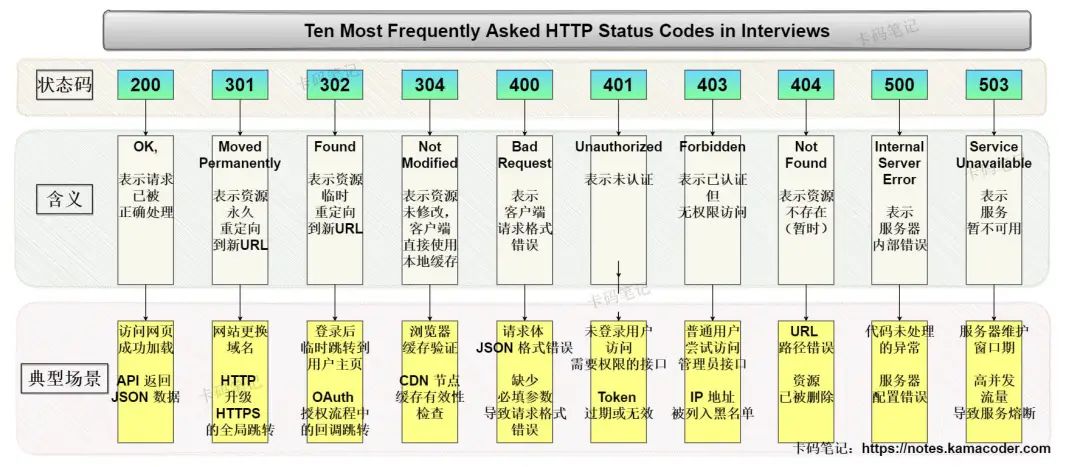
- Detailed explanation of frequently used HTTP status codes is shown in the image below:
- More HTTP status codes are shown in the table below:
Status Code Status Code English Name Chinese Description 100Continue Continue. The client should continue its request. 101Switching Protocols Switching protocols. The server switches protocols based on the client’s request (e.g., upgrading to WebSocket). 200OK Request successful. Generally used for GET and POST requests. 201Created Created. The request was successful and a new resource was created. 202Accepted Accepted. The request has been accepted but not yet processed (commonly used for asynchronous tasks). 203Non-Authoritative Information Non-authoritative information. The returned metadata comes from a copy rather than the original server. 204No Content No content. The server successfully processed the request but did not return any content (e.g., DELETE request). 205Reset Content Reset content. The client should reset the document view (e.g., clear the form). 206Partial Content Partial content. The server successfully processed part of the GET request (e.g., resume download). 300Multiple Choices Multiple choices. The resource has multiple addresses available, and the client needs to choose. 301Moved Permanently Moved permanently. The resource has been permanently redirected to a new URI (the browser will cache the new address). 302Found Found. The resource is temporarily redirected to a new URI (subsequent requests still use the original address). 303See Other See other address. Forces the client to access the new URI using the GET method (commonly used for redirection after POST). 304Not Modified Not modified. The client’s cached resource is still valid, no need to retransmit. 305Use Proxy Use proxy. Request must be accessed through a proxy (modern browsers have deprecated this). 306Unused Deprecated (originally designed for subsequent requests through a proxy, now replaced by 307/308). 307Temporary Redirect Temporary redirect. Keeps the original request method for redirection (e.g., temporary redirect for a POST request). 400Bad Request Client request syntax error, server cannot understand. 401Unauthorized Unauthorized. Valid credentials are required (e.g., login token). 402Payment Required Reserved status (actually used in payment scenarios, such as Stripe API calls). 403Forbidden Forbidden. Authenticated but no permission to access the resource. 404Not Found Not found. The server cannot find the resource based on the request. 405Method Not Allowed Method not allowed. The HTTP method requested is not allowed (e.g., using GET to access an interface that only supports POST). 406Not Acceptable Not acceptable. The server cannot provide the media type requested by the client (e.g., only supports JSON but requests XML). 407Proxy Authentication Required Proxy authentication required. Must authenticate through a proxy server. 408Request Time-out Request timeout. The server waited too long for the client to send the request. 409Conflict Conflict. The request conflicts with the current state of the server (e.g., concurrent editing resource version conflict). 410Gone Gone. The resource no longer exists (distinct from 404, clearly indicating that the resource has been actively deleted). 411Length Required Length required. The request must include a Content-Lengthheader.412Precondition Failed Precondition failed. The conditions in the request header are not met (e.g., If-Matchvalidation failed).413Request Entity Too Large Request entity too large. The server refuses to process (e.g., uploading a file exceeds the limit). 414Request-URI Too Large Request-URI too large. The requested URL exceeds the server limit (e.g., GET parameters too long). 415Unsupported Media Type Unsupported media type. The server cannot process the format attached to the request (e.g., uploaded file type not supported). 416Requested range not satisfiable Requested range invalid. The client requests data beyond the available range of the resource (e.g., requesting data beyond the end of a file). 417Expectation Failed Expectation failed. The server cannot meet the requirements of the Expectrequest header (e.g.,Expect: 100-continuenot supported).500Internal Server Error Internal server error. Code exception or configuration error. 501Not Implemented Not implemented. The server does not support the functionality requested (e.g., using an unsupported HTTP method). 502Bad Gateway Bad gateway. The proxy server received an invalid response from upstream (e.g., backend service crashed). 503Service Unavailable Service unavailable. The server is overloaded or undergoing maintenance (can specify retry time using Retry-Afterheader).504Gateway Time-out Gateway timeout. The proxy server did not receive a timely response from upstream (e.g., backend service response timeout). 505HTTP Version not supported Unsupported HTTP version. The server does not support the protocol version in the request (e.g., requesting HTTP/3 but the server only supports HTTP/1.1).
Eight-Legged Essay Training Camp
Why is there an Eight-Legged Essay Training Camp?
Currently, there is a lot of material on eight-legged essays (interview questions), but people still face the following troubles when memorizing:
- There is too much content in eight-legged essays, which questions should be prioritized in limited time?
- It feels like the content cannot be finished, and there is no rhythm in self-study.
- Have memorized many eight-legged essays but cannot articulate during interviews.
- Feeling nervous during interviews: Who am I, where am I, what am I doing?
To avoid everyone stuttering during interviews and speaking ineffectively, KamaCoder Training Camp has developed a brand new training mode called recording check-in!
Daily eight-legged tasks are given, and participants are required to record their answers in the system to complete the check-in for the day.
For details, see here: Interview Blitz (Eight-Legged Essay) Training Camp Details
Effects of the Eight-Legged Training Camp
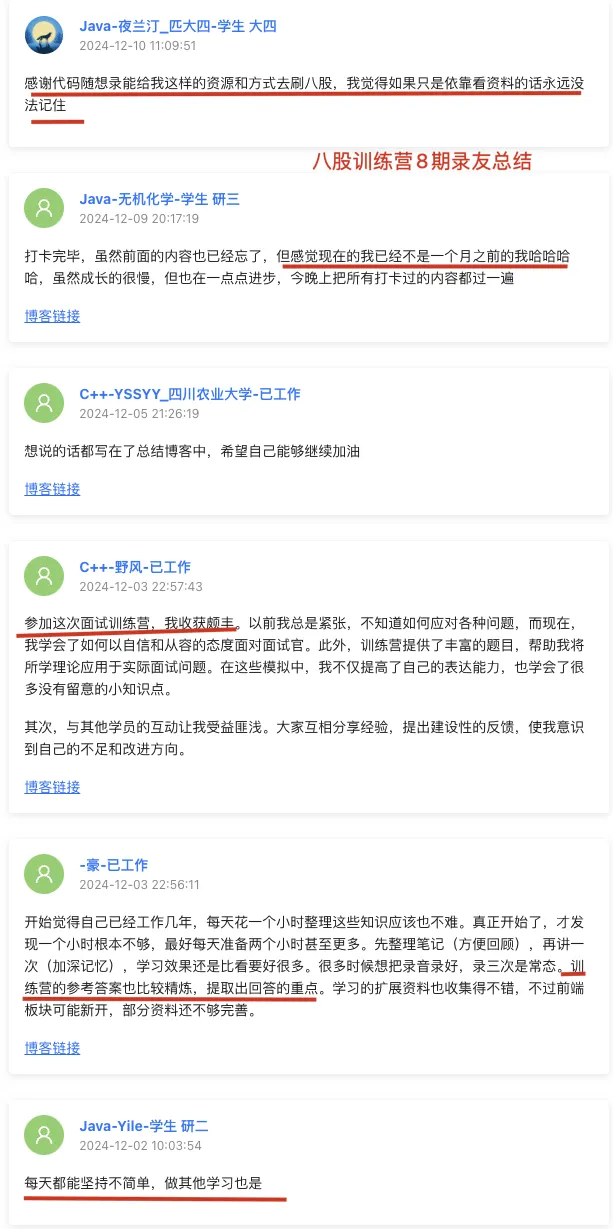
This is the feedback from previous participants:
View Training Camp Start Dates and Register
Scan the WeChat code to view the recent training camp start dates: 
For any questions about the training camp, you can scan the code to contact customer service, as shown below:
Welcome participants to take notes, click “Read Original” to go directly to KamaCoder Notes.