↓Recommended Follow↓
Everyone knows that computer programming languages are usually divided into three categories: machine language, assembly language, and high-level language. High-level languages need to be translated into machine language to be executed, and there are two ways to translate: compiled and interpreted. Therefore, we generally divide high-level languages into two main categories: compiled languages, such as C, C++, and Java; and interpreted languages, such as Python, Ruby, MATLAB, and JavaScript.
This article will introduce how to convert programs written in high-level C/C++ languages into binary code that processors can execute, including four steps:
-
Preprocessing
-
Compilation
-
Assembly
- Linking
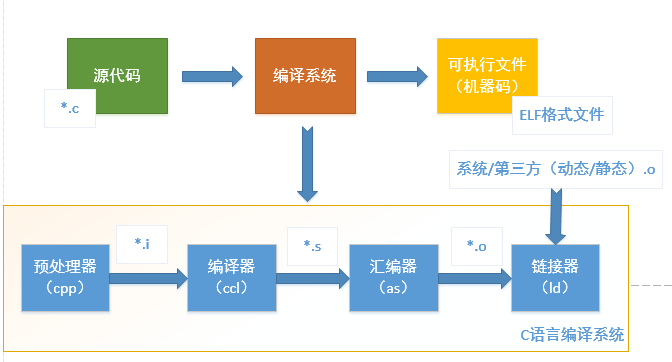
Introduction to GCC Toolchain
GCC, short for GNU Compiler Collection, is a commonly used compilation tool on Linux systems. The GCC toolchain software includes GCC, Binutils, C runtime library, etc.
GCC
GCC (GNU C Compiler) is the compilation tool. The process of converting programs written in C/C++ languages into binary code that processors can execute is completed by the compiler.
Binutils
A set of binary program processing tools, including: addr2line, ar, objcopy, objdump, as, ld, ldd, readelf, size, etc. This set of tools is indispensable for development and debugging, and they are briefly introduced as follows:
-
addr2line: Used to convert program addresses into their corresponding source files and lines of code, and can also retrieve the corresponding functions. This tool helps the debugger locate the corresponding source code position during the debugging process.
-
as: Mainly used for assembly, for a detailed introduction to assembly, please refer to the following text.
-
ld: Mainly used for linking, for a detailed introduction to linking, please refer to the following text.
-
ar: Mainly used to create static libraries. To help beginners understand, the concepts of dynamic libraries and static libraries are introduced here:
-
If multiple .o object files are to be generated into a library file, there are two types of libraries: static libraries and dynamic libraries.
-
In Windows, static libraries are files with a .lib suffix, and shared libraries have a .dll suffix. In Linux, static libraries have an .a suffix, while shared libraries have a .so suffix.
-
The difference between static libraries and dynamic libraries lies in when the code is loaded. The code of static libraries is already loaded into the executable during the compilation process, resulting in a larger size. The code of shared libraries is loaded into memory only when the executable program runs, which is a simple reference during the compilation process, resulting in a smaller code size. In Linux systems, the ldd command can be used to view the shared libraries that an executable program depends on.
-
If a system has multiple programs that need to run simultaneously and share libraries, using dynamic libraries will save memory.
-
ldd: Can be used to view the shared libraries that an executable program depends on.
-
objcopy: Translates one object file into another format, such as converting .bin to .elf or .elf to .bin.
-
objdump: Mainly used for disassembly. For a detailed introduction to disassembly, please refer to the following text.
-
readelf: Displays information about ELF files, please refer to the following text for more information.
-
size: Lists the sizes of each part of the executable file and the total size, including code segment, data segment, total size, etc. Please refer to the following text for specific examples of using size.
C Runtime Library
The C language standard consists of two parts: one part describes the syntax of C, and the other part describes the C standard library. The C standard library defines a set of standard header files, each containing related functions, variables, type declarations, and macro definitions. For example, the common printf function is a C standard library function whose prototype is defined in the stdio header file.
The C language standard only defines the prototypes of C standard library functions but does not provide implementations. Therefore, C language compilers usually require support from a C runtime library (C Run Time Library, CRT). The C runtime library is often referred to as the C runtime library. Similar to the C language, C++ also defines its own standard and provides related support libraries, known as the C++ runtime library.
Preparation Work
Since the GCC toolchain is mainly used in a Linux environment, this article will also use the Linux system as the working environment. To demonstrate the entire compilation process, this section first prepares a simple Hello program written in C as an example, with the source code shown below:
#include <stdio.h>

// This program is simple, only printing a Hello World string.
int main(void)
{
  printf("Hello World! \n");
  return 0;
}
Compilation Process
1. Preprocessing
The preprocessing process mainly includes the following steps:
-
Remove all #define directives and expand all macro definitions, and process all conditional preprocessing directives, such as #if #ifdef #elif #else #endif, etc.
-
Process #include preprocessing directives, inserting the included files into the position of the preprocessing directive.
-
Remove all comments “//” and “/* */”.
-
Add line numbers and file identifiers to generate debugging line numbers and compilation error warning line numbers.
- Retain all #pragma compiler directives, as they will be needed in the subsequent compilation process. The command to use gcc for preprocessing is as follows:
$ gcc -E hello.c -o hello.i // Preprocess the source file hello.c to generate hello.i
// The GCC option -E makes GCC stop after preprocessing
The hello.i file can be opened as a regular text file for viewing, with a code snippet shown below:
// hello.i code snippet

extern void funlockfile (FILE *__stream) __attribute__ ((__nothrow__ , __leaf__));
# 942 "/usr/include/stdio.h" 3 4

# 2 "hello.c" 2


# 3 "hello.c"
int
main(void)
{
  printf("Hello World!" "\n");
  return 0;
}
2. Compilation
The compilation process involves performing a series of lexical analysis, syntax analysis, semantic analysis, and optimization on the preprocessed file to generate the corresponding assembly code.
The command to use gcc for compilation is as follows:
$ gcc -S hello.i -o hello.s // Compile the preprocessed hello.i file to generate the assembly program hello.s
// The GCC option -S makes GCC stop after compiling, generating the assembly program
The assembly program hello.s generated by the above command has a code snippet shown below, all of which is assembly code.
// hello.s code snippet

main:
.LFB0:
    .cfi_startproc
    pushq   %rbp
    .cfi_def_cfa_offset 16
    .cfi_offset 6, -16
    movq    %rsp, %rbp
    .cfi_def_cfa_register 6
    movl    $.LC0, %edi
    call    puts
    movl    $0, %eax
    popq    %rbp
    .cfi_def_cfa 7, 8
    ret
    .cfi_endproc
3. Assembly
The assembly process involves processing the assembly code to generate instructions recognizable by the processor, stored in an object file with a .o suffix. Since each assembly statement corresponds to a processor instruction, assembly is relatively simple compared to the compilation process, achieved by calling the assembler as in Binutils based on the correspondence between assembly instructions and processor instructions.
When a program consists of multiple source code files, each file must first complete the assembly work to generate .o object files before proceeding to the next linking step. Note: Object files are already a part of the final program, but they cannot be executed until linking.
The command to use gcc for assembly is as follows:
$ gcc -c hello.s -o hello.o // Assemble the compiled hello.s file to generate the object file hello.o
// The GCC option -c makes GCC stop after assembly, generating the object file
// Or directly call as for assembly
$ as -c hello.s -o hello.o // Use Binutils' as to assemble hello.s to generate the object file
Note: The hello.o object file is in ELF (Executable and Linkable Format) format.
4. Linking
Linking can be divided into static linking and dynamic linking, with the key points as follows:
-
Static linking means directly adding static libraries to the executable file during the compilation phase, resulting in a larger executable file. The linker copies the function code from its location (different object files or static libraries) to the final executable program. To create an executable file, the linker must complete two main tasks: symbol resolution (linking the definitions and references of symbols in the object files) and relocation (correlating symbol definitions with memory addresses and modifying all references to symbols).
-
Dynamic linking means that during the linking phase, only some descriptive information is added, and the corresponding dynamic libraries are loaded into memory when the program is executed.
-
In Linux systems, the order of dynamic library search paths during gcc compilation and linking is usually: first look for paths specified by the -L option in the gcc command; then search the paths specified by the LIBRARY_PATH environment variable; and finally search the default paths /lib, /usr/lib, /usr/local/lib.
-
In Linux systems, the order of dynamic library search paths when executing binary files is usually: first search the dynamic library search paths specified at the time of compiling the target code; then search the paths specified by the LD_LIBRARY_PATH environment variable; then search the dynamic library search paths specified in the configuration file /etc/ld.so.conf; and finally search the default paths /lib, /usr/lib.
-
In Linux systems, the ldd command can be used to view the shared libraries that an executable program depends on.
Since the paths for linking dynamic and static libraries may overlap, if there are identically named static and dynamic library files in the path, such as libtest.a and libtest.so, gcc will default to choose the dynamic library during linking and will link libtest.so. If you want gcc to choose to link libtest.a, you can specify the gcc option -static, which will force the use of static libraries for linking. Taking Hello World as an example:
- If you use the command “gcc hello.c -o hello”, it will link using dynamic libraries, and the size of the generated ELF executable file (viewed using the size command from Binutils) and the linked dynamic libraries (viewed using the ldd command from Binutils) are as follows:
$ gcc hello.c -o hello
$ size hello  // Use size to check size
   text    data     bss     dec     hex filename
   1183     552       8    1743     6cf     hello
$ ldd hello // It can be seen that this executable file is linked to many other dynamic libraries, mainly Linux's glibc dynamic library
        linux-vdso.so.1 =>  (0x00007fffefd7c000)
        libc.so.6 => /lib/x86_64-linux-gnu/libc.so.6 (0x00007fadcdd82000)
        /lib64/ld-linux-x86-64.so.2 (0x00007fadce14c000)
If you use the command “gcc -static hello.c -o hello”, it will link using static libraries, and the size of the generated ELF executable file (viewed using the size command from Binutils) and the linked dynamic libraries (viewed using the ldd command from Binutils) are as follows:
$ gcc -static hello.c -o hello
$ size hello // Use size to check size
     text    data     bss     dec     hex filename
 823726    7284    6360  837370   cc6fa     hello // It can be seen that the text code size has become extremely large
$ ldd hello
       not a dynamic executable // Indicates that no dynamic libraries are linked
The final file generated by the linker is an ELF format executable file, which is usually linked into different segments, common segments include .text, .data, .rodata, .bss, etc.
Analyzing ELF Files
1. Sections of ELF Files
The ELF file format is shown in the figure below, with sections (Section) located between the ELF Header and the Section Header Table. A typical ELF file contains the following sections:
-
.text: The instruction code segment of the compiled program.
-
.rodata: ro stands for read-only, i.e., read-only data (such as constants).
-
.data: Initialized global variables and static local variables of the C program.
-
.bss: Uninitialized global variables and static local variables of the C program.
- .debug: Debug symbol table, used by the debugger to assist in debugging.
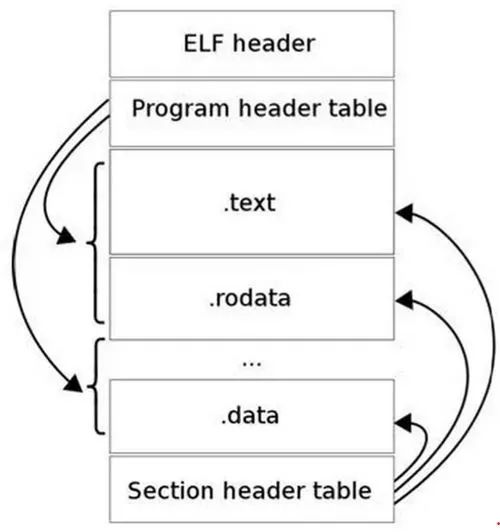
You can use readelf -S to view information about its various sections as follows:
$ readelf -S hello
There are 31 section headers, starting at offset 0x19d8:

Section Headers:
  [Nr] Name              Type             Address           Offset
       Size              EntSize          Flags  Link  Info  Align
  [ 0]                   NULL             0000000000000000  00000000
       0000000000000000  0000000000000000           0     0     0
……
  [11] .init             PROGBITS         00000000004003c8  000003c8
       000000000000001a  0000000000000000  AX       0     0     4
……
  [14] .text             PROGBITS         0000000000400430  00000430
       0000000000000182  0000000000000000  AX       0     0     16
  [15] .fini             PROGBITS         00000000004005b4  000005b4
……
2. Disassembling ELF
Since ELF files cannot be opened as regular text files, if you want to directly view the instructions and data contained in an ELF file, you need to use disassembly methods.
Use objdump -D to disassemble it as follows:
$ objdump -D hello
……
0000000000400526 <main>:  // PC address of main label
// PC address: instruction encoding                  Assembly format of the instruction
  400526:    55                          push   %rbp
  400527:    48 89 e5                mov    %rsp,%rbp
  40052a:    bf c4 05 40 00          mov    $0x4005c4,%edi
  40052f:    e8 cc fe ff ff          callq  400400 <puts@plt>
  400534:    b8 00 00 00 00          mov    $0x0,%eax
  400539:    5d                      pop    %rbp
  40053a:    c3                          retq
  40053b:    0f 1f 44 00 00          nopl   0x0(%rax,%rax,1)
……
Use objdump -S to disassemble it and display the C language source code mixed in:
$ gcc -o hello -g hello.c // Must add -g option
$ objdump -S hello
……
0000000000400526 <main>:
#include <stdio.h>

int
main(void)
{
  400526:    55                          push   %rbp
  400527:    48 89 e5                mov    %rsp,%rbp
  printf("Hello World!" "\n");
  40052a:    bf c4 05 40 00          mov    $0x4005c4,%edi
  40052f:    e8 cc fe ff ff          callq  400400 <puts@plt>
  return 0;
  400534:    b8 00 00 00 00          mov    $0x0,%eax
}
  400539:    5d                      pop    %rbp
  40053a:    c3                          retq
  40053b:    0f 1f 44 00 00          nopl   0x0(%rax,%rax,1)
……
Author: Xianlingge
https://blog.csdn.net/qq_39221436/article/details/125638972
– EOF –
Add the WeChat of the homepage, not only Linux skills +1

The homepage will regularly share Linux-related tools, resources and selected technical articles, and periodically share some interesting activities, internal referrals and how to use technology for side projects

Add WeChat to open a window
Recommended Reading Click the title to jump
1. Linux Network Basics and Performance Optimization
2. Microsoft Strengthens Linux, Poaching Systemd Author from Red Hat
3. Linux Creator Speaks: Rust Will Soon Appear in the Linux Kernel
Did you gain something after reading this article? Please share it with more people
Recommended to follow “Linux Enthusiasts” to enhance Linux skills
Likes and views are the greatest support ❤️