WiFi 6 is likely a major reshuffle for wireless router manufacturers
Every technological iteration is a test for brand manufacturers; “the old goes, the new comes.” The wireless router market is likely to undergo a significant reshuffle. Many manufacturers are seizing the opportunity of WiFi 6 to launch new products and capture market share.
High-end brands, ASUS and NETGEAR, were the first to invest in WiFi 6;
Popular brands, TP-LINK (including Mercury), have perfected their WiFi 6 product line after several generations of updates this year;
Huawei (including Honor) launched the AX3 earlier this year, marking the explosive start of WiFi 6;
Xiaomi (including Redmi) absorbed the router team from Phicomm, and the AX3600 is also a best-seller.
Xiaomi and Huawei have become formidable competitors in the router market.
Phicomm’s glory remained in the WiFi 5 era, collapsing on the eve of WiFi 6;
Tenda has yet to release any WiFi 6 products.
······
1
What is WiFi 6?
Let’s start with a brief explanation of what this hot WiFi 6 is all about. (If you are familiar with WiFi protocols, you can skip this section)
WiFi 6, originally named 11ax, is the sixth generation of WiFi protocol.
To explain simply, WiFi technology relies on WiFi protocols, which are set and maintained by an international standard organization called IEEE. IEEE has many standards, and the standard for WiFi is named 802.11. 802.11 encompasses a series of WiFi (actually wireless LAN, with WiFi being the most representative class of wireless LAN) protocol standards, named with the suffix 802.11 + letter.
The sixth technological iteration of WiFi is included within the series of 802.11 standards.
802.11a: The first generation of WiFi protocol, operating in the 5GHz band, with a maximum rate of 54Mbps;
802.11b: Maximum rate of 11Mbps, operating in the 2.4GHz band;
802.11g: Can be seen as placing 11a in the 2.4GHz band, with a maximum rate of 54Mbps;
802.11n: This is WiFi 4, which represents a significant upgrade from 11n, with qualitative improvements in speed. It supports both 2.4GHz and 5GHz. To this day, many WiFi 4 routers are still being sold;
802.11ac: WiFi 5, which further enhances bandwidth, modulation, MIMO, etc., based on WiFi 4, operating in 5GHz, with some chips also supporting 2.4GHz 11ac. The common router models like AC1300, AC1900, AC2600 are WiFi 5 products.
802.11ax: This is the true essence of WiFi 6, supporting both 2.4GHz and 5GHz, with significant enhancements over WiFi 5 (which will be detailed in the next section, so I won’t elaborate here).
The renaming from 11ax to WiFi 6 might be the most successful rebranding in WiFi history.
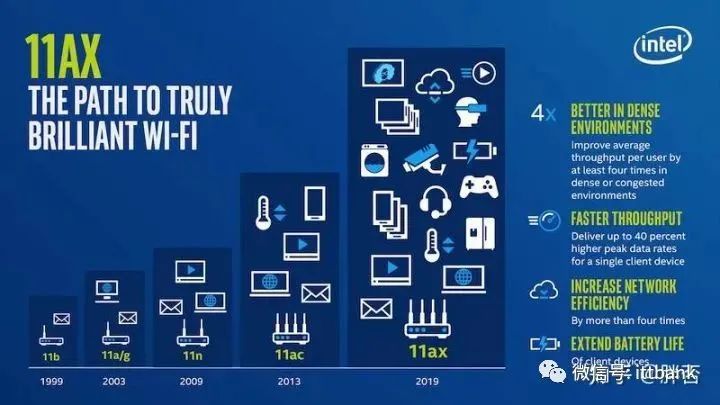
Before WiFi 6, there were no such names as WiFi 5 or WiFi 4; they were all called 11n, 11ac, and 11ax. However, this naming was extremely unfriendly to the average consumer, as few could distinguish the differences, and more importantly, the letters n, ac, ax do not convey the order of succession or technical superiority.
In comparison, Bluetooth upgrades from 2.0, 3.0, 4.0, to 5.0 are clear; everyone knows that 5.0 is better than 4.0, which is straightforward and conducive to the dissemination and promotion of new technologies;
Mobile communications are the same, from 2G, 3G, to 4G, and now 5G, with simple naming and clear iterative relationships, even laymen can understand that 5G is better than 4G and 4G is better than 3G.
Therefore, in 2018, the WiFi Alliance (a commercial alliance composed of manufacturers, distinct from IEEE) renamed the 802.11ax protocol to WiFi 6. The 11ac and 11n were also renamed to WiFi 5 and WiFi 4 respectively.
This renaming was undoubtedly very successful. For consumers, they may not know which is better between 11ax and 11ac, but WiFi 6 is certainly better than WiFi 5; for manufacturers, there is no need for lengthy explanations about the differences between protocols; and for the entire WiFi market, it was also an important innovation.
2
WiFi 6 Technical Advantages: Is WiFi 6 Really That Good?
WiFi 6 is developed based on WiFi 5, with several important technical upgrades. The following section summarizes some of the technical advantages of WiFi 5 to see just how good WiFi 6 really is.
Imagine if you were to design WiFi, what would you want it to be like? Perhaps the following:
Higher speeds;
Wider coverage;
Better multi-user experience;
Lower latency;
Less interference;
Lower power consumption;
·······
These are precisely the directions in which WiFi technology is continuously evolving. The technical upgrades of WiFi 6 also revolve around these aspects.
2.1 Wireless Rate
The increase in rate is the most significant feature of WiFi 6.
To draw a simple analogy, how can a road transport more people? There are two direct methods:
1) Make the road wider: a wider road can accommodate more vehicles, thus transporting more people;
2) Enable each vehicle to carry more people: if each vehicle can carry more passengers, for example, switching from private cars to buses, the road’s transport capacity can also be increased.
The same principle applies to WiFi transmission rates:
Bandwidth: Bandwidth refers to the “width of the road” for WiFi; WiFi 5 supports 80MHz bandwidth, while WiFi 6 increases to 160MHz, achieving a “doubling” effect in rate enhancement.
However, since the bandwidth is larger and the rate is higher, can the bandwidth continue to increase? The answer is no; the spectrum is a very precious and limited resource, regulated by national laws, and the spectrum allocated for WiFi is finite. Thus, bandwidth cannot increase indefinitely. This is similar to how a road cannot be widened indefinitely due to land resources, financial capabilities, etc.
Modulation Method: The modulation method is difficult to explain in a few sentences; simply put, it is like “enabling each vehicle to carry more people”. By adopting a higher-order modulation method, WiFi 5 supports 256QAM, while WiFi 6 supports up to 1024QAM, which also enhances the wireless rate of WiFi 6.
With the improvements in bandwidth and modulation, a 2*2 MIMO WiFi 6 router achieves a wireless rate of 3000Mbps, while a similarly configured WiFi 5 router achieves a wireless rate of 1200Mbps.
2.2 OFDMA
OFDMA = OFDM + FDMA, is a combination of two technologies.
OFDM: Orthogonal Frequency Division Multiplexing;
FDMA: Frequency Division Multiple Access;
Combined, OFDMA means Orthogonal Frequency Division Multiple Access. The effect can be understood as dividing a channel into smaller sub-channels (frequency division), where each terminal can exclusively occupy a portion of the “sub-channel”. The benefits include enhanced efficiency, reduced latency, improved performance, and a better multi-user experience.
2.3 TWT
TWT stands for Target Wake Time, a power-saving technology that controls the wake-up time of terminal devices to achieve power savings. TWT requires both the router and terminal devices (such as smartphones, smart home devices, computers) to support it.
This technology is not very prominent and can be overlooked.
2.4 Multi-User MU-MIMO
MIMO stands for Multiple Input Multiple Output, which appeared in the WiFi 4 era. Before WiFi 4, 11a, 11b, and 11g were all single spatial streams (i.e., single antenna), and with the emergence of WiFi 4 (11n), spatial streams increased, and MIMO followed.
WiFi 4 is SU-MIMO (Single User Multiple Input Multiple Output), where only one user can communicate at a time, akin to a single-lane queue;
WiFi 5 upgraded to MU-MIMO (Multi-User Multiple Input Multiple Output), allowing multiple users to communicate simultaneously, akin to multi-lane traffic. However, it only supports DOWNLINK unidirectional communication;
WiFi 6 further improved MIMO, achieving BIDIRECTIONAL MIMO for UPLOAD and DOWNLOAD.
WiFi 6’s MIMO capacity has also increased to support a maximum of 8X8 MIMO. Combined with OFDMA technology, it achieves higher parallel performance and enhances the multi-user experience.
2.5 BSS Coloring Technology
As we know, interference exists between WiFi networks; the stronger the interference, the worse the online experience. BSS coloring, in principle, distinguishes “self” and “neighbors” through coloring, balancing interference and performance through idle channel detection technology to find the optimal solution. BSS is particularly applicable to large-scale AP deployment scenarios, such as airports, stations, schools, etc.
3
How to Use WiFi 6?
Here are two basic knowledge points about WiFi:
WiFi protocols are backward compatible; every new generation of protocols is compatible with older ones;
WiFi 6 routers will inevitably support WiFi 5 and earlier devices, so there is no need to worry about old devices not being usable after switching to WiFi 6.
WiFi rate negotiation follows the wooden barrel effect, with the negotiation leaning towards the lower side.
In any communication technology, there must be two parties for communication. WiFi is no exception; when two WiFi devices negotiate rates, they can only negotiate to the rate supported by the lower party. Protocol, bandwidth, and MIMO numbers must all negotiate down to the lowest party.
For example, when Huawei’s AX3 pro router (WiFi 6, supports 160MHz, 2*2 MIMO, maximum rate of 2400Mbps) connects to a Huawei P30 phone (WiFi 5, 80MHz, 2 MIMO), the negotiated result is: WiFi 5, 80MHz, 2*2 MIMO, with a maximum negotiated rate of 866Mbps.
Now it’s clear how to use WiFi 6; merely having a WiFi 6 router is not enough.
For computers (laptops/desktop) to use WiFi 6, they need to be equipped with WiFi 6 compatible wireless network cards. I previously wrote an article summarizing the selection of WiFi 6 wireless network cards, which you can refer to if needed. To briefly mention, the current WiFi 6 wireless network cards only have one chip solution: Intel’s AX200, and all manufacturers’ WiFi 6 network cards are based on AX200. Laptops can also directly purchase AX200 modules to support WiFi 6.
Compared to computers, smartphones are used more frequently, and the smartphones that support WiFi 6 are mainly flagship models released in 2020 with Qualcomm, MTK, and Huawei Kirin processors.
Kirin 990: Huawei P40 series, Honor 30 Pro;
Qualcomm Snapdragon 865: Xiaomi 10 Supreme Memorial Edition, Xiaomi 10 series, OPPO Find X2 series, OnePlus 8 series, VIVO NEX 3S, IQOO 3, IQOO 5, IQOO Neo3, Realme X50 series, Nubia Red Magic 5S, etc.;
MediaTek MTK Dimensity 1000+: iQOO Z1, Redmi K30 Supreme Memorial Edition, Redmi K30.
4
Understanding Wireless Router Configuration
Knowing yourself and knowing your enemy will win you a hundred battles. This section will interpret the configuration of wireless routers to help everyone better understand the “tricks” in manufacturers’ promotions.
4.1 Wireless Specifications
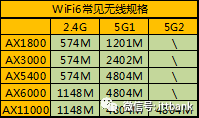
The wireless specifications of wireless routers are labeled based on the ideal rates for dual-band/tri-band concurrency. The table above lists some common WiFi 6 wireless router specifications.
AX1800: Entry-level WiFi 6 specification, with the lowest product price. 2.4G and 5G are both 2X2, with a bandwidth of 80MHz, so it can only support a maximum rate of 1800Mbps;
AX3000: Mainstream WiFi 6 specification, with 2.4G and 5G both 2X2, supporting bandwidth up to 160MHz, achieving a rate of 3000Mbps;
AX5400: 5G 4X4, 2.4G 2X2; there are several products of this specification, basically considered a lower configuration of AX6000;
AX6000: High-end WiFi 6, with both 2.4G and 5G 4X4, 160MHz bandwidth, achieving a total rate of 6000Mbps;
AX11000: Luxury tri-band WiFi 6, with luxurious configuration and price. Tri-band means that a single router has three frequency bands of WiFi operating simultaneously, with 2.4G 4X4, 5G1 4X4, 5G2 4X4, achieving a total rate of 11000Mbps. This specification has one model each from ASUS and NETGEAR.
In addition to these five common specifications, there are also some mixed products of WiFi 5 and WiFi 6, and the rate combinations may produce some strange specifications, which are detailed in the summary table below.
4.2 Hardware Configuration
Many people are familiar with the configuration of computers and smartphones, and can easily recall various parameters and performances. However, the hardware configuration of wireless routers has always been in a “black box” state for ordinary consumers. It is difficult for everyone to have the same basis for purchasing routers as they do for computers and smartphones.
However, this situation was similar for computers over twenty years ago and for smartphones ten years ago. Ten years ago, Xiaomi emerged, breaking the opaque configuration situation in smartphones with the slogan “If you don’t believe, run a benchmark,” leading to a booming ten-year development in the smartphone market. I believe that wireless routers will also undergo a similar development process.
In fact, in the past year or two, with Xiaomi and Huawei continuously strengthening their presence in the wireless router market, their promotional strategies and competitive methods have obviously differed from traditional router manufacturers, and the opaque configuration of wireless routers has seen some improvement.
Now we know that routers also need to have large memory, more CPU cores, higher clock speeds, and that when buying routers, independent large amplifiers are necessary…
The hardware configuration of wireless routers can be viewed in two parts:
The first part is the “computer” configuration:
Routers are essentially computers, but unlike general-purpose computers like desktops and smartphones, they are specialized embedded computers designed for processing network data forwarding. Understanding this part is similar to understanding computer/smartphone configurations.
CPU
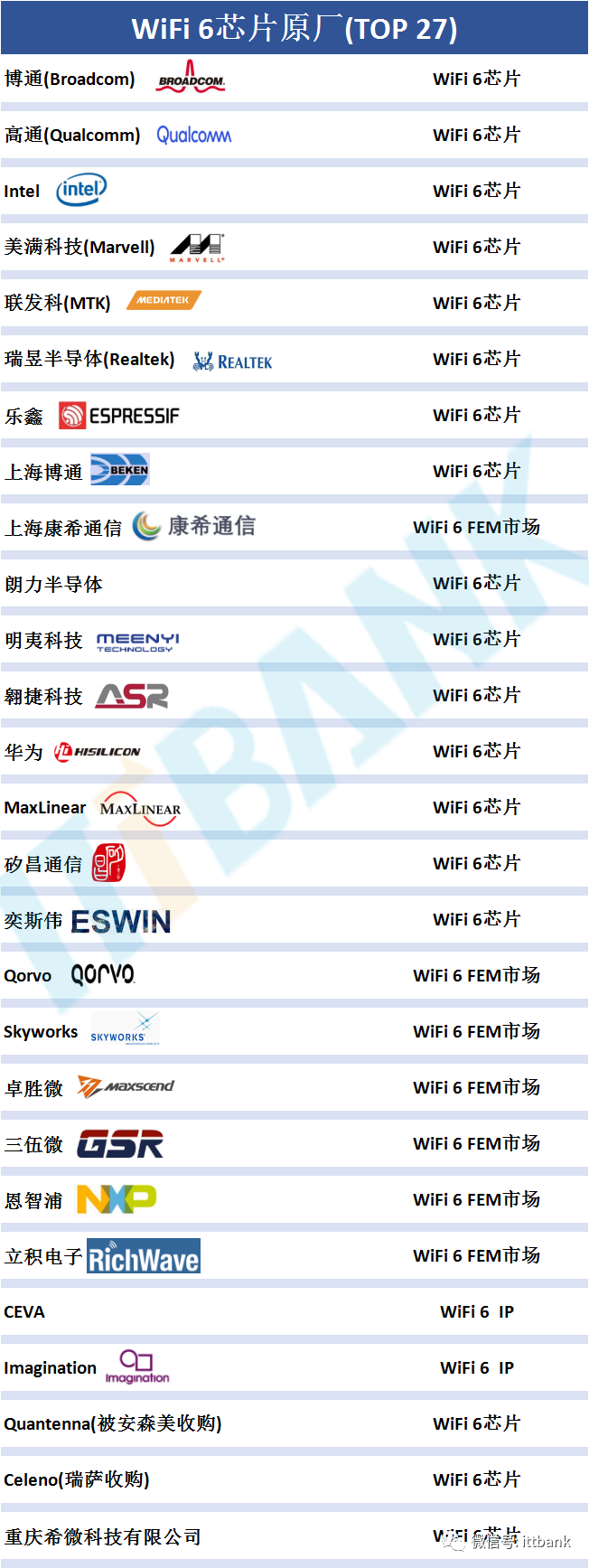
The CPU of routers is provided by several manufacturers.
Broadcom:
Broadcom has considerable strength in the WiFi market. For WiFi 6, it has the following solutions:
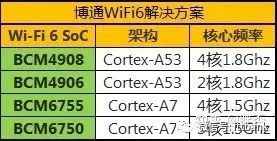
Among them, BCM4908 and BCM4906 are new architectures with powerful performance, used in mid-to-high-end models;
BCM6755 and BCM6750 still use the A7 architecture, mostly in mid-to-low-end models. BCM6755 and BCM6750 CPUs integrate WiFi chips, with the difference being that 6750 can choose either WiFi 2.4G or 5G, while BCM6755 integrates both 2.4G and 5G WiFi chips.
Qualcomm:
Qualcomm is an absolute giant in the communications industry and has strong capabilities in the WiFi market as well.
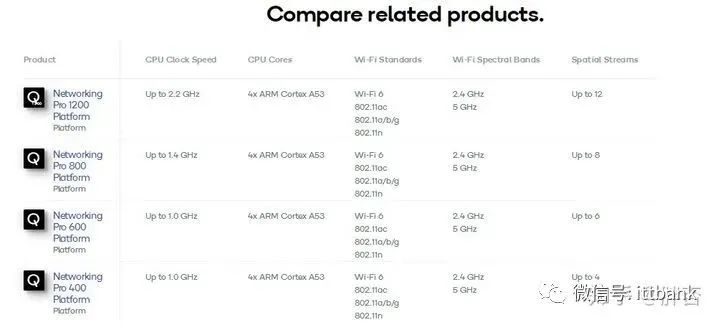
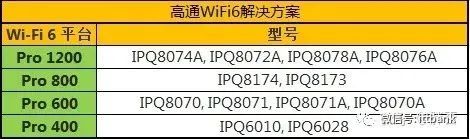
Xiaomi has a good partnership with Qualcomm, and the WiFi 6 solutions use Qualcomm’s Pro 600 and Pro 400 platforms in two models.
ASUS, Linksys, and NETGEAR use higher-performance platforms like Pro1200 and Pro800. Specific models can be found in the table in the fifth section.
Qualcomm’s CPUs have two outstanding advantages:
-
Qualcomm’s chip process is updated, allowing for lower power consumption and less heat generation under the same specifications, which is beneficial for performance;
-
Qualcomm’s WiFi-SON technology is a mature MESH solution that has been around for several years and is considered a leader in MESH technology.
Intel:
WiFi is not Intel’s main product. Although Intel released WiFi 6 chips early, it currently only has one model on the market, the GRX350. At the end of last year, TP-LINK’s first WiFi 6 router was equipped with this chip.
This year, various manufacturers are actively working on their WiFi 6 product lines, but Intel has been indifferent.
However, Intel’s AX200 wireless network card is currently the only wireless network card that supports WiFi 6 and has been selling well, with many products available. If you’ve purchased a WiFi 6 router but haven’t upgraded your network card, you might consider it.
MTK:
MTK has also made good product layouts in the WiFi market, with many mid-to-low-end routers using MTK solutions.
In the WiFi 6 market, MTK is currently focusing on the MT7621, which was a chip that existed in the WiFi 5 era, such as the once-glorious Phicomm K2P, which was a legendary device. However, the MT7621 is a previous generation product and has become significantly outdated in the WiFi 6 era, as it only supports 80MHz and AX1800 specifications.
MT7621 has two versions, MT7621A and MT7621D, with the difference being whether DDR is built-in or external, and performance-wise, they can be treated equally.
MTK certainly has new WiFi 6 products in development; it remains to be seen when they will be released, and we hope MTK can achieve a similar success in the router market as it did in the mobile market with Dimensity.
HiSilicon:
Huawei’s HiSilicon has a series of chips named “Lingxiao” in the router field for WiFi 6, with two models, Lingxiao HI5651T and Lingxiao HI5651L, with both 2.4G and 5G WiFi chips being products of HiSilicon. The progress of HiSilicon in semiconductors is evident, and although it is currently facing challenges and risks, I believe HiSilicon can overcome these difficulties. Router chip manufacturing is not currently affected by sanctions, so Huawei’s router products will not be significantly impacted.
Realtek:
Realtek is known for its crab chips; many people have used their products, such as sound cards and network cards. Realtek’s strength in the router market is relatively weak, with few products, and they lag behind other manufacturers. However, Realtek occupies a significant market share in the wireless network card market, as most wireless network cards on the market are produced by them.
Memory
When computers lag, users often upgrade their configurations by adding a memory stick; when purchasing smartphones, they often consciously choose a phone with larger RAM for smoother performance. The importance of memory for wireless routers, as a type of “computer,” is similar.
Memory mainly focuses on two key parameters: generation and capacity
Currently, WiFi 6 routers begin with DDR3 memory, and some flagship models have already adopted DDR4;
Common memory capacities range from 128MB, 256MB, 512MB, and many have adopted 1GB memory capacity. Although this seems small compared to computers and smartphones, which often have 8GB or 16GB of memory, it is considered high configuration for routers.
Flash Memory
Flash memory corresponds to the hard drive of a computer and the ROM of a smartphone, serving to store the router’s operating system, user configurations, data, and function plugins.
The importance of flash memory is lower than that of CPU and memory because routers are not designed to store large amounts of data; the size of flash memory just needs to be sufficient.
The second part is the unique hardware configuration of wireless routers.
Ports
Ports are divided into WAN and LAN ports. The WAN port connects to the operator’s network, usually connected to an optical modem; LAN ports are for the local area network.
Gigabit Ports: Gigabit ports are a must-have configuration; in fact, by the time of WiFi 5, routers with 100M ports were already rare, and by WiFi 6, all ports have become Gigabit.
2.5G Ports: 2.5G ports provide 2.5 times the speed of Gigabit. There are not many routers with 2.5G ports, only ASUS and TP-LINK offer routers with 2.5G ports. Some households have broadband exceeding 1000M, and using a 2.5G WAN port is necessary to fully utilize the speed. Additionally, some users may require high-speed local area networks, which can also benefit from 2.5G ports.
WiFi Chips
WiFi chips are a crucial configuration for wireless routers. WiFi chips differ from CPUs (although some CPUs have integrated WiFi chips), as they represent the MAC layer of WiFi, essentially the baseband of WiFi data. For example, when an MT7621 router’s CPU is paired with a WiFi 5 chip, it becomes a WiFi 5 router, like the Phicomm K2P; when an MT7621 is paired with a WiFi 6 chip, such as the MT7915, it becomes a WiFi 6 router.
Amplifiers (PA/LNA/FEM)
PA: Signal amplifiers are used in the WiFi transmission link, determining the strength of the WiFi signal sent; the greater the power, the further the transmission distance. However, due to physical properties and national regulations, the power of PAs cannot be excessively high, generally around 20dBm;
LNA: Low Noise Amplifiers are used in the WiFi reception link, determining how weak a signal the router can receive. The better the performance of the LNA, the more it can detect weaker WiFi signals, effectively enhancing the router’s “hearing”. Generally, people pay more attention to PAs, but LNAs are equally important; a good router must have equally strong transmission and reception capabilities.
FEM: This is actually an integrated term, encompassing PA and LNA, as well as RF switches. One FEM integrates PA and LNA into a single chip. You can simply understand FEM = PA + LNA.
In the advertisements for routers, manufacturers often promote how many signal amplifiers/FEM/PAs their products use, which essentially refers to the same component.
Differences between internal and external:
Firstly, all wireless routers come with PA/LNA; manufacturers often promote external PAs as a selling point.
Internal PA/LNA: This means that PA and LNA are integrated within the WiFi chip, which reduces costs and simplifies design. The downside is that internal PAs/LNAs are often limited by power consumption, so their power generally cannot be too high, typically being ordinary power PAs;
External PA/LNA: These are external components connected to the WiFi chip, allowing for greater design flexibility, as manufacturers can choose different specifications of PAs based on their needs. It is important to note that external PAs are not necessarily better than internal PAs; if an external PA is just an ordinary power PA, it would not differ from an internal PA.
Antenna
Antennae are also an important configuration for wireless routers. Here are some key points about antennas:
1) Gain: This is a critical parameter for antennas; the higher the gain, the better. Generally, the gain of home-use routers is within 5dBi;
2) Directionality: Home-use router antennas are typically omnidirectional, meaning their gain is roughly equal in all directions. An excellent antenna design should balance omnidirectionality and gain for optimal performance;
3) Internal vs. External: Whether antennas are internal or external primarily depends on the router’s design. Some people dislike the appearance of antennas that look like octopuses, so in recent years, the design of home routers has progressed rapidly, with manufacturers paying great attention to industrial design. Some designs are indeed beautiful and can serve as decorative items in the home. Performance-wise, external antennas generally outperform internal antennas, as external designs allow for greater adjustment of gain, omnidirectionality, and isolation. Internal antennas, on the other hand, often result in a more compact router design, which limits antenna performance.
USB
USB interfaces can be used to mount USB drives for file sharing functions. The necessity of USB interfaces depends on individual needs; it is not an essential feature. Not many people use them, and the overall user experience is generally average.
File sharing is indeed a pressing need; Xiaomi launched a hard drive version of a router a few years ago, with the USB interface primarily meeting this need. However, if there is a strong need for file sharing, it is more recommended to use NAS products, such as Synology NAS, for a better user experience.
4.3 Function Interpretation
MESH
MESH is a WiFi networking technology that allows two or more routers to form a single WiFi network, significantly enhancing WiFi coverage. MESH is currently a very popular technology.
In terms of WiFi networking, Qualcomm’s WiFi-SON has a mature layout and offers superior user experience; HiSilicon, MTK, and Broadcom also have their own MESH technologies.
Return methods: This refers to how routers in a MESH network are interconnected.
Wired Return: This connects the routers in the network via cables, which is the optimal return method as it does not occupy WiFi frequency bands and is more stable;
Wireless Return: There are two methods for wireless return; one is to designate a specific frequency band for return use, such as using 5G1 as the return frequency band, allowing only 2.4G and 5G4 for user access; the other is to automatically switch return methods, automatically selecting which frequency band to use for return.
WAN and LAN Blind Plugging
This is a useful small feature that allows cables to be plugged in without distinguishing between WAN and LAN ports, as the system can automatically recognize them. With this feature, the next time you explain to your parents how to connect the router, you won’t have to struggle to clarify which is the WAN port and which is the LAN port.
Dual Band Integration
This combines the 2.4G and 5G frequency bands into a single WiFi network. When this feature is enabled, the two 2.4G and 5G WiFi signals from the router become one WiFi signal, automatically assessing and switching to the better frequency based on the usage environment.
This feature is not highly recommended because some manufacturers do not implement it well, leading to insufficiently intelligent automatic switching, which may result in delays and lower speeds. While it is more convenient, it is still better to manually choose which WiFi to use for more reliable speeds.
5
Overview of WiFi 6 Router Models
The key point is here, take note!
After two weeks of effort, I have compiled information on all WiFi 6 routers available on the market into the table below. Those in need can refer to the configuration information of each router.

6
WiFi 6 Selection Recommendations
6.1 Specification Selection: Match Incoming Bandwidth
When purchasing a router, it is essential to match it with your incoming bandwidth. This is not just a selection recommendation for WiFi 6, but a general recommendation for purchasing routers. For instance, if your home has only a 50M bandwidth, a WiFi 5 AC1200 router is more than sufficient; however, if your home has a bandwidth of 500M, using WiFi 6 would be more appropriate; if the incoming bandwidth exceeds a gigabit, remember that the speed bottleneck is at the gigabit WAN port, so to fully utilize the bandwidth, you need to choose a router with a 2.5G WAN port.
6.2 Coverage Area: MESH is the Best Choice for Ordinary Users
Coverage area is a performance that many people are very concerned about. There are various solutions to increase coverage, such as the AC + AP method recommended by many on Zhihu, but MESH is the optimal choice for ordinary users looking to enhance WiFi coverage, as it is cost-effective, easy to operate, and highly applicable. The AC + AP method is more suitable for professional players or homes with very large areas that have been uniformly planned by professionals during renovation.
For ordinary consumers, MESH is the better choice.
6.3 Is WiFi 5 Still Viable?
The answer is that WiFi 5 is still very viable and not outdated. If you encounter the following situations, it is not advisable to switch to WiFi 6:
-
Low incoming bandwidth of 100-200M; there is no need to switch to WiFi 6;
-
If you have just replaced your WiFi 5 router, you can use it for about a year; there is no need to rush to switch. WiFi 6 is developing rapidly, and in about a year, WiFi 6 will become more common and may drop below 100 yuan, marking the era of widespread WiFi 6 adoption, making it easier to switch later;
-
In schools or office environments, the campus network generally has low bandwidth, and office spaces prioritize stability, so these places generally do not recommend pursuing the hotspots of WiFi 6.
6.4 WiFi 6 Wireless Network Cards
If you want your computer to use WiFi 6, remember to replace it with a WiFi 6 wireless network card.
6.5 WiFi 6 Smartphones
Some smartphones supporting WiFi 6 have been mentioned above, and here is a list again.
-
Kirin 990: Huawei P40 series, Honor 30 Pro;
-
Qualcomm Snapdragon 865: Xiaomi 10 Supreme Memorial Edition, Xiaomi 10 series, OPPO Find X2 series, OnePlus 8 series, VIVO NEX 3S, IQOO 3, IQOO 5, IQOO Neo3, Realme X50 series, Nubia Red Magic 5S, etc.;
-
MediaTek MTK Dimensity 1000+: iQOO Z1, Redmi K30 Supreme Memorial Edition, Redmi K30.
Statement:
This account maintains neutrality regarding all original and reprinted articles’ statements and viewpoints; the articles and images’ copyrights belong to the original authors.
For submissions/recruitment/promotion/advertising, please add WeChat: 15989459034