Background Data Block
The backgroundDB block is associated withFB blocks. When creating a backgroundDB block, it is necessary to specify theFB block it belongs to, and thatFB block must already exist, as shown in Figure1.
When calling anFB block, you can either assign it an already created backgroundDB block (for example, data block_1), or directly define a newDB block (for example, average_DB), which will be automatically generated and serve as a background data block, as shown in Figure2. The backgroundDB block only stores data related to theFB block interface data area (excluding temporary variables), compared to the globalDB block. The format of the data block changes with the interface data area. User-defined variables cannot be inserted into the data block, and their access method (optimized or non-optimized), persistence, and default values are determined by the settings in the function block.
The backgroundDB block and the globalDB block are both global variables, so their access methods are the same.
The globalDB, also known as thesharedDB, is a data block that can be read and written by any program block under a specificPLC site.
The background data block of the function blockFB is a dedicated data block forFB, meaning that only the program calling this background data block is allowed to read and write to it, while other programs can only read this background data block.
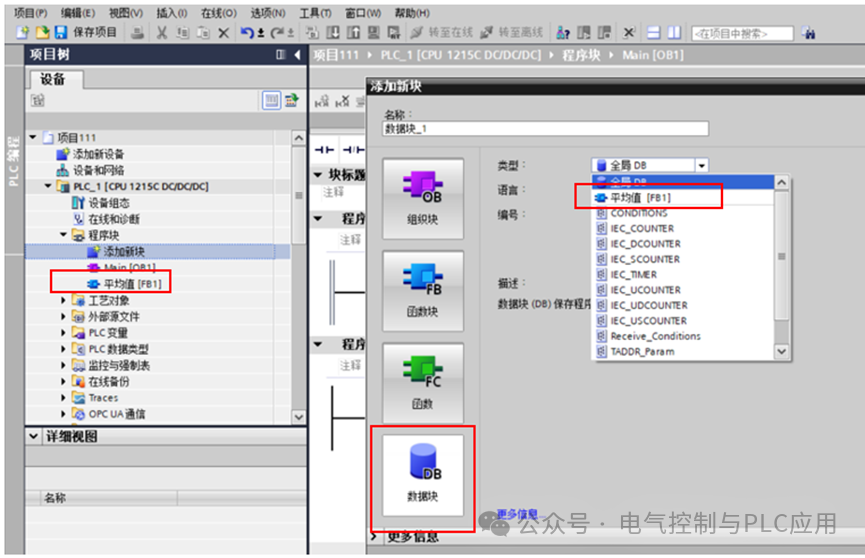
Figure1 Creating a Background Data Block
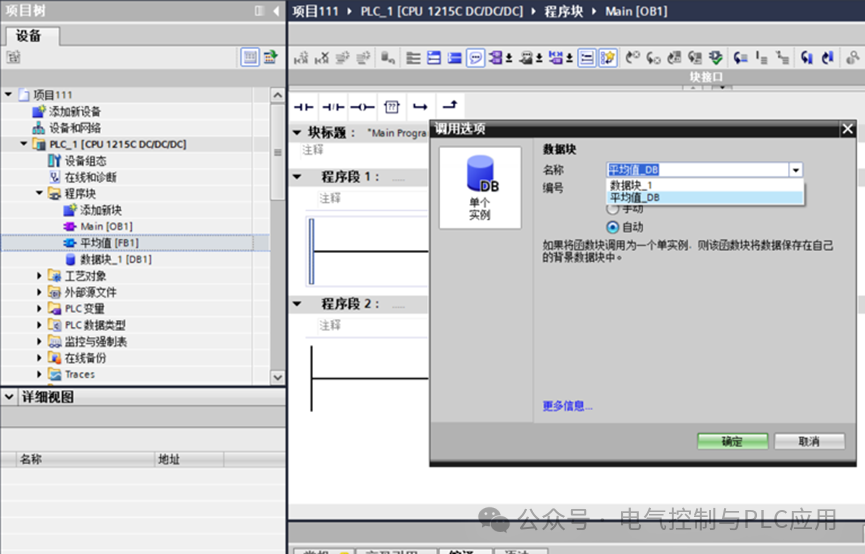
Figure2 Main Program CallsFB
System Data Types as Templates for Global Data Blocks
For some fixed-format data blocks, there may be a lot of data that is inconvenient for users to create themselves, such as parameters for open user communicationDB.TIA Portal software provides a template with a fixed data format, allowing users to create data blocks with that format, for example, using theTCON_Param system data type to create the correspondingDB.
When creating a data block based on a data type, it is necessary to specify the data type it belongs to, as shown in Figure3, defining timer type data. Especially when using coil-type timers, we need to define a data block of timer data type.
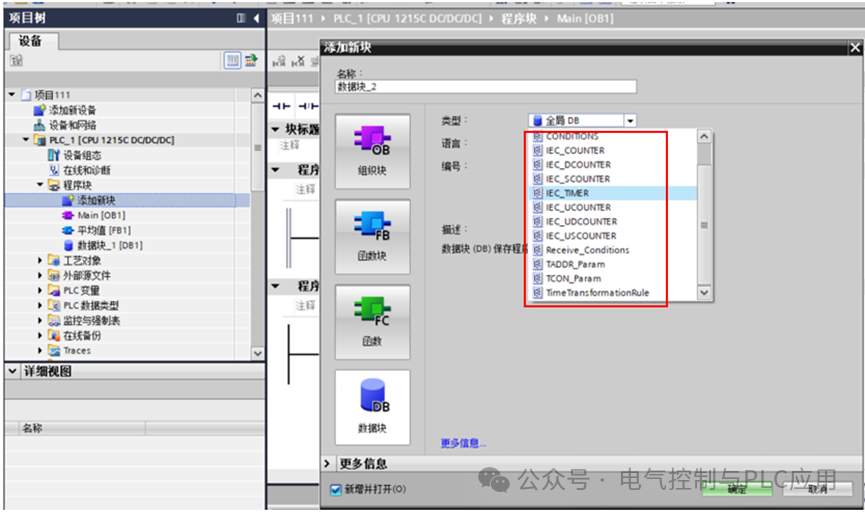
Figure3 Defining Data Blocks Using System Data Types
Similar to the backgroundDB block, theDB block based on system data types only stores data related to the system data type and cannot insert user-defined variables. The same system data type can generate multiple data blocks. For example, with theIEC timer, you can first create a data block of theIEC_TIMER system data type. When using theIEC timer in the program, you can use the pre-createdIEC_TIMER data type data block as its background data block (as shown in the– data block2_ timer type), or you can automatically generate a data block when generating the timer (as shown in the-IEC_Timer_0_DB type), as shown in Figures4 and5.
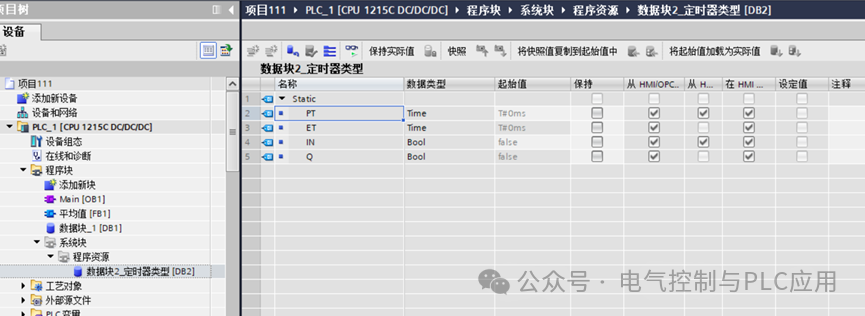
Figure4 Timer Type Data Block
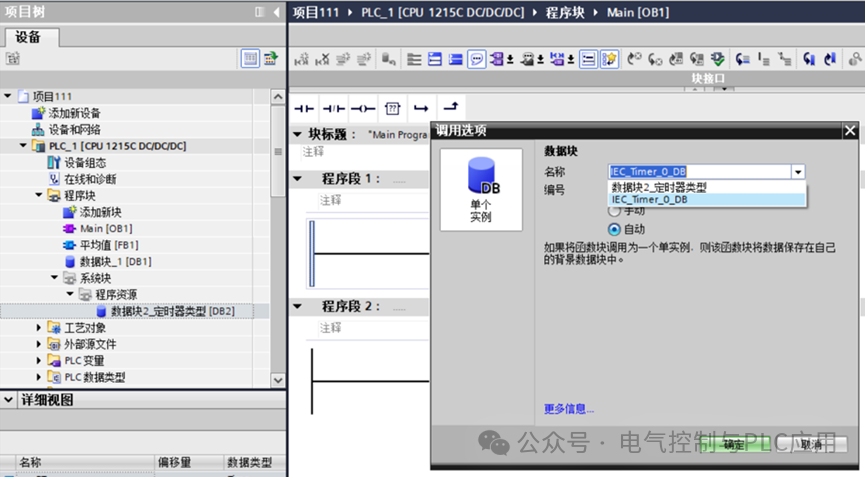
Figure5 Generation or Selection of Background Data Blocks
CreatingDB
ThePLC data type is a user-defined data type template that can consist of different data types, providing a fixed format data structure for user convenience.PLC data type variables are used as a whole variable in the program.
(1)CreatingPLC Data Types
In the “PLC Data Type” folder, click “Add New Data Type” to create and open a declaration table for thePLC data type. Select thePLC data type and choose the “Rename” command from the shortcut menu to rename thisPLC data type. Then declare variables and data types in the declaration table to complete the creation of thePLC data type. For example, create a data type named “PLC_DT_1” that contains3 variables, as shown in Figure6 .
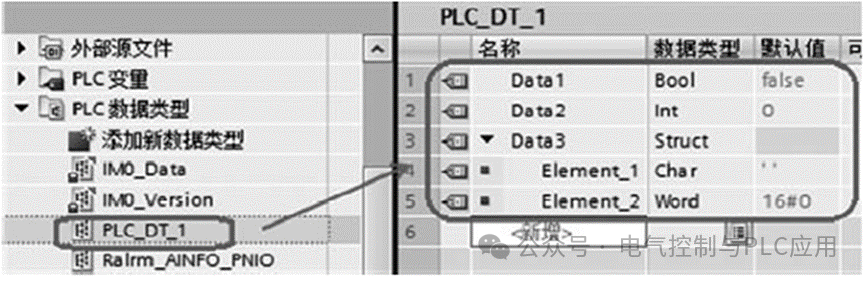
Figure6 CreatingPLC Data Types
(2)Creating Data Blocks with Fixed Data Structures
Click the “Add New Block” command, select the data block, and choose the createdPLC data type “PLC_DT_1” from the dropdown list, as shown in Figure7. Then click “OK” to generate aDB block with the same data structure as “PLC_DT_1“. This is similar to generating a timer background data block using timer type data.
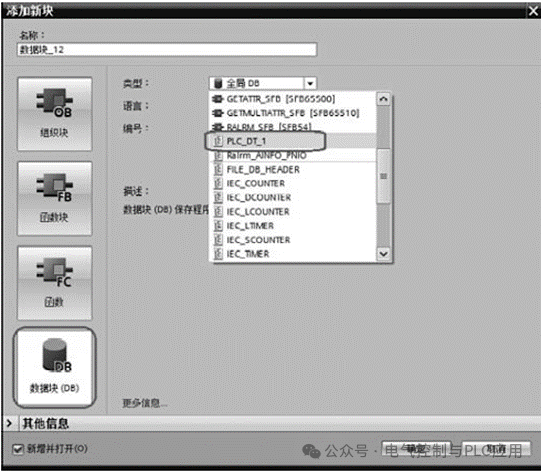
Figure7 Creating Fixed Format Data Blocks
(3)Using as a Data Structure, similar tobool,int variables
ThePLC data type can also be used as a whole variable multiple times in the data block. This usage is similar to complex data types-UDT, (refer toComprehensive PLC Common Data Types).
First, create a globalDB block, then enter variable names in thisDB and select the createdPLC data type from the dropdown list, for example, “PLC_DT_1“. You can generate variables of the same data structure multiple times as needed, as shown in Figure8.
Any changes to thePLC data type will cause inconsistencies in the data blocks using this data type. Inconsistent variables are marked in red, as shown in Figure9. To resolve the inconsistency issue, the data block must be updated.
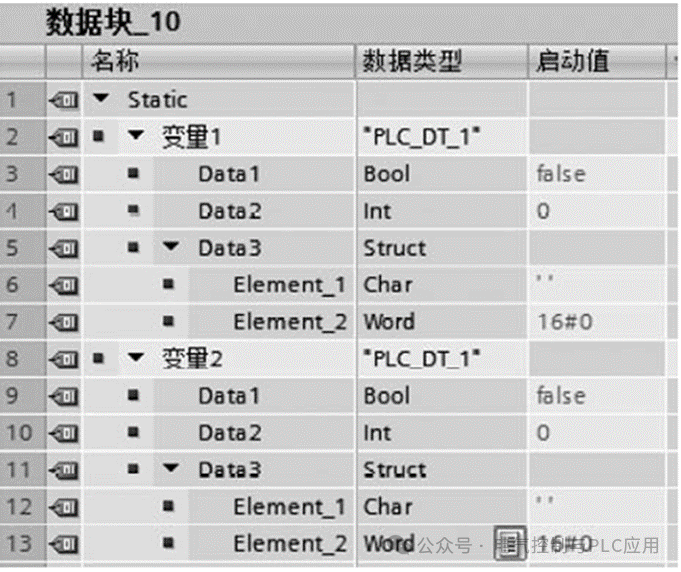
Figure8 Defining Different Variables Multiple Times UsingPLC Data Types
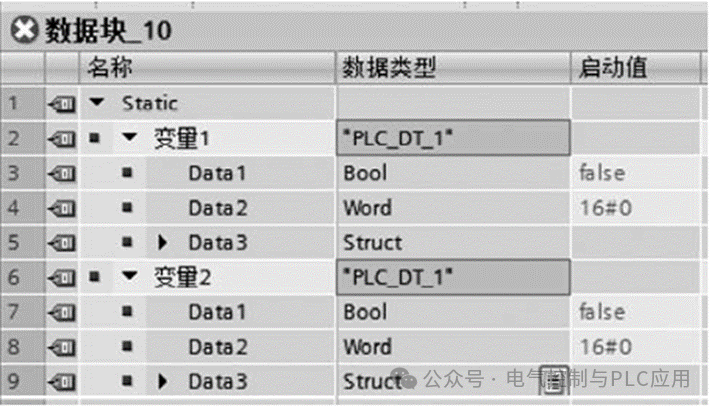
Figure9 Inconsistent Data Blocks
There are three ways to update data blocks:
1) When inconsistent variables appear, right-click on the variable and select “Update Interface” from the pop-up menu;
2) You can click the “Update Interface” button in the data block toolbar to update;
3) Compile the entire program block folder, and the data blocks will be automatically updated; you can also right-click to compile a single block.