16.1 What is a Regular Expression
A regular expression (regex, regexp, or re) is a powerful tool for matching and manipulating text. It consists of a pattern made up of a series of characters and special characters used to describe the text patterns to be matched. Regular expressions can be used to search, replace, extract, and validate specific patterns in text.
16.2 The re Module
The re module in Python provides operations for matching regular expressions.
import reThe re module provides several methods for searching or processing strings.
16.2.1 search
re.search(pattern, string)Scans the entire string to find the first position where the regular expression pattern matches and returns the corresponding Match object. If no position matches the pattern in the string, it returns None.
16.2.2 match
re.match(pattern, string)If the zero or more characters at the beginning of the string match the regular expression pattern, it returns the corresponding Match object. If the string does not match the pattern, it returns None.
16.2.3 findall
re.findall(pattern, string)Returns all non-overlapping matches of the pattern in the string as a list of strings or a list of string tuples. The scan of the string is from left to right, and the matches are returned in the order they are found. Empty matches are also included in the results.
16.2.4 sub
re.sub(pattern, repl, string, count=0)Returns the string obtained by replacing the leftmost non-overlapping occurrences of the pattern in the string with repl. If the pattern is not found, the string is returned unchanged. repl can be a string or a function; if it is a string, any backslash escape sequences will be processed. That is, \n will be converted to a newline character, \r will be converted to a carriage return, and so on. If repl is a function, it will be called for each non-overlapping occurrence of the pattern. The function takes a single Match argument and returns the replacement string. The optional count parameter is the maximum number of replacements; count must be a non-negative integer. If this parameter is omitted or set to 0, all matches will be replaced.
16.2.5 split
re.split(pattern, string, maxsplit=0)Splits the string by the pattern. If capturing parentheses are used in the pattern, the text of all groups will also be included in the list. If maxsplit is non-zero, at most maxsplit splits will be performed, and the remaining characters will be returned as the last element of the list.
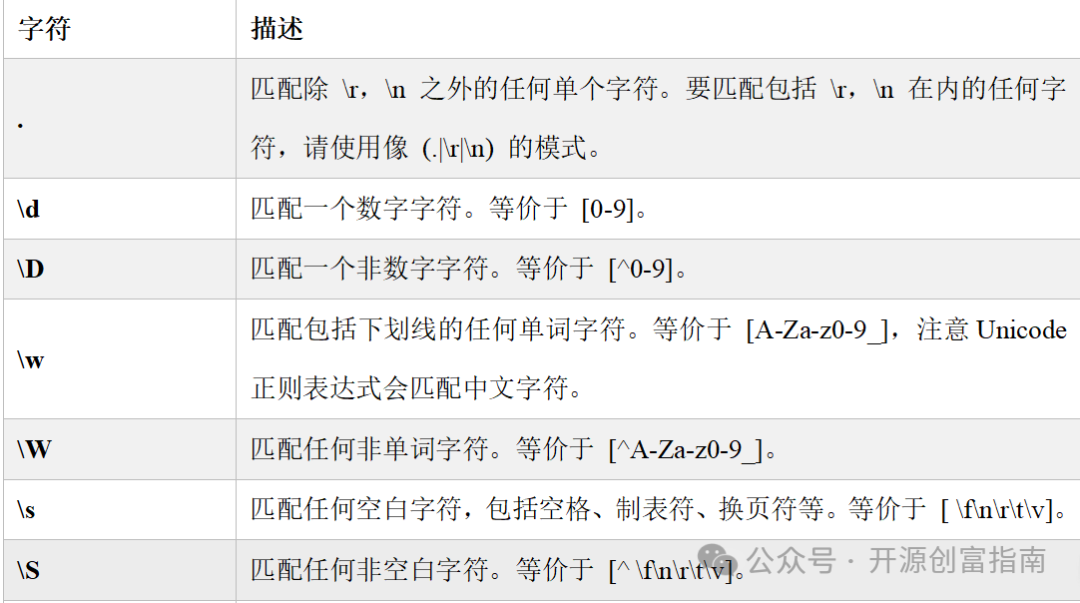
16.3 Character Classes
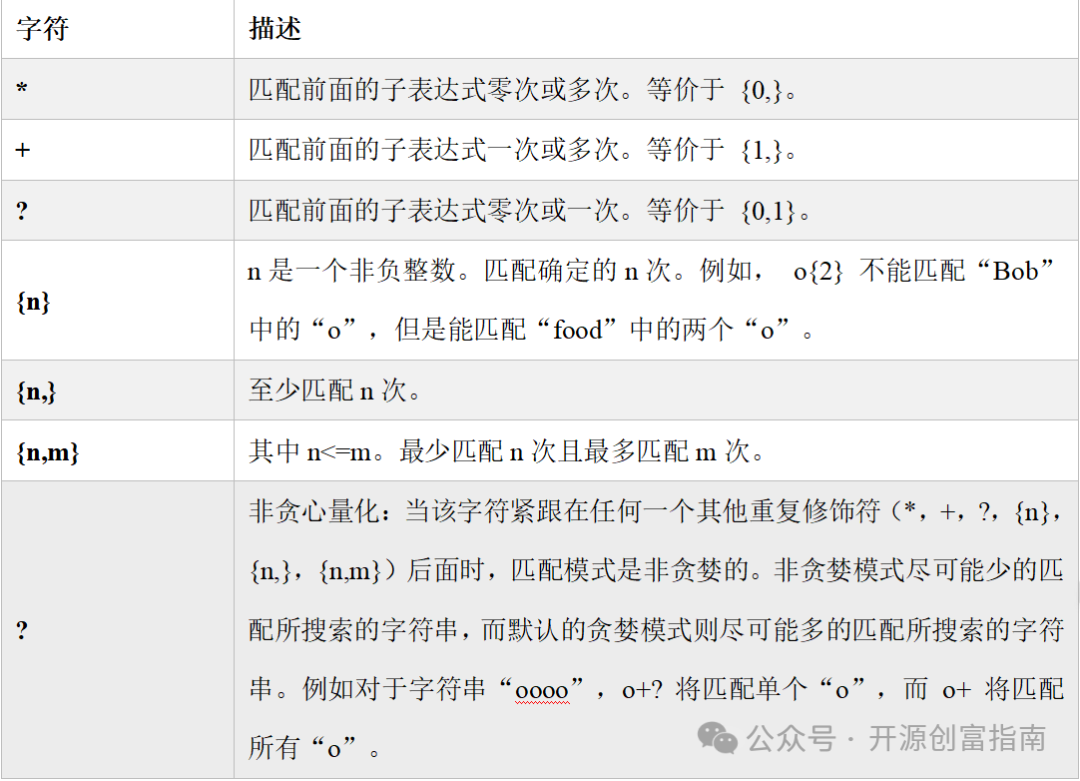
16.4 Quantifiers
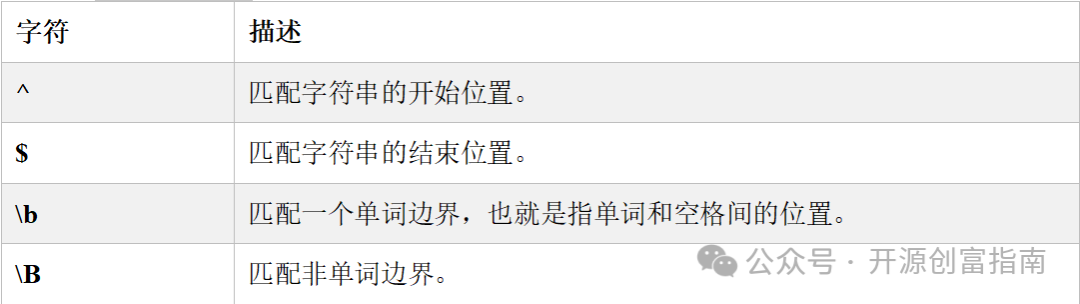
16.5 Boundaries
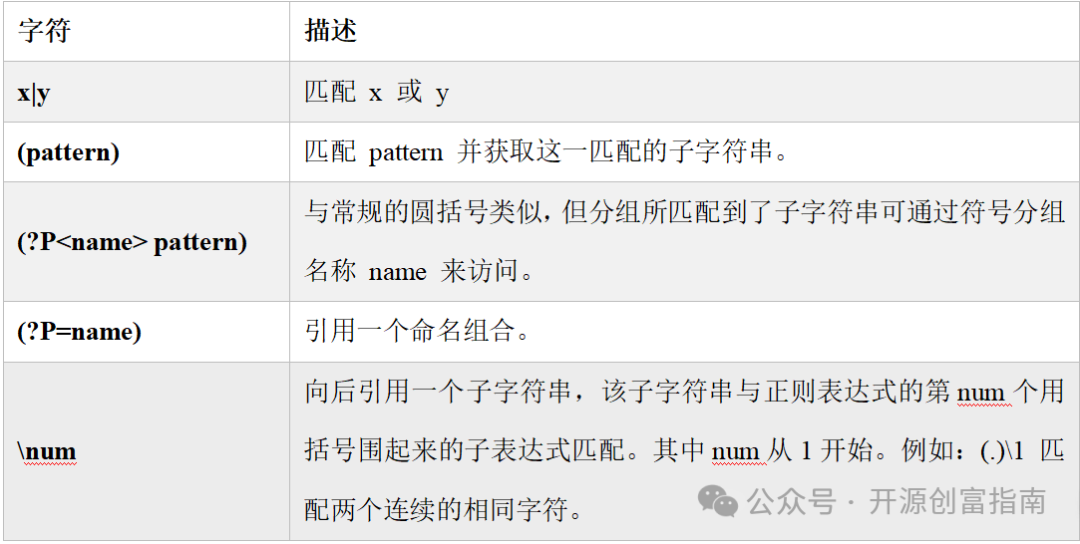
16.6 Matching Groups
16.7 Raw Strings
In Python, prefixing a string with r indicates a raw string, which ignores escape sequences. Raw strings are particularly useful for regular expressions, as they often contain many backslashes (e.g., \d or \w), and using raw strings can avoid issues with escape sequences.For example:
import re

text="abcdef123456"
print(re.search(r"\w+", text))
print(re.search("\w+", text))  # SyntaxWarning: invalid escape sequence '\w'
Not using a raw string will still run, but it will generate a syntax warning.
16.8 Examples
16.8.1 Matching Phone Numbers
import re

test= [
    "13812345678",  # Valid
    "11456817239",  # Invalid
    "19912345678",  # Valid
    "17138412356",  # Valid
    "1234567890",  # Invalid
    "14752345673",  # Valid
    "1800123456",  # Invalid
]

# Starts with 1, second digit is 3, 4, 5, 7, 8, or 9, followed by 9 digits
pattern=r"^1[345789]\d{9}$"
for i in test:
    print(f"{i:20}{"Valid" if re.match(pattern, i) else "Invalid"}")
16.8.2 Matching Email Addresses
import re

test = [
    "[email protected]",
    "[email protected]",
    "[email protected]",
    "@missingusername.com",
    "[email protected]",
]
# Matching email addresses
pattern = r"[\w!#$%&\'*+-/=?^`{|}~.]+@[\w!#$%&\'*+-/=?^`{|}~.]+\.[a-zA-Z]{2,}$"
for i in test:
    print(f"{i:40}{"Valid" if re.match(pattern, i) else "Invalid"}")
16.8.3 Matching Numbers Between 0 and 255
import re

test = ["0", "9", "50", "100", "199", "200", "255", "256", "-1", "01", "001"]
# Tens place is 1-9, ? indicates no tens place, units place is 0-9
# Or hundreds place is 1, tens place is 0-9, units place is 0-9
# Or hundreds place is 2, tens place is 0-4, units place is 0-9
# Or hundreds place is 2, tens place is 5, units place is 0-5
pattern = r"^([1-9]?\d|1\d{2}|2[0-4]\d|25[0-5])$"
for num in test:
    print(f"{num:5} {"Valid" if re.match(pattern, num) else "Invalid"}")
16.8.4 Extracting URLs from Tags
import re

test = """<link rel="alternate" hreflang="zh" href="https://zh.wikipedia.org/wiki/%E6%AD%A3%E5%88%99%E8%A1%A8%E8%BE%BE%E5%BC%8F">
<link rel="alternate" hreflang="zh-Hans" href="https://zh.wikipedia.org/zh-hans/%E6%AD%A3%E5%88%99%E8%A1%A8%E8%BE%BE%E5%BC%8F">
<link rel="alternate" hreflang="zh-Hans-CN" href="https://zh.wikipedia.org/zh-cn/%E6%AD%A3%E5%88%99%E8%A1%A8%E8%BE%BE%E5%BC%8F">
<link rel="alternate" hreflang="zh-Hans-MY" href="https://zh.wikipedia.org/zh-my/%E6%AD%A3%E5%88%99%E8%A1%A8%E8%BE%BE%E5%BC%8F">
<link rel="alternate" hreflang="zh-Hans-SG" href="https://zh.wikipedia.org/zh-sg/%E6%AD%A3%E5%88%99%E8%A1%A8%E8%BE%BE%E5%BC%8F">
<link rel="alternate" hreflang="zh-Hant" href="https://zh.wikipedia.org/zh-hant/%E6%AD%A3%E5%88%99%E8%A1%A8%E8%BE%BE%E5%BC%8F">
<link rel="alternate" hreflang="zh-Hant-HK" href="https://zh.wikipedia.org/zh-hk/%E6%AD%A3%E5%88%99%E8%A1%A8%E8%BE%BE%E5%BC%8F">
<link rel="alternate" hreflang="zh-Hant-MO" href="https://zh.wikipedia.org/zh-mo/%E6%AD%A3%E5%88%99%E8%A1%A8%E8%BE%BE%E5%BC%8F">
<link rel="alternate" hreflang="zh-Hant-TW" href="https://zh.wikipedia.org/zh-tw/%E6%AD%A3%E5%88%99%E8%A1%A8%E8%BE%BE%E5%BC%8F">
<link rel="alternate" hreflang="x-default" href="https://zh.wikipedia.org/wiki/%E6%AD%A3%E5%88%99%E8%A1%A8%E8%BE%BE%E5%BC%8F">"""

# Extract all URLs from href
pattern = r"href=\"(.+?)\""
for i in re.findall(pattern, test):
    print(i)
16.8.5 Replacing All Numbers in Text with Corresponding Words
import re

test = "I have 2 apples and 3 oranges."
# Define a mapping from numbers to words
num_map = {"1": "one", "2": "two", "3": "three", "4": "four", "5": "five"}
print(re.sub(r"\d", lambda x: num_map[x.group(0)], test))  # I have two apples and three oranges.
Follow the public account “Open Source Wealth Guide” to unlock more technologies. Thank you for your attention, and wish you success and prosperity!