An In-Depth Example of Longer Regular Expressions
We will now explore a detailed example that uses regular expressions in various ways to manipulate strings. First, here is some code that generates random numbers (though not too randomly). Example 1-5 showcases gendata.py, a script for generating datasets. Although this program simply displays the generated set of strings to standard output, this output can easily be redirected to a test file.
Example 1-5: Data Generator for Regular Expression Practice (gendata.py) This script creates random data for regular expression practice and outputs the generated data to the screen. To port this program to Python 3, you only need to modify the print statements to functions, change the xrange() function to range(), and replace sys.maxint with sys.maxsize.
from random import randrange, choice
from string import ascii_lowercase as lc
from sys import maxint
from time import ctime

tlds=('com','edu','net','org','gov')

for i in xrange(randrange(5,11)):
    dtint=randrange(maxint) #pick date
    dtstr=ctime(dtint)      #date string
    llen=randrange(4,8)     #login is shorter
    login=''.join(choice(lc) for j in range(llen))
    dlen=randrange(llen,13) #domain is longer
    dom=''.join(choice(lc) for j in xrange(dlen))
    print('%s::%s@%s.%s::%d-%d-%d' % (dtstr, login, dom, choice(tlds), dtint, llen, dlen))
This script generates strings with three fields, separated by a pair of colons or double colons. The first field is a random (32-bit) integer that will be converted to a date. The next field is a randomly generated email address. The last field is a set of integers separated by hyphens (-).
Running this code, we will obtain the following output (which the reader will benefit from), and save this output locally as redata.txt.
Thu Jul 22 19:21:19 2004::[email protected]::1090549279-4-11
Sun Jul 13 22:42:11 2008::[email protected]::1216014131-4-11
Sat May 5 16:36:23 1990::[email protected]::641950583-6-10
Thu Feb 15 17:46:04 2007::[email protected]::1171590364-6-8
Thu Jun 26 19:08:59 2036::[email protected]::2098145339-7-7
Tue Apr 10 01:04:45 2012::[email protected]::1334045085-5-10
The reader may discern that the output from this program is prepared for regular expression processing. We will explain line by line how we will implement some regular expressions to manipulate this data, leaving plenty of content for exercises at the end of this chapter.
Matching Strings
For the upcoming exercises, create both loose and strict versions of the regular expressions. It is recommended that readers test these regular expressions in a brief application that utilizes the previously shown example file redata.txt (or the data generated by running gendata.py). As an exercise, readers will need to use this data again.
Before placing the regular expressions into the application, to test the regular expressions, we will import the re module and assign a sample line from redata.txt to the string variable data. As shown below, these statements are constants in all the examples presented.
>>> import re
>>> data = 'Thu Feb 15 17:46:04 2007::[email protected]::1171590364-6-8'
In the first example, we will create a regular expression to extract (only) the days of the week from the timestamp in each line of the data file redata.txt. We will use the following regular expression.
"^ Mon|^Tue|^Wed|^Thu|^Fri|^Sat|^Sun"
This example requires the string to start with any of the seven listed strings (“^” is the caret in the regular expression). If we were to “translate” this regular expression into natural language, it would read something like this: “the string should start with ‘Mon’, ‘Tue’, …, ‘Sat’, or ‘Sun’.”
In other words, if we group the date string as shown below, we can replace all the caret characters with a single caret.
"^ (Mon|Tue|Wed|Thu|Fri|Sat|Sun)"
The parentheses around the string set mean that one of these strings will have a successful match. This is the “friendly” version of the regular expression we started with, which did not use parentheses. In this modified version of the regular expression, we can access the matched string as a subgroup.
>>> patt = '^(Mon|Tue|Wed|Thu|Fri|Sat|Sun)'
>>> m = re.match(patt, data)
>>> m.group() # entire match
'Thu'
>>> m.group(1) # subgroup 1
'Thu'
>>> m.groups() # all subgroups
('Thu',)
The feature we implemented in this example may not seem revolutionary, but it has its uniqueness in any place where additional data is provided as part of the regular expression to perform string matching operations, even if those characters are not part of the characters you are interested in.
Both of the above regular expressions are very strict, especially in requiring a set of strings. This may not work well in an internationalized environment where local dates and abbreviations are used. A loose regular expression would be: ^\w{3}. This regular expression only requires a string that starts with three consecutive alphanumeric characters. Once again, translating the regular expression into normal natural language: the caret ^ indicates “as the start,” \w indicates any single alphanumeric character, and {3} indicates that there will be three consecutive copies of the regular expression, with {3} modifying the regular expression. Again, if you want to group, you must use parentheses, for example ^(\w{3}).
>>> patt = '^(\\w{3})'
>>> m = re.match(patt, data)
>>> if m is not None: m.group()
...
'Thu'
>>> m.group(1)
'Thu'
Note that the regular expression ^(\w){3} is incorrect. When {3} is inside the parentheses, it first matches three consecutive alphanumeric characters and then represents a group. However, if {3} is moved outside, it is equivalent to three consecutive single alphanumeric characters.
>>> patt = '^(\\w){3}'
>>> m = re.match(patt, data)
>>> if m is not None: m.group()
...
'Thu'
>>> m.group(1)
'u'
The reason we see the letter “u” when accessing subgroup 1 is that subgroup 1 is continuously replaced by the next character. In other words, m.group(1) starts with the letter “T,” then becomes “h,” and finally is replaced by “u.” These are three independent (and overlapping) groups of single alphanumeric characters, as opposed to a single group containing three consecutive alphanumeric characters.
In the next (and final) example, we will create a regular expression to extract the numeric fields found at the end of each line of redata.txt.
Searching and Matching… and Greediness
However, before creating any regular expressions, we realize that these integer data items are located at the end of the data string. This means we need to choose whether to use search or match. Initiating a search will be easier to understand because we know exactly what we want to find (the dataset containing three integers), and what we are looking for is not at the start of the string or the entire string. If we want to implement a match, we would have to create a regular expression to match the entire line and then use subgroups to save the desired data. To demonstrate the difference between them, we need to first perform a search and then implement a match to show that using search is more suitable for our current needs.
Since we want to find three integers separated by hyphens, we can create our own regular expression to illustrate this requirement: \d+-\d+-\d+. This regular expression means “any numeric digit (at least one) followed by a hyphen, then multiple digits, another hyphen, and finally a set of digits.” We will now use search() to test this regular expression:
>>> patt = '\\d+-\\d+-\\d+'
>>> re.search(patt, data).group() # entire match
'1171590364-6-8'
A match attempt failed, why? Because matching starts from the beginning of the string, and the values to be matched are at the end of the string. We will have to create another regular expression to match the entire string. However, we can use lazy matching, which uses “.+” to indicate that an arbitrary set of characters follows the part we are really interested in.
patt = '.+\\d+-\\d+-\\d+'
>>> re.match(patt, data).group() # entire match
'Thu Feb 15 17:46:04 2007::[email protected]::1171590364-6-8'
This regular expression works very well, but we only want the numeric fields at the end, not the entire string, so we have to use parentheses to group the desired content.
>>> patt = '.+(\\d+-\\d+-\\d+)'
>>> re.match(patt, data).group(1) # subgroup 1
'1171590364-6-8'
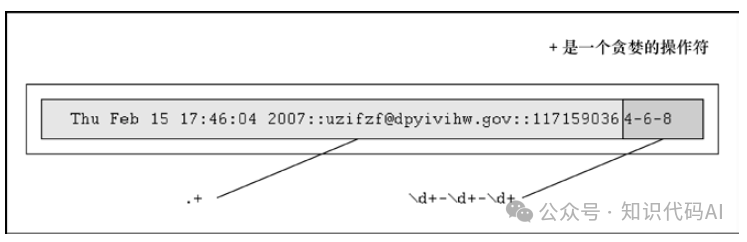
What happened? We extracted 1171590364-6-8, not just 4-6-8. Where is the rest of the first integer? The problem lies in the greedy nature of the regular expression. This means that for this wildcard pattern, the regular expression is evaluated from left to right and tries to grab as many characters as possible that match that pattern. In the previous example, using “.+” grabbed all single characters from the start of the string to the expected first integer field. \d+ only requires one digit, so it gets “4,” where .+ matched everything from the start of the string to the expected first digit field: ‘Thu Feb 15 17:46:04 2007::[email protected]::117159036’, as shown in Figure 1-2.
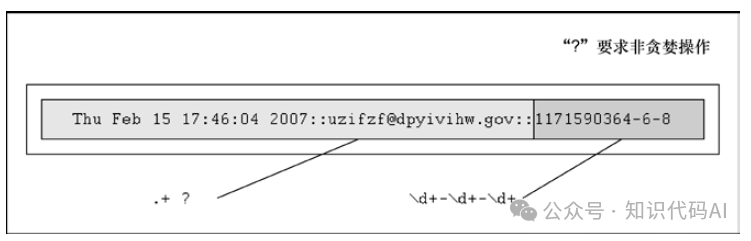
One solution is to use the “non-greedy” operator “?”. Readers can use this operator after “*”, “+”, or “?”. This operator will require the regular expression engine to match as few characters as possible. Therefore, if we place a “?” after “.+”, we will get the expected result, as shown in Figure 1-3.
>>> patt = '.+?(\\d+-\\d+-\\d+)'
>>> re.match(patt, data).group(1) # subgroup 1
'1171590364-6-8'
Another simpler solution in practical situations is to use “::” as the field separator. Readers can simply use the regular string strip(‘:: ‘) method to get all parts, and then use strip(‘-‘) as another hyphen separator to obtain the three integers we initially wanted to query. However, we do not want to choose this solution first, as this is how we will piece the strings together to use gendata.py as a starting point!
In the final example: suppose we only want to extract the middle integer from the three integer fields. Here is how to implement it (using a search so we don’t have to match the entire string): – (\d+) -. Try this pattern, and you will get the following content.
>>> patt = '-(\\d+)-'
>>> m = re.search(patt, data)
>>> m.group() # entire match
'-6-'
>>> m.group(1) # subgroup 1
'6'
This chapter has barely scratched the surface of the powerful capabilities of regular expressions, and we cannot cover everything in limited space. However, we hope to have provided readers with enough useful introductory information to master this powerful tool and integrate it into their programming skills. Readers are encouraged to consult the reference documentation for more details on how to use regular expressions in Python. For those who wish to delve deeper into regular expressions, we recommend reading Mastering Regular Expressions by Jeffrey E. F. Friedl.