Introduction
Welcome back, Python learners!
Python Introduction 01: With three magical tools, even coding novices can become programming experts!
Python Introduction 02: Is your eBook collection a mess? Don’t organize it, let’s write a program to fix it!
Python Introduction 03: The book list has come to life! How to use ‘variables’ magic to let your collection grow on its own? – Introduction to Variables and Data Structures
After the ‘magic’ of the last lesson, our book list has successfully ‘come to life’ and can grow freely. Looking at the increasing number of books in the <span>book_shelf</span> list, doesn’t it feel like your digital empire is unprecedentedly magnificent? But, as the saying goes –“Buying books is like a mountain falling, finding books is like pulling silk.”

Imagine, if you want to revisit a famous quote from ‘Animal Farm’, but you are faced with a long list of code outputs, and your eyes start ‘manually scanning’… 5 seconds, 10 seconds, 30 seconds… finally, you find it in the second to last book.
This won’t do! We write programs to be lazy, oh no, to improve efficiency! How can we suffer from this ‘manual retrieval’ pain?
Today is the day we stand tall! We are going to equip our library with an ‘intelligent search engine’ to achieve instant location! And the two great judges in the programming world that will make this happen are: conditional statements and loops.
Intelligent Retrieval – Conditional Statements and Loop Searches
1. <span>if</span> statement: The ‘if’ world of programs
In the human world, we say: “If it rains, then I will take an umbrella.” In the Python world, we express the same logic using <span>if</span>:
# Pseudocode: Understanding Logic
if condition is true:
    execute this code
For example, we want the program to determine if a book is ‘The Three-Body Problem’:
book = "三体"
if book == "三体":
    print("That's right, this is the sci-fi masterpiece that shocked me!")
Note that double equals
<span>==</span>! In programming, a single<span>=</span>is assignment (putting something in a box), while two<span>==</span>is the actual judgment of ‘equal’. Don’t get confused, this is a pitfall for beginners!
2. <span>for</span> loop: The tireless ‘automatic page-turner’
What is the core of a search engine? It is to pick up each book on the shelf and check the title until the target is found. This repetitive task of ‘picking up one by one’ is entrusted to the <span>for</span> loop:
for single_book in book_shelf:
    # Perform some checks on this 'single_book'
Let’s combine <span>if</span> and <span>for</span> to implement the first search function:
# This is the Book Management System V1.0 (with search!)

book_shelf = ["三体", "百年孤独", "人类简史", "红楼梦", "看见", "动物农场"]

# Task: Search for 'Animal Farm'
print("Searching the entire library for 'Animal Farm'...")
print("-" * 20)

for book in book_shelf: # Start checking from the first book
    if book == "动物农场":
        print(f"Found it! The book you are looking for is: {book}")
        break # 'break' stops further work once found!
Run it! You will see the program acting like a well-trained librarian, instantly finding the book you want!
3. Upgrading the Engine: Implementing Fuzzy Search
But the above search is too ‘precise’, I must type the full ‘Animal Farm’. What if I only remember the word ‘Animal’? We need fuzzy search!
This requires the use of Python’s keyword <span>in</span>:
search_keyword = "动物" # You only need to remember the keyword

for book in book_shelf:
    if search_keyword in book: # Check if the keyword is in the title
        print(f"Found it! The book you are looking for is: {book}")
Now, whether you input ‘Animal’ or ‘Farm’, as long as the title contains this substring, it won’t escape your watchful eye!
4. Creating an Interactive Search Command Line
Finally, let’s integrate these capabilities to create a search program that can converse with you:
# Book Management System - Interactive Search Version

book_shelf = ["三体", "百年孤独", "人类简史", "红楼梦", "看见", "动物农场"]

while True: # This is an infinite loop, keeping the program running for us
    print("\n=== Welcome to the Book Search System ===")
    print("1. Show all books")
    print("2. Search for books")
    print("3. Exit the system")

    choice = input("Please select a function (enter number): ")

    if choice == "1":
        print("Current library contains all books:", book_shelf)
    elif choice == "2":
        keyword = input("Please enter the keyword of the book title to search: ")
        found_books = [] # Create an empty list to store found books
        for book in book_shelf:
            if keyword in book:
                found_books.append(book)

        if found_books: # If the list is not empty
            print(f"Found {len(found_books)} related books: {found_books}")
        else:
            print("Sorry, no related books found.")
    elif choice == "3":
        print("Thank you for using, goodbye!")
        break # Exit the loop, end the program
    else:
        print("Invalid input, please try again!")
Run this program, and you will feel like you are using real software! It can display all books, search, and exit. Our project finally has the appearance of a ‘system’!
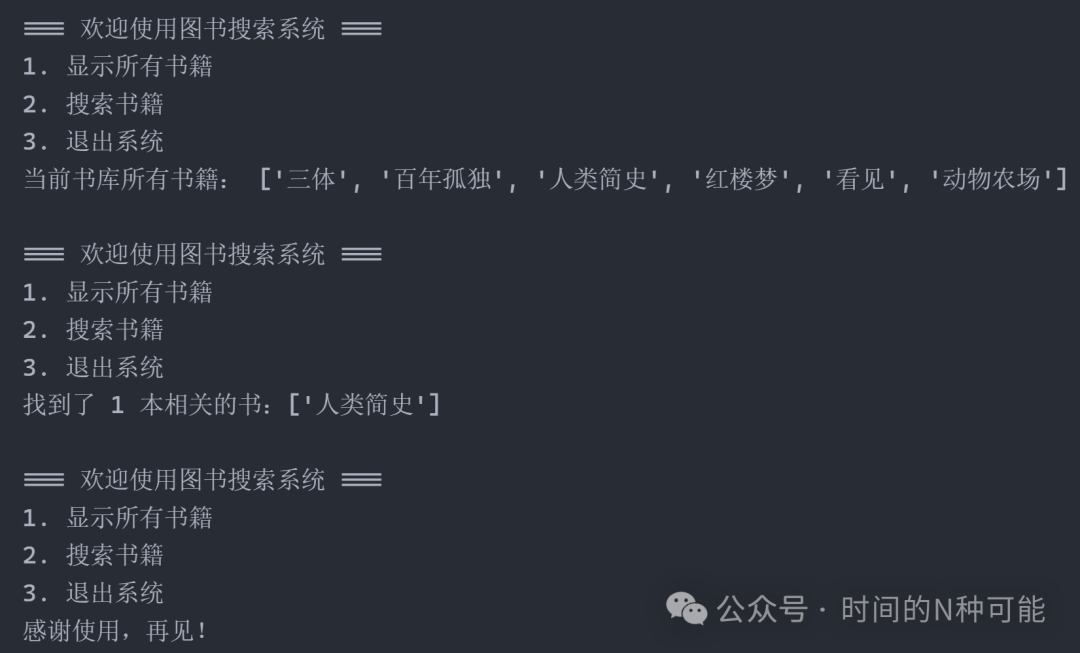
Book Search System
Knowledge Points of This Chapter 🔍:
-
<span>if/elif/else</span>: Conditional branches in programs, allowing code to make choices. -
<span>for ... in ...</span>: Iteration loops, the best companion for dealing with lists. -
<span>while True</span>: Creates a never-ending service loop (until encountering<span>break</span>). -
<span>input()</span>: Receives user input, allowing the program to converse with you. -
<span>in</span>: Part of the loop and a powerful tool for checking inclusion. -
<span>break</span>: The ’emergency exit’ to forcibly end the loop.
Looking Ahead: From ‘Finding’ to ‘Understanding’
Awesome! We now have a basic system with add (from the previous chapter’s append), search (this chapter’s search), and display (show all) functions!
However, have you noticed that our books only have names? What if I want to find books by ‘Liu Cixin’? What if I want to see books with ratings above 4.5?
This simple string list can no longer hold richer book information.
In the next chapter, we will welcome a comprehensive data upgrade! We will learn about dictionaries, allowing each book to record rich information such as title, author, category, rating. Our book management system will evolve from a ‘small book list’ into a true ‘information repository’!
Imagine being able to say during a search: “Find me all the sci-fi books by Liu Cixin with a rating above 4.5…” Isn’t it exciting just to think about it?

Conclusion:
Today, you taught the code how to ‘think’ and ‘decide’. From passive display to active response, this is another milestone on your programming journey.
Remember, true automation is letting machines understand your intentions and silently complete everything for you.
Next Episode Preview: “Evolving the Book List into a Library! Using ‘Dictionaries’ to Create Luxurious Profiles for Each Book”
Disclaimer: All content in this tutorial is for programming learning purposes, and the mentioned book titles and authors are for example only, with no commercial use. Please respect intellectual property and support legitimate eBooks.